
SoFlow 300.450.01
SoFlow SO4 Pro Gen 2 Electric Scooter User Manual
Model: 300.450.01 | Brand: SoFlow
1. הקדמה
Welcome to your new SoFlow SO4 Pro Gen 2 Electric Scooter. This manual provides essential information for safe operation, maintenance, and troubleshooting. Please read it thoroughly before using your scooter to ensure a safe and enjoyable experience.
2. זיכערקייַט אינסטרוקציעס
אייער זיכערהייט איז וויכטיגסט. שטענדיג זיך צוהערן צו די פאלגנדע אנווייזונגען:
- טראָגט שטענדיק אַ העלם און פּאַסיקע שוץ-קליידער (קני פּעדס, עלנבויגן פּעדס) ווען איר רײַט.
- Check the brakes, tire pressure, and overall condition of the scooter before each ride.
- פאָלגן אַלע היגע פאַרקער געזעצן און רעגיאַליישאַנז.
- פֿאָרט נישט אין נאַסע באַדינגונגען, שווערן רעגן, אדער דורך לאַכן.
- The maximum load capacity is 150 kg. Do not exceed this limit.
- Utilize the integrated turn signals for enhanced visibility when changing direction.
- The contactless anti-theft feature with the integrated NFC chip provides additional security.
- Avoid riding on uneven surfaces, steep slopes (over 18%), or in crowded areas.
3. פּעקל אינהאַלט
Upon opening your package, ensure all the following items are present:
- SoFlow SO4 Pro Gen 2 Electric Scooter (1 piece)
- Lithium Battery (pre-installed or separate)
- באַטערי טשאַרדזשער
- באַניצער מאַנואַל
4. פּראָדוקט איבערview
Familiarize yourself with the main components of your SoFlow SO4 Pro Gen 2 Electric Scooter.

פיגורע 4.1: פראָנט view of the SoFlow SO4 Pro Gen 2 Electric Scooter, highlighting the handlebars, front wheel, and deck.
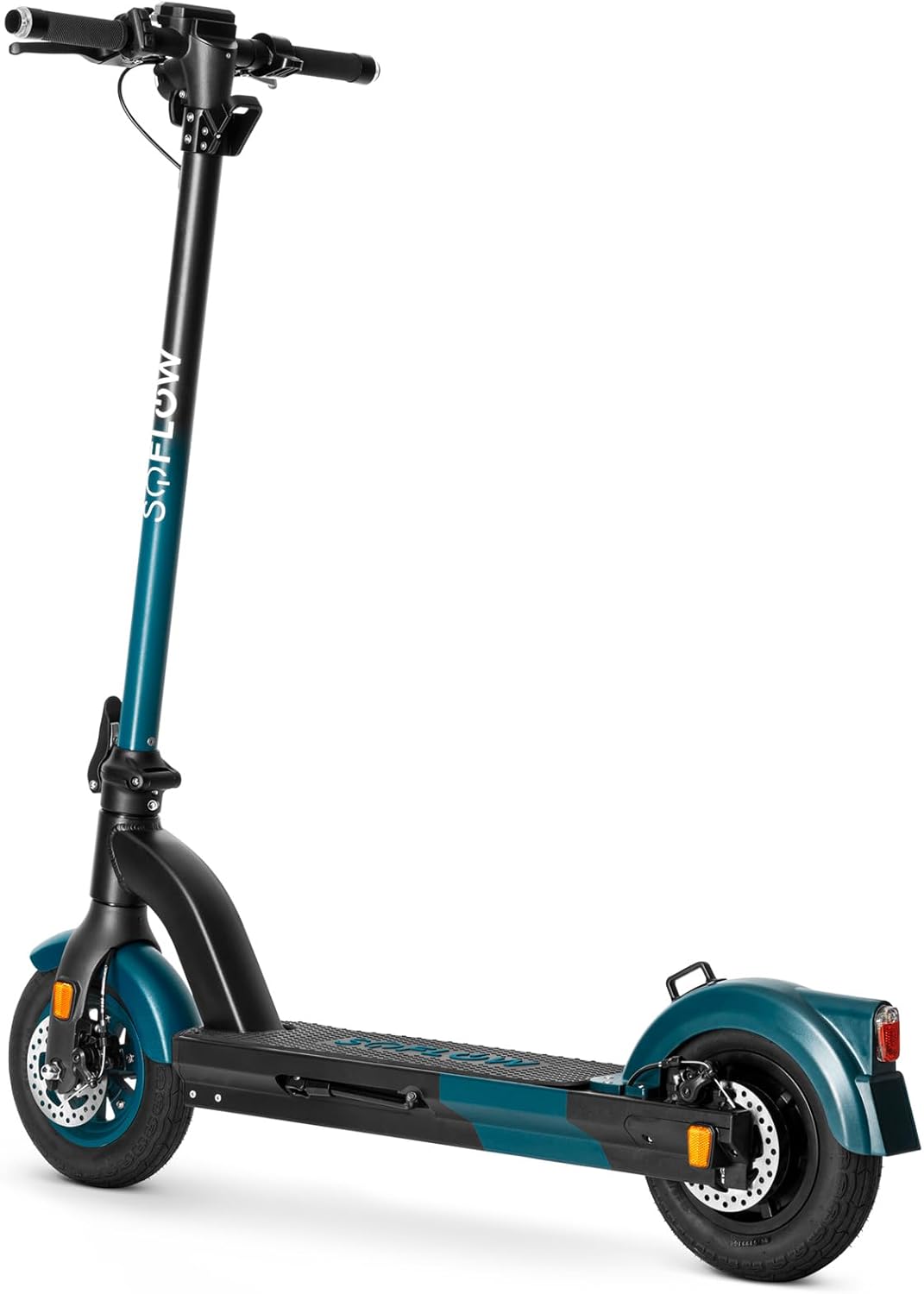
פיגורע 4.2: פראָנט-זייַט view of the SoFlow SO4 Pro Gen 2 Electric Scooter, showing the front disc brake and tire.
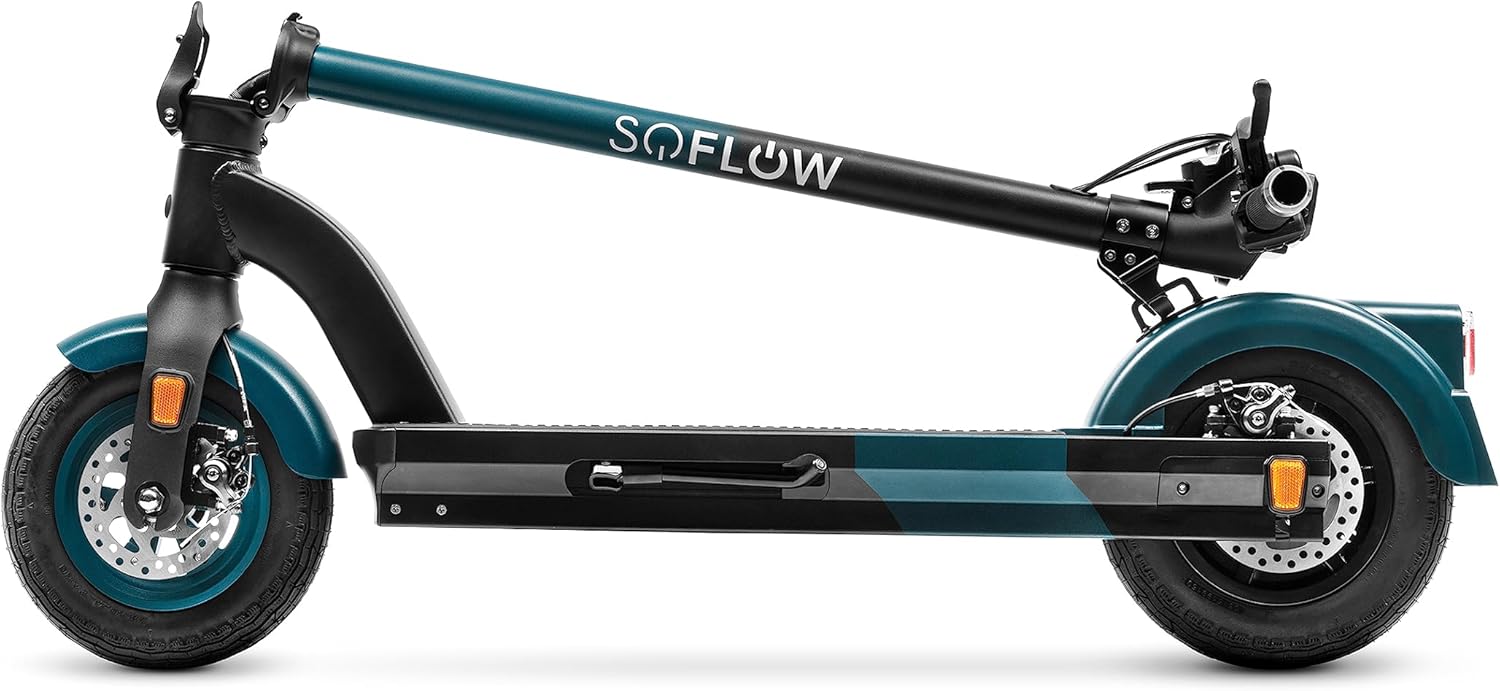
פיגורע 4.3: זייַט view of the SoFlow SO4 Pro Gen 2 Electric Scooter, illustrating the overall profile and rear wheel.

פיגורע 4.4: דערציען view of the SoFlow SO4 Pro Gen 2 Electric Scooter, showing the rear fender, brake light, and disc brake.

פיגורע 4.5: The SoFlow SO4 Pro Gen 2 Electric Scooter in its folded position, demonstrating its compact design for transport.

פיגורע 4.6: A hand removing the lithium battery from the scooter's deck compartment, illustrating the removable battery feature.
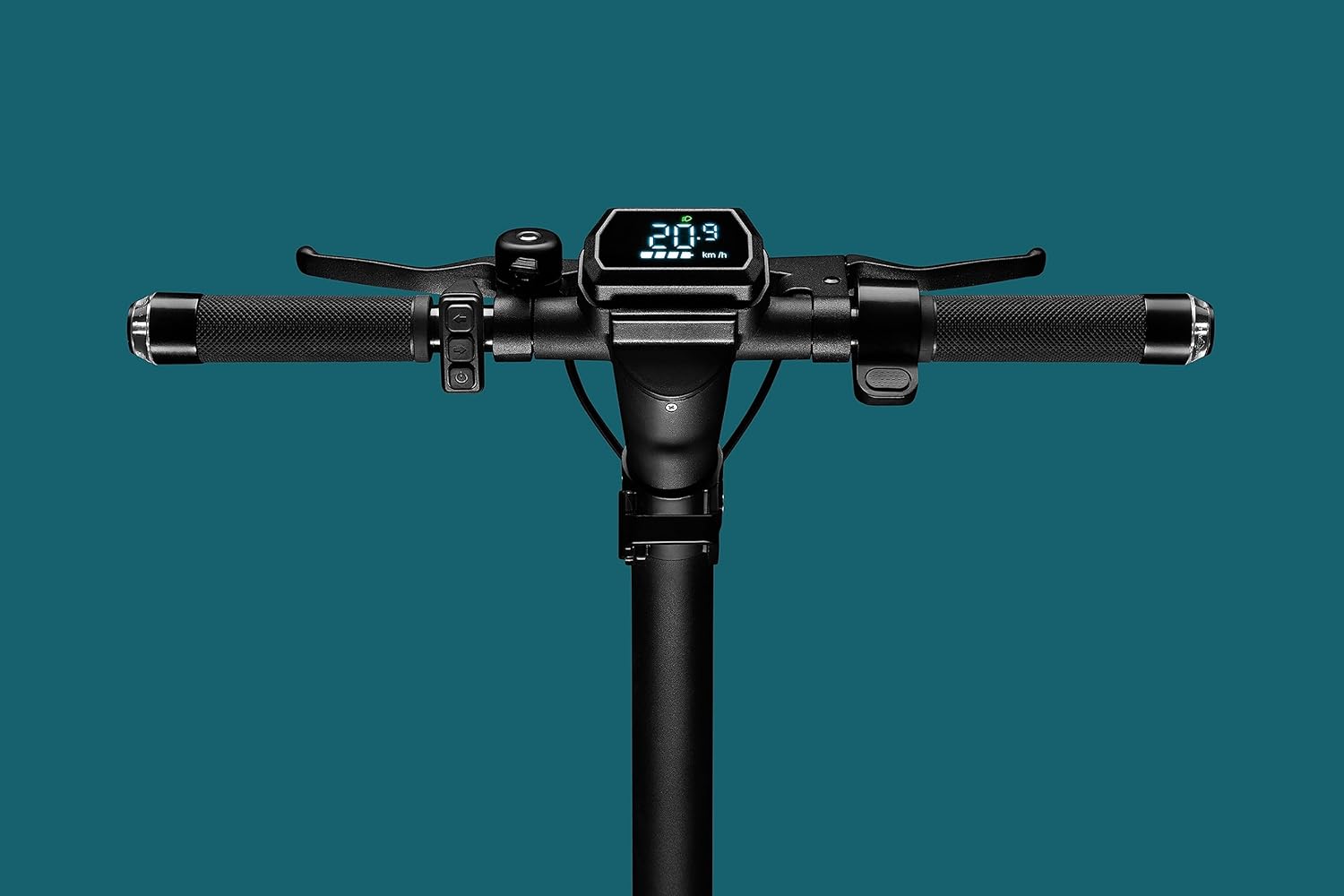
פיגורע 4.7: Close-up of the handlebar display, showing the digital screen with speed and battery indicators, along with controls.

פיגורע 4.8: The scooter's headlight illuminated, with integrated turn signals on the handlebars also lit, emphasizing visibility features.

פיגורע 4.9: דעטאַילעד view of the front wheel and disc brake assembly.

פיגורע 4.10: דעטאַילעד view of the rear wheel and disc brake assembly.
5. סעטאַפּ
5.1 אויסלייגן דעם סקוטער
- שטעלן די סקוטער אויף אַ פלאַך ייבערפלאַך.
- Release the folding mechanism latch, usually located near the base of the handlebar stem.
- Carefully lift the handlebar stem until it locks securely into the upright position. Ensure the locking mechanism is fully engaged.
- Adjust the handlebars to your desired height if adjustable, and tighten any quick-release clamps.
5.2 טשאַרדזשינג די באַטאַרייע
The SoFlow SO4 Pro Gen 2 is equipped with a Lithium battery. For optimal performance and battery longevity, follow these charging instructions:
- געפינען די טשאַרדזשינג פּאָרט אויף די סקוטער.
- Connect the charger to the charging port, then plug the charger into a standard power outlet.
- The charging indicator on the charger will show the charging status (e.g., red for charging, green for fully charged).
- A full charge takes approximately 3 hours and 50 minutes with the special "fast charge" charger.
- Always ensure the battery is fully charged before your first ride and after each use for maximum range.
6. אַפּערייטינג ינסטרוקטיאָנס
6.1 פּאַוערינג אויף / אַוועק
- צו מאַכט אויף: Press and hold the power button on the handlebar display until the screen illuminates.
- צו מאַכט אַוועק: דריק און האלט דעם מאַכט קנעפּל ווידער ביז דער עקראַן שליסט זיך אויס.
6.2 ריידינג די סקוטער
- שטעלט איין פוס פעסט אויפן דעק און שטופט אפ מיטן צווייטן פוס צו באקומען אנפאנגס מאָמענטום.
- Once moving, place your second foot on the deck.
- Gently press the accelerator lever (throttle) to engage the motor.
- The 500-watt motor provides ample power for speeds up to 25 km/h and inclines up to 18%.
- Use the integrated turn signals on the handlebars to indicate your direction changes.
6.3 ברייקינג
The scooter is equipped with front and rear disc brakes for precise and controlled stopping.
- To slow down or stop, gently squeeze the brake levers on the handlebars.
- Apply both brakes simultaneously for more effective stopping power.
- Avoid sudden or harsh braking, especially at high speeds, to prevent loss of control.
6.4 Using the SoFlow App
Enhance your riding experience by connecting your scooter to the intuitive SoFlow application:
- Download the SoFlow app from your smartphone's app store.
- Enable Bluetooth on your smartphone and open the SoFlow app.
- Follow the in-app instructions to pair your scooter.
- The app provides important details such as battery capacity, current speed, Bluetooth status, and light indicators.
- You can also track your completed journeys and electronically lock the scooter for added security.
7. וישאַלט
Regular maintenance ensures the longevity and optimal performance of your SoFlow SO4 Pro Gen 2 Electric Scooter.
- רייניקונג: ווישט אַראָפּ דעם סקוטער מיט אַדamp cloth after each use. Avoid using high-pressure water or harsh chemicals.
- טייער דרוק: Regularly check the tire pressure of the 10-inch pneumatic tires. Maintain recommended pressure for optimal ride quality and range.
- ברעיק אינספּעקציע: Periodically inspect the front and rear disc brakes for wear and proper function. Adjust or replace brake pads as needed.
- באַטערי זאָרגן: Charge the battery regularly, even if the scooter is not in use for extended periods, to maintain battery health. Store the scooter in a cool, dry place.
- אַלגעמיינע טשעק: קאָנטראָלירט רעגולער אַלע שרויפן, באָלץ און פֿאַרבינדונגען צו זיכער מאַכן אַז זיי זענען פֿעסט און זיכער.
8. טראָובלעשאָאָטינג
די סעקציע באהאנדלט אלגעמיינע פראבלעמען וואס איר קענט באגעגענען מיט אייער סקוטער.
| פּראָבלעם | מעגלעך סיבה | לייזונג |
|---|---|---|
| סקוטער גייט נישט אן | Low or depleted battery; Loose battery connection; Power button malfunction | Charge the battery fully; Ensure battery is securely seated; Contact support if issue persists |
| פֿאַרקלענערטע ראַנגע/אויטאָנאָמיע | Under-inflated tires; Heavy load; Riding uphill frequently; Cold weather | Check and inflate tires to recommended pressure; Reduce load; Adjust riding style; Battery performance may be reduced in cold temperatures |
| ברעיקס פילן זיך שוואַך | Worn brake pads; Loose brake cable; Disc brake misalignment | Inspect brake pads and replace if worn; Adjust brake cable tension; Consult a technician for disc brake alignment |
| ומגעוויינטלעך נויזיז בעשאַס אָפּעראַציע | לויזע קאָמפּאָנענטן; שמוץ אין רעדער/ברעיקס; מאָטאָר פּראָבלעם | Check all fasteners; Clean wheels and brakes; If noise persists, contact customer support |
9. טעכניש ספּעסאַפאַקיישאַנז
Detailed specifications for the SoFlow SO4 Pro Gen 2 Electric Scooter:
| שטריך | באַשרייַבונג |
|---|---|
| סאָרט | SoFlow |
| מאָדעל נאָמען | SO4 PRO Gen2 |
| נומער מאָדעל נומער | 300.450.01 |
| פּראָדוקט דימענשאַנז (L x W x H) | 109.1 X 46.6 X 114.5 סענטימעטער |
| וואָג | 17.50 קג |
| מאַקסימום וואָג קאַפּאַציטעט | 150 קילאָגראַמס |
| מאָטאָר מאַכט | 500 וו |
| באַטערי טיפּ | ליטהיום-יאָן |
| טשאַרדזשינג צייט | בעערעך. 3 שעה 50 מינוט |
| מאַקסימום גיכקייַט | 25 קילאמעטער/ה |
| Range (Autonomy) | Approx. 40 KM |
| מאַקסימום ינקליין | 18% |
| ראָד גרייס | 10 אינטשעס |
| בראַקעס | Front and Rear Disc Brakes, Regenerative Braking |
| ראַם מאַטעריאַל | אַלומינום |
| ספּעציעלע פֿעיִקייטן | NFC Anti-theft, Integrated Turn Signals, SoFlow App Connectivity, Foldable |
10. וואָראַנטי און שטיצן
Your SoFlow SO4 Pro Gen 2 Electric Scooter comes with a standard manufacturer's warranty covering defects in materials and workmanship under normal use. Please refer to the warranty card included in your package for specific terms and conditions, including the warranty period and coverage details.
For technical support, warranty claims, or any questions regarding your scooter, please contact SoFlow customer service through their official webזייטל אדער די קאָנטאַקט אינפֿאָרמאַציע וואָס איז צוגעשטעלט אין אייער קויפן דאָקומענטאַציע.
Ask a question about this manual
Ask about setup, troubleshooting, compatibility, parts, safety, or missing instructions. Manuals+ will review the question and use this page’s manual context to help answer it.