
הקדמה
This manual provides essential information for the safe and effective use of your ProForm City L6 Folding Treadmill. Please read all instructions carefully before operating the equipment. Retain this manual for future reference.

Image: The ProForm City L6 Folding Treadmill, showcasing its compact design and console.
וויכטיק סאַפעטי אינפֿאָרמאַציע
To reduce the risk of serious injury, read all important precautions and instructions in this manual before using the treadmill. ProForm assumes no responsibility for personal injury or property damage sustained by or through the use of this product.
- באַראַטנ זיך אַ דאָקטער איידער איר אָנהייבן קיין געניטונג פּראָגראַם.
- האַלטן קינדער און פּעץ אַוועק פון די טרעדמיל.
- שטעלט דעם טרעדמיל אויף א גלייכער ייבערפלאַך מיט לפּחות 2 מעטער (6.5 פֿיס) פרייען פּלאַץ הינטער אים און 0.5 מעטער (1.6 פֿיס) אויף יעדער זייט.
- טראָגט פּאַסיקע ספּאָרט קליידער און אַטלעטישע שיך.
- דו זאלסט נישט אַרבעטן די טרעדמיל אויב די מאַכט שנור אָדער צאַפּן איז דאַמידזשד.
- האַלט שטענדיק די האַנטריילס ווען איר אָנהייבט אָדער אָפּשטעלט די טרעדמיל.
- Do not exceed the maximum user weight capacity of 250 pounds (113 kg).
סעטאַפּ
אַנפּאַקינג און פּלייסמאַנט
Carefully remove all components from the packaging. Place the treadmill on a flat, stable surface. Ensure adequate clearance around the unit for safe operation and maintenance.
Assembly (Folding Mechanism)
The ProForm City L6 features a SpaceSaver Design for compact storage. To prepare for use, carefully unfold the treadmill deck until it locks into place. To fold for storage, lift the deck until it secures in the upright position.
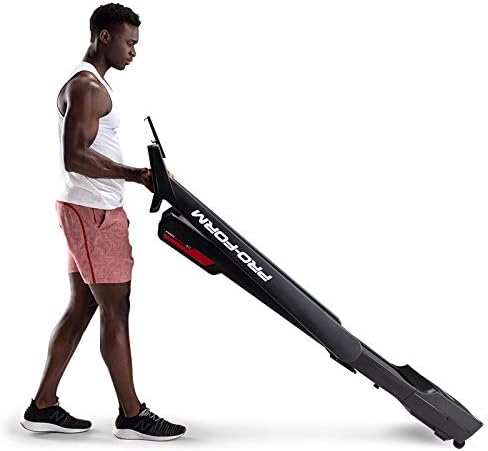
Image: A user demonstrating the folding mechanism of the ProForm City L6 Treadmill for compact storage.
מאַכט קאַנעקשאַן
Connect the power cord to a grounded outlet. Ensure the safety key is properly inserted into the console before attempting to power on the treadmill.
iFIT Activation
Your treadmill includes a 30-day iFIT membership. To activate, download the iFIT app on your tablet or smartphone. Connect your device to the treadmill via Bluetooth. Follow the on-screen instructions in the iFIT app to set up your account and access workouts.

Image: The treadmill console with a tablet mounted, showing the iFIT application interface.
אַפּערייטינג ינסטראַקשאַנז
סטאַרטינג די טרעדמיל
- זיכער מאַכן אַז דער זיכערהייט שליסל איז אין פּלאַץ.
- טרעט אויף די טרעדמיל גאַרטל, שטעלן דיין פֿיס אויף די זייַט רעלס.
- דרוק די אָנהייב קנעפּל. דער גאַרטל וועט אָנהייבן צו רירן זיך מיט אַ נידעריקער גיכקייט.
- Gradually increase speed using the SPEED + buttons or Digital QuickSpeed controls.

Image: A user engaged in a running workout on the ProForm City L6 Treadmill.
אַדזשאַסטינג ספּיד
ניצן די SPEED + און גיכקייט - buttons on the console to adjust the treadmill's speed. The treadmill offers speeds from 0 to 8 MPH. For iFIT workouts, the trainer may automatically adjust your speed.
אפשטעלן די טרעדמיל
דרוק די האַלטן button to gradually slow down and stop the treadmill belt. For an emergency stop, pull the safety key from the console.
ניצן די ווייַז
The 5-inch high-contrast display shows your workout metrics, including distance, speed, estimated calorie burn, and time. When connected to iFIT, enhanced metrics are available through the app.
וישאַלט
רייניקונג
קעסיידער ריין די טרעדמיל מיט אַדamp cloth and mild soap. Avoid using abrasive cleaners or solvents. Wipe down the console and handrails after each use to remove sweat and debris.
גאַרטל קער
Inspect the walking belt periodically for wear and tear. Ensure the belt is properly centered and tensioned. Refer to the full product manual (if available from manufacturer) for detailed instructions on belt adjustment and lubrication, if required.
אַלגעמיינע דורכקוק
Check all bolts and nuts for tightness regularly. Replace any worn components immediately. Unplug the treadmill before performing any maintenance or cleaning.
טראָובלעשאָאָטינג
| פּראָבלעם | מעגלעך סיבה | לייזונג |
|---|---|---|
| טרעדמיל גייט נישט אן. | Power cord not plugged in; safety key not inserted; circuit breaker tripped. | זיכער מאַכן אַז דער עלעקטרישער שנור איז גוט איינגעשלאָסן. אַרײַנשטעקן דעם זיכערהייטס-שליסל אינגאַנצן. קאָנטראָלירן דעם הויזגעזינדלעכן קרייַז-ברעכער. |
| גיין גאַרטל גליטשט אָדער כעזיטירט. | גאַרטל שפּאַנונג צו לויז; גאַרטל דאַרף לובריקאַציע. | Adjust belt tension (refer to manufacturer's detailed guide). Lubricate belt if necessary (use approved silicone lubricant). |
| די קאנסאל דיספלעי איז ליידיג אדער נישט שטענדיג. | Loose cable connection; power issue. | Check all cable connections to the console. Unplug and re-plug the treadmill. |
If you encounter issues not listed here, or if solutions do not resolve the problem, contact customer support.
ספּעסאַפאַקיישאַנז
- מאָדעל: PFTL28820
- סאָרט: פּראָפאָרם
- פּראָדוקט דימענשאַנז: 30.48 X 81.28 X 187.96 סענטימעטער (12 X 32 X 74 אינטשעס)
- נומער וואָג: 65.77 קג (145 לבס)
- מאַקסימום באַניצער וואָג: 250 לבס (113 קג)
- גיכקייַט קייט: 0-8 MPH Digital QuickSpeed Controls
- טרעד גאַרטל: 18" x 47"
- ווייַז: 5-inch High-Contrast LCD
- מאָטאָר כאָרספּאַוער: 2 הפּ
- ספּעציעלע פֿעיִקייטן: SpaceSaver Design (Foldable), iFIT Bluetooth Connectivity
- מאַכט מקור: קאָרדעד עלעקטריק

Image: The ProForm City L6 Treadmill with its physical dimensions indicated.
וואָראַנטי
The ProForm City L6 Folding Treadmill is protected by the following warranties:
- ראַם: 10-יאָר לימיטעד וואָראַנטי
- פּאַרץ און אַרבעט: 1-יאָר לימיטעד וואָראַנטי
This warranty applies to the original owner and is valid only in the country where the product was purchased. For full warranty terms and conditions, please refer to the warranty card included with your product or visit the official ProForm webפּלאַץ.
שטיצן
For technical assistance, parts inquiries, or warranty claims, please contact ProForm Customer Service. Have your model number (PFTL28820) and serial number ready when contacting support.
Visit the official ProForm website for additional resources, FAQs, and contact information: www.proform.com