
1. הקדמה
The Marantz NR1609 is a slim-profile 7.2 channel AV Surround Receiver designed to deliver exceptional audio and video performance in a compact form factor. It supports the latest audio formats like Dolby Atmos and DTS:X, along with 4K Ultra HD video pass-through, HDR, and Dolby Vision. With built-in HEOS multi-room audio technology, Bluetooth, and AirPlay 2, the NR1609 offers versatile connectivity for all your entertainment needs.
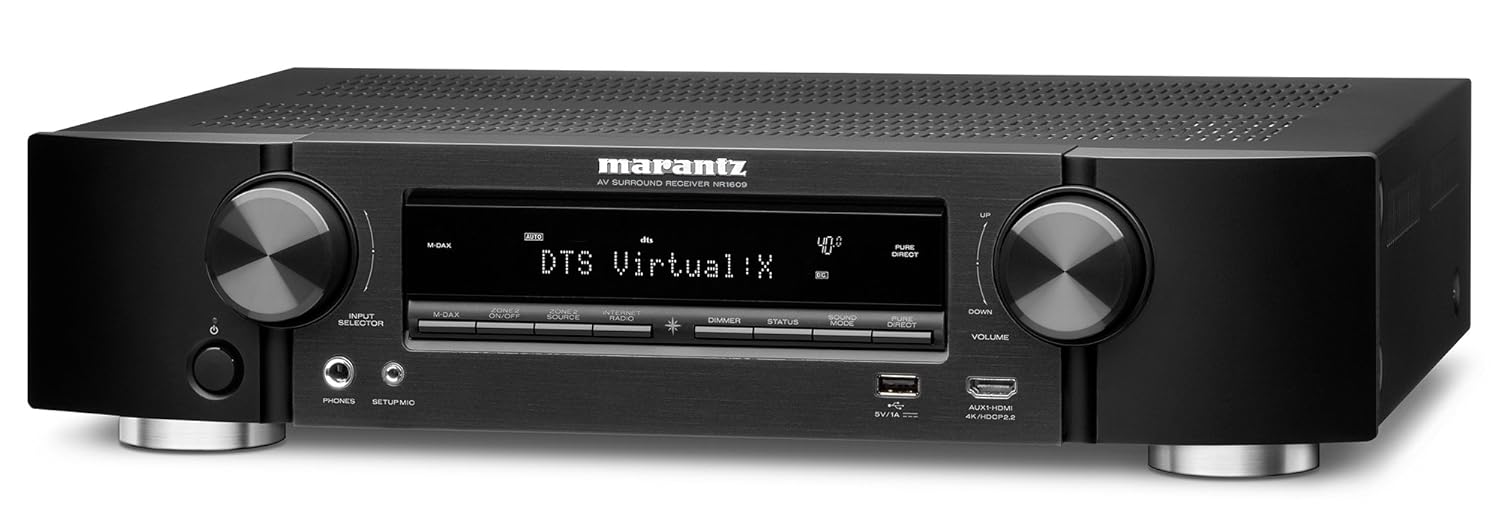
פיגורע 1: פראָנט view of the Marantz NR1609 AV Surround Receiver, showcasinזײַן גלאַטן דיזײַן און פראָנט פּאַנעל קאָנטראָלס.
2. זיכערקייַט אינפֿאָרמאַציע
Please read these safety instructions carefully before operating the unit. Failure to comply may result in fire, electric shock, or other injury.
- ווענטילאַטיאָן: Ensure adequate space around the unit for proper ventilation. Do not block ventilation openings.
- מאַכט מקור: פֿאַרבינדט דעם אַפּאַראַט נאָר צו אַן AC אַוטלעט פֿון דער וואָלומעtage ספּעסיפיעד אויף די דערציען טאַפליע.
- נעץ: שטעלט נישט אויס דעם אַפּאַראַט צו רעגן אָדער פייכטקייט. שטעלט נישט קיין זאכן אָנגעפילט מיט פליסיקייטן, ווי וואַזעס, אויף דעם אַפּאַראַט.
- אָרט: Place the unit on a flat, stable surface away from direct sunlight, heat sources, and excessive dust.
- סערוויס: פרובירט נישט צו סערוויסן דעם אַפּאַראַט אליין. לאָזט איבער אַלע סערוויסינג צו קוואַליפֿיצירטע סערוויס פּערסאָנעל.
3. שליסל פֿעיִקייטן
The Marantz NR1609 offers a range of advanced features for an immersive home theater experience:
- שלאַנק פּראָfile פּלאַן: Half the height of traditional AV receivers, ideal for space-constrained setups.
- 7-Channel Discrete Power Ampלייבער: Delivers 90W per channel for dynamic sound.
- Advanced HDMI Connectivity: 8 HDMI inputs (including 1 front) and 1 ARC output, all with HDCP 2.2 support.
- 4K Ultra HD שטיצן: 4K/60 Hz full-rate pass-through, 4:4:4 color resolution, HDR, BT.2020, Dolby Vision, and HLG.
- Object-Based Audio: Supports Dolby Atmos, DTS:X, and DTS Virtual:X processing for three-dimensional sound.
- הויך-האַכלאָטע אַודיאָ: Decodes ALAC, FLAC, WAV (up to 24-bit/192-kHz), and DSD (2.8MHz/5.6MHz) files.
- איינגעבויט HEOS: Wireless multi-room audio technology for streaming music throughout your home.
- קול קאָנטראָל: Compatible with Amazon Alexa via the HEOS Home Entertainment skill.
- סטרימינג באַדינונגס: Access popular music services like Spotify, TuneIn, and Deezer via Bluetooth, AirPlay 2, or the HEOS app.
4. סעטאַפּ גייד
4.1 אַנפּאַקינג און פּלייסמאַנט
Carefully remove the NR1609 from its packaging. Ensure all accessories, including the remote control, power cord, setup microphone, and antennas, are present. Place the receiver on a sturdy, level surface with adequate ventilation space around it (at least 10 cm on sides and top).
4.2 קאַנעקשאַנז
Before making any connections, ensure the receiver and all connected devices are powered off and unplugged from the AC outlet.
- HDMI קאַנעקשאַנז: Connect your video sources (Blu-ray player, game console, set-top box) to the HDMI IN ports. Connect your TV or projector to the HDMI OUT (ARC) port.
- רעדנער קאַנעקשאַנז: Connect your speakers to the corresponding speaker terminals on the rear panel. Pay attention to polarity (+/-). The NR1609 supports 7.2 channel configurations.
- נעץ קאַנעקשאַן: For internet radio, firmware updates, and HEOS functionality, connect an Ethernet cable to the LAN port or attach the Wi-Fi antennas and configure wireless settings.
- אַודיאָ ינפּוץ: Connect external audio devices using analog RCA cables or digital optical/coaxial cables. A dedicated PHONO input is available for turntables.
- מאַכט: Once all connections are made, connect the power cord to the receiver and then to an AC outlet.

Figure 2: Rear panel of the Marantz NR1609, illustrating the various input and output ports for comprehensive connectivity.
4.3 Initial Setup Wizard and Audyssey Calibration
Upon first power-on, the NR1609 will guide you through an on-screen setup wizard. Follow the prompts to configure your language, network settings, and speaker setup. The Audyssey MultEQ XT calibration system will optimize your speaker settings for your room's acoustics using the included setup microphone. This process is crucial for achieving optimal sound quality.
5. אַפּערייטינג ינסטרוקטיאָנס
5.1 יקערדיק אָפּעראַציע
- מאַכט אויף / אַוועק: Use the POWER button on the front panel or remote control.
- אַרייַנשרייַב סעלעקציע: Use the INPUT SELECTOR knob on the front panel or dedicated input buttons on the remote to choose your desired source (e.g., Blu-ray, TV Audio, Game).
- באַנד קאָנטראָל: Adjust the VOLUME knob on the front panel or the VOLUME +/- buttons on the remote.
5.2 Audio Modes and Surround Sound
The NR1609 supports various audio modes, including advanced object-based formats:
- Dolby Atmos: Creates a three-dimensional sound field with overhead effects.
- DTS:X: Similar to Dolby Atmos, offering flexible speaker layouts and immersive sound.
- DTS Virtual:X: Provides a virtual height and surround effect without dedicated height or surround speakers.
- Stereo/Direct Modes: For pure two-channel audio playback.
Use the "SOUND MODE" buttons on the remote to cycle through available audio modes for the current input.
5.3 נעץ און סטרימינג פֿעיִקייטן
- HEOS Multi-Room Audio: Download the HEOS app to control music playback across multiple HEOS-enabled devices in your home.
- בלועטאָאָטה: Pair your smartphone or tablet to stream audio wirelessly.
- אַירפּלייַ 2: Stream audio from Apple devices to the receiver and other AirPlay 2 compatible speakers.
- מוזיק באַדינונגס: Access integrated services like Spotify Connect, TuneIn Internet Radio, and Deezer directly through the HEOS app or receiver interface.
5.4 Voice Control with Amazon Alexa
The Marantz NR1609 supports Amazon Alexa voice control via the HEOS Home Entertainment skill. Enable the skill in your Alexa app and link your HEOS account to control basic functions like power, volume, input selection, and music playback using voice commands.
6. וישאַלט
- רייניקונג: ניצט אַ ווייכע, טרוקענע שטאָף צו רייניקן די אויסערלעכע זייט פון דעם אַפּאַראַט. ניצט נישט קיין שרײַבנדיקע רייניגער אָדער סאָלווענטן.
- Firmware דערהייַנטיקונגען: Periodically check for and install firmware updates via the network connection to ensure optimal performance and access to new features. This can usually be done through the receiver's setup menu.
7. טראָובלעשאָאָטינג
If you encounter issues with your Marantz NR1609, refer to the following common troubleshooting steps:
| פּראָבלעם | מעגלעך סיבה / לייזונג |
|---|---|
| קיין געזונט |
|
| קיין בילד |
|
| נעץ קאַנעקשאַן ישוז |
|
| ווייַט קאָנטראָל איז נישט ארבעטן |
|
If the problem persists, please refer to the official Marantz support webפּלאַץ אָדער קאָנטאַקט קונה דינסט.
8. ספּעסאַפאַקיישאַנז
Detailed technical specifications for the Marantz NR1609 AV Surround Receiver:
| שטריך | דעטאַל |
|---|---|
| מאָדעל | NR1609 |
| טשאַנאַלז | 7.2 |
| מאַכט אַרויסגאַנג (פּער קאַנאַל) | 90W (6 ohms, 1 kHz, 1% THD, 1ch Driven) / 50W (8 ohms, 20 Hz - 20 kHz, 0.08% THD, 2ch Driven) |
| HDMI איינגאבעס / אויסגאבעס | 8 In (1 Front) / 1 Out (ARC) |
| HDCP ווערסיע | HDCP 2.2 support on all HDMI ports |
| ווידעא דורכגאַנג | 4K/60Hz, 4:4:4 Pure Color, HDR, Dolby Vision, HLG, BT.2020 |
| אַודיאָ פֿאָרמאַטירונגען | Dolby Atmos, DTS:X, DTS Virtual:X, Dolby TrueHD, DTS-HD Master Audio |
| High-Res Audio Support | ALAC, FLAC, WAV (up to 24-bit/192kHz), DSD (2.8/5.6MHz) |
| ווירעלעסס קאַנעקטיוויטי | Wi-Fi (2.4GHz/5GHz), Bluetooth, AirPlay 2, HEOS Built-in |
| קול קאָנטראָל | אַמאַזאָן אַלעקסאַ קאַמפּאַטאַבאַל |
| דימענשאַנז (ב x ד x ה) | 440 X 368 X 105 מם (17.3 X 14.5 X 4.1 אינטשעס) |
| וואָג | 8.4 קג (18.5 לבס) |
| מאַכט קאַנסאַמשאַן | 250W (Operational) |

פיגורע 3: אינערלעכער view of the Marantz NR1609, showing the main circuit board and heat sinks.

Figure 4: Another internal view of the Marantz NR1609, illustrating the overall component layout and wiring.
9. וואָראַנטי און שטיצן
The Marantz NR1609 is covered by a standard manufacturer's warranty. For specific warranty terms and conditions, please refer to the warranty card included with your product or visit the official Marantz webפּלאַץ.
For technical support, frequently asked questions, and additional resources, please visit the official Marantz support page: