
1. הקדמה
א דאנק פארן קויפןasing the Homtime D2qi Bluetooth Speaker with Wireless Charging and Alarm Clock. This device is designed to provide a versatile audio experience with convenient features for your daily life. Please read this manual carefully before use to ensure proper operation and to maximize the product's lifespan.
2. זיכערקייַט אינפֿאָרמאַציע
- דו זאלסט נישט ויסשטעלן די מיטל צו עקסטרעם טעמפּעראַטורעס, הומידיטי אָדער דירעקט זונשייַן.
- האַלטן אַוועק פון וואַסער און אנדערע ליקווידס.
- נעמט נישט אויס דעם אפאראט אדער פרובירט נישט צו פאררעכטן אליין. לאָזט איבער אלע סערוויסעס צו קוואַליפֿיצירטע פּערסאָנעל.
- Use only the provided or recommended power adapter.
- ויסמיידן דראַפּינג אָדער אונטערטעניק די מיטל צו שטאַרק ימפּאַקץ.
3. פּעקל אינהאַלט
ביטע טשעק די פּאַקעט פֿאַר די פאלגענדע זאכן:
- Homtime D2qi Bluetooth Speaker
- מאַכט אַדאַפּטער
- באַניצער מאַנואַל
4. פּראָדוקט איבערview
The Homtime D2qi combines a high-quality Bluetooth speaker with a digital alarm clock and a convenient wireless charging pad. It features intuitive controls for easy operation.

פיגורע 4.1: פראָנט view of the Homtime D2qi speaker with a smartphone placed on its top surface for wireless charging.

Figure 4.2: The Homtime D2qi speaker positioned on a book, showcasing its compact design and the digital clock display.

Figure 4.3: The Homtime D2qi speaker in a home setting, demonstrating wireless charging functionality.
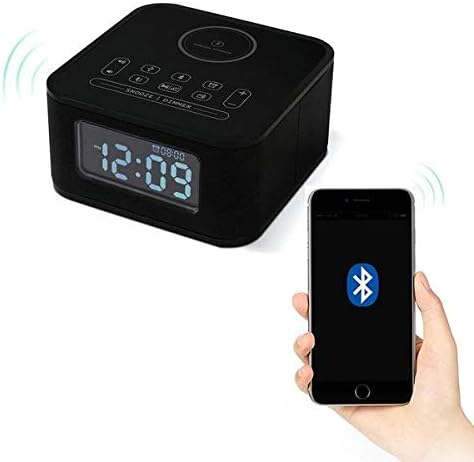
Figure 4.4: The Homtime D2qi speaker connected via Bluetooth to a smartphone.
5. סעטאַפּ
5.1 מאַכט קאַנעקשאַן
- Connect the provided power adapter to the DC input port on the back of the Homtime D2qi.
- צאַפּן די מאַכט אַדאַפּטער אין אַ נאָרמאַל וואַנט ווענטיל.
- דער עקראַן וועט זיך אָנצינדן, וואָס ווײַזט אָן אַז דער אַפּאַראַט איז אָנגעשלאָסן.
5.2 ערשטע צייט איינשטעלונג
Upon first power-on or after a power outage, you may need to set the time. Refer to the 'Operating Instructions' section for detailed steps on setting the clock.
6. אַפּערייטינג ינסטרוקטיאָנס
6.1 בלועטאָאָטה קאַנעקשאַן
- דרוק די בלועטאָאָטה קנעפּל on the top panel to enter Bluetooth pairing mode. The Bluetooth indicator will flash.
- אויף אייער סמאַרטפאָון אָדער אַודיאָ מיטל, אַקטיווירט בלועטוט און זוכט פֿאַר פֿאַראַן דעוויסעס.
- Select "Homtime D2qi" from the list.
- אַמאָל פארבונדן, וועט דער בלוטוט אינדיקאַטאָר אויפהערן צו בלינקען און בלייבן פעסט. איר קענט איצט שפּילן אַודיאָ דורך דעם רעדנער.
6.2 ווירעלעסס טשאַרדזשינג
- Place your Qi-compatible smartphone centrally on the wireless charging pad located on the top surface of the speaker.
- Ensure the phone is properly aligned with the charging coil.
- The charging indicator on your phone will show that charging has begun.
6.3 וועקער זייגער פונקציע
- דרוק די שרעק קנעפּל צו אַרייַן שרעק באַשטעטיקן מאָדע.
- ניצן די +/- קנעפּלעך to adjust the hour and minute.
- דרוק די שרעק קנעפּל again to confirm each setting.
- צו אַקטיווירן/דעאַקטיווירן דעם אַלאַרם, דריק די שרעק קנעפּל briefly when not in setting mode.
- צו שלאפן, דריק די סנוז / דיממער קנעפּל ווען דער שרעק קלינגט.
6.4 ראַדיאָ פֿונקציע
- דרוק די מאָדע קנעפּל צו באַשטימען צו FM ראַדיאָ מאָדע.
- דריקן און האַלטן די שפּיל / פּויזע קנעפּל to auto-scan and save available stations.
- ניצן די פרייַערדיק / ווייַטער קנעפּלעך to navigate through saved stations.
6.5 רוף ענטפערן
When connected via Bluetooth, the speaker can be used for hands-free calls.
- צו ענטפֿערן אַ ינקאַמינג רופן, דריקן די שפּיל / פּויזע קנעפּל.
- צו ענדיקן אַ רוף, דריקן די שפּיל / פּויזע קנעפּל ווידער.
7. וישאַלט
- רייניקט דעם אַפּאַראַט מיט אַ ווייכן, טרוקענעם שטאָף. ניצט נישט קיין שרײַבנדיקע רייניגערס אדער סאָלווענטן.
- האַלט די טשאַרדזשינג פּאַד פריי פון שטויב און שמוץ צו ענשור עפעקטיוו וויירלעס טשאַרדזשינג.
- האַלט דעם אַפּאַראַט אין אַ קיל, טרוקן אָרט ווען נישט אין באַנוץ פֿאַר לענגערע פּעריאָדן.
8. טראָובלעשאָאָטינג
| פּראָבלעם | מעגלעך סיבה | לייזונג |
|---|---|---|
| קיין מאַכט | שטראָם אַדאַפּטער נישט פארבונדן אדער אַ דעפעקטיווע אַוטלעט. | זיכער מאַכן אַז דער מאַכט אַדאַפּטער איז זיכער אַרייַנגעשטעקט אין דעם מיטל און אין אַ אַרבעטנדיקן וואַנט ווענטיל. |
| קיין געזונט פון רעדנער | Bluetooth not connected; volume too low; incorrect mode. | Ensure Bluetooth is paired. Increase volume on both the speaker and your device. Check if the speaker is in the correct mode (Bluetooth/Radio). |
| ווירעלעסס טשאַרדזשינג איז נישט ארבעטן | Phone not Qi-compatible; phone not aligned; phone case too thick. | Verify phone supports Qi wireless charging. Realign phone on the charging pad. Remove thick phone cases. |
| Buttons difficult to locate in the dark | Buttons are flush with the surface. | Familiarize yourself with button layout during daylight. Use the dimmer function to adjust display brightness. |
| Bluetooth disconnects automatically | Power saving feature; device out of range. | Reconnect Bluetooth manually. Keep devices within Bluetooth range (approx. 10 meters). |
9. ספּעסאַפאַקיישאַנז
| שטריך | דעטאַל |
|---|---|
| סאָרט | Homtime |
| מאָדעל נומער | D2qi |
| קאָליר | שוואַרץ |
| רעדנער טיפּ | בלועטאָאָטה ספּיקערז |
| קאַנעקטיוויטי | ווירעלעסס |
| קאַמפּאַטאַבאַל דעוויסעס | סמאַרטפאָנעס |
| רעזולטאַט מאַכט | 5 - 10 וואטס |
| פּראָדוקט וואָג | 0.5 קג |
| פּעקל דימענשאַנז | 19.6 X 18.8 X 14.8 סענטימעטער |
| ייַזנוואַרג צובינד | Audio/Video Port |
10. וואָראַנטי און שטיצן
Homtime products are manufactured to the highest quality standards. For warranty information and customer support, please refer to the warranty card included in your package or visit the official Homtime webזייטל. האַלט אייער קויף קוויטל ווי אַ באַווייַז פון קויפן.


