
1. הקדמה
This manual provides essential information for the setup, operation, and maintenance of your Proscan PLDED3280A 32-Inch 720p LED TV. Please read this manual thoroughly before operating your television and retain it for future reference.
שליסל פֿעיִקייטן:
- 32-Inch LED HD TV with Built-in ATSC Tuner
- Multiple Connectivity Options: HDMI, VGA, YPbPr, AV Audio/Video, PC Audio, Headphone, Coaxial Out, RF
- 60Hz Refresh Rate for smooth motion
- 16:9 Aspect Ratio for widescreen viewing
- Slim Bezel Design for a modern aesthetic
2. וואָס איז אין דער קעסטל
ביים עפענען דעם פעקל, זיכער מאכן אז אלע זאכן זענען דא:
- Proscan PLDED3280A 32-Inch 720p LED TV
- ווייַט קאָנטראָל
- טעלעוויזיע שטאַנד (2 שטיק)
- באַניצער מאַנואַל (דעם דאָקומענט)

Figure 2.1: Proscan PLDED3280A 32-Inch 720p LED TV.
3. סעטאַפּ
3.1 אַטאַטשינג די שטיין
- לייגט פֿאָרזיכטיק דעם טעלעוויזיע־עקראַן אַראָפּ אויף אַ ווייכער, ריינער ייבערפֿלאַך כּדי צו פֿאַרמייַדן קראַצן.
- Align the stand pieces with the mounting holes on the bottom of the TV.
- באַפעסטיקט דעם שטאַנד מיט די צוגעשטעלטע שרויפן. נישט צו שטאַרק אָנציִען.
3.2 קאַנעקטינג מאַכט
שטעקט אריין דעם עלעקטרישן שנור אין דעם AC IN פּאָרט אויף דער הינטערשטער זייט פון דעם טעלעוויזאָר, און דערנאָך שטעקט אריין דעם אַנדערן עק אין אַ נאָרמאַלן עלעקטרישן אַוטלעט (AC 120V, 60Hz).
3.3 קאַנעקטינג פונדרויסנדיק דעוויסעס
Your Proscan TV offers various input ports for connecting external devices such as cable boxes, DVD/Blu-ray players, gaming consoles, and computers.
- הדמי: For high-definition audio and video. Connect up to three HDMI devices.
- ווגאַ: For connecting a PC.
- YPbPr (Component): For analog high-definition video.
- AV (קאָמפּאָזיט): For standard definition video and stereo audio.
- RF (אַנטענע/קאַבל): פֿאַר פֿאַרבינדן אַן אַנטענע אָדער קאַבל טעלעוויזיע פֿיד.
- פּיסי אַודיאָ: For audio input from a PC.
- כעדפאָון: פֿאַר קאַנעקטינג כעדפאָונז.
- קאָאַקסיאַל אַרויסגאַנג: פֿאַר דיגיטאַל אַודיאָ אַרויסגאַנג.
Ensure all cables are securely connected to the correct ports on both the TV and the external device.
4. אפערירן דעם טעלעוויזאר
4.1 מאַכט אויף / אַוועק
דרוק די מאַכט button on the remote control or the power button on the side of the TV to turn the television on or off. A blue indicator light on the front of the TV signifies it is powered on.
4.2 אויסוואל פון איינגאבע מקור
צו בייטן צווישן פארבונדענע דעווייסעס, דריק די אַרייַנשרייַב button on the remote control or the side of the TV. A menu will appear on screen, allowing you to select from available inputs such as TV, AV, Component, HDMI1, HDMI2, HDMI3, PC, or USB Media Player.
4.3 באַנד קאָנטראָל
ניצן די VOL+ און וואָל- buttons on the remote control or the side of the TV to adjust the volume level. A volume bar with a numerical indicator will appear on the screen.
4.4 קאַנאַל סעלעקציע
If an antenna or cable is connected to the RF input, use the CH+ און טש- buttons on the remote control or the side of the TV to change channels.
4.5 מעניו נאַוויגאַציע
דרוק די MENU button on the remote control or the side of the TV to access the on-screen display (OSD) menu. Use the arrow buttons to navigate through options and the OK or אַרייַן קנעפּל צו באַשטעטיקן סאַלעקשאַנז.
5. וישאַלט
Proper care ensures the longevity of your Proscan TV:
- רייניקונג די פאַרשטעלן: ווישט אָפּ דעם עקראַן מיט אַ ווייכן, לינט-פֿרײַעם שטאָף. פֿאַר שווערע פֿלעקן, ווישט אַ ביסלampווישט דעם שטאָף מיט וואַסער אָדער אַ ספּעציאַליזירטן עקראַן רייניגער. פֿאַרמייַדט שטרענגע כעמיקאַלן אָדער אַברייסיוו מאַטעריאַלן.
- רייניקונג די קאַבינעט: ניצט אַ ווייכן, טרוקענעם שטאָף צו רייניקן דעם טעלעוויזיע קאַבינעט.
- ווענטילאַטיאָן: זאָרגט פֿאַר גענוגיקע ווענטילאַציע אַרום דעם טעלעוויזאָר. בלאָקירט נישט די ווענטילאַציע עפענונגען.
- מאַכט שנור: קאָנטראָלירט רעגולער דעם עלעקטרישן שנור פֿאַר יעדן שאָדן. אויב עס איז געשעדיגט, זאָלט איר עס גלייך אויסטוישן.
- סטאָרידזש: If storing the TV for an extended period, disconnect it from power and store it in a cool, dry place.
6. טראָובלעשאָאָטינג
איידער איר קאָנטאַקטירט קונה שטיצע, פּרוּווט די פאלגענדע לייזונגען פֿאַר געוויינטלעכע פּראָבלעמען:
| פּראָבלעם | מעגלעך סיבה / לייזונג |
|---|---|
| קיין מאַכט | Ensure the power cord is securely plugged into both the TV and the outlet. Check if the outlet is working. |
| קיין בילד / קיין סיגנאַל | Verify the correct input source is selected (e.g., HDMI1, AV). Check all cable connections between the TV and external devices. |
| קיין געזונט | קאָנטראָלירט דעם וואָלומען לעוועל און זיכערט זיך אַז דער טעלעוויזאָר איז נישט שטיל. קאָנטראָלירט די קאַנעקשאַנז פון די אַודיאָ קאַבל. |
| ווייַט קאָנטראָל איז נישט ארבעטן | טוישט די באַטעריעס אין דער ווײַטקאָנטראָל. מאַכט זיכער אַז עס זענען נישטאָ קיין שטערונגען צווישן דער ווײַטקאָנטראָל און דעם טעלעוויזיע'ס IR סענסאָר. |
| נעבעך בילד קוואַליטי | אַדזשאַסטירן בילד סעטטינגס (ברייטקייט, קאָנטראַסט, קאָליר). זיכער מאַכן אַז די אַרייַנגאַנג מקור גיט אַ הויך-קוואַליטעט סיגנאַל. |
7. ספּעסאַפאַקיישאַנז
| שטריך | דעטאַל |
|---|---|
| סאָרט | פּראָסקאַן |
| מאָדעל נומער | PLDED3280A |
| פאַרשטעלן גרייס | 32 אינטשעס |
| ווייַז טעכנאָלאָגיע | געפירט |
| האַכלאָטע | 720 פּ |
| דערפרישן קורס | 60 הז |
| אַספּעקט פאַרהעלטעניש | 16:9 |
| קאַנעקטיוויטי טעכנאָלאָגיע | HDMI, VGA, YPbPr, AV, PC Audio, Headphone, Coaxial Out, RF |
| פּונקט וואָג | 13.7 פונט |
| פּראָדוקט דימענשאַנז | 8"ד רענטגענ 28.8"וו רענטגענ 19.1"ה |
| קאָליר | שוואַרץ |
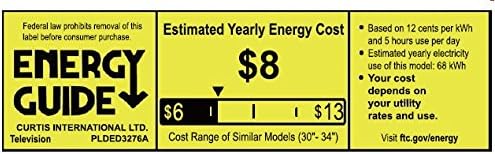
Figure 7.1: Estimated Yearly Energy Cost for similar models.
8. וואָראַנטי און שטיצן
For detailed warranty information and customer support, please refer to the official Proscan website or the full User Manual PDF.
You can download the complete User Manual (PDF) דאָ.
פֿאַר ווייַטער הילף, באַזוכן די PROSCAN Store on Amazon.