
הקדמה
This manual provides comprehensive instructions for the setup, operation, maintenance, and troubleshooting of your Proscan CRK83X PSVR82 TV Remote Control. This remote is designed to work seamlessly with various Proscan TV and VCR models, offering a direct replacement or compatible control solution.
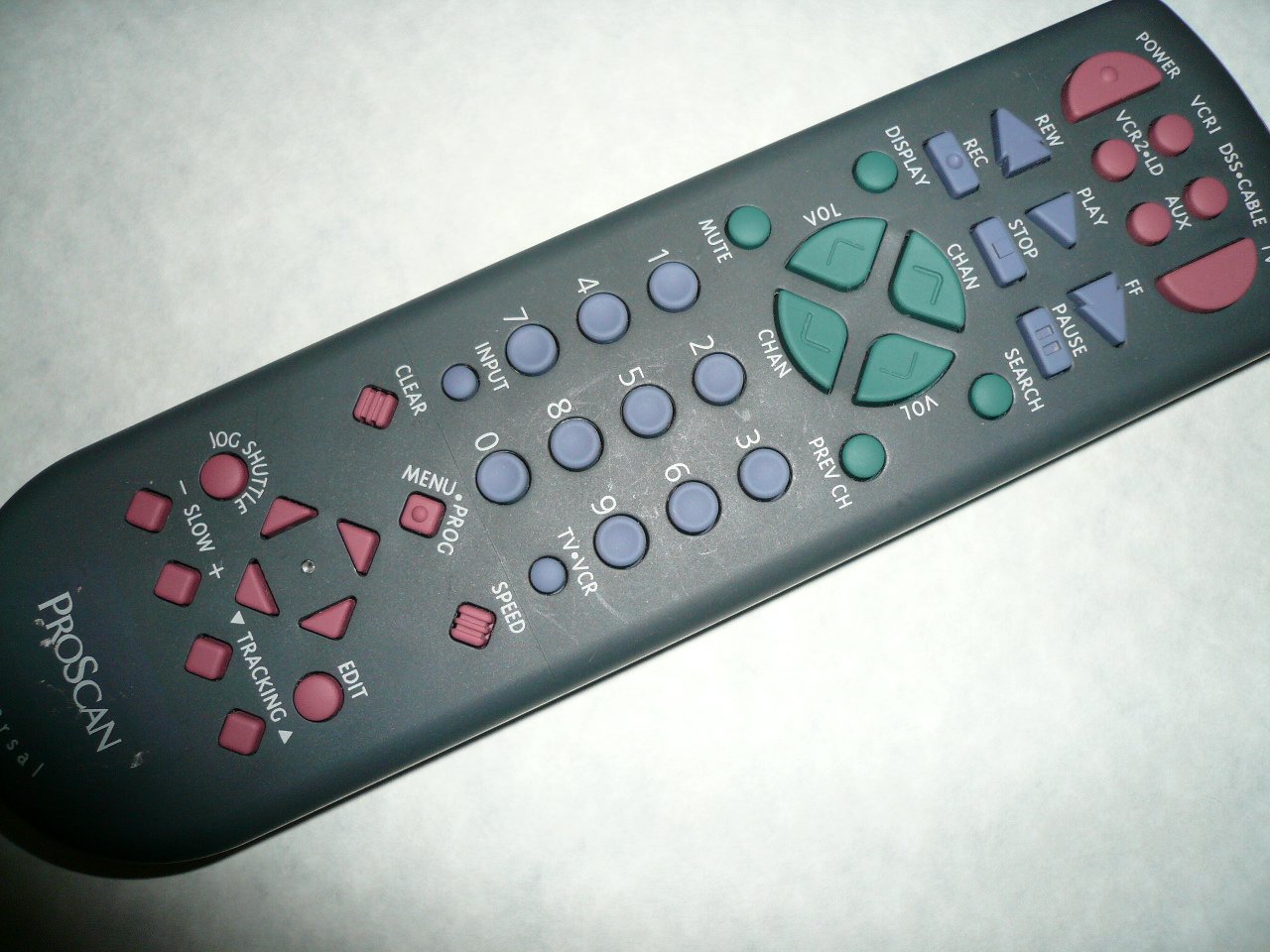
An image showing the Proscan CRK83X PSVR82 TV Remote Control, highlighting its ergonomic design and button layout. The remote is dark gray with purple and teal buttons, clearly labeled for various functions.
סעטאַפּ
1. באַטאַרייע ייַנמאָנטירונג
- געפֿינען די דעקן פון די באַטאַרייע אָפּטייל אויף די צוריק פון די ווייַט קאָנטראָל.
- שלעפּט דעם דעקל אַראָפּ אָדער דריק דעם לאַטש צו עס עפֿענען.
- אַרײַנשטעלן צוויי (2) AAA באַטעריעס (נישט אַרײַנגערעכנט), און זיכער מאַכן אַז די פּאָזיטיוו (+) און נעגאַטיוו (-) טערמינאַלן זענען ריכטיק אויסגעשטעלט מיט די מאַרקירונגען אינעווייניק אין דעם אָפּטייל.
- לייגט צוריק דעם דעקל פונעם באַטעריע־אָפּטייל דורך עס צוריקצורוקן אין פּלאַץ ביז עס קליקט זיכער.
2. ערשט נוצן
The Proscan CRK83X PSVR82 remote control is typically pre-programmed for compatible Proscan TV and VCR models. No complex programming steps are usually required for initial use with supported devices. Simply point the remote at your device and press the desired function button.
This remote is compatible with a wide range of models, including but not limited to: P5VR74, PAVR57, PCVR72, PRVR71, PSDR72, PSDR73, PSNKVSR72, PSNPSVR57, PSNPSVR65, PSNPSVR70, PSNPSVR71, PSNPSVR72, PSNPSVR73, PSNPSVR74, PSNPSVRR73, PSNR65, PSNVR74, PSRV65, PSRV71, PSRV72, PSRV74, PSRVR65, PSRVR71, PSUR70, PSUR72, PSV174, PSV65, PSV71, PSV72, PSVDR73, PSVER72, PSVH57, PSVP71, PSVR22, PSVR27, PSVR57, PSVR61, PSVR62, PSVR65, PSVR72L, PSVR72VCR, PSVR75, PSVR79, PSVR83, PSVT73, PSVV73, PSZR65, PSZR71, PSZR73, PVSR73, R65, RCU800, RSVR73, SPVR65, SSVR62, VR653HF, VR730, VR730HF.
אַפּערייטינג ינסטראַקשאַנז
Familiarize yourself with the buttons and their functions for optimal control of your television and VCR.
| קנעפּל נאָמען | פֿונקציע |
|---|---|
| מאַכט | Turns the connected device (TV/VCR) on or off. |
| VCR1, DSS/CABLE, VCR2/LD, AUX | Selects the input source for the television or VCR. |
| שטום | מיוטעס אָדער אַנמיוט די אַודיאָ רעזולטאַט. |
| וואָל +/- | אַדזשאַסטירט דעם באַנד לעוועל אַרויף אָדער אַראָפּ. |
| טשאַנ +/- | ענדערונגען דעם קאַנאַל אַרויף אָדער אַראָפּ. |
| PREV CH | טוישט זיך צו די פריערדיגע viewעד קאַנאַל. |
| DISPLAY | Displays on-screen information such as channel number or time. |
| REC | Initiates recording on the VCR. |
| REW | Rewinds the tape during VCR playback. |
| שפּיל | Starts playback of a tape or disc. |
| FF | Fast forwards the tape during VCR playback. |
| האַלטן | סטאַפּס פּלייבאַק אָדער רעקאָרדינג. |
| פּויזע | Pauses playback or recording. |
| זוכן | Activates search function, typically for VCR content. |
| נומער פּאַד (0-9) | Directly enters channel numbers or menu selections. |
| אַרייַנשרייַב | גייט דורך די פארהאן איינגאבע קוועלער. |
| קלאָר | Clears entered numbers or menu selections. |
| MENU / PROG | Accesses the on-screen menu or programming functions. |
| טעלעוויזיע-ווקר | Toggles control between TV and VCR modes. |
| דזשאַג וועבשיפל | Provides frame-by-frame or variable speed control for VCR playback. |
| פּאַמעלעך +/- | Adjusts slow-motion speed during VCR playback. |
| SPEED | Adjusts playback speed, typically for VCR. |
| TRACKING ▲/▼ | Adjusts the VCR tracking for optimal picture quality. |
| רעדאַגירן | Activates editing functions, typically for VCR. |
וישאַלט
רייניקונג פון די ווייַטקאָנטראָל
- ווישט ווי די ווײַטקאָנטראָל מיט אַ ווייכן, טרוקענעם שטאָף.
- פֿאַר שווערן שמוץ, אַ ביסל דampווישט דעם שטאָף מיט וואַסער אָדער אַ מילדן, נישט-שרייַבנדיקן רייניגער. שפּריצט נישט רייניגער גלייך אויף דער ווײַטקאָנטראָל.
- פֿאַרמײַדט די נוצן פֿון שאַרפֿע כעמיקאַלן, סאָלווענטן, אָדער אַברייזיווע רייניקונג פּאַדס, ווײַל די קענען שאַטן די ייבערפֿלאַך אָדער אינעווייניקסטע קאָמפּאָנענטן פֿון דער ווײַטקאָנטראָל.
באַטערי פאַרבייַט
Replace batteries when the remote's response becomes sluggish or it stops functioning. Refer to the "Battery Installation" section under Setup for detailed instructions.
וואַרפט שטענדיק אַוועק גענוצטע באַטעריעס פאַראַנטוואָרטלעך לויט די לאָקאַלע רעגולאַציעס.
טראָובלעשאָאָטינג
| פּראָבלעם | מעגלעך סיבה / לייזונג |
|---|---|
| די ווײַטקאָנטראָל אַרבעט נישט. |
|
| די ווײַטקאָנטראָל אַרבעט צווישנצײַטיק. |
|
| געוויסע קנעפּלעך רעאַגירן נישט. |
|
ספּעסאַפאַקיישאַנז
- סאָרט: פּראָסקאַן
- מאָדעל: CRK83X PSVR82
- פאַבריקאַנט: פּראָסקאַן
- קאַמפּאַטאַבאַל דעוויסעס: Television (and various Proscan VCR models as listed in Setup section)
- קאַנעקטיוויטי טעכנאָלאָגיע: ינפרערעד
- קאָנטראָללער טיפּ: קנעפּל קאָנטראָל
- ספּעציעלע שטריך: ערגאַנאַמיק פּלאַן
- ASIN: B00P82T2LS
- ערשטער דאַטע בנימצא: 4 נאוועמבער 2014
וואָראַנטי און שטיצן
Specific warranty information for the Proscan CRK83X PSVR82 TV Remote Control is not provided in this manual. Please refer to the product packaging or contact your retailer for details regarding warranty coverage.
For further assistance or technical support, please contact the manufacturer or your point of purchase. No specific support contact details are available in this document.