
הקדמה
The Zalman ZM-NS2000 is a high-performance laptop cooling pad designed to prevent overheating and enhance the longevity and stability of your notebook. It features a large, quiet 200mm fan and an ergonomic design with adjustable tilt, providing a comfortable and efficient cooling solution for laptops up to 17 inches. Additionally, it includes an integrated USB hub to expand your connectivity options.
פּראָדוקט פֿעיִקייטן
- ערגאָנאָמיק פּלאַן: Features an adjustable tilt mechanism for comfortable typing and viewינג אַנגלעס.
- עפעקטיוו קאָאָלינג: Equipped with a large 200mm fan that operates quietly at approximately 20 dB(A).
- אַדזשאַסטאַבאַל פאָכער ספּיד: Manually regulate fan speed from 470 to 610 RPM to optimize cooling performance.
- אינטעגרירטע USB כאַב: Includes three additional USB 2.0 ports for connecting peripherals such as a mouse, keyboard, or external drives.
- ברייט קאַמפּאַטאַבילאַטי: Designed to accommodate laptops up to 17 inches.
- USB Powered: Conveniently powered directly from your laptop's USB port, with the connection cable included.
- קאַבלע פאַרוואַלטונג: Features a system to keep cables organized for a tidy workspace.
פּעקל אינהאַלט
- Zalman ZM-NS2000 Laptop Cooling Pad
- וסב קאַנעקשאַן קאַבלע
סעטאַפּ
- אָרט: Place the Zalman ZM-NS2000 cooling pad on a stable, flat surface.
- לאַפּטאַפּ פּאַזישאַנינג: Carefully place your laptop onto the cooling pad, ensuring it is centered over the fan area for optimal airflow.
- אַדזשאַסטירן טילט: Adjust the integrated stand at the rear of the cooling pad to achieve your desired ergonomic typing or viewינג ווינקל.
- פאַרבינדן וסב מאַכט: Connect one end of the provided USB cable to the USB input port on the cooling pad and the other end to an available USB port on your laptop. The cooling fan will begin to operate.
- פֿאַרבינדן פּעריפֿערישע אַפּאַראַטן (אָפּציאָנאַל): Utilize the three additional USB 2.0 ports on the cooling pad to connect external devices such as a mouse, keyboard, or USB flash drive.

Image: The Zalman ZM-NS2000 cooling pad shown with its adjustable stand extended and USB ports visible on the side.
אַפּערייטינג ינסטראַקשאַנז
- מאַכט אויף / אַוועק: דער קיל-פּאַד צינדט זיך אויטאָמאַטיש אָן ווען עס ווערט פארבונדן צו אַ שטאַרקן USB פּאָרט אויף אייער לאַפּטאַפּ. טרענט אָפּ דעם USB קאַבל צו עס אויסלעשן.
- פאָכער ספּיד קאָנטראָל: Locate the fan speed adjustment dial or switch on the side of the cooling pad. Rotate the dial or move the switch to increase or decrease the fan speed according to your cooling needs.
- יו-עס-בי כאַב באַניץ: The integrated USB 2.0 ports function as a standard USB hub. Connect your devices to these ports as needed. Note that these ports are for data transfer and power for low-power devices; high-power devices may require an external power source or direct connection to the laptop.
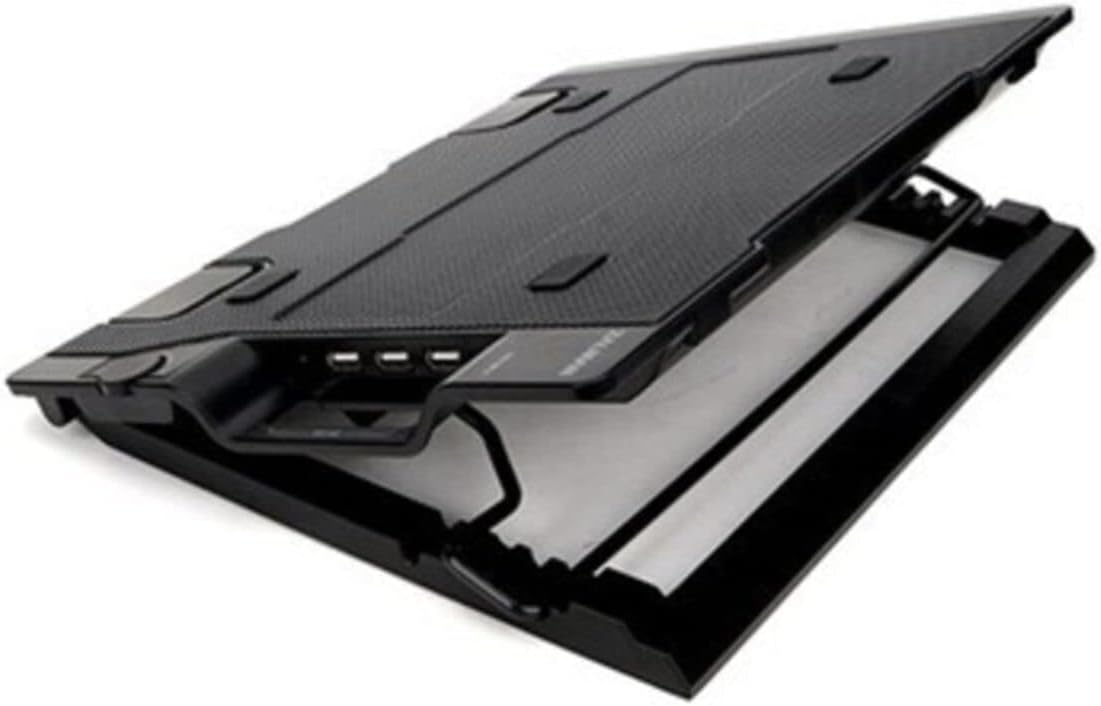
בילד: א נאנטע זייט view of the Zalman ZM-NS2000, highlighting the three USB 2.0 ports and the fan speed control dial.
וישאַלט
- רייניקונג: Regularly clean the fan and the surface of the cooling pad to prevent dust accumulation, which can impede airflow and fan performance. Use a soft, dry cloth or compressed air. Do not use liquid cleaners directly on the fan or electronic components.
- סטאָרידזש: ווען ניט אין נוצן, קראָם די קאָאָלינג בלאָק אין אַ קיל, טרוקן אָרט אַוועק פון דירעקט זונשייַן און עקסטרעם טעמפּעראַטורעס.
טראָובלעשאָאָטינג
- פען דרייט זיך נישט:
- Ensure the USB connection cable is securely plugged into both the cooling pad and a functioning USB port on your laptop.
- Try connecting the cooling pad to a different USB port on your laptop or another device to rule out a faulty port.
- Check if the fan speed control is set to a minimum or off position. Adjust it to increase speed.
- ניט גענוגיק קאָאָלינג:
- Verify that your laptop's intake and exhaust vents are not obstructed by the cooling pad or other objects.
- Increase the fan speed to its maximum setting.
- Ensure the cooling pad is placed on a hard, flat surface to allow for proper airflow underneath.
- USB פּאָרטן אַרבעטן נישט:
- Confirm the main USB connection to your laptop is secure and providing power.
- Test the peripheral device by connecting it directly to your laptop to ensure it is working correctly.
- Some high-power USB devices may not function correctly through the cooling pad's hub due to power limitations. Connect such devices directly to your laptop.
ספּעסאַפאַקיישאַנז
| סאָרט | זלמן |
| מאָדעל נומער | ZM-NS2000 |
| קאָליר | שוואַרץ |
| פאָכער גרייס | 200 מם |
| פאַן ספּיד | 470 - 610 RPM (Manually Adjustable) |
| ראַש מדרגה | בעערעך 20 dB(A) |
| וסב פּאָרץ | 3 רענטגענ וסב 2.0 |
| קאָאָלינג אופֿן | לופט |
| מאַטעריאַל | שטאָל |
| פּונקט וואָג | 2.4 פונט (אומגעפער 1.09 ק"ג) |
| לאַפּטאַפּ קאַמפּאַטאַבילאַטי | אַרויף צו 17 אינטשעס |
| UPC | 823884205312 |
וואָראַנטי און שטיצן
For technical assistance, warranty information, or customer support regarding your Zalman ZM-NS2000 Laptop Cooling Pad, please contact Zalman customer service directly through their official website or the contact information provided with your purchase documentation. Please retain your proof of purchase for warranty claims.