
1. Intshayelelo
Thank you for choosing the Bontempi HarmonyKeys 61-Key Digital Keyboard. This instrument is designed to provide a versatile and engaging musical experience for users of various skill levels. This manual provides essential information for the proper setup, operation, maintenance, and troubleshooting of your new digital keyboard. Please read this manual thoroughly before use to ensure optimal performance and longevity of your instrument.
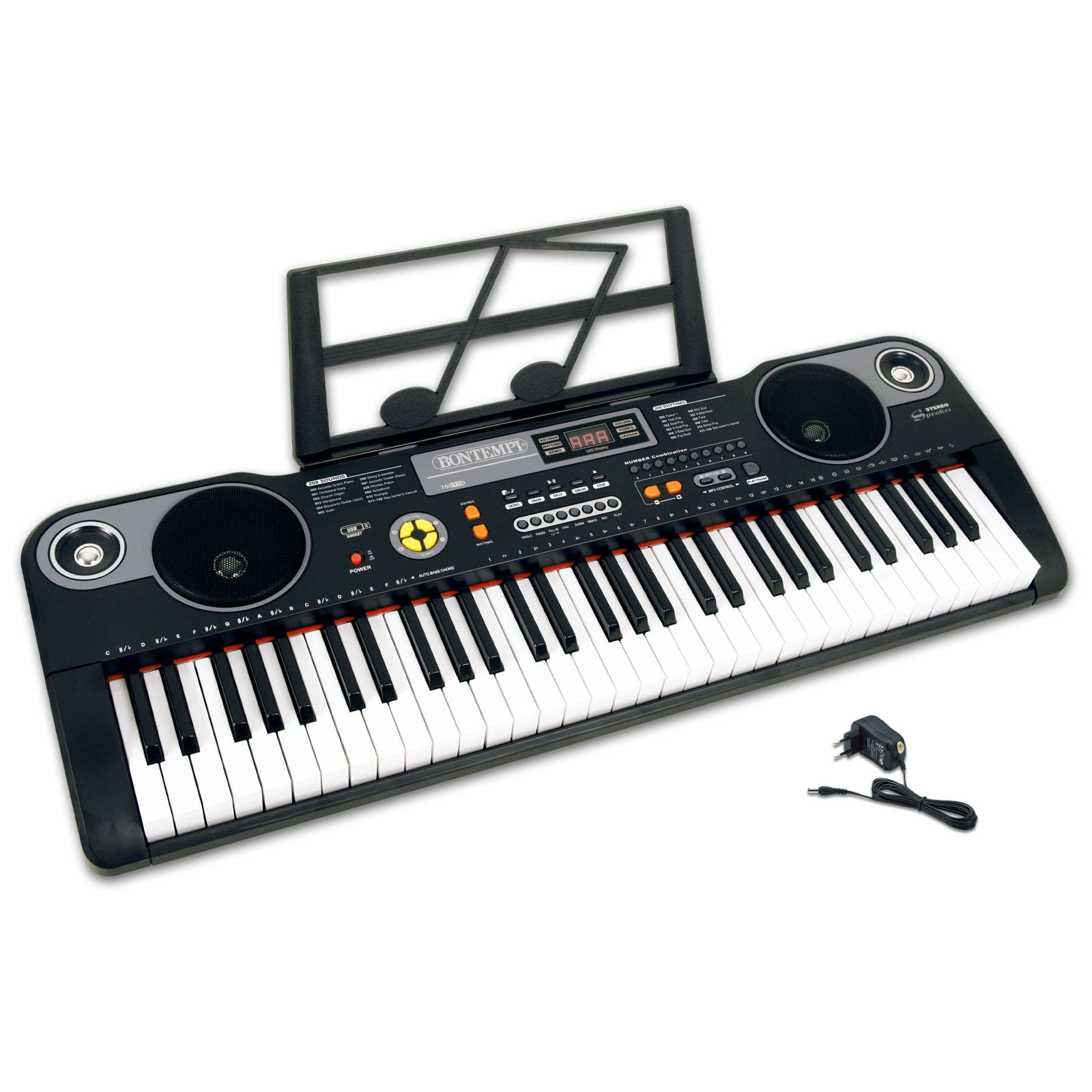
Umfanekiso 1: Phezulu view of the Bontempi HarmonyKeys 61-Key Digital Keyboard, showing the keys, control panel, and speakers.
2. Ulwazi loKhuseleko
To prevent damage to the instrument or injury to yourself or others, please observe the following safety precautions:
- Umthombo wamandla: Use only the specified power adapter or a compatible USB power source. Ensure the voltage matches the instrument's requirements.
- Amanzi nokufuma: Do not expose the instrument to water or moisture. Avoid placing liquids near the keyboard.
- Imithombo yoBubushushu: Gcina isixhobo kude nemithombo yobushushu efana nee-radiator, ii-heat registers, izitovu, okanye ezinye izixhobo ezivelisa ubushushu.
- Ukungenisa umoya: Do not block any ventilation openings. Ensure adequate airflow around the instrument.
- Ukucoca: Coca kuphela ngelaphu elomileyo. Musa ukusebenzisa izicoci zolwelo okanye izicoci ze-aerosol.
- Inkonzo: Sukuzama ukusebenzela le mveliso ngokwakho. Bhekisa konke ukunikezelwa kweenkonzo kubasebenzi benkonzo efanelekileyo.
- Ukubekwa: Place the instrument on a stable, flat surface to prevent it from falling.
3. Imixholo yePakethe
Qinisekisa ukuba zonke izinto zikhona kwiphakheji:
- Bontempi HarmonyKeys 61-Key Digital Keyboard
- I-Adapter yamandla
- Incwadana yemiyalelo (olu xwebhu)
- Music Stand (if included with your specific model)
Phawula: Batteries are not included and must be purchased separately if you intend to use the keyboard without the power adapter.

Image 2: The Bontempi HarmonyKeys 61-Key Digital Keyboard shown with its music stand and power adapter.
4. Seta
4.1 Uqhagamshelo lwamandla
Your HarmonyKeys keyboard can be powered in two ways:
- Using the AC Power Adapter: Connect the included power adapter to the DC IN jack on the back of the keyboard. Plug the other end into a standard wall outlet.
- Using Batteries (not included): For portable use, insert the required number of D-size batteries (refer to the battery compartment for specifications) into the battery compartment on the underside of the keyboard. Ensure correct polarity.
4.2 Ukubekwa kwindawo yokuqala
Place the keyboard on a stable, flat surface. If using a keyboard stand, ensure it is properly assembled and secure. Attach the music stand to the designated slot on the keyboard, if applicable.
4.3 Ukuqhagamshela ii-Headphones
To practice privately, connect standard 3.5mm stereo headphones to the HEADPHONE jack on the keyboard. The internal speakers will automatically mute when headphones are connected.
5. Imiyalelo yokusebenza
5.1 Ukuvula/Vala amandla
Cofa i AMANDLA button to turn the keyboard on. The display will light up. Press the AMANDLA button again to turn the keyboard off.
5.2 Basic Play
Once powered on, you can immediately begin playing the 61 keys. The default sound is typically a piano tone. Use the volume controls to adjust the output level.
5.3 Selecting Sounds and Rhythms
Your HarmonyKeys keyboard features 60 demo songs, 200 sounds, and 200 rhythms. Use the dedicated buttons and the numeric keypad to select different instrument sounds (Tones) and rhythmic accompaniments (Rhythms). The digital display will show your current selection.
5.4 Imisebenzi eKhethekileyo
- Gcina: Cofa i UKUGCINWA button to make notes linger longer after the key is released.
- Vibrato: Vula i VIBRATO function to add a slight pitch modulation to the sound.
- Record & Play: Sebenzisa i I-REC button to record your performance and the DLALA button to listen back.
- Polyphony: The keyboard supports 8-note polyphony, allowing up to 8 notes to sound simultaneously.
- Learning Function (OKON): Utilize the OKON function for guided learning, which helps users practice songs. Refer to the on-screen prompts or specific instructions for this feature.
5.5 UQhagamshelwano lwe-USB
The USB connection allows you to connect the keyboard to a computer or other compatible devices for expanded functionality, such as using it as a MIDI controller with general-purpose music software (e.g., GarageBand, FL Studio, Logic Pro) or playing MP3 songs from a USB flash drive.
5.6 Iividiyo zeMveliso
Video 1: Demonstration of various sounds and features of the digital keyboard.
Ividiyo 2: Ngaphezuluview of the keyboard's design and key layout.
Video 3: Short clip showcasing a specific musical style or rhythm.
Video 4: Detailed look at the control panel and button functions.
Video 5: Demonstration of the USB connectivity feature.
Video 6: Quick demonstration of the record and playback function.
Video 7: Showcase of the learning function (OKON).
Video 8: Comprehensive overview of the keyboard's musical capabilities.
6. Isondlo
Proper maintenance ensures the longevity and performance of your digital keyboard.
- Ukucoca: Wipe the surface of the keyboard with a soft, dry cloth. For stubborn dirt, slightly dampen the cloth with water and then wipe dry immediately. Avoid using abrasive cleaners, solvents, or waxes.
- Ugcino: When not in use for extended periods, store the keyboard in a cool, dry place, away from direct sunlight and extreme temperatures. If using batteries, remove them to prevent leakage.
- Ukuphatha: Avoid dropping the keyboard or subjecting it to strong impacts. Do not place heavy objects on the keys or control panel.
7. Ukuxazulula ingxaki
Ukuba udibana neengxaki, jonga kwitheyibhile engezantsi ukuze ufumane iingxaki eziqhelekileyo kunye nezisombululo.
| Ingxaki | Unobangela Onokwenzeka | Isisombululo |
|---|---|---|
| Akukho mandla | Power adapter not connected or faulty; batteries drained or incorrectly inserted. | Ensure power adapter is securely connected and plugged into a working outlet. Check battery orientation and replace if necessary. |
| Akukho sandi | Volume too low; headphones connected; speaker malfunction. | Increase volume. Disconnect headphones. If problem persists, contact support. |
| Izitshixo aziphenduli | Keyboard in a special mode; internal malfunction. | Try restarting the keyboard. Check if any learning or demo modes are active. |
| Isandi esigqwethekileyo | Volume too high; faulty connection. | Reduce volume. Check all cable connections. |
8. Iinkcukacha
Technical details of the Bontempi HarmonyKeys 61-Key Digital Keyboard:
| Uphawu | Iinkcukacha |
|---|---|
| Igama loMfanekiso | HarmonyKeys |
| Inani lezitshixo | 61 |
| Imilinganiselo (L x W x H) | 860 x 295 x 90 mm (33.86 x 11.61 x 3.54 intshi) |
| Ubunzima | 3.89kg (8.58 lbs) |
| Izinto zoMzimba | Iplastiki |
| Uqhagamshelwano | i-USB |
| UJack weHeadphone | 3.5 mm |
| Umthombo wamandla | AC Power Adapter (included), Batteries (not included) |
| Isoftware exhaswayo | General purpose music software (e.g., GarageBand, FL Studio, Logic Pro) |
| I-GTIN (UPC) | 047663557144 |
9. Iwaranti kunye neNkxaso
Bontempi products are manufactured to high-quality standards. For information regarding warranty coverage, please refer to the warranty card included with your product or visit the official Bontempi website. If you require technical assistance or have questions not covered in this manual, please contact Bontempi customer support through their official channels.