
1. Giới thiệu
This manual provides detailed instructions for the installation, operation, and maintenance of your VSTARCAM CS995 Pan/Tilt Smart Security Camera. This indoor camera is designed to provide comprehensive surveillance with features such as 2K QHD resolution, full-color night vision, motion detection, and two-way audio. Please read this manual thoroughly before using the product to ensure proper setup and functionality.
2. Nội dung gói hàng
Kiểm tra xem tất cả các mặt hàng được liệt kê dưới đây có trong gói hàng của bạn không. Nếu có bất kỳ mặt hàng nào bị thiếu hoặc hư hỏng, vui lòng liên hệ với bộ phận hỗ trợ khách hàng.
- VSTARCAM CS995 Pan/Tilt Smart Security Camera
- Bộ đổi nguồn
- Cáp sạc
- Gắn bộ vít
- Đứng
- Hướng dẫn sử dụng (tài liệu này)
3. Sản phẩm hếtview
The VSTARCAM CS995 camera offers advanced features for indoor monitoring.
3.1 Các tính năng chính
- Phạm vi xoay và nghiêng 360°: Pan 310° horizontally and tilt 115° vertically for complete room coverage.
- Độ phân giải 2K QHD: Captures clear, detailed video footage.
- Tầm nhìn ban đêm đầy đủ màu sắc: Provides clear, colored images up to 15ft in low-light conditions using dual light sources.
- Phát hiện chuyển động và con người: AI-powered detection sends real-time alerts to your mobile phone upon detecting motion or human figures.
- Âm thanh hai chiều: Built-in microphone and speaker allow for clear communication with family or pets.
- Lưu trữ linh hoạt: Supports local storage via Micro SD card (up to 256GB, not included) and cloud storage (7-day trial available).
- Kết nối Wi-Fi 2.4GHz: Connects to your home network for remote access and control.
3.2 Các thành phần của máy ảnh
Familiarize yourself with the physical components of your camera.

Image: VSTARCAM CS995 camera illustrating its 310° pan and 115° tilt capabilities. The image shows the camera in a living room setting, monitoring a child playing.
- Ống kính: Main camera lens for video capture.
- Infrared LEDs/Spotlights: Dùng cho tầm nhìn ban đêm và chiếu sáng.
- Micrô: Dùng để thu âm thanh trong quá trình giao tiếp hai chiều.
- Người nói: For audio output during two-way communication and alerts.
- Khe cắm thẻ nhớ Micro SD: Để lưu trữ video cục bộ.
- Cổng điện: Để kết nối bộ đổi nguồn.
- Nút Đặt lại: Used for factory reset (usually a small pinhole).
4. Hướng dẫn cài đặt
4.1 Khởi động máy ảnh
- Kết nối cáp sạc với cổng nguồn của máy ảnh.
- Cắm bộ đổi nguồn vào ổ cắm điện tiêu chuẩn.
- The camera will power on and initiate its self-test, indicated by a rotating motion and status light.
4.2 Installing the O-KAM Pro App
- Download the "O-KAM Pro" app from your smartphone's app store (App Store for iOS, Google Play Store for Android).
- Đăng ký tài khoản mới hoặc đăng nhập nếu bạn đã có tài khoản.
4.3 Kết nối Camera với Wi-Fi
Hãy đảm bảo điện thoại thông minh của bạn được kết nối với mạng Wi-Fi 2.4GHz. Máy ảnh không hỗ trợ Wi-Fi 5GHz.
- Open the O-KAM Pro app and tap the "+" icon to add a new device.
- Follow the on-screen instructions to select your camera model and begin the pairing process.
- You may be prompted to scan a QR code displayed on your phone with the camera, or to enter your Wi-Fi credentials.
- Wait for the camera to connect to your Wi-Fi network. A voice prompt or status light change will indicate a successful connection.
4.4 Installing a Micro SD Card (Optional)
For local storage, insert a Micro SD card (up to 256GB, not included) into the designated slot on the camera. Ensure the camera is powered off before inserting or removing the card.
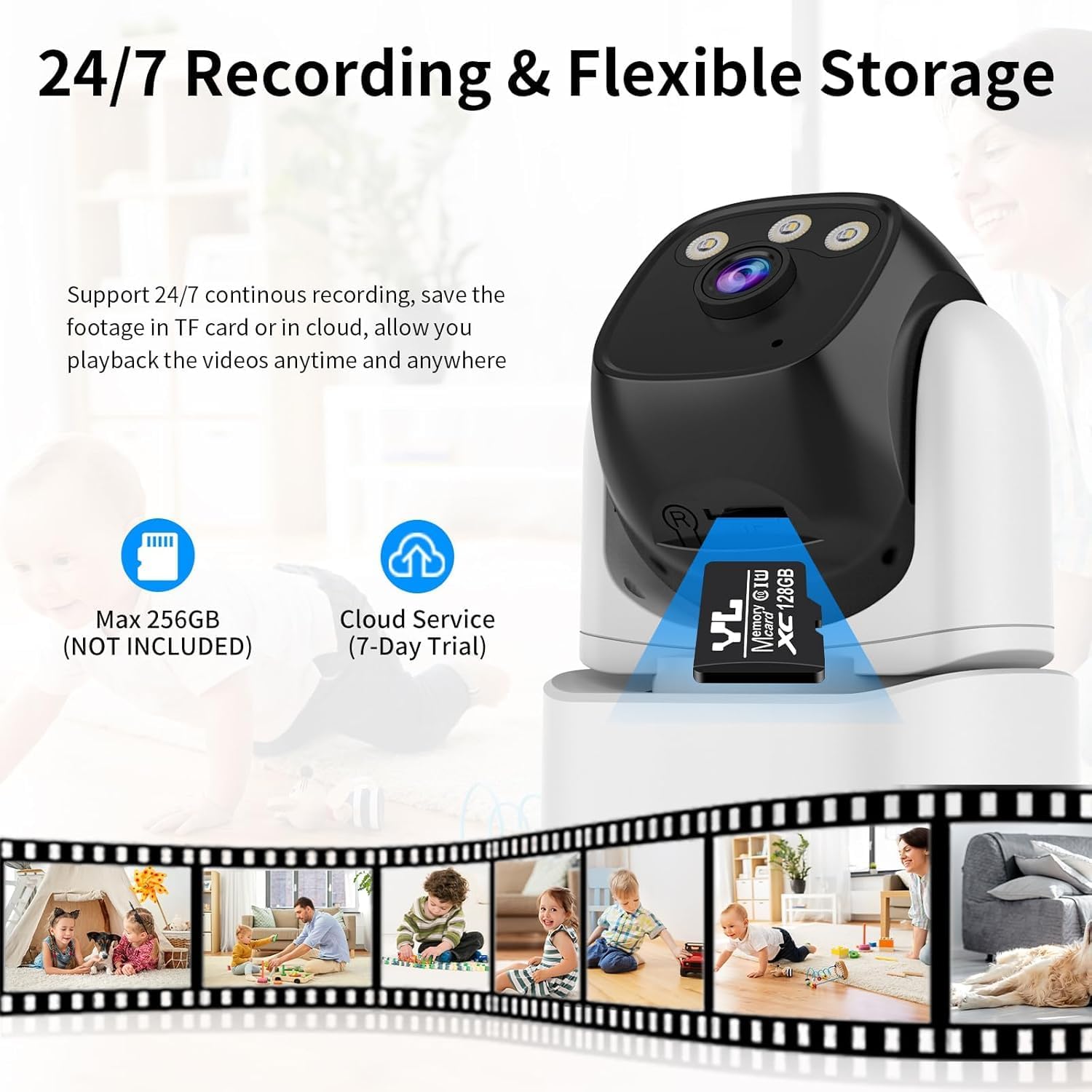
Image: VSTARCAM CS995 camera highlighting the Micro SD card slot and indicating support for both local (SD card) and cloud storage options.
5. Hướng dẫn vận hành
5.1 Trực tiếp View và Điều khiển PTZ
Once connected, open the O-KAM Pro app to view Hình ảnh trực tiếp từ camera của bạn.
- Xoay/Nghiêng: Kéo ngón tay của bạn trên màn hình trực tiếp view screen to remotely adjust the camera's horizontal (pan) and vertical (tilt) angles.
- Phóng: Use pinch-to-zoom gestures on the live view to digitally zoom in or out.
Image: VSTARCAM CS995 camera illustrating its 310° pan and 115° tilt capabilities. The image shows the camera in a living room setting, monitoring a child playing.
5.2 Âm thanh hai chiều
The camera supports two-way communication.

Image: VSTARCAM CS995 camera demonstrating its two-way audio function, showing a child communicating with an adult via the camera.
- Chạm vào biểu tượng micro trong phần phát trực tiếp của ứng dụng. view để nói qua loa của camera.
- Chạm vào biểu tượng loa để nghe âm thanh từ môi trường xung quanh camera.
5.3 Motion and Human Detection
The camera can detect motion and human figures, sending alerts to your phone.

Image: VSTARCAM CS995 camera demonstrating AI-powered motion and human detection, showing the camera tracking a person in a living room.
- Bật cảnh báo: In the app settings, navigate to "Detection Settings" to enable motion and human detection.
- Tùy chỉnh khu vực: Xác định các khu vực cụ thể bên trong camera. view để phát hiện chuyển động.
- Độ nhạy: Điều chỉnh độ nhạy phát hiện để giảm thiểu báo động sai.

Image: VSTARCAM CS995 camera illustrating real-time alert notifications, including spotlight activation, alarm alerts, and push notifications to a smartphone when motion is detected.
5.4 Chế độ nhìn ban đêm
Camera cung cấp nhiều tùy chọn nhìn ban đêm:

Image: VSTARCAM CS995 camera demonstrating its three night vision modes: Infrared (black and white), Full Color (using ambient light or spotlights), and Smart Light (activates spotlights upon detection for color vision).
- Chế độ hồng ngoại: Chế độ nhìn ban đêm đen trắng tiêu chuẩn.
- Chế độ đầy đủ màu sắc: Utilizes built-in spotlights to provide color images in the dark.
- Smart Light Mode: The camera remains in infrared mode and switches to full color with spotlights upon detecting motion.
You can switch between these modes in the O-KAM Pro app settings.
5.5 Ghi và phát lại
The camera supports 24/7 continuous recording to a Micro SD card or cloud storage.
- Ghi thẻ SD: Ensure a Micro SD card is inserted and formatted via the app. Recordings will be saved locally.
- Lưu trữ đám mây: Activate the cloud storage service (7-day trial available) through the app for remote backup.
- Phát lại: Truy cập foo đã ghitage through the "Playback" section in the O-KAM Pro app.
5.6 Chia sẻ nhiều người dùng
You can share live views of your camera with other users through the O-KAM Pro app.
- In the app, go to the camera settings and find the "Share Device" option.
- Invite other users by entering their O-KAM Pro account details.
- Shared users will receive an invitation and can view the live feed and access certain features based on permissions granted.
6. Bảo trì
- Vệ sinh: Dùng vải mềm, khô để lau ống kính và thân máy ảnh. Tránh sử dụng chất tẩy rửa có tính mài mòn hoặc dung môi.
- Cập nhật chương trình cơ sở: Regularly check the O-KAM Pro app for available firmware updates to ensure optimal performance and security.
- Vị trí: Ensure the camera is placed in a stable, dry indoor environment, away from direct sunlight or extreme temperatures.
KHAI THÁC. Xử lý sự cố
7.1 Camera không kết nối được với Wi-Fi
- Hãy đảm bảo mạng Wi-Fi của bạn là 2.4GHz. Camera không hỗ trợ mạng 5GHz.
- Hãy kiểm tra xem mật khẩu Wi-Fi đã nhập trong ứng dụng có chính xác hay không.
- Trong quá trình thiết lập, hãy đặt camera gần bộ định tuyến Wi-Fi hơn.
- Khởi động lại bộ định tuyến và camera, sau đó thử kết nối lại.
- Perform a factory reset on the camera by pressing and holding the reset button for several seconds until a voice prompt confirms.
7.2 Không có cảnh báo phát hiện chuyển động
- Check if motion detection is enabled in the O-KAM Pro app settings.
- Adjust the detection sensitivity. Higher sensitivity may be needed for subtle movements.
- Ensure notification permissions are enabled for the O-KAM Pro app on your smartphone.
- Verify that the camera has a stable internet connection.
7.3 Issues with Two-Way Audio
- Hãy đảm bảo micrô và loa của điện thoại không bị tắt tiếng hoặc bị chặn.
- Check the volume settings within the O-KAM Pro app.
- Verify the camera's internet connection stability.
7.4 Unable to Share Camera with Family Members
- Ensure the family member has downloaded the O-KAM Pro app and created their own account.
- Double-check the account details (email/username) entered when sending the share invitation.
- The invited user must accept the sharing invitation within the app.
- Verify that both your device and the invited user's device have a stable internet connection.
8. Thông số kỹ thuật
| Tính năng | Chi tiết |
|---|---|
| Tên mẫu | CS995 |
| Sử dụng trong nhà/ngoài trời | Trong nhà |
| Độ phân giải quay video | 1440p (2K QHD) |
| Công nghệ kết nối | Có dây (Nguồn), Wi-Fi (Dữ liệu) |
| Công nghệ truyền thông không dây | Wi-Fi (chỉ 2.4 GHz) |
| Nguồn điện | Điện có dây |
| Tầm nhìn ban đêm | 15 mét (khoảng 49 feet) |
| Tốc độ khung hình | 20 khung hình mỗi giây |
| Tùy chọn lưu trữ | Micro SD Card (max 256GB), Cloud Storage |
| Phương pháp kiểm soát | Ứng dụng (O-KAM Pro) |
| Phạm vi Pan/Tilt | Xoay 310 °, Nghiêng 115 ° |
| Kích thước sản phẩm (L x W x H) | 5 x 3 x 3 inch |
| Trọng lượng sản phẩm | 11.2 ounce |
| Vật liệu | Nhựa |
9. Bảo hành và Hỗ trợ
VSTARCAM provides professional customer service. If you encounter any issues or have questions regarding your CS995 camera, please contact our support team.
- Thông tin liên lạc: Refer to the contact details provided on the product packaging or the official VSTARCAM webđịa điểm.
- Bảo hành: Information regarding product warranty can be found on the official VSTARCAM webtrang web hoặc bằng cách liên hệ với dịch vụ khách hàng.