
1. Giới thiệu
This manual provides detailed instructions for the installation, operation, and maintenance of your VIKVIZ 5MP PoE IP Bullet Camera (Model: PG2T56IRC-ZS). Please read this manual thoroughly before using the product to ensure proper setup and functionality. Keep this manual for future reference.
2. Sản phẩm hếtview
2.1 Các tính năng chính
- Độ phân giải Ultra HD 5MP: Captures video at 2592 x 1944 resolution at 30 frames per second.
- Zoom quang học 5X: Features a 2.7-13.5mm varifocal lens with a 105° ultra-wide viewgóc ing.
- Tầm nhìn ban đêm đầy đủ màu sắc: Dual illuminated system with 4 warm LEDs and 4 IR LEDs for clear color night vision up to 98 feet.
- Phát hiện chuyển động thông minh: Advanced human and vehicle detection to reduce false alarms.
- Âm thanh hai chiều: Micrô và loa tích hợp để giao tiếp thời gian thực.
- Nén video H.265+: Efficiently saves storage space and provides smoother video.
- Cấp nguồn qua Ethernet (PoE): Single Ethernet cable for both power and data transmission.
- Thiết Kế chống chịu thời tiết: IP66 rated metal casing thích hợp sử dụng ngoài trời trong nhiều điều kiện thời tiết khác nhau.
- Lưu trữ linh hoạt: Supports NFS, NVR, APP Cloud Storage, or SD cards (up to 256GB, purchased separately).
2.2 Nội dung gói
Xác minh rằng tất cả các mục đều có trong gói hàng của bạn:
- VIKVIZ 5MP PoE IP Bullet Camera
- Hướng dẫn sử dụng
- Vít lắp

Image: Contents of the VIKVIZ 5MP PoE IP Bullet Camera package, including the camera, instruction manual, and mounting screws.
3. Thiết lập
3.1 Vị trí lắp đặt
Chọn một vị trí ngoài trời cung cấp mong muốn viewing angle and is within reach of an Ethernet cable. The camera is IP66 weatherproof, suitable for various environmental conditions.

Image: A VIKVIZ bullet camera mounted on an exterior wall, shown operating in rainy conditions, highlighting its IP66 weatherproof rating.
3.2 Gắn máy ảnh
- Mark the drilling points on the wall or ceiling using the camera's mounting base as a template.
- Khoan lỗ thí điểm tại các vị trí được đánh dấu.
- Insert the provided wall anchors (if necessary for your surface).
- Secure the camera's mounting base to the surface using the mounting screws.
- Điều chỉnh góc camera khi cần.
3.3 Power and Network Connection (PoE)
The camera supports Power over Ethernet (PoE), simplifying installation by using a single Ethernet cable for both power and data.
- Kết nối một đầu cáp Ethernet với cổng PoE của camera.
- Connect the other end of the Ethernet cable to a PoE-enabled NVR, PoE switch, or PoE injector.
- Ensure the NVR/switch/injector is powered on. The camera will power up automatically.
Ghi chú: A PoE NVR/switch/injector and DC power adapter are not included. If PoE is not available, a 12V DC power adapter (not included) can be used with a standard Ethernet connection.

Image: A VIKVIZ PoE camera connected to a Network Video Recorder (NVR) using a single Ethernet cable, illustrating the Power over Ethernet setup for data, sound, and power.
3.4 Cấu hình ban đầu
For initial setup and configuration, use the recommended software:
- For Windows and MAC: Use AjDevTools software.
- For professional playback and recording: Blue Iris software is recommended.
- Truy cập di động: Download the "videolink" app for smartphone access.
The camera works with most major web browsers including Google Chrome, Microsoft Edge, and Safari.
4. Hoạt động
4.1 Truy cập từ xa qua ứng dụng di động
The "videolink" app allows you to view foo trực tiếptage, receive motion alerts, and manage camera settings from your smartphone.
- Download and install the "videolink" app from your device's app store.
- Follow the in-app instructions to add your camera. This typically involves scanning a QR code on the camera or manually entering its details.
- Once added, you can access live view, playback recordings, and configure settings.
4.2 Smart Motion Detection (Human/Vehicle)
The camera features advanced recognition technology to accurately identify human and vehicle movement, minimizing false alarms.
- Configure detection zones and sensitivity settings within the camera's software or mobile app.
- When a person or vehicle is detected, the camera can trigger an event, sending notifications via email, FTP, or push alerts to your smartphone.
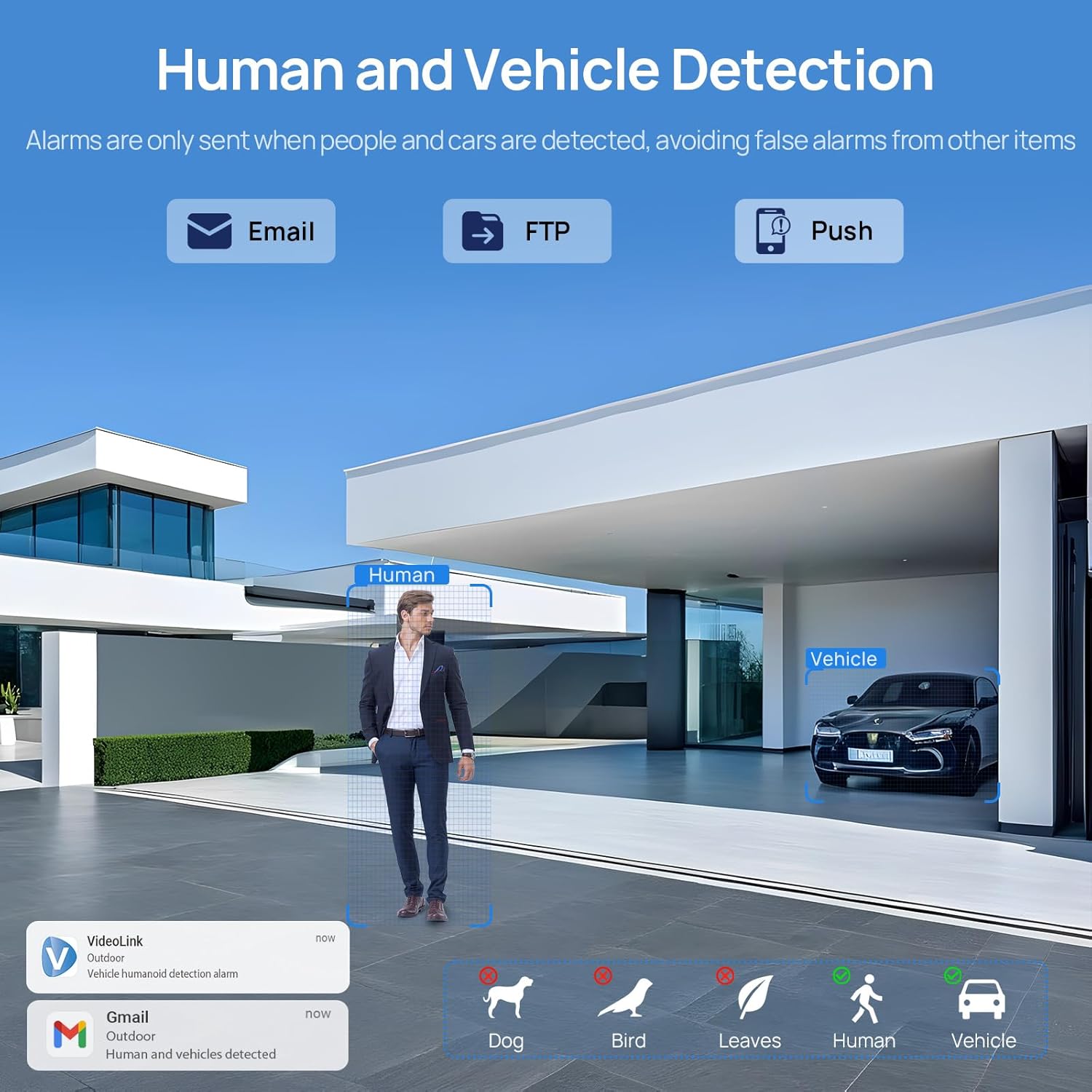
Image: A scene demonstrating the camera's human and vehicle detection capabilities, showing alerts for detected individuals and cars while ignoring animals or environmental factors.
4.3 Chế độ nhìn ban đêm
Camera này cung cấp khả năng quan sát ban đêm đa năng:
- Tầm nhìn ban đêm IR: By default, the IR illuminator is active at night for black and white surveillance.
- Tầm nhìn ban đêm đầy đủ màu sắc: When a target is detected, the spotlight activates to record in full color. The spotlight will warn the target in the area.
- Hệ thống chiếu sáng kép thông minh: The camera intelligently switches between IR light and warm light (spotlight) depending on the situation, providing color details when needed.

Image: A split image showing a scene at night with the spotlight off (black and white IR vision) and with the spotlight on (full-color night vision), demonstrating the camera's dual illumination feature.
4.4 Zoom quang học 5X
The 2.7-13.5mm varifocal lens allows for 5X optical zoom, enabling you to adjust the viewing angle from 32° to 100° and focus on specific details without losing image quality.
- Adjust the zoom level through the camera's software or mobile application.
- The optical zoom maintains clarity even at maximum magnification.

Image: A series of images demonstrating the 5X optical zoom capability of the camera, showing a wide view and then progressively zoomed-in views of a specific area, highlighting the detail retention.
4.5 Âm thanh hai chiều
The integrated microphone and speaker enable two-way communication, allowing you to listen to the environment and speak through the camera.
- Access the two-way audio function via the mobile app.
- Use it to greet visitors or deter unwanted individuals.

Image: A scenario depicting a delivery person at a door, with a VIKVIZ camera facilitating a two-way audio conversation between the homeowner (via smartphone app) and the delivery person.
5. Bảo trì
- Vệ sinh thường xuyên: Thường xuyên lau sạch ống kính máy ảnh bằng khăn mềm.amp vải để đảm bảo chất lượng hình ảnh rõ nét. Tránh sử dụng chất tẩy rửa có tính mài mòn.
- Cập nhật chương trình cơ sở: Kiểm tra của nhà sản xuất webTruy cập trang web hoặc ứng dụng để xem các bản cập nhật phần mềm khả dụng nhằm đảm bảo hiệu suất và bảo mật tối ưu.
- Kiểm tra cáp: Regularly inspect the Ethernet cable for any signs of wear or damage, especially in outdoor installations.
- Bảo vệ môi trường: While the camera is weatherproof (IP66), ensure it is not submerged in water or exposed to extreme conditions beyond its operating temperature range (-10°C to 50°C).
KHAI THÁC. Xử lý sự cố
- Không có điện: Ensure the PoE NVR/switch/injector is powered on and the Ethernet cable is securely connected. If using a DC adapter, verify the power source and connection.
- Không có nguồn cấp dữ liệu video: Check network connectivity. Ensure the camera is properly configured in your NVR or app. Verify the IP address and network settings.
- Chất lượng hình ảnh kém: Lau sạch ống kính máy ảnh. Kiểm tra xem có vật cản nào trong khung hình không. view. Ensure sufficient lighting for night vision modes. Adjust focus if applicable.
- Cảnh báo chuyển động sai: Adjust the sensitivity settings for human/vehicle detection in the camera's software or app. Refine detection zones to exclude irrelevant areas.
- Sự cố âm thanh hai chiều: Check microphone and speaker settings in the app. Ensure network bandwidth is sufficient for real-time audio.
- Không thể truy cập camera từ xa: Verify your internet connection. Ensure port forwarding (if required by your network setup) is correctly configured on your router. Check firewall settings.
7. Thông số kỹ thuật
| Tính năng | Đặc điểm kỹ thuật |
|---|---|
| Tên mẫu | PG2T56IRC-ZS |
| Nghị quyết | 5MP (2592 x 1944) @ 30fps |
| Thu phóng quang học | 5X (2.7-13.5mm varifocal lens) |
| Viewgóc ing | 105° (wide) to 32° (telephoto) |
| Tầm nhìn ban đêm | Lên đến 98 feet (30 mét) |
| Loại tầm nhìn ban đêm | Full Color, IR, Smart Hybrid Light |
| Âm thanh | Âm thanh hai chiều (Mic và loa tích hợp) |
| Nén Video | H.265+, H.265, H.264 |
| Kết nối | Ethernet (PoE), ONVIF |
| Tùy chọn lưu trữ | NFS, NVR, APP Cloud Storage, Micro SD Card (up to 256GB) |
| Xếp hạng thời tiết | IP66 |
| Nhiệt độ hoạt động | -10°C đến 50°C (14°F đến 122°F) |
| Nguồn điện | Cấp nguồn qua Ethernet (PoE) hoặc nguồn DC 12V (không kèm bộ chuyển đổi) |
| Vật liệu | Kim loại |
| Kích thước | 12.7 x 5.11 x 4.72 inch |
| Cân nặng | 2.2 pound |
8. Bảo hành và Hỗ trợ
8.1 Chính sách hoàn trả
This product is eligible for a return within 30 days of purchase for a refund or replacement, subject to the retailer's terms and conditions.
8.2 Hỗ trợ kỹ thuật
For technical assistance, troubleshooting, or warranty inquiries, please contact VIKVIZ customer support through their official website or the retailer where the product was purchased. Refer to your purchase documentation for specific contact details.