
1. Hướng dẫn an toàn quan trọng
Please read and understand all safety instructions before operating the OUKITEL P1000 PLUS. Failure to follow these instructions may result in electric shock, fire, or serious injury.
- Không tháo rời, sửa chữa hoặc chỉnh sửa thiết bị.
- Tránh xa lửa, nước và nhiệt độ quá cao.
- Không sử dụng thiết bị trong điều kiện ẩm ướt hoặc để thiết bị tiếp xúc với mưa.
- Đảm bảo thông gió thích hợp trong quá trình sử dụng để tránh quá nóng.
- Để xa tầm tay trẻ em và vật nuôi.
- Chỉ sử dụng phụ kiện và cáp sạc được chấp thuận.
- If the unit emits smoke, strange odors, or unusual noise, discontinue use immediately and contact support.
2. Sản phẩm hếtview
The OUKITEL P1000 PLUS is a portable power station designed to provide reliable power for various applications, from home backup to outdoor adventures. It features a robust LiFePO4 battery, multiple output ports, and fast charging capabilities.
Các tính năng chính:
- 1800W Continuous Output (3600W Peak): Powers a wide range of appliances.
- Công suất 1024Wh: Extended runtime for essential devices.
- Sạc nhanh 1200W: Recharges from 0-100% in approximately 41 minutes (AC + Solar).
- Pin LiFePO4: Offers over 3,500 charge cycles for a lifespan exceeding 10 years.
- Kiểm soát ứng dụng: Monitor and manage the power station via a smartphone application.
- 0.01s UPS Function: Cung cấp nguồn điện liên tục trong suốt thời gian sử dụng.tagnghĩa là
- 11 cổng đầu ra: Versatile connectivity for various devices.

Image: The OUKITEL P1000 PLUS providing power to common household appliances, demonstrating its capacity and output.
3. Bắt đầu
Nội dung gói hàng:
Xác minh rằng tất cả các mục đều có trong gói hàng:
- OUKITEL P1000 PLUS Power Station
- Cáp sạc AC
- Cáp sạc ô tô
- Cáp sạc năng lượng mặt trời (MC4 sang XT60)
- Hướng dẫn sử dụng
Mức phí ban đầu:
Before first use, fully charge the OUKITEL P1000 PLUS. Connect the AC charging cable to a wall outlet and to the AC input port on the power station. The display will indicate charging status. It is recommended to fully charge the unit every 3 months if not in regular use to maintain battery health.
4. Hướng dẫn vận hành
Bật/Tắt nguồn:
- Để bật thiết bị, hãy nhấn và giữ nút nguồn chính trong 3 giây. Màn hình sẽ sáng lên.
- To turn off the unit, press and hold the main power button for 3 seconds. The display will turn off.
Sử dụng các cổng đầu ra:
The P1000 PLUS features 11 output ports:
- 4 ổ cắm điện AC: For standard household appliances (1800W continuous, 3600W peak). Press the AC power button to activate.
- 2 x USB-A Quick Charge 3.0 Ports: For fast charging compatible USB devices.
- 1 cổng USB-C PD 20W: For charging smaller USB-C devices.
- 1 cổng USB-C PD 100W: For fast charging laptops and other high-power USB-C devices.
- 2 x DC5521 Outlets: For 12V DC devices. Press the DC power button to activate.
- 1 x Cigarette Lighter Port: For 12V car accessories. Press the DC power button to activate.
Ensure that the total power consumption of connected devices does not exceed the unit's maximum output capacity to prevent overload.

Hình ảnh: Chi tiết view of the OUKITEL P1000 PLUS's optimized and versatile output ports.
5. Sạc trạm điện
The OUKITEL P1000 PLUS supports multiple charging methods:
Sạc tường AC:
Connect the AC charging cable to the unit's AC input port and a standard wall outlet. The unit supports 1200W fast AC charging, reaching 0-70% in approximately 30 minutes.

Image: The power station undergoing fast AC charging from a wall outlet.
Sạc năng lượng mặt trời:
Connect compatible solar panels (up to 500W) to the unit's solar input port using the provided MC4 to XT60 cable. The unit can be fully charged in approximately 2 hours with 500W solar input.

Image: The power station being charged by solar panels in an outdoor setting.
AC + Solar Combined Charging:
For the fastest charging, combine AC and solar inputs. This method can charge the unit from 0-100% in approximately 41 minutes.
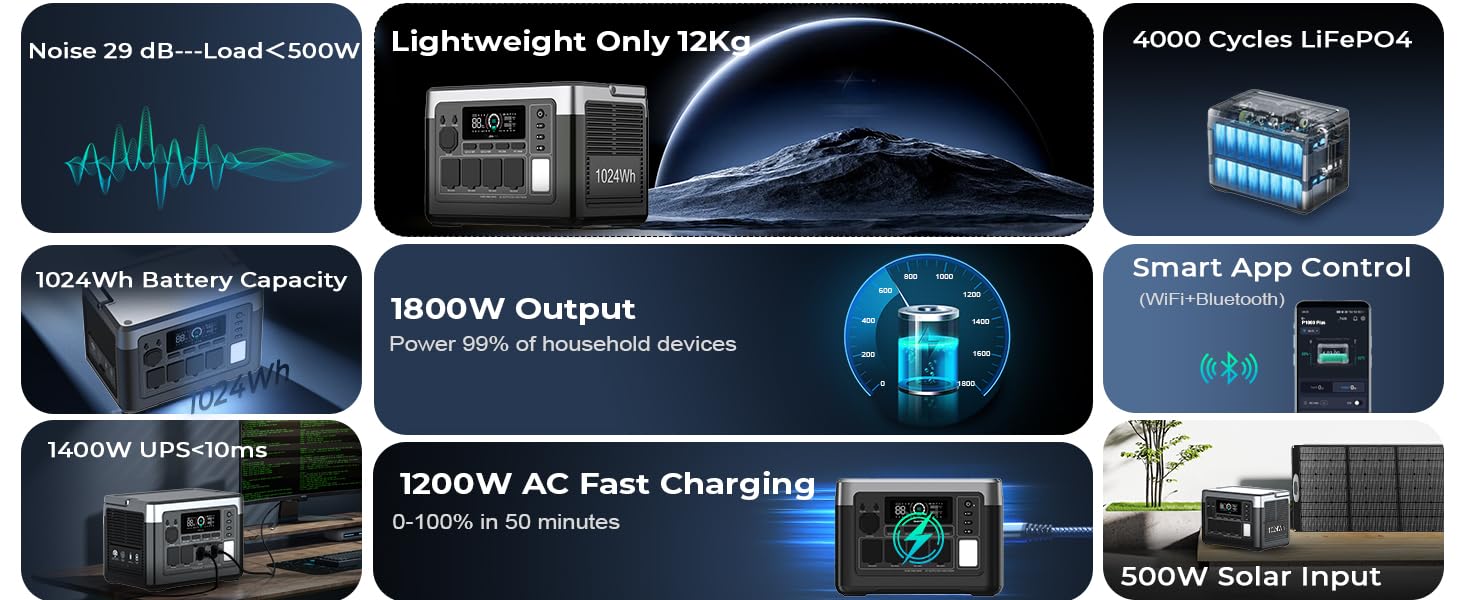
Image: The power station utilizing both AC and solar panel inputs for rapid charging.
Sạc xe hơi:
Connect the car charging cable to your vehicle's 12V cigarette lighter socket and the unit's input port. This method is suitable for charging on the go.
6. Kiểm soát ứng dụng
The OUKITEL P1000 PLUS can be controlled and monitored using the OUKITEL smartphone application. This allows for remote management and real-time data access.
Kết nối với ứng dụng:
- Download the OUKITEL app from your device's app store.
- Đảm bảo Bluetooth và Wi-Fi được bật trên điện thoại thông minh của bạn.
- Open the app and follow the on-screen instructions to pair with your P1000 PLUS.
Tính năng của ứng dụng:
- Monitor real-time battery level, input/output power, and charging status.
- Adjust AC charging power.
- Control individual output ports.
- View temperature and other operational data.

Image: A user interacting with the OUKITEL app on a smartphone to manage the power station.
7. Chức năng UPS (Nguồn điện dự phòng không gián đoạn)
The OUKITEL P1000 PLUS features a 0.01-second Uninterruptible Power Supply (UPS) function. When connected to an AC wall outlet and simultaneously powering devices, the unit can automatically switch to battery power in the event of a power outage, ensuring continuous operation for connected electronics.
How to Use UPS:
- Connect the P1000 PLUS to an AC wall outlet using the AC charging cable.
- Connect your critical devices (e.g., computers, medical equipment) to the AC output ports of the P1000 PLUS.
- In case of a power failure, the P1000 PLUS will automatically provide power from its internal battery to the connected devices with minimal interruption.
This feature is ideal for protecting sensitive electronics from data loss or disruption during unexpected power interruptions.

Image: The power station acting as a UPS, keeping essential home appliances running during a power interruption.
8. Bảo trì và Bảo quản
Bảo trì chung:
- Lau sạch thiết bị bằng khăn mềm, khô. Không sử dụng chất tẩy rửa có tính ăn mòn hoặc dung môi.
- Regularly check ports for dust or debris and clean if necessary.
- Tránh làm rơi hoặc va đập mạnh vào thiết bị.
Kho:
- Store the unit in a cool, dry place, away from direct sunlight and heat sources.
- For long-term storage, charge the unit to approximately 50-80% every 3 months to prolong battery life.
- Avoid storing the unit in environments with extreme temperatures (below 0°C or above 40°C).

Image: An illustration of the advanced battery technology and BMS for safety and longevity.
KHAI THÁC. Xử lý sự cố
If you encounter issues with your OUKITEL P1000 PLUS, refer to the following common problems and solutions:
| Vấn đề | Nguyên nhân có thể | Giải pháp |
|---|---|---|
| Đơn vị không bật | Battery is depleted; Power button not pressed long enough. | Sạc thiết bị; Nhấn và giữ nút nguồn trong 3 giây. |
| Không có tín hiệu đầu ra từ các cổng AC | Ngõ ra AC không được kích hoạt; Chức năng bảo vệ quá tải đã được kích hoạt. | Nhấn nút nguồn AC; Giảm tải đã kết nối, sau đó khởi động lại nguồn điện AC. |
| Sạc chậm bằng năng lượng mặt trời | Ánh sáng mặt trời không đủ; Các tấm pin không được đặt ở góc tối ưu; Các tấm pin bị bẩn. | Ensure direct sunlight; Adjust panel angle; Clean panels. |
| Sự cố kết nối ứng dụng | Bluetooth/Wi-Fi off; App not updated; Unit too far from phone. | Enable Bluetooth/Wi-Fi; Update app; Move phone closer to unit. |
If the problem persists, please contact OUKITEL customer support.
10. Thông số kỹ thuật
Detailed technical specifications for the OUKITEL P1000 PLUS:
| Tính năng | Đặc điểm kỹ thuật |
|---|---|
| Người mẫu | P1000 CỘNG |
| Loại pin | LiFePO4 |
| Dung tích | 1024Wh |
| Đầu ra AC | 1800W (Continuous), 3600W (Peak), 120V |
| Đầu ra USB-A | 2 x Quick Charge 3.0 |
| Đầu ra USB-C | 1 x PD 20W, 1 x PD 100W |
| Đầu ra DC | 2 x DC5521, 1 x Cigarette Lighter Port |
| Đầu vào AC | 1200W Tối đa |
| Đầu vào năng lượng mặt trời | 500W Tối đa |
| Thời gian chuyển mạch UPS | 0.01 giây |
| Kích thước (D x R x C) | 11.42" x 6.7" x 7.87" |
| Cân nặng | 13.2 pound (6 kg) |
| Nhiệt độ hoạt động | 0°C đến 40°C (32°F đến 104°F) |
11. Bảo hành và Hỗ trợ
The OUKITEL P1000 PLUS comes with a 5-year warranty, ensuring reliable service and peace of mind. This warranty covers defects in materials and workmanship under normal use.
Hỗ trợ khách hàng:
For technical assistance, warranty claims, or any questions regarding your OUKITEL P1000 PLUS, please contact our dedicated customer support team. You can find contact information on our official website or through the OUKITEL app.
- Hỗ trợ trực tuyến: Thăm nom www.oukitel.com để biết câu hỏi thường gặp và tài nguyên hỗ trợ.
- Hỗ trợ qua Email: Vui lòng tham khảo bao bì sản phẩm hoặc thông tin chính thức. webTrang web này cung cấp địa chỉ email hỗ trợ.