
1. Giới thiệu
Cảm ơn bạn đã muaasing the BEWEAI 9-Channel 2.4Ghz RC Bulldozer Toy. This remote-controlled construction vehicle is designed to provide a realistic and engaging play experience with its detailed features, metal blade, and multi-directional control. Please read this manual thoroughly before operating the toy to ensure safe and optimal performance.
2. Thông tin an toàn
Cảnh báo: Không thích hợp cho trẻ em dưới 3 tuổi do có các bộ phận nhỏ.
- Nên có sự giám sát của người lớn trong quá trình vận hành, đặc biệt là đối với người dùng nhỏ tuổi.
- Keep hands, hair, and loose clothing away from moving parts, such as tracks and the blade.
- Do not operate the toy near people, pets, or obstacles to prevent accidents.
- Tránh vận hành thiết bị trong điều kiện ẩm ướt hoặc gần nước để tránh làm hỏng các linh kiện điện tử.
- Use only the specified batteries and charging cable. Improper use can lead to fire, explosion, or injury.
- Remove batteries from the toy and remote control when not in use for extended periods.
- Do not attempt to modify or disassemble the toy or its components.
3. Nội dung gói hàng
Xác minh rằng tất cả các mục đều có trong gói hàng:
- 1 × Remote Control Bulldozer
- Điều khiển từ xa 1 ×
- 2 × 500mAh Rechargeable Lithium Batteries (3.7V)
- Cáp sạc 1 × USB
- 1 × Tuốc nơ vít
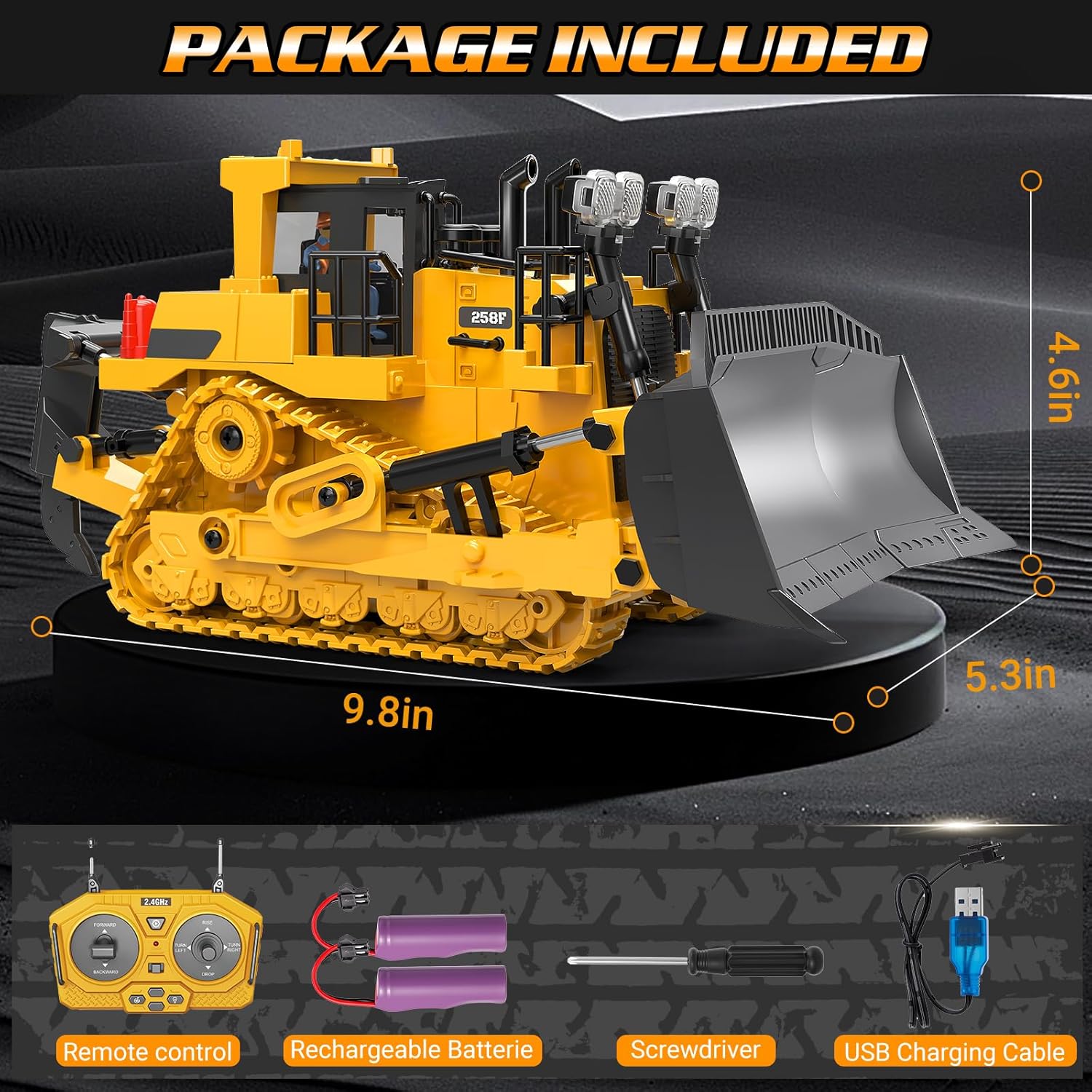
Image: All items included in the BEWEAI RC Bulldozer Toy package.
4. Thiết lập
4.1. Lắp đặt pin
- Bulldozer Battery:
- Locate the battery compartment on the underside of the bulldozer.
- Sử dụng tua vít được cung cấp để mở nắp ngăn chứa pin.
- Connect one of the 3.7V/500mAh lithium batteries to the bulldozer's power connector.
- Carefully place the battery inside the compartment and close the cover, securing it with the screw.
- Pin điều khiển từ xa:
- Xác định vị trí ngăn chứa pin ở mặt sau của điều khiển từ xa.
- Open the cover and insert two 1.5V 'AA' batteries (not included), ensuring correct polarity (+/-).
- Đóng nắp ngăn chứa pin.
4.2. Charging the Bulldozer Battery
- Connect the USB charging cable to the bulldozer battery.
- Cắm đầu còn lại của cáp USB vào bộ chuyển đổi nguồn USB tiêu chuẩn (ví dụ: bộ sạc điện thoại, cổng USB máy tính).
- Đèn báo trên cáp USB sẽ sáng trong quá trình sạc và tắt khi sạc đầy.
- Thời gian sạc thông thường là 2-3 giờ. Không nên sạc quá mức.
4.3. Ghép nối điều khiển từ xa
- Ensure both the bulldozer and the remote control have fresh or fully charged batteries installed.
- Turn on the bulldozer using the power switch located on the vehicle.
- Bật điều khiển từ xa. Đèn báo trên điều khiển sẽ nhấp nháy.
- Move the left joystick (forward/backward control) up and then down. The remote control indicator light will stop flashing and remain solid, indicating successful pairing.
- The bulldozer is now ready for operation.

Image: The RC Bulldozer, remote control, and rechargeable batteries, ready for setup.
5. Hướng dẫn vận hành
The BEWEAI RC Bulldozer features a 9-channel remote control, allowing for precise and versatile movements. Familiarize yourself with the remote control layout and functions:

Image: Key features of the BEWEAI RC Bulldozer.
5.1. Chức năng điều khiển từ xa
| Điều khiển | Chức năng |
|---|---|
| Cần điều khiển bên trái (Lên/Xuống) | Forward / Backward Movement |
| Cần điều khiển bên trái (Trái/Phải) | Left Track Forward / Right Track Forward (for turning) |
| Cần điều khiển bên phải (Lên/Xuống) | Blade Up / Blade Down |
| Cần điều khiển bên phải (Trái/Phải) | 360° Rotation (Left/Right) |
| Nút sáng | Turns Headlights On/Off |
| Nút âm thanh | Turns Engine Sounds On/Off |
| Nút Demo | Activates One-Click Automatic Demonstration Mode |
5.2. Hoạt động cơ bản
- Lái xe: Use the left joystick to move the bulldozer forward or backward. Push both joysticks in the same direction for straight movement.
- Quay: To turn, push one joystick forward and the other backward, or push one joystick forward while the other is neutral. The bulldozer can perform 360-degree rotations using the right joystick's left/right movement.
- Kiểm soát lưỡi dao: Use the right joystick's up/down movement to raise or lower the front blade for digging or pushing materials.
- Đèn và âm thanh: Press the dedicated buttons on the remote to activate or deactivate the realistic headlights and engine sounds.
- Chế độ Demo: Press the 'Demo' button to see the bulldozer perform a pre-programmed sequence of movements. Press any control to exit demo mode.

Image: The bulldozer performing a 360-degree rotation.

Image: The bulldozer is suitable for operation on various terrains.
6. Bảo trì
6.1. Vệ sinh
- After use, especially in dusty or sandy environments, gently wipe the bulldozer with a soft, dry cloth to remove dirt and debris.
- Không sử dụng nước hoặc chất tẩy rửa hóa học vì chúng có thể làm hỏng các linh kiện điện tử.
- Periodically check the tracks for any trapped debris and carefully remove it.
6.2. Chăm sóc và bảo quản pin
- Always remove batteries from both the bulldozer and the remote control when storing the toy for extended periods.
- Bảo quản pin ở nơi khô ráo, thoáng mát, tránh ánh nắng trực tiếp và nhiệt độ cao.
- Do not dispose of batteries in fire; they may explode. Dispose of used batteries responsibly according to local regulations.
- If the bulldozer will not be used for a long time, fully charge the lithium batteries before storage and recharge them every 3 months to maintain battery health.
KHAI THÁC. Xử lý sự cố
| Vấn đề | Nguyên nhân có thể | Giải pháp |
|---|---|---|
| Bulldozer does not move or respond. |
|
|
| Thời gian hoạt động ngắn. |
|
|
| Remote control indicator light flashes continuously. | Not paired with bulldozer. | Thực hiện quy trình ghép cặp (Mục 4.3). |
| Sự can thiệp trong quá trình hoạt động. | Other 2.4Ghz devices nearby. | Hãy di chuyển đến khu vực có ít nhiễu sóng không dây hơn. |
8. Thông số kỹ thuật
| Tính năng | Chi tiết |
|---|---|
| Số hiệu mẫu | BC1045 |
| Kích thước sản phẩm | 9.5 x 4.2 x 5.1 inch (khoảng 24.1 x 10.7 x 13 cm) |
| Trọng lượng sản phẩm | 1.65 pound (khoảng 0.75 kg) |
| Kênh điều khiển | 9 kênh |
| Tính thường xuyên | 2.4Ghz |
| Bulldozer Battery | 2 x 3.7V/500mAh Lithium Ion (included) |
| Pin điều khiển từ xa | 2 x 1.5V 'AA' (not included) |
| Độ tuổi khuyến nghị | 6 tuổi trở lên |
| Vật liệu | Plastic, Metal (blade, ripper) |
9. Bảo hành và Hỗ trợ
For warranty information or technical support, please refer to the contact details provided with your purchase or contact the seller directly through the platform where the product was acquired. Keep your purchase receipt as proof of purchase.