
1. Giới thiệu
Thank you for choosing the MINISO MS201 AI Translation Earbuds. These earbuds are designed to facilitate real-time communication across 135 languages, making them ideal for travel, business, and learning. This manual provides detailed instructions on how to set up, operate, and maintain your device to ensure optimal performance.

Image 1.1: The MINISO MS201 AI Translation Earbuds and their charging case, featuring an LCD touchscreen.
2. Có gì trong hộp
Vui lòng kiểm tra nội dung gói hàng của bạn. Nếu thiếu hoặc hư hỏng bất kỳ mặt hàng nào, vui lòng liên hệ với bộ phận chăm sóc khách hàng.
- Open Ear Earbuds x 1 pair
- Hộp sạc x 1
- Hướng dẫn sử dụng x 1
- Cáp sạc Type-C x 1

Image 2.1: Illustration of the package contents, including earbuds, charging case, user manual, and Type-C charging cable.
3. Thiết lập
3.1 Sạc thiết bị
Trước khi sử dụng lần đầu, hãy sạc đầy tai nghe và hộp sạc. Sử dụng cáp sạc Type-C được cung cấp kèm theo.
- Kết nối cáp Type-C với cổng sạc trên vỏ máy và nguồn điện.
- The LCD screen on the case will indicate charging status.
- A full charge provides up to 6 hours of continuous use for the earbuds, extendable to 60 hours with the charging case.

Image 3.1: The earbuds and charging case being charged via a Type-C cable, highlighting the 6-hour single charge and 60-hour total playtime.
3.2 Cài đặt và ghép nối ứng dụng
The translation function requires the 'SayMi' application. No subscription is needed.
- Tải ứng dụng: Scan the QR code in the user manual (or search 'SayMi' in your device's app store) to download the application.
- Bật Bluetooth: Bật Bluetooth trên điện thoại di động của bạn.
- Kết nối tai nghe: Open the SayMi app. On the homepage, click "Connect" and select the MS201 headset from the available devices.
- Start Translation: Once connected, you can choose your desired translation mode within the app.
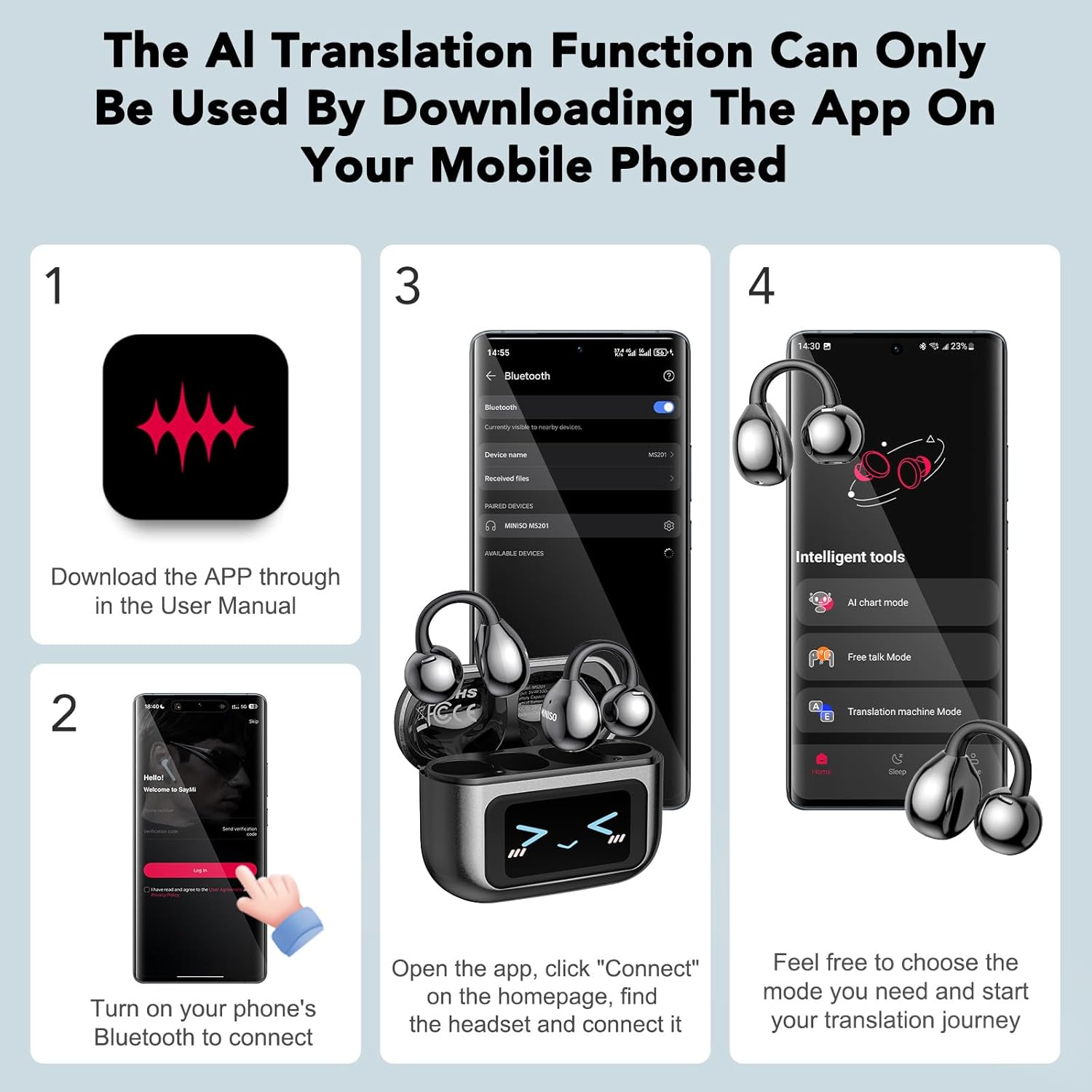
Image 3.2: A visual guide demonstrating the four steps to download the SayMi app, enable Bluetooth, connect the earbuds, and select a translation mode.
4. Hướng dẫn vận hành
The MINISO MS201 offers multiple translation modes and features for diverse communication needs.
4.1 Các chế độ dịch
The earbuds support 5 distinct translation modes, accessible via the SayMi app:
- Chế độ đối thoại AI: For real-time voice dialogue where the app responds through voice.
- Chế độ đàm thoại miễn phí: Automatically recognizes, segments, and translates sentences.
- Chế độ máy dịch: Functions as a dedicated translation device.
- Chế độ Tai nghe + Điện thoại: One person wears the headphones, and the translated language is played through the mobile phone for the other party.
- Bản dịch ảnh: Recognizes text from images and translates it.

Image 4.1: Visual representation of the AI Dialogue, Free Talk, Translation Machine, Headphones+Phone, and Photo Translation modes in use.
4.2 Specific Mode Usage
Chế độ đối thoại AI
Engage in conversational translation. Click the button in the app to speak, and SayMi will provide a voice response.

Image 4.2: A person using the AI Dialogue Mode on their phone, with the earbuds visible, demonstrating real-time conversational translation.
Headphones+Phone Mode (Face-to-Face Translation)
For direct conversations, one person wears an earbud, and the translated speech is played through the phone's speaker for the other person.

Image 4.3: Two individuals engaged in a conversation, with one wearing an earbud, illustrating the Headphones+Phone mode for two-way translation.
Dịch ảnh
Translate text from images. This mode supports both real-time photo translation and importing existing photos for translation.

Hình ảnh 4.4: Ví dụamples of users utilizing the photo translation feature, capturing text from signs and documents for instant translation.
Voice Note Mode
Transcribe voices in real-time. Click the 'Recording' button, select the recording language, and confirm to start recording.

Image 4.5: A person using the Voice Note Mode on the SayMi app, showing the recording interface and transcription feature.
4.3 LCD Full-Color Touchscreen
The charging case features an LCD touchscreen for direct control over various functions without needing your phone.
- Phát nhạc: Điều khiển phát/tạm dừng, chuyển bài hát.
- Điều chỉnh âm lượng: Modify audio levels.
- AI Assistant Activation: Access your phone's AI assistant.
- Chế độ bộ chỉnh âm: Select from 5 professional EQ modes (Pop, Jazz, Rock, Classical, Country) for music listening.

Image 4.6: The LCD touchscreen on the charging case showing different interface options for music control, settings, and equalizer modes.
4.4 Quản lý cuộc gọi
The earbuds incorporate C-shaped dual-flow wind noise reduction technology for clear calls, regardless of which earbud is worn.
5. Bảo trì
Proper maintenance ensures the longevity and performance of your MINISO MS201 earbuds.
- Vệ sinh: Dùng vải mềm, khô để vệ sinh tai nghe và hộp sạc. Tránh sử dụng chất lỏng hoặc chất tẩy rửa có tính mài mòn.
- Kho: Store the earbuds in their charging case when not in use to protect them from dust and damage. Keep the device in a cool, dry place, away from direct sunlight and extreme temperatures.
- Chăm sóc pin: To preserve battery life, avoid fully discharging the device frequently. Charge regularly, even if not in constant use.
KHAI THÁC. Xử lý sự cố
If you encounter issues with your MINISO MS201 earbuds, refer to the following common problems and solutions:
| Vấn đề | Giải pháp khả thi |
|---|---|
| Earbuds not pairing with phone/app |
|
| Translation accuracy issues |
|
| Không có âm thanh từ tai nghe |
|
| Charging case LCD not responding |
|
If the problem persists, please contact MINISO customer support for further assistance.
7. Thông số kỹ thuật
| Tính năng | Chi tiết |
|---|---|
| Số hiệu mẫu | MS201 |
| Ngôn ngữ dịch thuật | 135 languages (via SayMi App) |
| Phiên bản Bluetooth | V6.0 |
| Tuổi thọ pin Earbud | Lên đến 6 giờ (sạc một lần) |
| Tổng thời gian chơi (có hộp đựng) | Lên đến 60 giờ |
| Cổng sạc | Loại C |
| Trọng lượng Earbud | 4.1g (mỗi củ tai) |
| Tính năng đặc biệt | LCD Full-Color Touchscreen, C-shaped dual-flow wind noise reduction |
8. Bảo hành và Hỗ trợ
MINISO products are manufactured to high-quality standards. For warranty information, please refer to the warranty card included in your product packaging or visit the official MINISO website. If you have any issues or require technical support, please contact MINISO customer service. Remember, the translation feature requires the SayMi App, and no subscription is needed for its use.