
1. Giới thiệu
This manual provides essential information for setting up, operating, and maintaining your OnePlus Nord 5 smartphone. Please read this guide thoroughly to ensure optimal performance and longevity of your device.

Hình 1: Mặt trước và mặt sau view of the OnePlus Nord 5 smartphone.
2. Nội dung hộp
Upon unboxing your OnePlus Nord 5, verify that all the following items are included:
- OnePlus Nord 5 Smartphone
- Bộ đổi nguồn (80W)
- Cáp USB (Loại-C)
- Khay đẩy SIM
- Miếng dán màn hình (đã dán sẵn hoặc trong hộp)
- Ốp điện thoại
- Hướng dẫn bắt đầu nhanh
- Thẻ bảo hành
Video 1: Unboxing the OnePlus Nord 5 and reviewbao gồm nội dung của nó.

Hình 2: Mặt trước view of the OnePlus Nord 5.

Hình 3: Quay lại view of the OnePlus Nord 5.
3. Thiết lập
3.1 Lắp đặt thẻ SIM
- Xác định vị trí khay SIM ở bên cạnh thiết bị.
- Cắm dụng cụ đẩy SIM vào lỗ nhỏ bên cạnh khay và ấn chặt cho đến khi khay bật ra.
- Đặt thẻ Nano-SIM vào các khe cắm được chỉ định trên khay. Đảm bảo các điểm tiếp xúc màu vàng hướng xuống dưới.
- Cẩn thận lắp lại khay SIM vào điện thoại cho đến khi nghe thấy tiếng tách.
3.2 Bật nguồn ban đầu
Press and hold the Power button on the side of the device until the OnePlus logo appears. Follow the on-screen instructions to complete the initial setup, including language selection, Wi-Fi connection, and Google account setup.
4. Vận hành thiết bị của bạn
4.1 Hiệu suất
The OnePlus Nord 5 is equipped with the Snapdragon 8s Gen 3 processor and LPDDR5X RAM, designed for demanding applications and gaming. The device features a 7300mm² VC cooling system to maintain optimal temperatures during extended use.
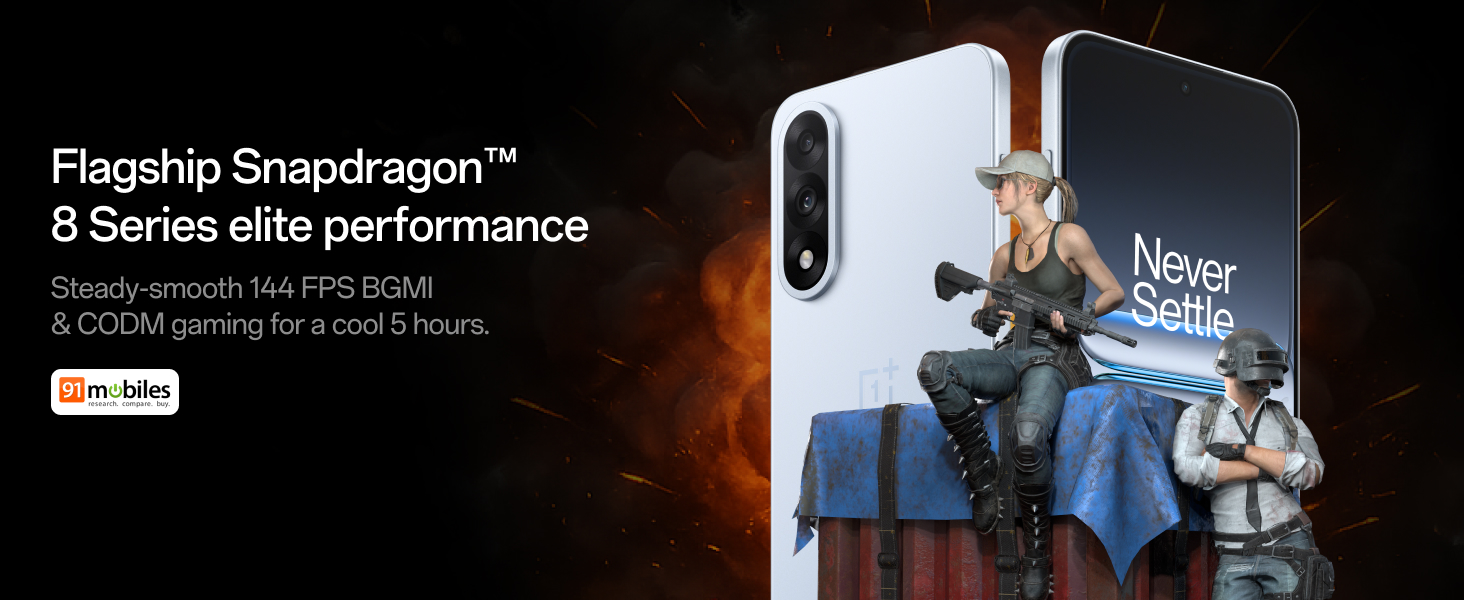
Figure 4: Snapdragon 8s Gen 3 processor for elite performance.
Video 2: Demonstration of gaming performance on the OnePlus Nord 5.
4.2 Tính năng của máy ảnh
The device features a dual 50MP camera system, including a 50MP front camera (ISOCELL JN5 with hardware autofocus) and a 50MP Sony LYT-700 back camera with Optical Image Stabilization (OIS). It supports 4K 60 FPS video capture.
AI Camera Enhancements:
- Công cụ xóa AI: Removes unwanted objects or people from photos.
- AI Detail Boost: Tăng cường độ rõ nét và chi tiết của hình ảnh.
- AI Unblur: Corrects blurry images.
- AI Reframe: Suggests improved compositions for photos.
- AI Perfect Shot: Adjusts facial expressions and corrects blinked eyes in group photos.

Figure 5: Dual 50MP camera system overview.

Figure 6: AI features for photo enhancement.
4.3 Pin và sạc
The OnePlus Nord 5 features a 6800 mAh battery and supports 80W ultra-fast charging. It also includes an all-new Bypass Charging feature, which powers the phone directly from the charger during gaming to reduce heat and maintain performance.

Figure 7: Illustration of Bypass Charging technology.
4.4 Hiển thị
Experience visuals on a 144Hz 1.5K AMOLED display with Aqua Touch 2.0 technology, offering a resolution of 2800 x 1272 pixels and up to 1400 nits brightness. Aqua Touch 2.0 improves touch responsiveness, even with wet or oily fingers.

Figure 8: Details of the 144Hz AMOLED display.
4.5 Tính năng AI
The OnePlus Nord 5 integrates various AI functionalities to enhance user experience:
- AI Voice Scribe: Transcribe, translate, and summarize meetings or content.
- Khoanh tròn để tìm kiếm: Nhanh chóng tìm kiếm thông tin bằng cách khoanh tròn nội dung trên màn hình.
- Gemini Live: An AI assistant for queries and information.
- Tìm kiếm AI: Intuitively understands natural language prompts for searching device content.

Figure 9: AI VoiceScribe interface.
4.6 Multitasking with Open Canvas
The Open Canvas feature allows for enhanced split-screen multitasking, enabling flexible resizing of applications and drag-and-drop functionality between apps. This improves productivity by extending split-screen capabilities beyond physical display limits.
Video 3: Demonstration of multitasking features on the OnePlus Nord 5.

Figure 10: Open Canvas for advanced multitasking.
4.7 Kết nối
The Nord 5 supports 5G-Advanced networking, offering faster internet speeds and improved signal stability, particularly in congested areas.

Figure 11: 5G-Advanced network features.
4.8 Software
The device runs on OxygenOS 15, based on Android 15. It is guaranteed to receive 4 Android version upgrades and 6 years of security updates, ensuring long-term software support and system smoothness.
5. Bảo trì
- Cập nhật phần mềm: Regularly install system updates to ensure optimal performance, security, and access to new features.
- Chăm sóc pin: To prolong battery life, avoid extreme temperatures and frequent full discharges. The device includes a 4-year healthy battery promise.
- Vệ sinh: Dùng vải mềm, không xơ để lau màn hình và thân máy. Tránh sử dụng vật liệu mài mòn hoặc hóa chất mạnh.
- Quản lý lưu trữ: Định kỳ xóa những thứ không cần thiết filecác ứng dụng và phần mềm giúp duy trì tốc độ thiết bị và giải phóng dung lượng lưu trữ.
KHAI THÁC. Xử lý sự cố
If you encounter issues with your OnePlus Nord 5, consider the following general troubleshooting steps:
- Khởi động lại thiết bị: Chỉ cần khởi động lại là có thể giải quyết được nhiều lỗi phần mềm nhỏ.
- Kiểm tra cập nhật: Đảm bảo phần mềm của thiết bị được cập nhật.
- Xóa bộ nhớ đệm: For app-specific issues, try clearing the app's cache in Settings.
- Khôi phục cài đặt gốc: Trong trường hợp bất đắc dĩ, khôi phục cài đặt gốc có thể giải quyết các sự cố phần mềm dai dẳng. Cảnh báo: Thao tác này sẽ xóa toàn bộ dữ liệu trên thiết bị của bạn. Hãy sao lưu thông tin quan trọng trước khi tiếp tục.
- Liên hệ bộ phận hỗ trợ: If the issue persists, refer to the support section for contact information.
7. Thông số kỹ thuật
| Tính năng | Chi tiết |
|---|---|
| Hệ điều hành | Android 15, OxygenOS 15 |
| Bộ xử lý | Snapdragon 8s Gen 3 (CPU Speed: 2, 2.8, 3 GHz) |
| ĐẬP | 12 GB (as per current model) |
| Trưng bày | 144Hz 1.5K AMOLED, 2800 x 1272 Resolution |
| Camera sau | 50MP Sony LYT-700 with OIS |
| Camera trước | 50MP ISOCELL JN5 with Autofocus |
| Ắc quy | Pin 6800 mAh, sạc nhanh 80W |
| Kết nối | 5G-Advanced, Bluetooth, NFC, USB, Wi-Fi |
| Kích thước | 16.41 x 7.7 x 0.81cm |
| Cân nặng | 211 gam |
| Số hiệu mẫu | CPH2707 |
| Nhà sản xuất | Công ty TNHH Oppo Mobiles Ấn Độ |
8. Bảo hành và Hỗ trợ
The OnePlus Nord 5 comes with a Lifetime Display Warranty, covering green line issues. For detailed terms and conditions, please refer to the official OnePlus website or the warranty card included in the box.

Figure 12: Lifetime Display Warranty information.
For customer service and technical support, you can contact OnePlus using the following information:
- Customer Service Contact Number: 1800 102 8411
- Hỗ trợ WhatsApp: +91-9289606888
- Địa chỉ nhà sản xuất: PLOT-NO.1, SECTOR ECOTECH-VII, GREATER, NOIDA, UTTAR PRADESH, India-201306