
1. Giới thiệu
The TCL NXTPAPER 14 is a versatile Android tablet designed for a wide range of uses, from digital drawing and note-taking to multimedia consumption. It features a unique paper-like display technology for enhanced eye comfort and comes equipped with a T-PEN stylus and a protective flip case. This manual will guide you through the setup, operation, and maintenance of your device.

Image: The TCL NXTPAPER 14 tablet, showcasing its large display, included T-PEN stylus, and flip case.
2. Có gì trong hộp
Vui lòng kiểm tra nội dung gói hàng của bạn để đảm bảo có đầy đủ các mục sau:
- TCL NXTPAPER 14 Android Tablet
- Vỏ lật
- T-PEN Stylus
- Cáp USB-C

Image: The TCL NXTPAPER 14 tablet with its included flip case, offering all-round protection and multiple viewing angles, and the T-PEN stylus with 4096 pressure levels.
3. Thiết lập
3.1 Sạc ban đầu
Before first use, fully charge your TCL NXTPAPER 14 tablet. Connect the included USB-C cable to the tablet's charging port and the other end to a compatible USB power adapter (not included). The tablet supports 33W fast charging and can be fully recharged in approximately two hours.

Image: An illustration showing the internal 10,000mAh battery of the TCL NXTPAPER 14 and its USB-C charging capability.
3.2 Bật nguồn và cấu hình ban đầu
- Press and hold the Power button located on the side of the tablet until the TCL logo appears.
- Làm theo lời nhắc trên màn hình để chọn ngôn ngữ, kết nối với mạng Wi-Fi và thiết lập tài khoản Google của bạn.
- Complete the initial setup wizard to personalize your tablet settings.
4. Hướng dẫn vận hành
4.1 NXTPAPER Display Technology
The TCL NXTPAPER 14 features a 14.3-inch 2.4K display with NXTPAPER 3.0 technology, designed for eye comfort. It offers anti-glare properties, blue light filtering, and DC dimming to reduce eye strain.

Image: Diagrams illustrating how the NXTPAPER display reduces blue light and minimizes glare compared to standard tablet displays.
4.2 VersaView Chế độ hiển thị
Switch between three distinct display modes using the NXTPAPER Key for optimized viewing experiences:
- Kiểu phổ biến: Provides crisp, vibrant visuals ideal for streaming, video calls, and general daily tasks.
- Chế độ giấy mực: Transforms the screen into an e-reader-like display, perfect for extended reading and note-taking with reduced eye fatigue.
- Color Paper Mode: Delivers soft, low-saturation colors, suitable for digital art, comics, and creative work.

Image: The TCL NXTPAPER 14 tablet displaying its three VersaView modes: Color Paper, Regular mode, and Ink Paper, with the NXTPAPER Key highlighted.
4.3 T-PEN Stylus Usage
The included T-PEN stylus offers 4096 levels of pressure sensitivity for precise input, ideal for drawing, sketching, and note-taking. The stylus magnetically attaches to the flip case for convenient storage. Ghi chú: The tablet is not compatible with third-party styluses.
Image: A person using the T-PEN stylus to draw and take notes on the TCL NXTPAPER 14 tablet.
4.4 Multitasking and Multi-Window Efficiency
The tablet supports various multitasking features to enhance productivity:
- Cửa sổ nổi: Allows applications to run in resizable windows that float above other content.
- Màn hình chia đôi: Divides the screen into two sections, enabling you to use two applications simultaneously side-by-side.

Image: The TCL NXTPAPER 14 tablet demonstrating its floating window and split screen capabilities for efficient multitasking.
4.5 Camera and Audio Features
The tablet is equipped with dual front cameras (13MP + 5MP) and an 8MP rear autofocus camera, all capable of 2K video recording. Quad stereo speakers with Smart PA provide immersive, clear audio with up to 200% volume boost.

Image: The TCL NXTPAPER 14 highlighting its front and rear cameras for sharp video calls and photos, along with its quad stereo speakers for cinematic sound.
4.6 Sạc ngược
The 10,000mAh battery supports reverse charging, allowing you to power up your phone or earbuds using the tablet. An OTG cable (sold separately) is required for this function.
4.7 Cross-Device Interaction
The TCL NXTPAPER 14 supports screen mirroring and extended display modes when connected to a PC running Windows 10 or later. Both devices must be connected to the same network.
- Chế độ Gương: Duplicates your tablet's display on your PC.
- Chế độ mở rộng: Uses your tablet as a secondary display for your PC, expanding your workspace.
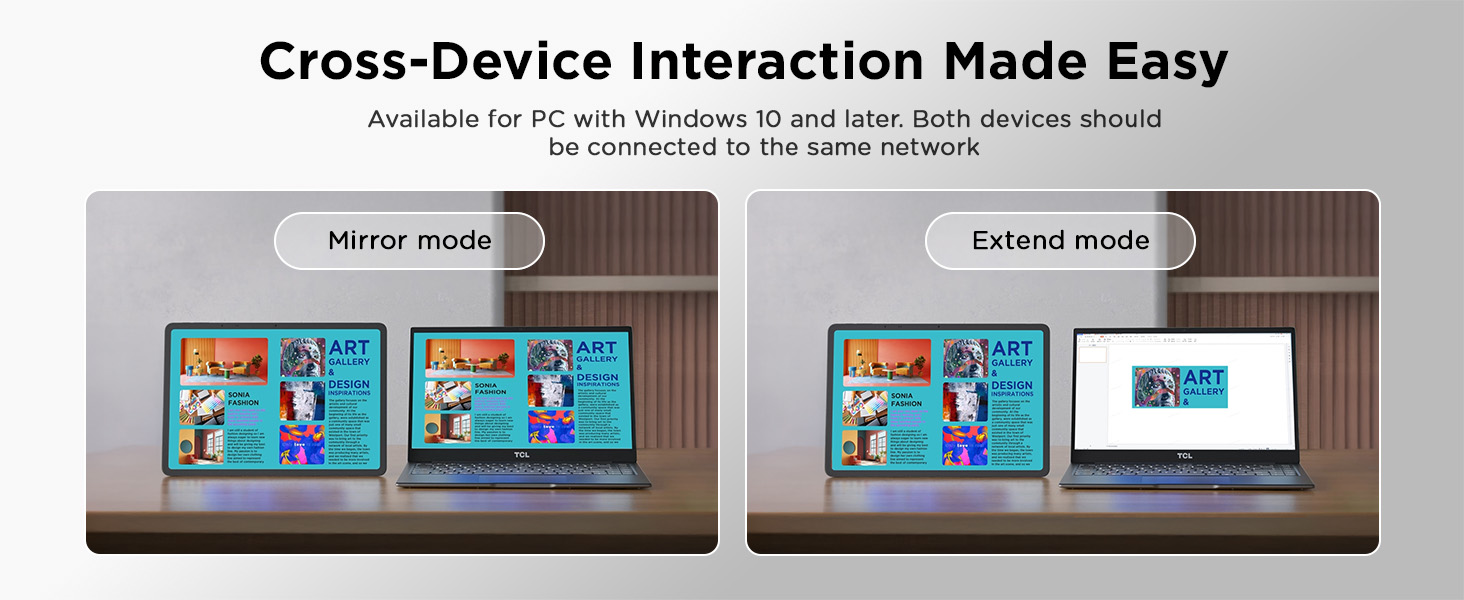
Image: The TCL NXTPAPER 14 tablet demonstrating mirror mode and extend mode when connected to a laptop, facilitating cross-device interaction.
5. Bảo trì
- Vệ sinh: Dùng vải mềm, không xơ để lau màn hình và thân máy tính bảng. Tránh sử dụng vật liệu mài mòn hoặc hóa chất mạnh.
- Cập nhật phần mềm: Thường xuyên kiểm tra và cài đặt các bản cập nhật hệ thống để đảm bảo hiệu suất và bảo mật tối ưu. Vào Cài đặt > Hệ thống > Cập nhật hệ thống.
- Quản lý lưu trữ: Định kỳ xóa những thứ không cần thiết files and apps to maintain sufficient storage space and tablet speed.
- Chăm sóc pin: Avoid extreme temperatures. For long-term storage, charge the battery to around 50% to prolong its lifespan.
KHAI THÁC. Xử lý sự cố
| Vấn đề | Giải pháp khả thi |
|---|---|
| Máy tính bảng không bật nguồn. | Ensure the battery is charged. Connect to a power source and try again. If unresponsive, press and hold the Power button for 10-15 seconds to force a restart. |
| Màn hình không phản hồi | Restart the tablet. If the issue persists, perform a factory reset (data will be lost). |
| Sự cố kết nối Wi-Fi | Restart the tablet and your Wi-Fi router. Forget the network in tablet settings and reconnect. Ensure you are within range. |
| Bút cảm ứng không hoạt động | Ensure the T-PEN stylus is fully charged (if applicable, check stylus manual). Confirm it is the included T-PEN stylus, as third-party styluses are not compatible. |
| Hiệu suất chậm | Đóng các ứng dụng không sử dụng. Xóa bộ nhớ cache và tập tin tạm thời. files. Check for system updates. Consider uninstalling rarely used apps. |
7. Thông số kỹ thuật
| Tính năng | Chi tiết |
|---|---|
| Tên mẫu | TCL NXTPAPER 14 |
| Hệ điều hành | Android 14 |
| Kích thước màn hình | 14.3 inch |
| Độ phân giải màn hình tối đa | 2400 x 1600 điểm ảnh |
| Bộ xử lý | MediaTek Helio G99 |
| ĐẬP | 8GB (+8GB RAM expansion) |
| Bộ nhớ trong | 256GB |
| Dung lượng pin | 10,000mAh |
| Sạc nhanh | 33W PD Capable |
| Front Cameras | 13MP + 5MP (2K video) |
| Camera sau | 8MP Autofocus (2K video) |
| Âm thanh | Quad Stereo Speakers with Smart PA |
| Kích thước (DxRxC) | 12.69 x 8.74 x 0.27 inch |
| Trọng lượng sản phẩm | 1.67 lbs (4.02 pounds listed in specs, using feature bullet for consistency) |
8. Bảo hành và Hỗ trợ
TCL products are covered by a limited warranty. For detailed warranty information, please refer to the official warranty card included with your product or visit the TCL official website. For technical support, product registration, or service inquiries, please contact TCL customer support.
You can also find additional resources and a downloadable PDF version of the user manual on the TCL support page or through the link provided with your purchase.
Hướng dẫn sử dụng chính thức (PDF): Tải xuống tại đây