
Giới thiệu
The Fosi Audio Music Visualizer AH-01A is a sound-activated RGB ambient light designed to enhance your audio experience with dynamic visual effects. Featuring vintage tube aesthetics and modern functionality, this device integrates seamlessly into home stereo systems or desktop setups, providing real-time music visualization through its built-in microphone.
Có gì trong hộp?
- Cơ sở ánh sáng
- Hướng dẫn sử dụng
- LED Light Strips (2)
- Glass Tubes (2)
- Cáp nguồn USB-C

Figure 1: Contents of the Fosi Audio Music Visualizer AH-01A packaging.
Tính năng sản phẩm
- Musical Resonance: Lights dynamically pulse to music rhythms, enhancing the audio-visual experience.
- Nhiều chế độ chiếu sáng: Features five distinct lighting effects with 48 full-color LED chips per strip.
- Hiệu ứng có thể tùy chỉnh: Adjustable lighting colors, sensitivity, and light falling speed to match various music styles.
- Micrô tích hợp: Integrated microphone for sound pickup, eliminating the need for external wiring.
- All-Metal Build: Crafted from CNC-machined aluminum alloy with an anodized finish for durability and a premium aesthetic.
- Rượutage-Modern Design: Combines crystal clear glass tubes and metallic orange knobs for a unique blend of vintage charm and modern style.
Sản phẩm trênview
The Fosi Audio Music Visualizer AH-01A features a compact design with two vertical glass tubes housing LED light strips. The front panel includes three control knobs for sensitivity, lighting mode/color, and falling speed. The rear panel houses the USB-C power input and two microphone pickup points.

Hình 2: Mặt trước view of the Music Visualizer with control knobs.

Hình 3: Phía sau view of the Music Visualizer with power input and microphone locations.
Hướng dẫn thiết lập
- Giải nén: Cẩn thận loại bỏ tất cả các thành phần khỏi bao bì.
- Lắp ráp ống: Gently insert the LED light strips into the glass tubes, then place the assembled tubes into the designated sockets on the light base.
- Kết nối nguồn điện: Connect the provided USB-C power cable to the DC 5V/1A input port on the rear of the device and plug the other end into a suitable USB power adapter (not included) or a powered USB port.
- Vị trí: Position the visualizer near your audio source (speakers, desktop, etc.) for optimal sound pickup.
Hướng dẫn sử dụng
The Fosi Audio Music Visualizer operates by picking up ambient sound through its built-in microphone. No direct audio connection is required. Adjust the controls on the front panel to customize the visual experience.

Figure 4: Adjusting the central knob to change lighting modes.
Kiểm soát và điều chỉnh
| Điều khiển | Chức năng |
|---|---|
| Sensitivity Knob (Left) | Adjusts the microphone's sensitivity to sound. Turn clockwise to increase sensitivity (reacts to quieter sounds), counter-clockwise to decrease. |
| Light Mode / Color Knob (Center) | Press to cycle through the five different lighting effects. Rotate to change the color scheme within the selected mode. |
| Delay Knob (Right) | Controls the falling speed of the light patterns. Adjust to synchronize the visual effects with different music tempos. |
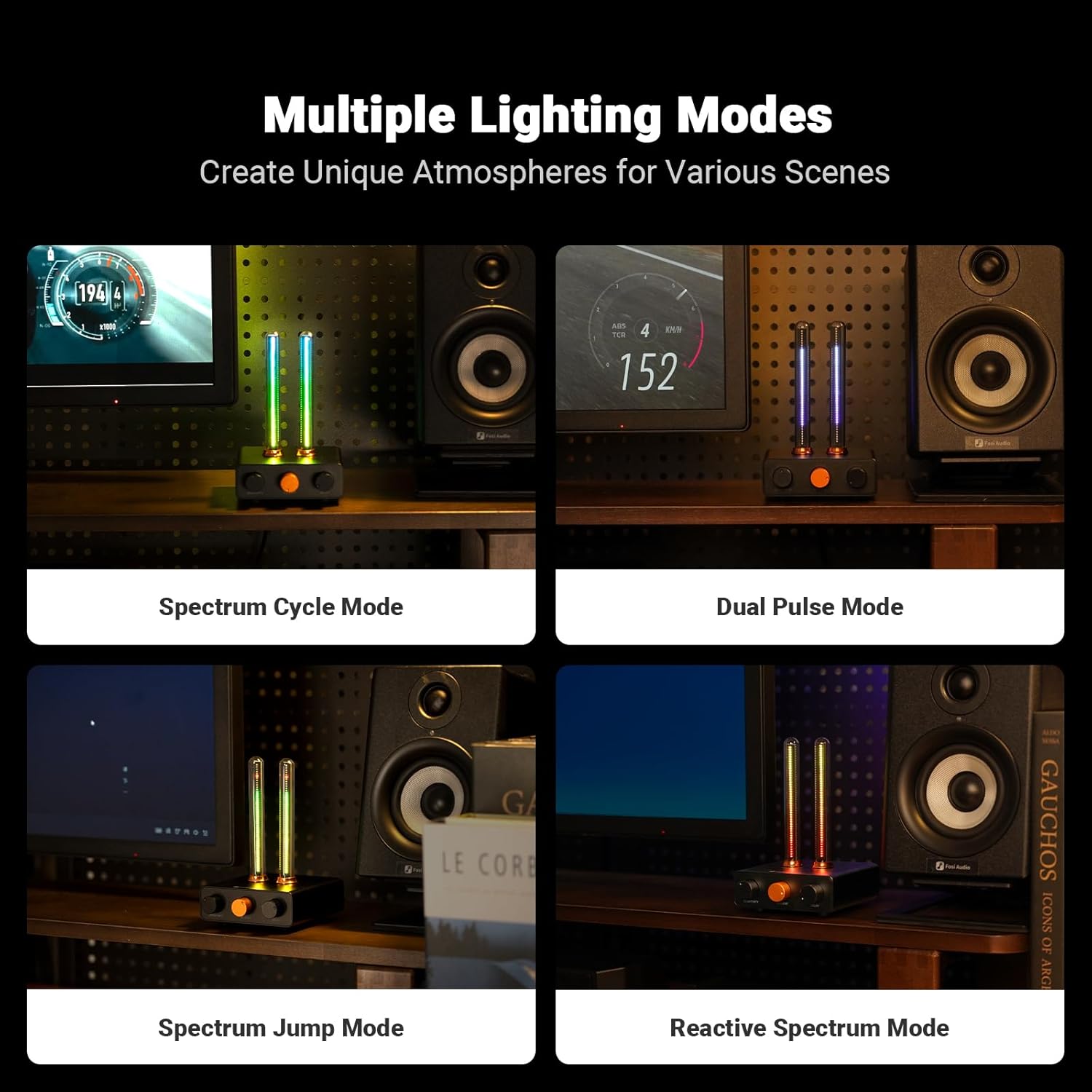
Hình 5: Ví dụamples of different lighting modes.
BẢO TRÌ
- Vệ sinh: Use a soft, dry cloth to wipe the device. Avoid abrasive cleaners or solvents.
- Xử lý: Handle the glass tubes with care to prevent breakage.
- Kho: Bảo quản nơi khô ráo, thoáng mát, tránh ánh nắng trực tiếp và nhiệt độ quá cao hoặc quá thấp khi không sử dụng.
Xử lý sự cố
- Không có điện: Ensure the USB-C cable is securely connected to both the device and a working power source. Verify the power source is active.
- Lights Not Responding to Sound:
- Increase the Sensitivity knob (left knob) clockwise.
- Ensure the device is placed close enough to the audio source.
- Check for any obstructions blocking the microphone pickup points on the rear.
- Inconsistent Light Patterns: Adjust the Delay knob (right knob) to fine-tune the light falling speed to better match the music tempo.
- Lights Stuck on One Color/Mode: Press the central Light Mode/Color knob to cycle through modes. If unresponsive, disconnect and reconnect power.
Thông số kỹ thuật
| Tính năng | Chi tiết |
|---|---|
| Số hiệu mẫu | AH-01A |
| Màu sắc | Đen |
| Vật liệu | Nhôm |
| Loại hoàn thiện | Anodized |
| Loại nguồn sáng | Điốt phát quang (LED) |
| Số lượng nguồn sáng | 48 mỗi dải |
| Trọng lượng sản phẩm | 0.38 kg (13.4 ounce) |
| Kích thước sản phẩm | 8 x 6 x 10 inch |
| Đầu vào nguồn điện | DC 5V/1A (USB-C) |
Video sản phẩm chính thức
Video 1: Official Fosi Audio Music Visualizer AH-01A demonstration, showcasing its features and dynamic lighting effects.
Bảo hành và Hỗ trợ
Fosi Audio products are designed for reliability and performance. For warranty information, technical support, or service inquiries, please refer to the official Fosi Audio webhoặc liên hệ trực tiếp với bộ phận hỗ trợ khách hàng của họ. Giữ lại hóa đơn mua hàng để yêu cầu bảo hành.