
1. Giới thiệu
The HAYDEN HY-A4 is a professional 4-channel audio mixing console designed for a wide range of applications including recording, podcasting, DJing, live streaming, and performances. It features XLR and 6.3mm balanced inputs, built-in Bluetooth, a USB sound card, 48V phantom power, 3-band EQ, and digital reverb. This manual provides essential information for the safe and effective use of your HY-A4 mixer.
2. Thông tin an toàn
- Đọc tất cả hướng dẫn trước khi vận hành thiết bị.
- Keep the mixer away from water or moisture to prevent electric shock.
- Không mở casing; chuyển mọi dịch vụ bảo dưỡng cho nhân viên có trình độ.
- Use only the provided power adapter or a compatible 5V 2.5A power supply.
- Đảm bảo thông gió thích hợp xung quanh thiết bị để tránh quá nóng.
- Tránh đặt vật nặng lên máy trộn.
3. Thiết lập
3.1 kết nối nguồn
Connect the provided 5V 2.5A power adapter to the mixer's power input and then to a suitable power outlet. The mixer can also be powered via USB 5V for outdoor use with a power bank.

Figure 3.1: Connecting the 5V power adapter to the HY-A4 mixer.
3.2 Kết nối đầu vào
The HY-A4 mixer offers various input options:
- Channels 1 & 2 (XLR/6.3mm Combo Jacks): Connect microphones (dynamic or condenser) or instruments. For condenser microphones, activate 48V phantom power.
- Channels 3/4 (6.3mm L/Mono & R Jacks): Connect stereo line-level devices such as electronic keyboards or other audio players.
- Âm thanh USB: Connect the mixer to a computer via a USB cable (not included) to use it as a USB sound card for recording or playback.
- Bluetooth: Pair your mobile device wirelessly for audio streaming.

Figure 3.2: Connection diagram illustrating various input and output options for the HY-A4 mixer, including guitars, microphones, electronic keyboards, and laptops.
3.3 Kết nối đầu ra
- Main Output (RCA L/R): Kết nối với nguồn điện amplifier, active speakers, or a recording device.
- Phones Output (3.5mm & 6.5mm): Connect headphones for monitoring.
- REC Output (RCA L/R): Dedicated output for recording devices.
4. Hướng dẫn vận hành
4.1 Bảng điều khiển Overview
Familiarize yourself with the mixer's controls:
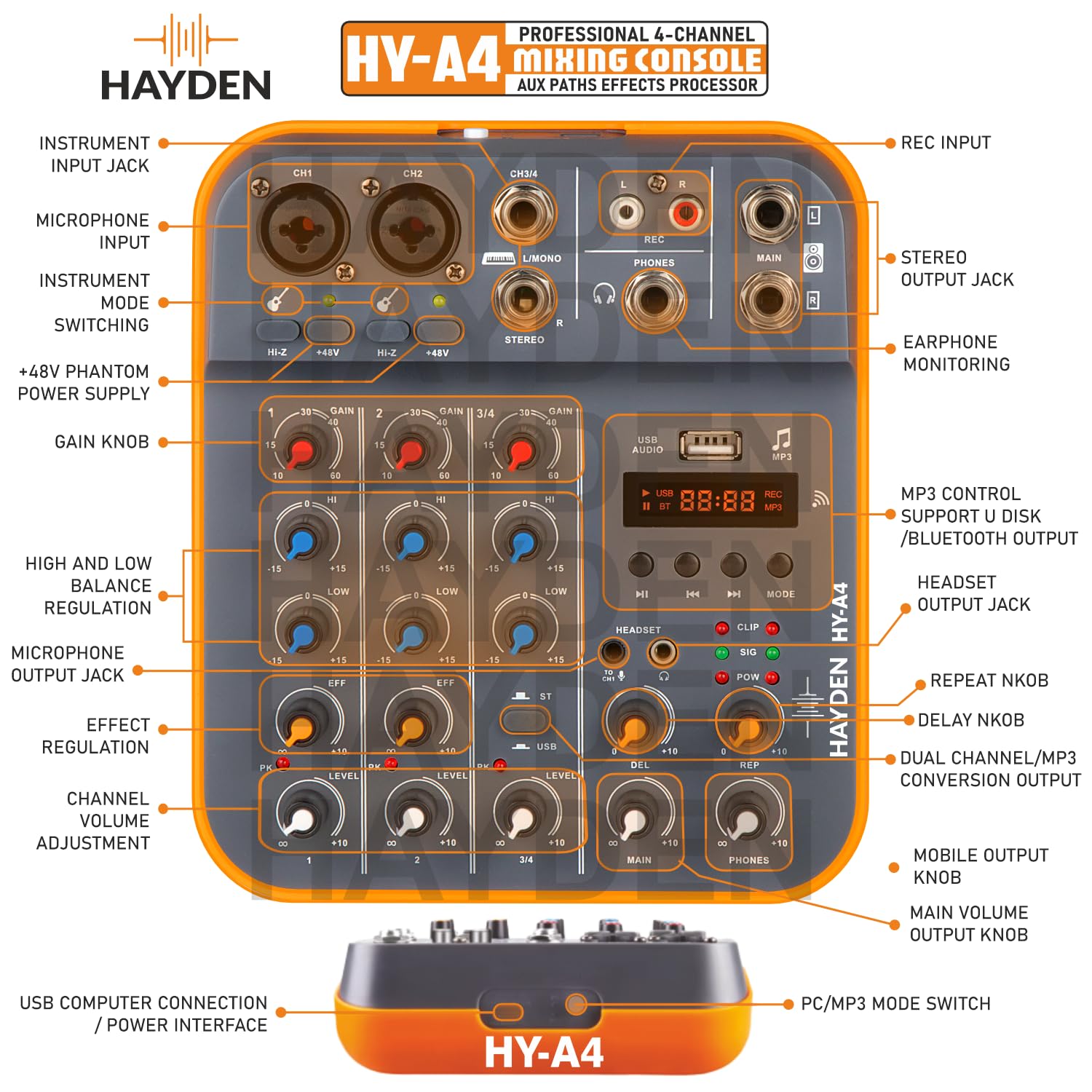
Hình 4.1: Chi tiết view of the HY-A4 mixer's control panel, showing input jacks, gain knobs, EQ controls, effect regulation, channel volume adjustments, and USB/MP3 controls.
- Núm điều chỉnh độ khuếch đại: Adjust the input sensitivity for each channel. Start with low gain and increase as needed.
- Công tắc HI-Z: Activates high impedance input for instruments like guitars on channels 1 and 2.
- Công tắc nguồn ảo +48V: Supplies 48V power to condenser microphones. Activate only when using condenser microphones.
- HI/LOW EQ Knobs: Adjust the high (12KHz) and low (80Hz) frequencies for each channel by +/-15dB.
- Núm điều chỉnh EFF: Control the amount of effect (reverb) applied to each channel.
- Núm cấp độ: Adjust the output volume for each individual channel.
- PK (Peak) LED: Illuminates when the input signal is too high, indicating potential clipping. Reduce gain if this LED lights up frequently.
- USB/MP3 Section: Features a digital display, playback controls (play/pause, next/previous), mode selection (USB, Bluetooth, MP3), and dedicated volume controls (DEL, REP, MAIN, PHONES).
- DEL (Delay) Knob: Adjusts the delay effect.
- REP (Repeat) Knob: Adjusts the repeat of the delay effect.
- Núm xoay chính: Điều khiển âm lượng đầu ra chính tổng thể.
- Núm điện thoại: Điều chỉnh âm lượng đầu ra của tai nghe.
4.2 Ghép nối Bluetooth
- Press the 'MODE' button in the USB/MP3 section until 'BT' appears on the digital display.
- On your mobile device, search for Bluetooth devices and select 'HY-A4'.
- Sau khi ghép nối, bạn có thể truyền phát âm thanh không dây đến bộ trộn.
4.3 Chức năng giao diện âm thanh USB
When connected to a computer via USB, the HY-A4 acts as an external sound card. You can use it for:
- Ghi âm: Capture audio from the mixer's inputs directly to your computer using recording software.
- Phát lại: Play audio from your computer through the mixer's main outputs.
4.4 Giám sát
Use the dual headphone outputs (3.5mm and 6.5mm) to monitor your mix in real-time. Adjust the 'PHONES' knob to control the monitoring volume.

Figure 4.2: A user monitoring audio feedback in real-time using headphones connected to the HY-A4 mixer, allowing for immediate sound adjustments.
5. Bảo trì
- Vệ sinh: Use a soft, dry cloth to clean the mixer's surface. Do not use liquid cleaners or solvents.
- Kho: Bảo quản máy trộn ở nơi khô ráo, thoáng mát, tránh ánh nắng trực tiếp và nhiệt độ cao.
- Chăm sóc cáp: Avoid bending or crimping cables excessively. Disconnect cables by pulling the plug, not the cable itself.
KHAI THÁC. Xử lý sự cố
| Vấn đề | Nguyên nhân có thể | Giải pháp |
|---|---|---|
| Không có âm thanh phát ra | Main volume too low; incorrect cable connection; amplifier/speaker off. | Increase MAIN volume; check all cable connections; ensure connected devices are powered on. |
| Không có tín hiệu đầu vào | Channel gain too low; incorrect input selected; microphone/instrument issue. | Increase channel GAIN; ensure correct input (XLR/6.3mm) is used; test microphone/instrument separately. |
| Micrô tụ điện không hoạt động | 48V Phantom Power not activated. | Press the +48V switch to activate phantom power. |
| Distorted audio (PK LED on) | Tín hiệu đầu vào quá mạnh. | Reduce the GAIN knob for the affected channel until the PK LED no longer illuminates. |
| Bluetooth không kết nối | Mixer not in Bluetooth mode; device not discoverable. | Press MODE button until 'BT' is displayed; ensure your device's Bluetooth is on and discoverable. |
| Poor USB recording quality | Incorrect software settings; driver issues; interference. | Check recording software input settings; ensure correct drivers are installed (if required); try a different USB port or cable. |
7. Thông số kỹ thuật
| Tính năng | Chi tiết |
|---|---|
| Người mẫu | HY-A4 |
| Số lượng kênh | 4 |
| Đầu vào | XLR, 1/4" (TRS), USB, Bluetooth |
| ma lực | 48V (có thể chuyển đổi) |
| EQ | 3-Band (High 12KHz, Low 80Hz ±15dB) |
| Các hiệu ứng | Digital Reverb, Delay |
| Đầu ra tai nghe | 3.5mm & 6.5mm (300mW output) |
| Chức năng USB | USB Sound Card, MP3 Playback |
| Nguồn điện | 5V DC, 2.5A (Corded Electric or USB 5V) |
| Kích thước sản phẩm | 18 x 16 x 5cm |
| Trọng lượng sản phẩm | 700 gam |
8. Bảo hành và Hỗ trợ
For warranty information and technical support, please refer to the documentation included with your purchase or contact HAYDEN customer service. Keep your proof of purchase for warranty claims.