
1. Giới thiệu
Cảm ơn bạn đã muaasing the Artec Kids Mini Piano. This electronic keyboard is designed to provide an engaging and educational musical experience for children aged 6 and above. Featuring a 37-key keyboard, various instrument tones, rhythm patterns, and interactive play modes, it encourages creativity and musical exploration. Please read this manual thoroughly before use to ensure proper operation and to maximize your enjoyment of the product.
2. Thông tin an toàn
WARNING: Not suitable for children under 3 years due to small parts. Choking hazard.
- Nguồn điện: This device operates on 4 AAA batteries or via a USB Type-A to DC cable.
- Tậptage: DC 5V.
- Tiêu thụ điện năng: 2.5W.
- Tiêu thụ hiện tại: 0.5A.
- Luôn giám sát trẻ em trong khi chơi.
- Không trộn lẫn pin cũ và pin mới. Không trộn lẫn pin kiềm, pin tiêu chuẩn (cacbon-kẽm) hoặc pin sạc (niken-cadmium).
- Tháo pin nếu không sử dụng sản phẩm trong thời gian dài.
- Giữ sản phẩm tránh xa nước và độ ẩm.
- Không cố tháo rời hoặc sửa đổi sản phẩm.
3. Tính năng sản phẩm
- Bàn phím 37 phím: Allows for two-handed play.
- Điều chỉnh âm lượng: 16 levels of volume control.
- Automatic Performance (8 Songs): Includes popular tunes like "Twinkle Twinkle Little Star" and "Canon."
- One-Key-One-Song Mode: Play along with accompaniment by pressing any key.
- Percussion & Animal Sounds (4 Types Each): Switch between various percussion and animal sounds.
- Instrument Tones (8 Types): Piano, Xylophone, Organ, Guitar, Violin, Harp, Trumpet, Clarinet.
- Rhythm Patterns (16 Types): Rock, Reggae, Samba, and more.
- Ghi âm & Phát lại: Record up to 150 notes and play them back.
- Tùy chọn nguồn điện: Operates on 4 AAA batteries or via USB power.
- Key Stickers: Includes stickers to label white keys for easy learning.

Figure 1: Artec Kids Mini Piano in Mint Green, highlighting its 37-key design and various functions for children aged 6 and up.
4. Thiết lập
4.1 Nguồn điện
The Kids Mini Piano can be powered by either 4 AAA batteries (not included) or a USB Type-A to DC cable (included).
4.1.1 Lắp đặt pin
- Locate the battery compartment on the underside of the piano.
- Sử dụng tua vít để mở nắp ngăn chứa pin.
- Lắp 4 pin AAA mới, đảm bảo lắp đúng cực (+/-).
- Đóng nắp ngăn chứa pin và cố định nó bằng vít.
4.1.2 USB Power Connection
Connect the included USB Type-A to DC cable to the DC 5V input port on the piano. Plug the USB Type-A end into a compatible USB power adapter (not included) or a computer USB port.

Figure 2: The Kids Mini Piano can be powered by 4 AAA batteries or a USB cable, offering flexibility for play at home or on the go.
4.2 Attaching Key Stickers
The piano comes with stickers to help beginners identify notes on the white keys. Carefully peel and apply these stickers to the corresponding white keys as shown in the diagram.
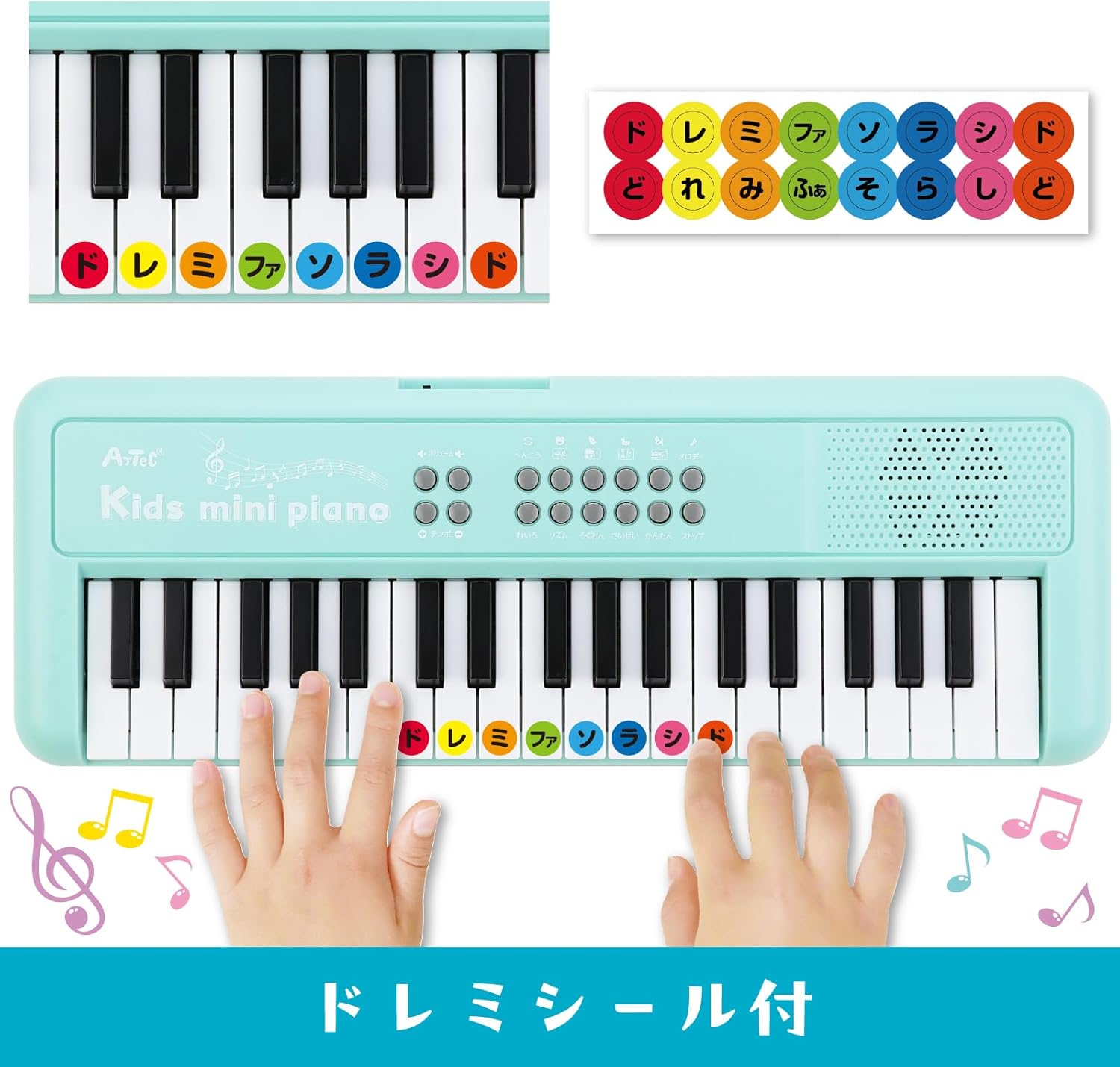
Figure 3: Apply the included 'Do Re Mi' stickers to the white keys for easy note identification and learning.
4.3 Music Stand Assembly
The detachable music stand can be inserted into the designated slot above the keyboard to hold sheet music or the included key stickers guide.
Video 1: This video demonstrates the assembly of the music stand and the application of key stickers on a similar electronic piano. Note that the piano color in the video may vary from the Mint Green product.
5. Hướng dẫn vận hành

Hình 4: Chi tiết view of the control panel, showing buttons for various functions including volume, tempo, melody, tone, rhythm, recording, and playback.
5.1 Bật/Tắt nguồn
Locate the power button (usually on the top left or right of the control panel) and press it to turn the piano ON or OFF.
5.2 Điều chỉnh âm lượng
Use the volume control buttons (often labeled with '+' and '-') to adjust the sound level. There are 16 levels of volume adjustment available.
5.3 chế độ chơi
5.3.1 Chế độ chơi miễn phí
In this mode, you can play the keys freely to create your own melodies. This is the default mode when the piano is turned on.
5.3.2 One-Key-One-Song Mode
Select a demo song, then press the 'One-Key-One-Song' button. The accompaniment will play, and you can press any key to play the melody notes in time with the music, making it easy to perform songs.
5.4 Instrument Tones (8 Types)
Press the 'Tone' button repeatedly to cycle through the 8 available instrument tones: Piano, Xylophone, Organ, Guitar, Violin, Harp, Trumpet, and Clarinet. Each press will change the sound of the keyboard.
5.5 Rhythm Patterns (16 Types)
Press the 'Rhythm' button repeatedly to select from 16 different rhythm patterns, including Rock, Reggae, and Samba. The selected rhythm will play as background music.
5.6 Percussion & Animal Sounds (4 Types Each)
Dedicated buttons allow you to switch between 4 types of percussion sounds and 4 types of animal sounds. These can be played along with your melodies or rhythms.
5.7 Ghi âm & Phát lại
- Press the 'Record' button to start recording your performance. The indicator light will illuminate.
- Play your desired melody (up to 150 notes).
- Nhấn lại nút 'Ghi âm' để dừng ghi âm.
- Press the 'Playback' button to listen to your recorded melody.
5.8 Demo Songs (8 Songs)
Press the 'Demo' button to play through the 8 pre-programmed demo songs. These include popular tunes like "Twinkle Twinkle Little Star," "Frère Jacques," "Mary Had a Little Lamb," "Happy Farmer," "Chouchou," "Für Elise," "Turkish March," and "Canon."
Video 2: This video demonstrates various functions of a multi-functional 37-key children's piano, including different instrument sounds, rhythms, and demo songs. The piano color in the video is pink.
Video 3: This video showcases the features of a 37-key electronic piano, including playing different notes and demonstrating various sounds. The piano color in the video is white.
6. Bảo trì
- Clean the piano with a soft, dry cloth. Do not use abrasive cleaners or solvents.
- Avoid exposing the piano to direct sunlight, high temperatures, or humidity.
- Store the piano in a cool, dry place when not in use.
- If the piano is not functioning correctly, first check the batteries or USB connection.
KHAI THÁC. Xử lý sự cố
| Vấn đề | Nguyên nhân có thể | Giải pháp |
|---|---|---|
| Không có âm thanh hoặc âm lượng thấp. | Low batteries, incorrect power connection, volume too low. | Replace batteries, ensure USB cable is securely connected, increase volume. |
| Phím không phản hồi. | Sự cố về nguồn điện, trục trặc bên trong. | Kiểm tra nguồn điện. Nếu sự cố vẫn tiếp diễn, hãy liên hệ với bộ phận hỗ trợ khách hàng. |
| Âm thanh bị méo. | Low batteries, volume too high. | Replace batteries, reduce volume. |
8. Thông số kỹ thuật
- Số hiệu mẫu: 75535
- Kích thước sản phẩm: 15.5 x 42.5 x 4.5cm
- Trọng lượng sản phẩm: 600 gam
- Vật liệu chính: HÔNG
- Độ tuổi khuyến nghị: 6 tuổi trở lên
- Nguồn điện: 4 x AAA batteries (sold separately) or USB Type-A to DC cable (included)
- Tậptage: Điện áp một chiều 5V
- Tiêu thụ điện năng: 2.5W
- Tiêu thụ hiện tại: 0.5A

Figure 5: Product dimensions and included items: Kids Mini Piano, Do Re Mi stickers, and a 1m USB Type-A to DC cable.
9. Bảo hành và Hỗ trợ
For warranty information, returns, or technical support, please refer to your purchase receipt or contact the retailer directly. Keep your proof of purchase for any warranty claims.