
Giới thiệu
Thank you for choosing the Severin FILKA Automatic Filter Coffee Machine, Model KA 4852. This innovative appliance combines the convenience of a fully automatic machine with the enjoyment of classic filter coffee. It is designed to deliver freshly ground filter coffee in your desired quantity, suitable for carafes, cups, and travel mugs.
This manual provides essential information for the safe and efficient operation, maintenance, and troubleshooting of your new coffee machine. Please read it thoroughly before first use and keep it for future reference.
Hướng dẫn an toàn quan trọng
Luôn tuân thủ các biện pháp phòng ngừa an toàn sau đây để tránh tai nạn và hư hỏng thiết bị:
- Đọc kỹ tất cả các hướng dẫn trước khi vận hành thiết bị.
- Không nhúng thiết bị, dây điện hoặc phích cắm vào nước hoặc bất kỳ chất lỏng nào khác.
- Để thiết bị xa tầm tay trẻ em.
- Đảm bảo voltage indicated on the rating plate matches your mains supply.
- Unplug the appliance from the mains socket when not in use, before cleaning, and in case of malfunction.
- Không vận hành thiết bị khi dây hoặc phích cắm bị hỏng hoặc sau khi thiết bị gặp trục trặc hoặc bị hư hỏng dưới bất kỳ hình thức nào.
- Đặt thiết bị trên bề mặt ổn định, bằng phẳng và chịu nhiệt.
- Tránh tiếp xúc với bề mặt nóng. Sử dụng tay cầm hoặc núm vặn.
- Chỉ sử dụng các phụ kiện được nhà sản xuất khuyến nghị.
Thành phần sản phẩm
Familiarize yourself with the parts of your Severin FILKA coffee machine:

Hình 1: Chính view of the Severin FILKA Automatic Filter Coffee Machine with coffee beans in the grinder and brewed coffee in the carafe.
- Máy xay cà phê tích hợp: For freshly ground coffee beans.
- Hộp đựng đậu: Có thể tháo rời để dễ dàng đổ đầy và vệ sinh.
- Bể chứa nước: Removable for convenient filling and cleaning.
- Màn hình cảm ứng kỹ thuật số: For intuitive control and settings adjustment.
- Đơn vị pha chế: Houses the permanent filter.
- Bộ lọc màu vàng vĩnh cửu: Reusable and dishwasher-safe.
- Khay ướt: Collects any drips.
- Bình thủy tinh: Included for brewing larger quantities of coffee.
Cài đặt
Hãy làm theo các bước sau để thiết lập máy pha cà phê lần đầu tiên:
- Tháo hộp: Carefully remove all packaging materials and check for any damage. Keep packaging for potential future transport.
- Làm sạch ban đầu: Before first use, clean all removable parts (water tank, bean container, permanent filter, glass carafe) with warm soapy water. Rinse thoroughly and dry. Wipe the exterior of the machine with a damp vải.
- Vị trí: Place the coffee machine on a stable, level, and heat-resistant surface, away from water sources and direct heat. Ensure adequate ventilation.
- Đổ đầy bình nước: Remove the water tank (xem Hình 2) and fill it with fresh, cold water up to the MAX mark. Reinsert the tank securely.
- Đổ đầy hộp đựng đậu: Open the lid of the bean container and fill it with whole coffee beans (xem Hình 3). Close the lid firmly.
- Chu trình pha cà phê đầu tiên (không có cà phê): To clean the internal system, perform a brewing cycle with only water. Place the glass carafe under the coffee outlet. Select the maximum water quantity on the display and start the brewing process. Discard the water after completion. Repeat this process once or twice.

Figure 2: A hand removing the transparent water tank from the side of the Severin FILKA coffee machine.
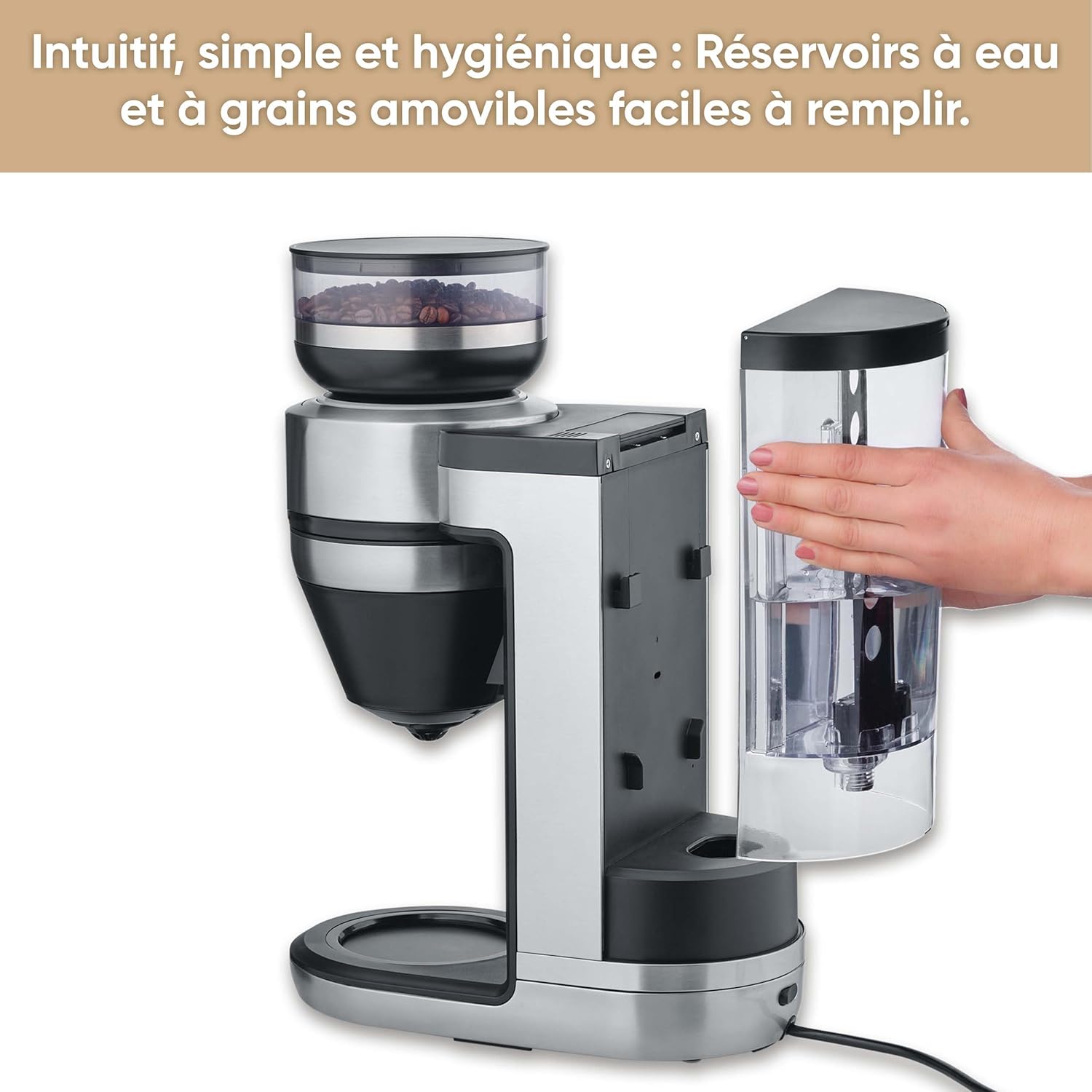
Figure 3: A hand holding the removable coffee bean container, lifted from the top of the Severin FILKA coffee machine.
Hướng dẫn sử dụng
Pha chế cơ bản
- Bật nguồn: Plug the machine into a suitable power outlet. The display will illuminate.
- Fill Water and Beans: Ensure the water tank is filled with fresh water and the bean container has enough coffee beans.
- Đặt thùng chứa: Place your desired container (small cup, large cup, travel mug, or glass carafe) under the coffee outlet. The machine offers 5-in-1 compatibility.
- Select Quantity: Use the digital touchscreen display (xem Hình 4) to select the desired coffee quantity. The machine's "Cup Control" feature automatically draws the necessary water for quantities between 100 ml and 350 ml.
- Bắt đầu pha chế: Press the 'Start/Stop' button on the display to begin the brewing process. The machine will grind the beans and brew the coffee.

Figure 4: Close-up of the digital touchscreen display on the Severin FILKA coffee machine, showing quantity and strength settings.

Figure 5: The Severin FILKA coffee machine brewing into a single cup, demonstrating the "Cup Control" feature.
Customizing Your Coffee
- Độ đậm của cà phê: Adjust the coffee strength using the options on the touchscreen display. There are 5 adjustable intensity levels, from mild to strong, to suit individual preferences.
- Chức năng trước khi truyền dịch: Activate the pre-infusion function via the display for a more intense and aromatic coffee flavor. This feature ensures optimal extraction.
- Nhiệt độ pha chế: The machine brews at an optimal temperature of up to 96°C, ensuring a hot and full-bodied coffee.
- Chức năng hẹn giờ: Utilize the integrated timer function to program your coffee machine to start brewing at a specific time.

Figure 6: Display showing brewing temperature and pre-infusion options for personalized coffee.
Bảo trì và vệ sinh
Regular cleaning and maintenance ensure the longevity and optimal performance of your Severin FILKA coffee machine.
Vệ sinh hàng ngày
- Bình thủy tinh: Wash the glass carafe and its lid with warm soapy water after each use.
- Bộ lọc vĩnh viễn: Remove the gold-tone permanent filter (xem Hình 7) and rinse it under running water to remove all coffee grounds. It is also dishwasher-safe.
- Khay ướt: Đổ sạch và làm sạch khay nhỏ giọt thường xuyên.
- Bên ngoài: Lau bên ngoài máy bằng vải mềm, damp vải. Không sử dụng chất tẩy rửa có tính mài mòn.

Hình 7: Cận cảnh view of the gold-tone permanent filter inside the Severin FILKA coffee machine.
Bảo trì thường xuyên
- Hộp đựng đậu: For thorough cleaning or changing bean types, the bean container can be easily removed by turning it. Clean it with a damp cloth and ensure it is completely dry before reattaching.
- Bể chứa nước: The removable water tank facilitates easy refilling and cleaning. Clean it periodically to prevent mineral buildup.
- Tẩy cặn: The machine features an integrated descaling function. Follow the instructions on the display or in the full manual for the descaling process. Regular descaling is crucial, especially in areas with hard water, to maintain performance and extend the appliance's lifespan.
Xử lý sự cố
If you encounter issues with your coffee machine, refer to the table below for common problems and solutions:
| Vấn đề | Nguyên nhân có thể | Giải pháp |
|---|---|---|
| Máy không bật. | Không có nguồn điện. | Kiểm tra xem dây nguồn đã được cắm chắc chắn vào ổ cắm và máy chưa. Thử cắm thiết bị khác vào ổ cắm để kiểm tra. |
| Cà phê không pha. | Bình chứa nước trống; Hộp đựng hạt cà phê trống; Bộ phận pha chế bị tắc. | Fill water tank; Fill bean container; Clean the permanent filter and brewing unit. |
| Cà phê có vị nhạt. | Incorrect coffee strength setting; Insufficient coffee beans. | Increase coffee strength setting on the display; Ensure adequate coffee beans are in the container. |
| Rò rỉ nước. | Water tank not properly seated; Internal component issue. | Ensure the water tank is correctly and firmly inserted. If leakage persists, contact customer support. |
| Hiển thị thông báo lỗi. | Sự cố cụ thể. | Refer to the full product manual for specific error codes or contact customer support. Try unplugging and re-plugging the machine. |
Thông số kỹ thuật
Here are the technical specifications for the Severin FILKA Automatic Filter Coffee Machine:
| Tính năng | Đặc điểm kỹ thuật |
|---|---|
| Thương hiệu | Severin |
| Số hiệu mẫu | KA4852 |
| Màu sắc | Đã chải |
| Kích thước (D x R x C) | 382 x 170 x 460cm |
| Tậptage | 230 vôn |
| Cân nặng | 5750 Kilôgam |
| Dung tích | 2 lít |
| Vật liệu | Thép không gỉ |
| Tính năng đặc biệt | Integrated stainless steel grinder, adjustable coffee intensity, timer, LED touchscreen display, pre-infusion function, 5-in-1 compatibility. |
Bảo hành và Hỗ trợ khách hàng
Để biết thông tin về phạm vi bảo hành, vui lòng tham khảo thẻ bảo hành đi kèm sản phẩm hoặc truy cập trang web chính thức của Severin. website. If you require technical assistance, spare parts, or have any questions not covered in this manual, please contact Severin customer support. Contact details can typically be found on the Severin webtrang web hoặc trong bao bì sản phẩm.