
1. Sản phẩm hếtview
The QRD Wireless Controller (Model: US-T5-JB02) is a high-performance replacement controller designed for Nintendo Switch, Switch Pro, Lite, and OLED models. It features advanced technologies such as Hall Effect joysticks for precise, drift-free control, dual vibration motors for immersive feedback, and a 6-axis gyroscope for accurate motion sensing. This controller also includes programmable back buttons and customizable LED backlighting, enhancing your gaming experience.
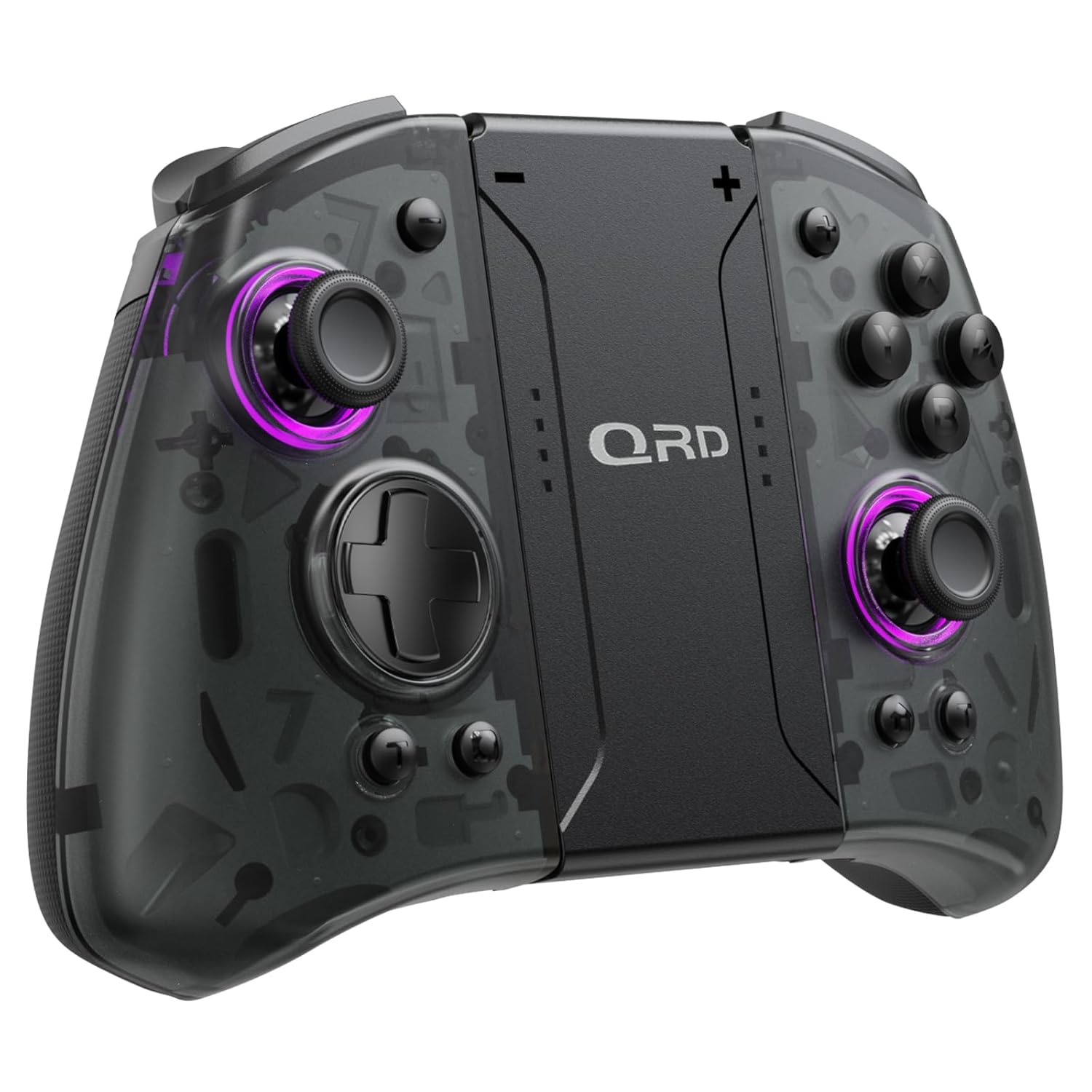
Hình ảnh 1.1: Mặt trước view of the QRD Wireless Controller, showcasinthiết kế tiện dụng và cách bố trí nút bấm.
2. Các tính năng chính
- Wireless Bluetooth 5.3 Connectivity: Ensures stable, lag-free connection for seamless gameplay.
- Cần điều khiển hiệu ứng Hall: Provides 360° precise, drift-free control and extended lifespan.
- Động cơ rung kép: Offers 3 levels of adjustable vibration for enhanced tactile feedback.
- 6-Axis Gyroscope Motion Sensing: Enables accurate tilt detection for precise aiming and movement in compatible games.
- Các nút quay lại có thể lập trình: Customize controls with single or multiple mappings for efficient combo execution.
- Chức năng Turbo: Allows for rapid firing of buttons.
- Đèn nền LED: Features 8 different colors with static, breathing, and flashing modes for personalized aesthetics.
- Tuổi thọ pin dài: Up to 10 hours of uninterrupted gameplay on a single charge (2 hours charging time).
- Thiết kế công thái học: Comfortable grip for extended gaming sessions, includes a screenshot function.

Image 2.1: Diagram highlighting key features such as Bluetooth 5.3, Dual Vibration, 6-Axis Gyro, Turbo, Macro Back Paddles, and Colorful Options.

Image 2.2: Illustration demonstrating the Hall Effect Joysticks, emphasizing drift-free and accurate control.
3. Thiết lập và kết nối
3.1 Ghép nối ban đầu với Nintendo Switch
- Hãy đảm bảo máy chơi game Nintendo Switch của bạn đã được bật nguồn và cập nhật lên phiên bản hệ thống mới nhất.
- Từ menu TRANG CHỦ, chọn "Bộ điều khiển" > "Thay đổi kiểu cầm/thứ tự".
- On the QRD Wireless Controller, press and hold the Nút TRANG CHỦ (usually located in the center) for 3-5 seconds until the LED indicators start flashing rapidly.
- Sau khi bộ điều khiển được ghép nối thành công, đèn LED tương ứng của người chơi trên bộ điều khiển sẽ sáng liên tục.
- The controller can also be connected by sliding it into the Nintendo Switch Dock while the console is attached.
3.2 Reconnecting the Controller
To reconnect a previously paired controller, simply press the Nút TRANG CHỦ once. The controller will automatically attempt to connect to the last paired console.
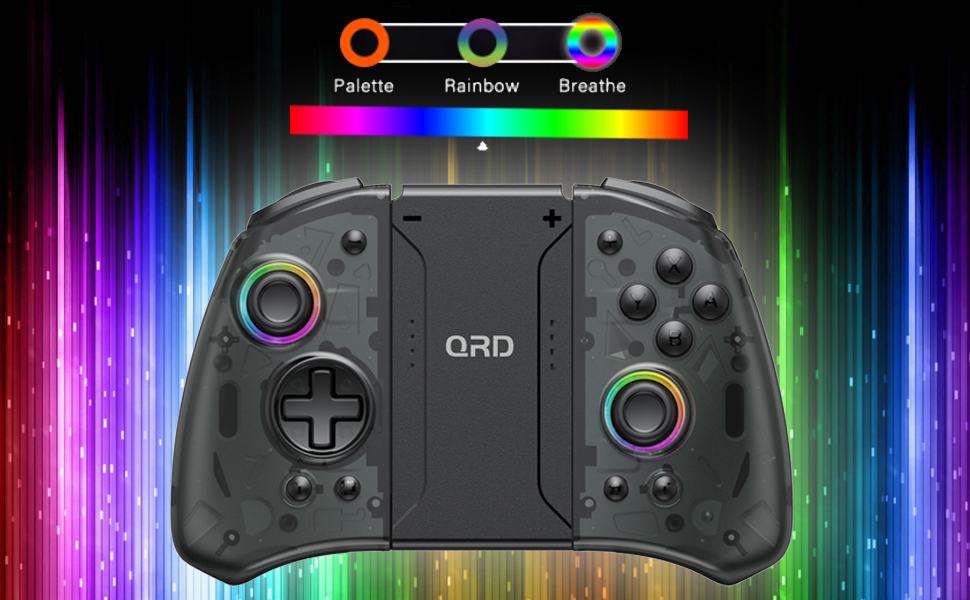
Image 3.1: Visual representation of controller compatibility with Nintendo Switch and Switch OLED models. Note: Not compatible with Switch Lite.
4. Hướng dẫn vận hành
Bố cục 4.1 nút
Hãy làm quen với bố cục các nút trên tay cầm điều khiển:
- Cần điều khiển trái: Movement control.
- Cần điều khiển bên phải: Điều khiển camera hoặc ngắm bắn.
- D-Pad: Đầu vào định hướng.
- Các nút A/B/X/Y: Các nút hành động.
- Nút Trái/Phải: Nút vai.
- Nút ZL/ZR: Nút kích hoạt.
- Nút Home: Returns to the HOME Menu, powers on/off the controller.
- Nút chụp ảnh màn hình: Chụp ảnh màn hình.
- +/- Các nút: Plus and Minus buttons for in-game functions.
- M1/M2 (Back Buttons): Programmable macro buttons.
4.2 Adjusting Vibration Intensity
The controller supports 3 levels of vibration intensity. To adjust, press and hold the Nút Turbo và sau đó nhấn Phím điều hướng lên or Phím điều hướng xuống to cycle through intensity levels (Low, Medium, High, Off).
4.3 Turbo Function Setup
To set a button to Turbo mode:
- Nhấn và giữ Nút Turbo.
- While holding Turbo, press the desired action button (e.g., A, B, X, Y, L, R, ZL, ZR). The button will now continuously register input when held down.
- To clear Turbo for a specific button, repeat the process. To clear all Turbo settings, press and hold the Nút Turbo trong 5 giây.
4.4 Programming Back Buttons (Macro)
The M1 and M2 back buttons can be programmed to execute a sequence of button presses (macro). Each macro can store up to 16 button presses.
- Nhấn và giữ M1 or M2 button you wish to program.
- While holding the M button, press the Nút SET (refer to manual diagram for location, typically a small button on the back). The indicator light will flash slowly.
- Enter the desired sequence of button presses (e.g., A, B, X, Y, D-Pad directions).
- Nhấn nút Nút SET Nhấn giữ nút lưu macro một lần nữa. Đèn báo sẽ ngừng nhấp nháy.
- To clear a macro, press and hold the programmed M button and then press the Nút SET hai lần.
4.5 Điều chỉnh đèn nền LED
The controller features customizable RGB lighting. To cycle through modes and colors:
- Nhấn nút Nút đèn LED (refer to manual diagram for location) to change between static color, breathing, and flashing modes.
- In static mode, press the Nút đèn LED repeatedly to cycle through the 8 available colors.

Image 4.1: Display of the controller's LED backlight options, including Palette (static colors), Rainbow, and Breathe modes.
5. Sạc và tuổi thọ pin
The QRD Wireless Controller is equipped with a built-in rechargeable Lithium Polymer battery. A 2.5m USB-C cable is included for charging.
- Connect the USB-C end of the cable to the controller's charging port and the USB-A end to a power source (e.g., Nintendo Switch Dock, USB wall adapter, computer USB port).
- Sạc đầy mất khoảng 2 giờ.
- Một lần sạc đầy cho phép chơi game liên tục lên đến 10 giờ.
- The LED indicators on the controller will show charging status and battery level.
6. Bảo trì
To ensure the longevity and optimal performance of your QRD Wireless Controller, follow these maintenance guidelines:
- Vệ sinh: Dùng vải mềm, khô để lau bộ điều khiển. Đối với vết bẩn cứng đầu, lau nhẹampLàm ướt khăn bằng nước. Tránh sử dụng hóa chất mạnh, dung môi hoặc chất tẩy rửa có tính mài mòn.
- Kho: Bảo quản bộ điều khiển ở nơi khô ráo, thoáng mát, tránh ánh nắng trực tiếp, nhiệt độ cao và độ ẩm cao.
- Xử lý: Avoid dropping the controller or subjecting it to strong impacts. Do not disassemble the controller, as this may void the warranty and cause damage.
- Sạc: Không nên để bộ điều khiển sạc quá lâu sau khi đã sạc đầy.
KHAI THÁC. Xử lý sự cố
| Vấn đề | Nguyên nhân có thể | Giải pháp |
|---|---|---|
| Bộ điều khiển không kết nối. | Pin yếu; Không ghép nối; Có nhiễu. | Charge the controller; Re-pair the controller following Section 3.1; Move closer to the console or away from other wireless devices. |
| Input lag or disconnection during gameplay. | Wireless interference; Distance from console; Low battery. | Ensure no strong wireless signals are nearby; Reduce distance to console; Charge the controller. |
| Joysticks drift or are unresponsive. | Calibration issue; Physical debris. | Go to Switch System Settings > Controllers and Sensors > Calibrate Control Sticks. Clean around the joystick base. |
| Các nút không phản hồi. | Stuck button; Software glitch. | Ensure buttons are not physically stuck. Try resetting the controller (if a reset button is present, otherwise power cycle). |
| Chức năng rung không hoạt động. | Vibration setting off; Game does not support vibration. | Adjust vibration intensity (Section 4.2). Verify game compatibility. |
8. Thông số kỹ thuật
| Tính năng | Chi tiết |
|---|---|
| Số hiệu mẫu | US-T5-JB02 |
| Kết nối | Bluetooth 5.3 |
| Khả năng tương thích | Nintendo Switch, Switch Pro, Switch OLED |
| Loại cần điều khiển | Hiệu ứng Hall |
| Rung động | Dual Motors, 3 adjustable levels |
| Kiểm soát chuyển động | Con quay hồi chuyển 6 trục |
| Nút có thể lập trình | Yes (Back Buttons) |
| Loại pin | Liti Polymer |
| Thời gian sạc | Xấp xỉ 2 giờ |
| Thời gian chơi | Lên đến 10 giờ |
| Cổng sạc | USB-C |
| Kích thước | 7.95 x 5.51 x 2.36 inch (xấp xỉ) |
| Cân nặng | 12.35 ounce (khoảng) |
9. Bảo hành và Hỗ trợ
9.1 Thông tin bảo hành
QRD products are manufactured with high-quality materials and undergo rigorous testing. This product comes with a standard manufacturer's warranty against defects in materials and workmanship. Please refer to the product packaging or the official QRD webVui lòng truy cập trang web để biết các điều khoản và thời hạn bảo hành cụ thể.
9.2 Hỗ trợ khách hàng
For technical assistance, troubleshooting, or warranty claims, please contact QRD Customer Support. Have your product model number (US-T5-JB02) and purchase information ready when contacting support.
- Hỗ trợ trực tuyến: Visit the official QRD website for FAQs, updated manuals, and support contact forms.
- Hỗ trợ qua Email: [Insert QRD Support Email Address Here - if available, otherwise omit]
- Hỗ trợ qua điện thoại: [Insert QRD Support Phone Number Here - if available, otherwise omit]
We are committed to providing excellent customer service and ensuring your satisfaction with QRD products.