
Giới thiệu
This manual provides detailed instructions for the safe and effective use of your Andis 560980 Limited Edition Galaxy Envy Li Cordless Clipper and Slimline Pro Cordless Beard Trimmer Combo Kit. Please read all instructions carefully before operating the devices and retain this manual for future reference.
Thông tin an toàn quan trọng
WARNING: To reduce the risk of electric shock, injury, or damage, always follow these basic safety precautions:
- Tránh tiếp xúc với mắt, da và nước.
- Tránh xa các nguồn nhiệt và ngọn lửa trần.
- Không sử dụng khi đang sạc.
- Always unplug or remove the battery before cleaning.
- Không sử dụng cho trẻ sơ sinh hoặc trẻ nhỏ khi không có sự giám sát của người lớn.
- Hãy tuân thủ các quy trình vệ sinh và bảo dưỡng được khuyến nghị.
Nội dung gói
Your Andis 560980 Combo Kit includes the following items:
- Andis Galaxy Envy Li Cordless Clipper
- Andis Slimline Pro Cordless Beard Trimmer
- Multiple Attachment Guide Combs (various sizes)
- Bộ chuyển đổi sạc
- Dầu lưỡi
- Bàn chải vệ sinh
- Bảo vệ lưỡi

Một chi tiết view of the accessories included with the Andis 560980 kit, showing the range of guide combs, power adapters, and lubricating oil for maintenance.
Cài đặt
1. Sạc thiết bị
Both the clipper and trimmer are equipped with rechargeable lithium-ion batteries, providing up to two hours of run-time. For optimal performance, fully charge the device before its first use.
- Connect the appropriate charging adapter to the device and plug it into a suitable power outlet.
- Đèn báo sạc sẽ sáng lên.
- Để thiết bị sạc đầy.
- The devices can also be used corded if the battery is low or for continuous operation.
2. Attaching and Removing Guide Combs
The kit includes various guide combs to achieve different cutting lengths. To attach a comb:
- Đảm bảo thiết bị đã tắt.
- Align the guide comb with the blade and slide it firmly into place until it clicks.
To remove a comb:
- Đảm bảo thiết bị đã tắt.
- Gently lift the back of the comb and slide it off the blade.
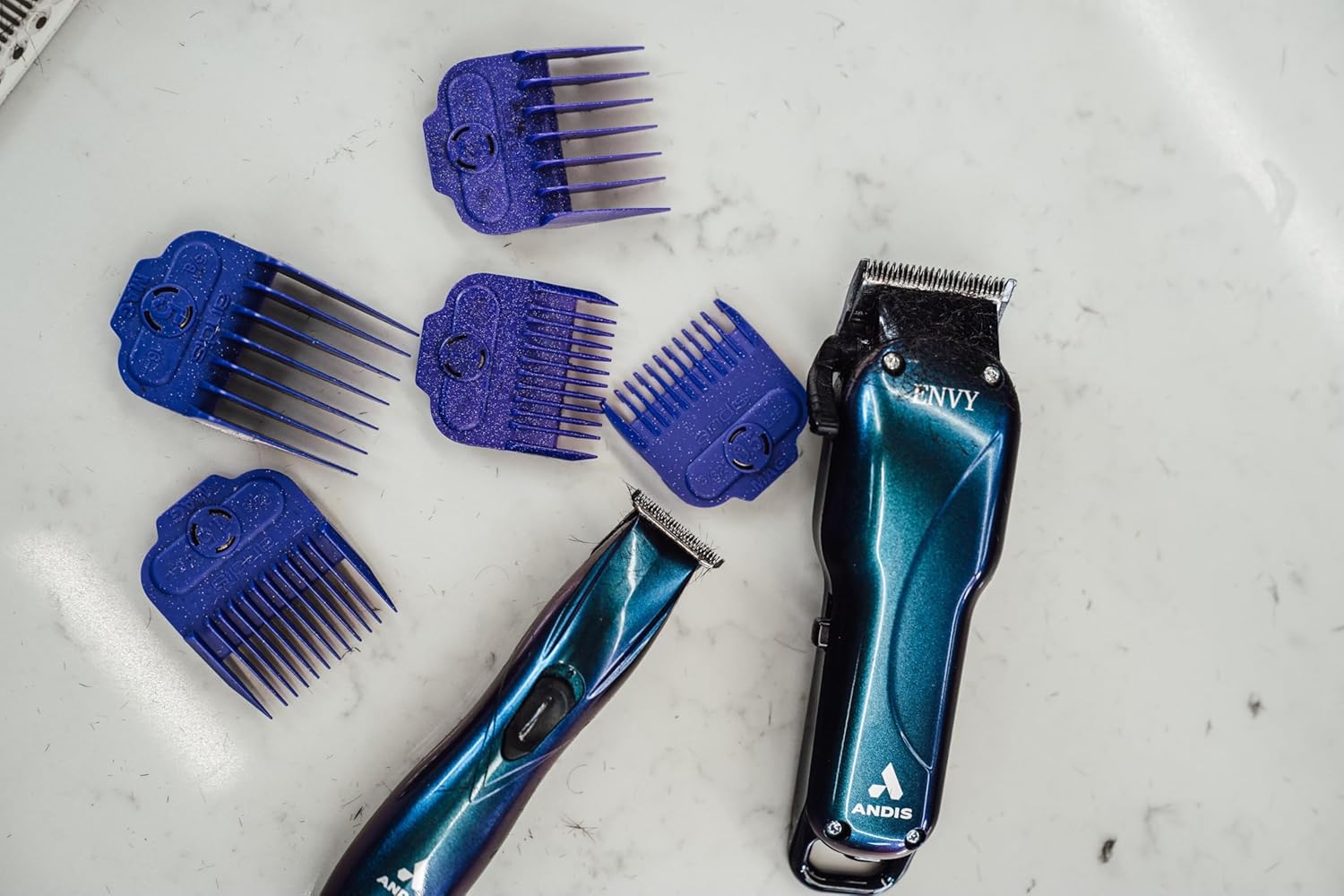
The Andis Galaxy Envy Clipper displayed with a selection of its included attachment combs, demonstrating the different cutting lengths available.
Hướng dẫn sử dụng
1. Using the Clipper (Galaxy Envy Li)
The Galaxy Envy Li Cordless Clipper is designed for cutting, tapering, and fading hair. Its carbon-steel blade adjusts from 000 to 1.
- Select the desired guide comb and attach it securely.
- Bật máy cắt tóc bằng công tắc nguồn.
- For tapers and fades, use the adjustable lever on the side of the clipper to change the blade height. The lever allows for precise adjustments between 000 (closest cut) and 1 (longer cut).
- For razor-sharp lines, the blade can be zero-gapped by a professional.
- Di chuyển máy cắt tóc ngược chiều mọc của tóc để có đường cắt đều.
- Turn off the clipper after use.
2. Using the Trimmer (Slimline Pro)
The Slimline Pro Cordless Beard Trimmer is ideal for trimming beards, designing, and texturizing.
- Choose the appropriate guide comb for your desired beard length or use without a comb for close trimming and detailing.
- Bật tông đơ.
- For beard trimming, move the trimmer in the direction of hair growth for a uniform trim.
- For detailing and sharp lines, use the edge of the blade carefully.
- Tắt máy cắt tỉa sau khi sử dụng.

A professional barber using the Andis Slimline Pro Trimmer to create intricate designs on a client's hair, highlighting its precision capabilities.
BẢO TRÌ
1. Vệ sinh lưỡi dao
Regular cleaning ensures optimal performance and longevity of your devices.
- Turn off and unplug the device (if corded).
- Use the provided cleaning brush to remove loose hair from the blades.
- For a more thorough cleaning, detach the blades if possible and clean under running water (refer to specific device instructions for water resistance). Ensure blades are completely dry before reattaching.
2. Tra dầu vào lưỡi dao
Apply blade oil regularly to keep the blades sharp and moving smoothly.
- After cleaning, apply a few drops of the provided blade oil across the top of the blades.
- Turn on the device for a few seconds to distribute the oil evenly.
- Lau sạch dầu thừa bằng khăn sạch.
3. Lưu trữ
Store your clipper and trimmer in a cool, dry place. Use the blade protector to prevent damage to the blades when not in use.
Xử lý sự cố
If you encounter any issues with your Andis devices, please refer to the following common solutions:
- Thiết bị không bật: Hãy đảm bảo thiết bị đã được sạc đầy. Nếu sử dụng thiết bị có dây, hãy kiểm tra kết nối nguồn điện.
- Hiệu suất cắt kém: Clean and oil the blades. Ensure blades are free of hair and debris. Blades may need sharpening or replacement if dull.
- Quá nhiệt: Ensure blades are clean and oiled. Allow the device to cool down if it feels excessively warm.
For persistent issues, please contact Andis customer support.
Thông số kỹ thuật
| Tính năng | Chi tiết |
|---|---|
| Số hiệu mẫu | 560980 |
| Thương hiệu | Và là |
| Nguồn điện | Pin (Pin sạc Lithium-ion) |
| Thời gian chạy | Lên đến 2 giờ |
| Vật liệu lưỡi dao | Thép không gỉ |
| Clipper Blade Adjustment | 000 to 1 (adjustable lever) |
| Màu sắc | Galaxy (Limited Edition) |
| Trọng lượng sản phẩm | 1.02 Kilôgam (2.24 Pound) |
| Kích thước | 9.41 x 9.29 x 3.03 inch (Gói hàng) |
| Đối tượng mục tiêu | Unisex-Người lớn |
| Kiểu tóc | Tất cả |
Bảo hành và Hỗ trợ
Your Andis 560980 Combo Kit is covered by a Manufacturer’s 12-month limited warranty. Please retain your proof of purchase for warranty claims.
For product support, warranty information, or to purchase replacement parts, please visit the official Andis Store or contact their customer service directly.