
1. Giới thiệu
The LEOBOG HI75C Pro is a 75% TKL mechanical wireless keyboard designed for versatility and performance. It features an aluminum alloy case, tri-mode connectivity (Bluetooth 5.0, 2.4GHz wireless, and USB-C wired), RGB backlighting, a multi-functional knob, and hot-swappable switches. This manual provides detailed instructions for setting up, operating, and maintaining your keyboard.

Figure 1: LEOBOG HI75C Pro Mechanical Wireless Keyboard Overview
2. Nội dung gói hàng
Xác minh rằng tất cả các mục đều có trong gói hàng của bạn:
- LEOBOG HI75C Pro Mechanical Wireless Keyboard
- Dụng cụ kéo bàn phím
- Cáp USB (Loại-C)
- Replace Switch (Spare Switches)
3. Tính năng sản phẩm
The LEOBOG HI75C Pro keyboard incorporates several advanced features for an enhanced user experience:
- Aluminium Alloy Cover: Provides superior heat dissipation, robustness, and durability. Features an exquisite powder coating process for a luxurious feel and fingerprint resistance.
- Thiết kế gioăng: Significantly reduces cavity noise and improves typing sound for a satisfying low-noise experience.
- Kết nối 3 chế độ: Supports Bluetooth 5.0, 2.4GHz wireless, and USB wired connections, allowing connection to up to five devices simultaneously.
- 75% Bố cục: An 81-key layout that balances concise design with full functionality, saving desk space.
- Đèn nền RGB: Features 16.8 million RGB lighting colors with 17 lighting effects and 10 music rhythm modes.
- Núm điều chỉnh hai chế độ: A multi-functional knob for precise control over volume (office mode) and lighting brightness (game mode).
- High Speed Response: Equipped with an advanced gaming keyboard chip for a response speed of up to 2.8ms.
- Công tắc có thể hoán đổi nóng: Cho phép thay thế công tắc dễ dàng mà không cần hàn.
- Pin 4000mAh: Provides extended usage time, approximately one month without backlighting.

Figure 2: Key features of the LEOBOG HI75C Pro keyboard.

Figure 3: Diagram illustrating the multi-layered gasket structure for sound dampăn cơm.

Figure 4: Ergonomic keycap height design for comfortable typing.
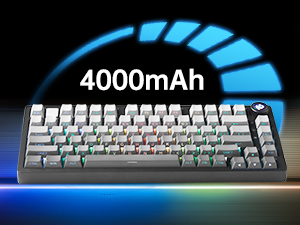
Figure 5: The keyboard is equipped with a 4000mAh battery.
4. Thiết lập và kết nối
The LEOBOG HI75C Pro offers three connection modes: wired, 2.4GHz wireless, and Bluetooth. Use the switch on the side of the keyboard to select your desired mode.
4.1 kết nối có dây
- Ensure the mode switch on the side of the keyboard is set to the wired (USB-C) position.
- Connect the provided USB-C cable to the keyboard and to an available USB port on your computer.
- Bàn phím sẽ tự động được nhận dạng và sẵn sàng sử dụng.
4.2 Kết nối không dây 2.4 GHz
- Ensure the mode switch on the side of the keyboard is set to the 2.4GHz wireless position.
- Cắm đầu thu USB 2.4GHz vào cổng USB có sẵn trên máy tính của bạn.
- Bàn phím sẽ tự động kết nối. Nếu không, hãy nhấn FN + ~ để bắt đầu ghép nối.
4.3 Kết nối Bluetooth 5.0
- Ensure the mode switch on the side of the keyboard is set to the Bluetooth position.
- Trên thiết bị của bạn (PC, Mac, Android, iOS), hãy bật Bluetooth và tìm kiếm các thiết bị mới.
- Nhấn và giữ Fn + 1, Fn + 2, hoặc Fn + 3 for 3-5 seconds to enter pairing mode for BT1, BT2, or BT3 respectively. The indicator light will flash.
- Select "LEOBOG HI75C Pro" from the list of available Bluetooth devices on your device.
- Once connected, the indicator light will stop flashing. You can switch between paired Bluetooth devices using FN + 1/2/3.

Figure 6: The keyboard supports Type-C wired, 2.4GHz wireless, and Bluetooth connections.
Video 1: Official LEOBOG overview of the HI75C Pro Mechanical Gaming Keyboard, showcasing thiết kế và tính năng của nó.
5. Hoạt động
5.1 Đèn nền RGB
The keyboard features extensive RGB backlighting with 17 preset lighting effects. Additionally, it offers 10 music rhythm RGB lighting modes that synchronize with audio output. You can adjust lighting effects and brightness using the multi-functional knob or dedicated key combinations. To turn off the lights, use the knob in game mode.
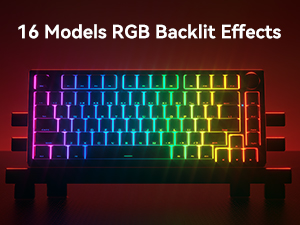
Figure 7: The keyboard offers 16 models of RGB backlit effects.
5.2 Dual-Mode Knob Control
The multi-functional knob allows for quick adjustments based on the selected mode:
- Chế độ chuyển đổi: Press and hold the knob to toggle between Office Mode and Game Mode.
- Chế độ văn phòng: When the indicator light is continuously on, the keyboard is in office mode. Rotate the knob to adjust the system volume.
- Chế độ chơi: When the indicator light is breathing, the keyboard is in game mode. Rotate the knob to adjust the lighting brightness.

Figure 8: The multi-functional knob for volume and lighting control.
5.3 Công tắc có thể hoán đổi nóng
The LEOBOG HI75C Pro supports hot-swappable 3-pin/5-pin mechanical switches, allowing you to easily change switches without soldering. This feature enables customization of typing feel and sound.

Figure 9: The keyboard features hot-swappable switches for customization.
6. Bảo trì
6.1 Vệ sinh
Để duy trì hiệu suất và vẻ ngoài tối ưu, hãy thường xuyên vệ sinh bàn phím:
- Hãy ngắt kết nối bàn phím khỏi tất cả các nguồn điện trước khi vệ sinh.
- Sử dụng một miếng vải mềm, không xơ vải lau nhẹampDùng nước hoặc dung dịch tẩy rửa nhẹ để lau sạch các phím và vỏ máy.
- Để vệ sinh sâu hơn, hãy sử dụng dụng cụ tháo nắp phím được cung cấp để tháo nắp phím và vệ sinh bên dưới bằng khí nén hoặc bàn chải nhỏ.
- Hãy đảm bảo bàn phím hoàn toàn khô ráo trước khi kết nối lại.
6.2 Thay thế keycap và switch
Thiết kế có thể hoán đổi nóng cho phép thay thế dễ dàng các phím bấm và công tắc:
- Sử dụng dụng cụ tháo nắp phím được cung cấp để nhẹ nhàng tháo các nắp phím.
- Use a switch puller (not included, but often comes with replacement switches) to carefully remove switches. Grip the switch firmly and pull straight up.
- Align the pins of the new switch with the holes on the PCB and press down gently until it clicks into place. Ensure pins are not bent.
- Place the desired keycap onto the new switch stem.
KHAI THÁC. Xử lý sự cố
7.1 Các vấn đề về kết nối
- Không có kết nối: Ensure the mode switch on the side of the keyboard is set correctly for wired, 2.4GHz, or Bluetooth.
- 2.4GHz Disconnection: Re-plug the USB receiver. Try pairing again by pressing FN + ~.
- Ngắt kết nối Bluetooth: Ensure Bluetooth is enabled on your device. Re-enter pairing mode on the keyboard (FN + 1/2/3) and re-select the keyboard on your device.
- Sự can thiệp: Di chuyển bàn phím đến gần thiết bị thu/thiết bị hơn hoặc tránh xa các thiết bị không dây khác có thể gây nhiễu.
7.2 Phần mềm và Firmware
For advanced customization, macro programming, and firmware updates, please visit the official LEOBOG website or authorized distributors' websites. Ensure you download the correct software/firmware version specifically for the LEOBOG HI75C Pro model to avoid compatibility issues.
7.3 Đèn RGB không hoạt động
- Check if the keyboard is in Game Mode, where the knob controls brightness. Rotate the knob to increase brightness.
- Ensure the battery is sufficiently charged if using wireless mode.
- If using software, verify that lighting effects are enabled and configured correctly.
8. Thông số kỹ thuật
| Tính năng | Chi tiết |
|---|---|
| Số hiệu mẫu | HI75C PRO |
| Kích thước sản phẩm | 12.97 x 5.35 x 1.74 inch |
| Trọng lượng sản phẩm | 3.41 pound |
| Công nghệ kết nối | Bluetooth, USB-C, Wi-Fi 2.4GHz |
| Mô tả bàn phím | Cơ khí |
| Thiết bị tương thích | Máy chơi game, Máy tính xách tay, PC, Điện thoại thông minh, Máy tính bảng |
| Tính năng đặc biệt | Customizable Display Keys, Ergonomic, Hot-Swappable, Hotkeys and Media Keys, Programmable Keys |
| Đèn nền bàn phím | RGB |
| Ắc quy | 1. Cần có pin (đã bao gồm), 4000mAh |
9. Bảo hành và Hỗ trợ
LEOBOG provides a Bảo hành 2 năm for the HI75C Pro Mechanical Wireless Keyboard, covering manufacturing defects from the date of purchase. For warranty claims, technical assistance, or product inquiries, please contact LEOBOG customer support through their official webtrang web hoặc nhà bán lẻ nơi sản phẩm được mua.

Figure 10: LEOBOG customer service is available for support.