
1. Giới thiệu
This manual provides essential instructions for the safe and efficient use of your Meizu Note 21 Pro smartphone. Please read this manual thoroughly before operating the device and retain it for future reference.
2. Có gì trong hộp
- Meizu Note 21 Pro Smartphone
- Bộ đổi nguồn
- (Other accessories such as USB cable, SIM ejector tool, and documentation may vary by region.)
3. Bố cục thiết bị
Familiarize yourself with the physical components of your Meizu Note 21 Pro.
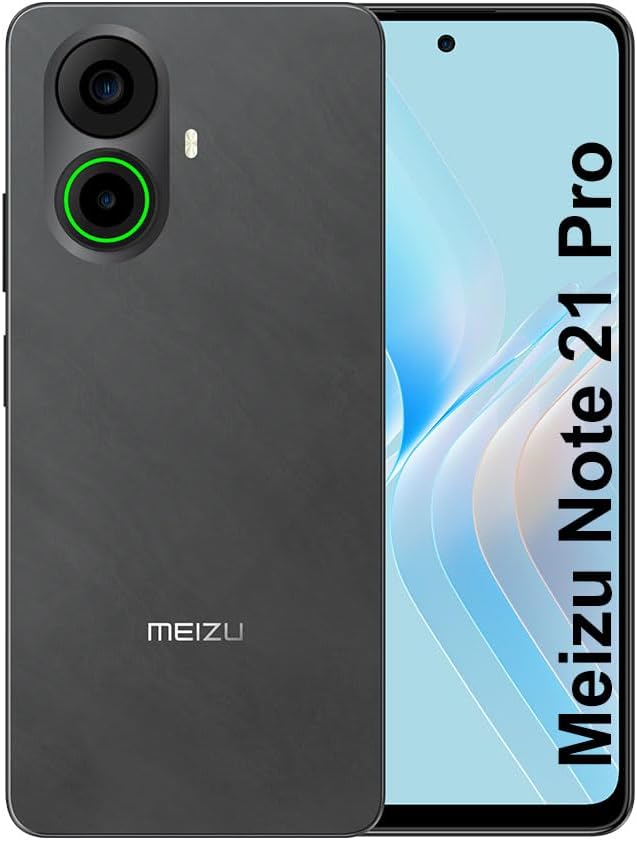
Hình ảnh 3.1: Phía trước và phía sau view of the Meizu Note 21 Pro. The front displays the screen with a punch-hole camera. The rear shows the dual camera module with a green accent ring on one lens, a flash, and the "MEIZU" logo at the bottom.
- Màn hình phía trước: 6.78-inch FHD+ screen with a 120Hz refresh rate.
- Camera trước: Nằm ở phía trên trung tâm của màn hình.
- Camera sau: Dual camera system, including a 64MP main camera.
- Cảm biến vân tay bên hông: Integrated for secure access.
- Cổng USB: Để sạc và truyền dữ liệu.
- Giắc cắm âm thanh 3.5 mm: Đối với tai nghe.
- Khay thẻ SIM/MicroSD: Supports Dual Nano SIM and MicroSD cards.
4. Thiết lập
4.1. Lắp thẻ SIM và thẻ MicroSD
- Xác định vị trí khay thẻ SIM ở bên cạnh thiết bị của bạn.
- Đưa dụng cụ đẩy SIM vào lỗ nhỏ bên cạnh khay và đẩy nhẹ cho đến khi khay bật ra.
- Đặt thẻ Nano SIM và/hoặc thẻ MicroSD vào các khe cắm được chỉ định trên khay. Đảm bảo các điểm tiếp xúc mạ vàng hướng xuống dưới.
- Cẩn thận lắp lại khay vào thiết bị cho đến khi khớp vào đúng vị trí.
4.2. Bật nguồn và thiết lập ban đầu
- Press and hold the Power button until the Meizu logo appears.
- Làm theo lời nhắc trên màn hình để chọn ngôn ngữ, kết nối với mạng Wi-Fi và thiết lập tài khoản Google của bạn.
- During setup, you will be guided to configure security features such as a PIN, pattern, or password.
4.3. Fingerprint Recognition Setup
- Điều hướng đến Cài đặt > Bảo mật và quyền riêng tư > Mở khóa bằng vân tay.
- Follow the on-screen instructions to register your fingerprint by repeatedly touching the side-mounted sensor.
- Hãy đảm bảo ngón tay của bạn che phủ toàn bộ khu vực cảm biến trong quá trình đăng ký để đạt hiệu quả tối ưu.
5. Vận hành thiết bị của bạn
5.1. Hiển thị và Điều hướng
- The 6.78-inch FHD+ display operates at a 120Hz refresh rate for smooth visuals.
- Navigate the Android 14 operating system using touch gestures: tap, swipe, pinch-to-zoom.
- Access quick settings by swiping down from the top of the screen.
5.2. Chức năng của máy ảnh
- Mở ứng dụng Camera từ màn hình chính hoặc ngăn kéo ứng dụng.
- The rear camera system features a 64MP main sensor for high-resolution photos and a 2MP depth-of-field camera for portrait effects.
- Camera trước 13MP phù hợp để chụp ảnh selfie và gọi video.
- Tap on the screen to focus, and use the on-screen shutter button to capture images. Explore various modes like Portrait, Night, and Pro within the camera app.
5.3. Hiệu suất và lưu trữ
- The MediaTek G99 Octa Core processor ensures efficient performance for applications and multitasking.
- The device comes with 256GB of internal storage and 8GB of RAM.
- Storage can be expanded using a MicroSD card (sold separately).
5.4. Pin và Sạc
- The Meizu Note 21 Pro is equipped with a 5000mAh battery.
- Use the provided Power Adapter for 30W fast charging.
- To charge, connect the USB cable to the phone's USB port and the power adapter, then plug the adapter into a wall outlet.
5.5. Kết nối
- 4G LTE: Supports various LTE FDD and TDD bands for cellular data. Note: This international version works on T-Mobile in the USA and globally with other carriers.
- Wi-Fi 5: Kết nối với mạng không dây để truy cập Internet.
- Bluetooth: Kết hợp với các phụ kiện không dây như tai nghe và loa.
- NFC: Dùng để thanh toán không tiếp xúc và ghép nối nhanh với các thiết bị tương thích.
- GPS: Dùng cho dịch vụ định vị và điều hướng.
6. Bảo trì
- Vệ sinh: Dùng vải mềm, không xơ để lau màn hình và thân thiết bị. Tránh sử dụng hóa chất mạnh hoặc vật liệu mài mòn.
- Chăm sóc pin: Avoid extreme temperatures. Do not fully discharge the battery frequently. For optimal battery longevity, keep the charge between 20% and 80%.
- Cập nhật phần mềm: Thường xuyên kiểm tra và cài đặt các bản cập nhật hệ thống để đảm bảo hiệu suất và bảo mật tối ưu. Truy cập vào... Cài đặt > Hệ thống > Cập nhật hệ thống.
KHAI THÁC. Xử lý sự cố
| Vấn đề | Giải pháp khả thi |
|---|---|
| Thiết bị không bật nguồn | Ensure the battery is charged. Connect the device to the power adapter and try again. If unresponsive, press and hold the Power button for 10-15 seconds to force a restart. |
| Tín hiệu mạng kém | Check if the SIM card is correctly inserted. Move to an area with better network coverage. Restart the device. Verify with your carrier that your plan is active. |
| Ứng dụng chạy chậm hoặc bị lỗi. | Đóng các ứng dụng nền. Xóa bộ nhớ đệm ứng dụng (Cài đặt > Ứng dụng > chọn ứng dụng > Lưu trữ và bộ nhớ đệm > Xóa bộ nhớ đệmKhởi động lại thiết bị. Đảm bảo có đủ dung lượng lưu trữ. |
| Cảm biến vân tay không hoạt động | Ensure your finger and the sensor are clean and dry. Re-register your fingerprint in settings. |
8. Thông số kỹ thuật
- Người mẫu: Meizu Note 21 Pro
- Hệ điều hành: Android 14
- Bộ xử lý: MediaTek G99 Octa Core (2.2GHz)
- Trưng bày: 6.78 inches FHD+ (1080 x 2160 resolution), 120Hz Refresh Rate
- ĐẬP: 8GB
- Bộ nhớ trong: 256GB
- Camera sau: Camera chính 64MP + Camera độ sâu 2MP
- Camera trước: 13MP
- Ắc quy: Pin 5000mAh, sạc nhanh 30W
- Kết nối: 4G LTE (FDD:1,2,3,4,5,7,8,12,17,18,19,20,26,28,66; TDD:38,40,41), 3G WCDMA, 2G Quad Band, Wi-Fi 5, Bluetooth, NFC, GPS
- Jack âm thanh: 3.5mm
- Kích thước: 6.64 x 2.96 x 0.33 inch
- Cân nặng: 1.1 pound
9. Bảo hành và Hỗ trợ
For warranty information and technical support, please refer to the warranty card included with your product or visit the official Meizu webtrang web. Giữ lại bằng chứng mua hàng để yêu cầu bảo hành.
For further assistance, you may contact Meizu customer service through their official channels.