
SAMSUNG SM-R630
Hướng dẫn sử dụng Samsung Galaxy Buds3 Pro
Mô hình: SM-R630
Giới thiệu
The Samsung Galaxy Buds3 Pro are advanced wireless earbuds designed to deliver an exceptional audio experience. They feature a comfortable, angled design, highlighted Light Blades, and a modern transparent charging case. Equipped with dual drivers (woofer and planar tweeter), they provide a wide spectrum of balanced sound. The integration of Galaxy AI enhances adaptive noise cancellation, sound optimization, and real-time language translation, offering a truly immersive and intelligent listening experience.
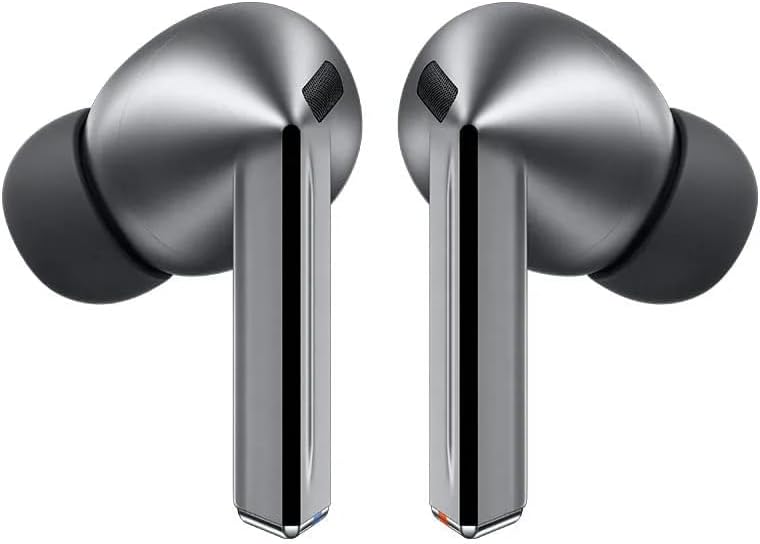
Image: Samsung Galaxy Buds3 Pro earbuds and their charging case.
Cài đặt
1. Sạc ban đầu
Before first use, ensure your Galaxy Buds3 Pro and their charging case are fully charged. Place the earbuds into the charging case. Connect the USB Type-C cable to the charging case and a power source. The indicator light on the case will show charging status.
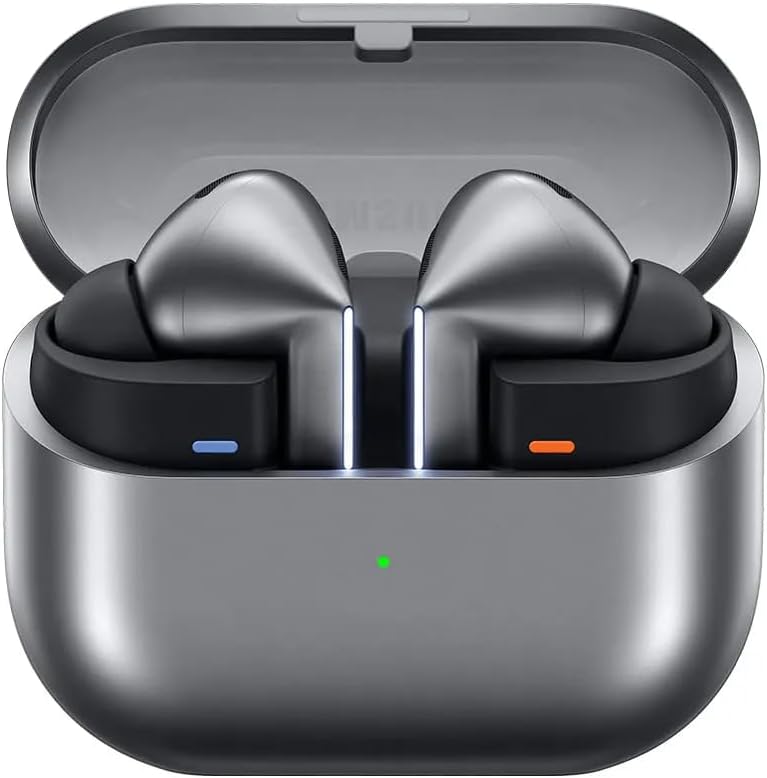
Image: Galaxy Buds3 Pro earbuds inside their open charging case, showing the charging indicator light.
2. Ghép nối với thiết bị của bạn
- Mở hộp sạc khi tai nghe vẫn còn bên trong. Tai nghe sẽ tự động chuyển sang chế độ ghép nối.
- On your Samsung Galaxy smartphone or other compatible device, go to Bluetooth settings.
- Select "Galaxy Buds3 Pro" from the list of available devices to connect.
- Làm theo bất kỳ lời nhắc nào trên màn hình để hoàn tất quá trình ghép nối.
For optimal experience, download the Samsung Wearable app on your smartphone to customize settings and access advanced features.
Hướng dẫn sử dụng
Điều khiển cảm ứng
The Galaxy Buds3 Pro feature intuitive touch controls on the earbuds for managing playback, calls, and other functions. You can customize these gestures via the Samsung Wearable app.
- Một lần nhấn: Phát/Tạm dừng nhạc, Trả lời/Kết thúc cuộc gọi.
- Nhấn đúp: Next track, Answer/End call.
- Nhấn ba lần: Bài hát trước.
- Chạm và giữ: Activate Active Noise Cancellation (ANC) / Ambient Sound mode, Decline call, or activate a custom function (e.g., voice assistant).

Image: Visual guide to touch and pinch controls on the Galaxy Buds3 Pro, including swipe for volume and pinch for play/pause or app launch.
Khử tiếng ồn chủ động (ANC) và Âm thanh xung quanh
The Galaxy Buds3 Pro offer intelligent Active Noise Cancellation (ANC) to block out distractions and an Ambient Sound mode to let you hear your surroundings. These modes can be toggled by touching and holding the earbuds or through the Samsung Wearable app. The Adaptive ANC feature, powered by Galaxy AI, analyzes your environment and adjusts the noise cancellation level automatically.

Image: The Galaxy Buds3 Pro adapting to different sound environments, illustrating the Adaptive Noise Control feature.
Tính năng AI của Galaxy
Leverage the power of Galaxy AI for enhanced audio and communication:
- Adaptive Equalizer/ANC: AI analyzes your ear shape and usage habits to precisely adjust sound and noise cancellation for an optimized listening experience.
- Dịch trực tiếp: When connected to a Galaxy AI-enabled smartphone, your Galaxy Buds3 Pro can interpret conversations in real-time, displaying translations on your phone and playing the interpreted audio through your earbuds. Simply touch and hold an earbud to activate listening mode during a conversation.
- Điều khiển bằng giọng nói: Control your audio settings hands-free with voice commands like "next song" or "increase volume."

Image: A smartphone screen displaying a live translation, with the Galaxy Buds3 Pro facilitating the audio interpretation.
Âm thanh 360
Experience immersive spatial sound with 360 Audio. This feature identifies the exact direction of sound as you move your head, providing a more vivid audio and visual experience, especially when watching content on compatible Samsung Galaxy devices and TVs.

Image: A person wearing Galaxy Buds3 Pro, immersed in a visual and auditory experience from a TV screen, illustrating 360 Audio.
BẢO TRÌ
Vệ sinh tai nghe của bạn
To maintain optimal sound quality and hygiene, regularly clean your Galaxy Buds3 Pro:
- Nhẹ nhàng lau sạch tai nghe và hộp sạc bằng vải mềm, khô và không xơ.
- Remove any earwax or debris from the earbud mesh and silicone tips using a small, soft brush or cotton swab.
- Đảm bảo các điểm tiếp xúc sạc trên cả tai nghe và hộp đựng đều sạch sẽ và khô ráo.
- Tránh sử dụng hóa chất mạnh, vật liệu mài mòn hoặc độ ẩm quá cao.
Chăm sóc pin
Để kéo dài tuổi thọ pin:
- Hãy sạc tai nghe thường xuyên, ngay cả khi không sử dụng liên tục.
- Tránh để thiết bị tiếp xúc với nhiệt độ quá cao.
- Bảo quản ở nơi khô ráo, thoáng mát.
Xử lý sự cố
Các vấn đề thường gặp và giải pháp
| Vấn đề | Giải pháp khả thi |
|---|---|
| Tai nghe không ghép nối | Ensure earbuds are charged. Place them in the case, close, then open to re-enter pairing mode. Check your device's Bluetooth settings. Restart your device. |
| Không có âm thanh hoặc âm lượng nhỏ | Check device volume. Ensure earbuds are properly seated in your ears. Clean earbud mesh. Disconnect and reconnect Bluetooth. |
| ANC không hoạt động hiệu quả | Ensure earbuds fit snugly. Adjust ANC settings in the Samsung Wearable app. Clean microphones on the earbuds. |
| Tai nghe thường xuyên bị ngắt kết nối | Ensure you are within Bluetooth range of your device. Avoid interference from other wireless devices. Update earbud firmware via the Samsung Wearable app. |
If issues persist, refer to the Samsung support webtrang web hoặc liên hệ với bộ phận chăm sóc khách hàng để được hỗ trợ thêm.
Thông số kỹ thuật
| Tính năng | Chi tiết |
|---|---|
| Tên mẫu | Galaxy Buds3 Pro (SM-R630) |
| Kiểm soát tiếng ồn | Chống ồn chủ động |
| Công nghệ kết nối | Không dây (Bluetooth) |
| Các thành phần bao gồm | USB Type-C Cable, Ear Tips Set (S/M/L), Wireless Charging Case, Earbuds (Left & Right), Quick Start Guide |
| Vật liệu | Nhựa |
| Mức độ chống nước | Không thấm nước |
| Thành phần pin | Pin Lithium-Ion |
| Trọng lượng sản phẩm | 180 gam |
| Kích thước | 4.4 x 9.6 x 8.75cm |
| Vị trí tai | Trong tai |
| Trở kháng | 25.75 Ohm |
Bảo hành và Hỗ trợ
Bảo hành của nhà sản xuất
The Samsung Galaxy Buds3 Pro comes with a Bảo hành 12 tháng của nhà sản xuất Bảo hành kể từ ngày mua, bao gồm các lỗi về vật liệu và chất lượng sản phẩm. Vui lòng giữ lại hóa đơn mua hàng để làm thủ tục bảo hành.
Hỗ trợ khách hàng
Để được hỗ trợ kỹ thuật, dịch vụ hoặc thông tin bổ sung, vui lòng truy cập trang hỗ trợ chính thức của Samsung website or contact Samsung customer service in your region. You can find contact details and FAQs on the Samsung webđịa điểm.
Tài nguyên trực tuyến:
Tài liệu liên quan - SM-R630
 |
Hướng dẫn sử dụng tai nghe Samsung Galaxy Buds3/Buds3 Pro Hướng dẫn sử dụng tai nghe Samsung Galaxy Buds3 và Galaxy Buds3 Pro, bao gồm thiết lập, sử dụng, tính năng và khắc phục sự cố. |
 |
Hướng dẫn sử dụng Samsung Galaxy Buds3 & Buds3 Pro Hướng dẫn sử dụng toàn diện cho tai nghe không dây Samsung Galaxy Buds3 và Galaxy Buds3 Pro, bao gồm thiết lập, tính năng, sử dụng ứng dụng, bảo trì và khắc phục sự cố. Tìm hiểu về kết nối Bluetooth, tính năng khử tiếng ồn và nhiều hơn nữa. |
 |
Hướng dẫn sử dụng Samsung Galaxy Buds3 & Buds3 Pro: Cài đặt, Tính năng và Khắc phục sự cố Hướng dẫn sử dụng toàn diện cho tai nghe không dây Samsung Galaxy Buds3 và Galaxy Buds3 Pro. Tìm hiểu về cách thiết lập, tính năng thiết bị, ứng dụng Galaxy Wearable, sạc, bảo trì và các biện pháp phòng ngừa an toàn. |
 |
Hướng dẫn sử dụng Samsung Galaxy Buds3 / Buds3 Pro A comprehensive user guide for the Samsung Galaxy Buds3 and Galaxy Buds3 Pro, covering setup, usage, charging, and troubleshooting. |
 |
Samsung Galaxy Buds3 | Buds3 Pro User Guide Comprehensive user guide for Samsung Galaxy Buds3 and Buds3 Pro wireless earbuds, covering setup, device layout, charging, water resistance, status indicators, wireless power sharing, earbud lights, fit, coupling, connection, controls, music and call features, Galaxy Wearable app functions, and legal information. |
 |
Samsung Galaxy Buds3 & Buds3 Pro User Guide: Setup, Features, and Operation Comprehensive user guide for Samsung Galaxy Buds3 and Galaxy Buds3 Pro wireless earbuds, covering setup, connection, features, the Galaxy Wearable app, and troubleshooting. |
Ask a question about this manual
Ask about setup, troubleshooting, compatibility, parts, safety, or missing instructions. Manuals+ will review the question and use this page’s manual context to help answer it.