
ATOMSTACK A6 Pro
Hướng dẫn sử dụng máy khắc laser ATOMSTACK A6 Pro
Model: A6 Pro | Thương hiệu: ATOMSTACK
1. Giới thiệu
The ATOMSTACK A6 Pro is a high-performance laser engraving and cutting machine designed for precision and ease of use.Featuring a 6W ultra-high performance laser module and advanced blue-ray laser point compression technology,it offers exceptional cutting ability and fine engraving detail. Its integrated design ensures quick setup,making it suitable for various creative and professional applications.

Hình 1.1: The ATOMSTACK A6 Pro Laser Engraving Machine, showcasinVới thiết kế nhỏ gọn và tích hợp.
2. Thông tin và cảnh báo an toàn
CẢNH BÁO: Laser engraving machines emit powerful laser radiation. Improper use can cause serious injury, including eye damage and skin burns.Always adhere to the following safety guidelines:
- Bảo vệ mắt: Always wear appropriate laser safety goggles when operating the machine. Never look directly into the laser beam or its reflection.
- Thông gió: Operate the machine in a well-ventilated area to dissipate fumes and smoke produced during engraving and cutting. Consider an exhaust system.
- Nguy cơ cháy nổ: Gia công bằng laser có thể gây cháy các vật liệu dễ bắt lửa. Không được để máy hoạt động mà không có người giám sát. Luôn để sẵn bình chữa cháy ở gần đó.
- Khả năng tương thích của vật liệu: Only engrave or cut materials specified as safe for laser processing. Avoid materials that produce toxic fumes or can easily ignite.
- Trẻ em và vật nuôi: Giữ trẻ em và vật nuôi tránh xa máy trong quá trình vận hành.
- Nguồn điện: Use only the specified power adapter (AC 24V 5A) for the machine.
- Dừng khẩn cấp: Làm quen với vị trí và cách sử dụng nút dừng khẩn cấp.

Hình 2.1: Product information label including critical safety warnings regarding direct or scattered radiation.
3. Thiết lập và Cài đặt
The ATOMSTACK A6 Pro is designed for minimal setup, allowing you to start working quickly.
3.1 Tháo dỡ
- Cẩn thận lấy máy và tất cả các bộ phận ra khỏi bao bì.
- Verify that all parts are present according to the packing list (refer to your product's specific packing list).

Hình 3.1: The ATOMSTACK A6 Pro is designed for immediate use upon unboxing, requiring no complex assembly.
3.2 Initial Placement and Connection
- Place the machine on a stable, level, and non-flammable surface. Ensure adequate space around the machine for ventilation and operation.
- Kết nối bộ chuyển đổi nguồn vào máy và sau đó kết nối với ổ cắm điện phù hợp.
- Ensure the laser module is securely seated and the tank chain bundling for cables is properly aligned to prevent tangling.

Hình 3.2: The tank chain bundling system ensures smooth and tangle-free cable operation, enhancing machine longevity.
4. Hướng dẫn vận hành
The ATOMSTACK A6 Pro offers versatile engraving and cutting capabilities.
4.1 Cài đặt và Kết nối Phần mềm
The ATOMSTACK A6 Pro is compatible with Atomstack's self-developed PC software and supports various control methods.
- Download and install the latest version of Atomstack's PC software from the official website or use the provided mobile application.
- Connect the machine to your computer via USB or Wi-Fi (if supported by your model). For mobile app control, connect your device to the machine's hotspot.
- Ensure the software recognizes the machine before proceeding.
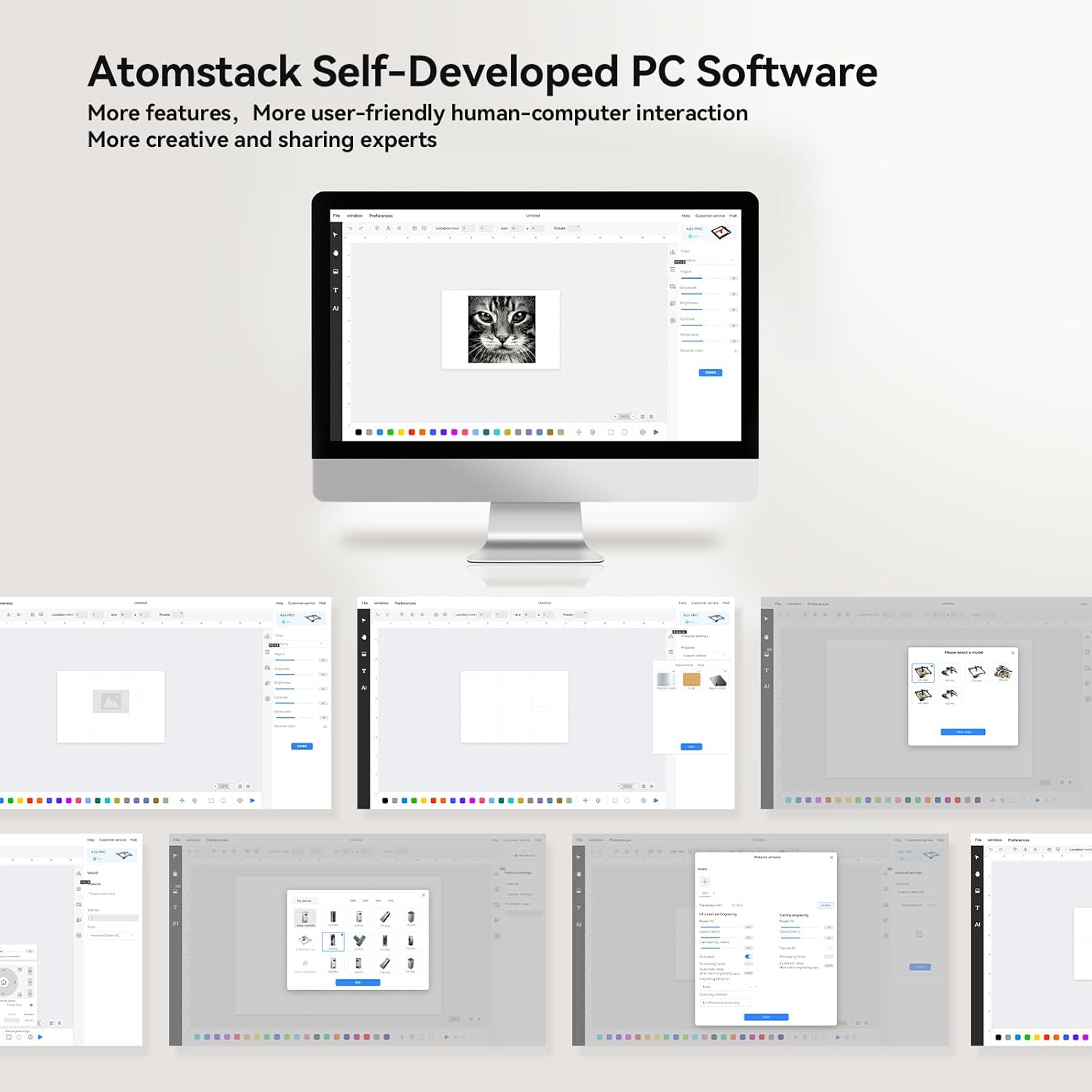
Hình 4.1: Quaview of the Atomstack self-developed PC software, designed for user-friendly interaction and creative projects.
4.2 Tập trung tia laser
The A6 Pro features a fixed focusing design for quick and accurate focusing.
- Place your material on the engraving bed.
- Adjust the laser module height according to the material thickness until the laser spot is at its smallest and sharpest point. This typically takes less than 10 seconds.
- For precise positioning, utilize the cross-positioning system for visual edge finding and object alignment.

Hình 4.2: The cross-positioning system aids in precise and horizontal engraving, allowing for quick and accurate focusing.
4.3 Khắc và Cắt
The A6 Pro is capable of engraving and cutting various materials with high precision.
- Chuẩn bị vật liệu: Ensure your material is clean and securely placed on the engraving bed.
- Design Import: Nhập hoặc tạo thiết kế của bạn ngay trong phần mềm.
- Cài đặt tham số: Adjust laser power, speed, and passes based on the material type and desired outcome. The 6W laser can cut through 3mm poplar wood, 3mm black acrylic, 3mm poplar plywood, and laser vinyl.
- Bắt đầu hoạt động: Khởi tạo quy trình khắc hoặc cắt từ phần mềm. Theo dõi chặt chẽ máy trong quá trình vận hành.

Hình 4.3: The ATOMSTACK A6 Pro is suitable for engraving and cutting a variety of materials including basswood, acrylic, pine wood, paulownia, bamboo, and leather.

Hình 4.4: The A6 Pro demonstrates significantly faster engraving speeds compared to traditional frame machines, enhancing work efficiency.
5. Bảo trì
Bảo trì thường xuyên sẽ đảm bảo tuổi thọ và hiệu suất tối ưu cho ATOMSTACK A6 Pro của bạn.
- Laser Module Cleaning: The non-clogging laser module is designed to resist lens pollution. However, periodic inspection and gentle cleaning of the laser lens with a suitable optical cleaner and lint-free cloth are recommended to maintain optimal laser performance.
- Vệ sinh đường ray: Keep the X-axis metal double guide rails clean and free of dust and debris to ensure smooth and precise movement.
- Vệ sinh chung: Wipe down the machine's exterior with a soft, dry cloth. Avoid using abrasive cleaners or solvents.
- Kiểm tra cáp: Periodically check the tank chain bundled cables for any signs of wear or damage.
KHAI THÁC. Xử lý sự cố
Phần này đề cập đến các vấn đề thường gặp mà bạn có thể gặp phải với ATOMSTACK A6 Pro.
| Vấn đề | Nguyên nhân có thể | Giải pháp |
|---|---|---|
| Máy không lên nguồn. | Power cable not connected; faulty power adapter; power switch off. | Ensure power cable is securely connected. Check power outlet. Verify power switch is in the ON position. |
| Tia laser không hoạt động hoặc hoạt động yếu. | Laser module not properly focused; dirty lens; incorrect software settings; laser module malfunction. | Re-focus the laser. Clean the laser lens. Check laser power settings in software. Contact support if issue persists. |
| Engraving/cutting results are inaccurate or distorted. | Loose belts/rails; material not flat; incorrect software settings; vibrations. | Check for any loose components or debris on the guide rails. Ensure material is flat and secured. Verify design and parameter settings in software. Minimize external vibrations. |
| Software not connecting to machine. | Incorrect USB port; driver issues; Wi-Fi connection problems. | Try a different USB port. Reinstall drivers. For Wi-Fi, ensure you are connected to the machine's hotspot. Restart both machine and computer/device. |
7. Thông số kỹ thuật
| Tính năng | Chi tiết |
|---|---|
| Người mẫu | A6 chuyên nghiệp |
| Thương hiệu | ATOMSTACK |
| Công suất Laser | 6W (Công suất quang học) |
| Kích thước điểm laser | 0.05 x 0.05 mm (Ultra-fine) |
| Khu vực khắc | 370 x 310mm |
| Độ chính xác cơ học | Lên đến 0.02 mm |
| Tốc độ khắc tối đa | 600 mm/giây |
| Đầu vào nguồn điện | Điện áp xoay chiều 24V 5A |
| Kích thước sản phẩm | 60 x 60 x 17cm |
| Trọng lượng sản phẩm | 8.26kg |
| Bo mạch chủ | Self-developed 32-bit ESP32 motherboard |
| Supported Materials (Cutting) | 3mm Poplar Wood, 3mm Black Acrylic, 3mm Poplar Plywood, Laser Vinyl |
| Supported Materials (Engraving) | Basswood, Acrylic, Pine wood, Paulownia, Bamboo, Leather, etc. |

Hình 7.1: The ATOMSTACK A6 Pro features an upgraded self-developed 32-bit motherboard for faster data processing.
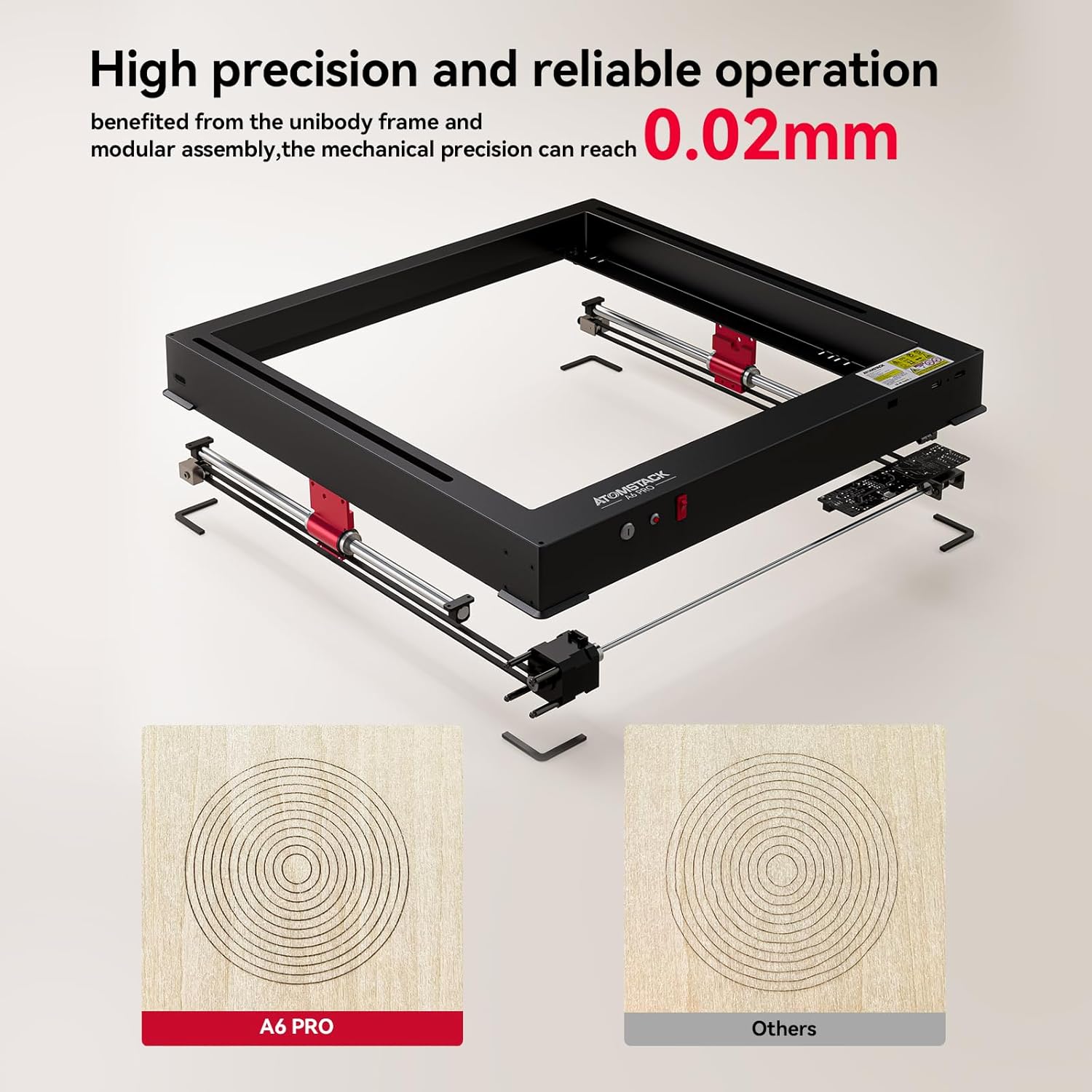
Hình 7.2: The unibody frame and modular assembly contribute to a mechanical precision of up to 0.02mm.
8. Bảo hành và Hỗ trợ
ATOMSTACK provides customer support and warranty services for its products.
- Thông tin bảo hành: Please refer to the warranty card included with your product or visit the official ATOMSTACK webtrang web để biết các điều khoản và điều kiện bảo hành chi tiết.
- Hỗ trợ kỹ thuật: For technical assistance, troubleshooting beyond this manual, or spare parts inquiries, please contact ATOMSTACK customer support.
- Email liên hệ: support@atomstack.com
- Nhà sản xuất: Shenzhen Atomstack Technologies Co., Ltd.
- Địa chỉ: 17th Floor, Building 3A, Phase II, Intelligent Park, No.76.Baohe Avenue, Baolong Street, Longgang Dist., Shenzhen, 518172China.
Ask a question about this manual
Ask about setup, troubleshooting, compatibility, parts, safety, or missing instructions. Manuals+ will review the question and use this page’s manual context to help answer it.