
Giới thiệu
Cảm ơn bạn đã muaasing the BANDAI DX Zillion Driver Transformation Belt. This manual provides essential information for the safe and proper use of your product. Please read it thoroughly before use and retain it for future reference.
Nội dung gói
- DX Zillion Driver Body: 1
- Transformation Card: 1
- Hướng dẫn sử dụng: 1
Cài đặt
1. Lắp đặt pin
The DX Zillion Driver requires 3 AA batteries (sold separately). Follow these steps to install them:
- Locate the battery compartment on the back of the Zillion Driver.
- Using a Phillips head screwdriver (not included), loosen the screw on the battery compartment cover.
- Tháo nắp ra.
- Insert 3 new AA batteries, ensuring the correct polarity (+/-) as indicated inside the compartment.
- Đậy nắp ngăn chứa pin lại và vặn chặt vít.
Ghi chú: Always use new batteries of the same type. Do not mix old and new batteries, or different types of batteries. Remove batteries if the product will not be used for an extended period.
2. Waist Size Adjustment
The Zillion Driver belt can be adjusted to fit waist sizes approximately 20.1 - 29.9 inches (51 - 76 cm). Adjust the belt straps on either side of the main unit to achieve a comfortable and secure fit.
Hướng dẫn sử dụng
1. Transformation to Kamen Rider Rigado
To transform into Kamen Rider Rigado, follow these steps:
- Touch the sensor located on the top of the Zillion Driver once. A transformation standby sound will activate.
- Insert and slash the included transformation card through the card slot. The transformation sound for Kamen Rider Rigado will activate, and the built-in 15 LEDs on the belt's front will light up with an animation.
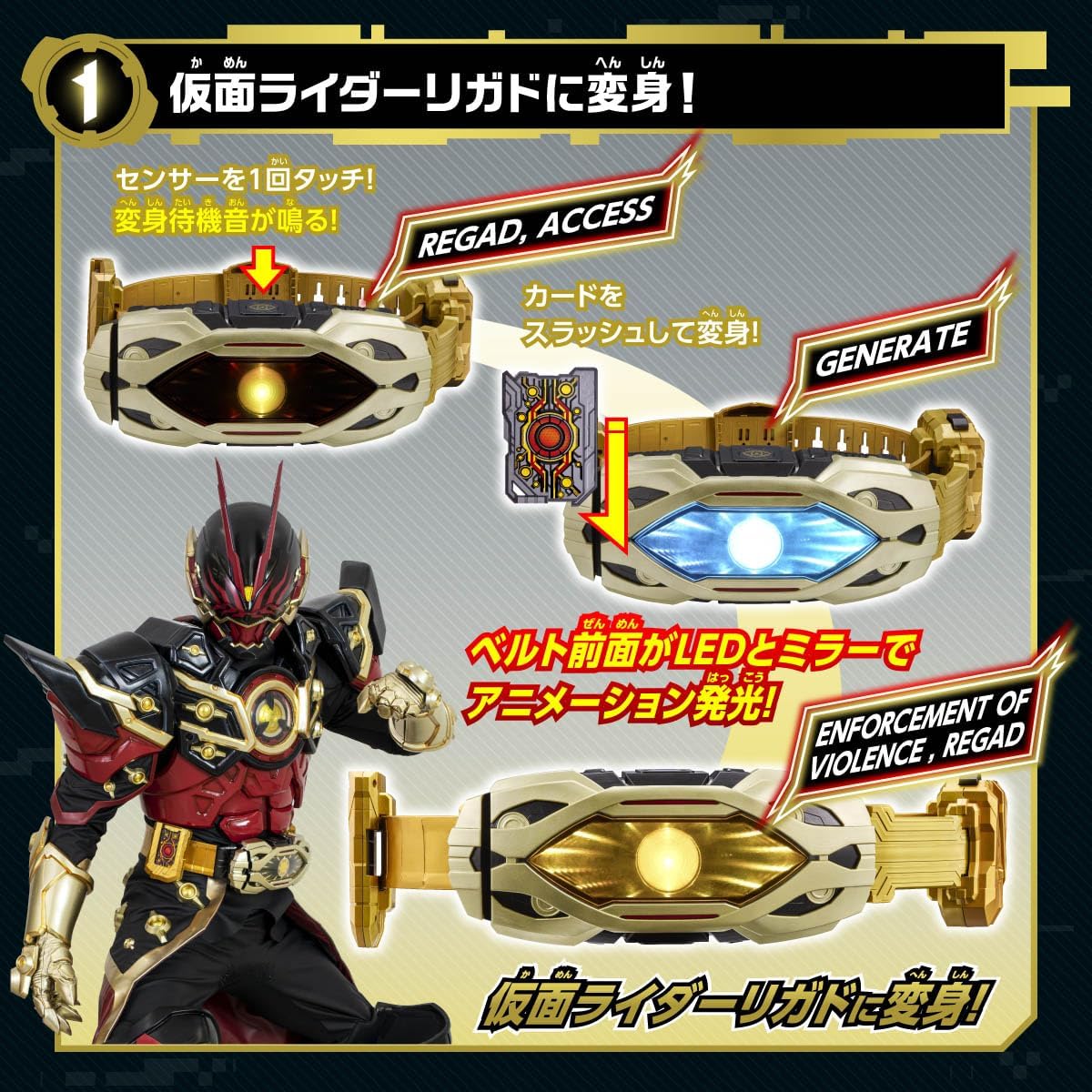
Hình 1: Illustration of the steps to transform into Kamen Rider Rigado. This includes touching the top sensor to activate the standby sound, then slashing the card to initiate the transformation sound and LED animation.
2. Transformation to Kamen Rider Rigado Omega
To transform into Kamen Rider Rigado Omega, follow these steps:
- Touch the switch on the side holder of the Zillion Driver once. A transformation standby sound will activate.
- Insert and slash the included transformation card through the card slot. The transformation sound for Kamen Rider Rigado Omega will activate, and the built-in 15 LEDs on the belt's front will light up with an animation.
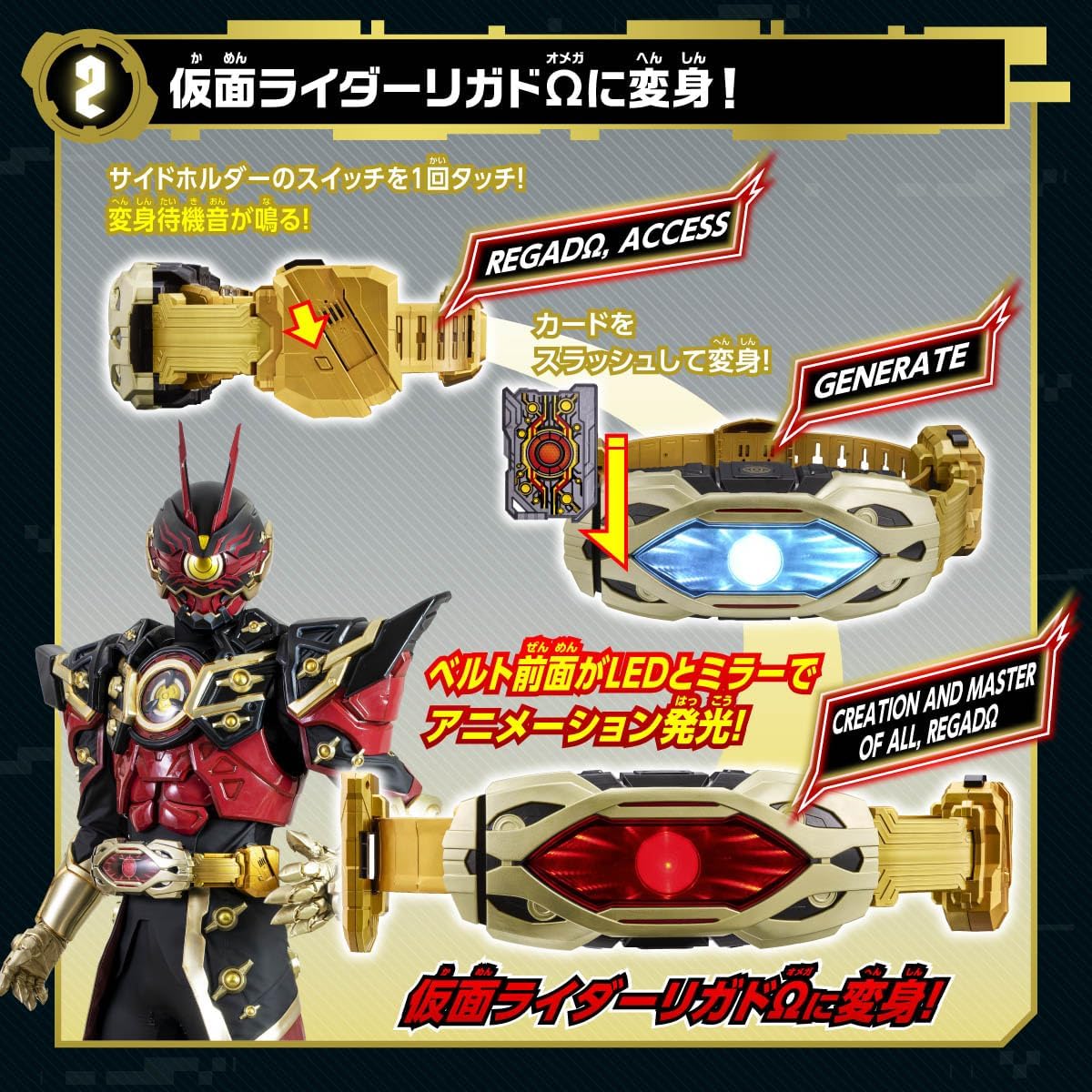
Hình 2: Illustration of the steps to transform into Kamen Rider Rigado Omega. This involves touching the side holder switch for standby, then slashing the card for transformation sound and LED effects.
3. Time Manipulation (Acceleration and Rebound)
After transformation, you can operate the switch on the side holder to activate time-related sound effects and LED animations:
- 1 Hoạt động: Activates acceleration sound effects and LED animation.
- 2 Operations: Activates time rebound sound effects and LED animation.
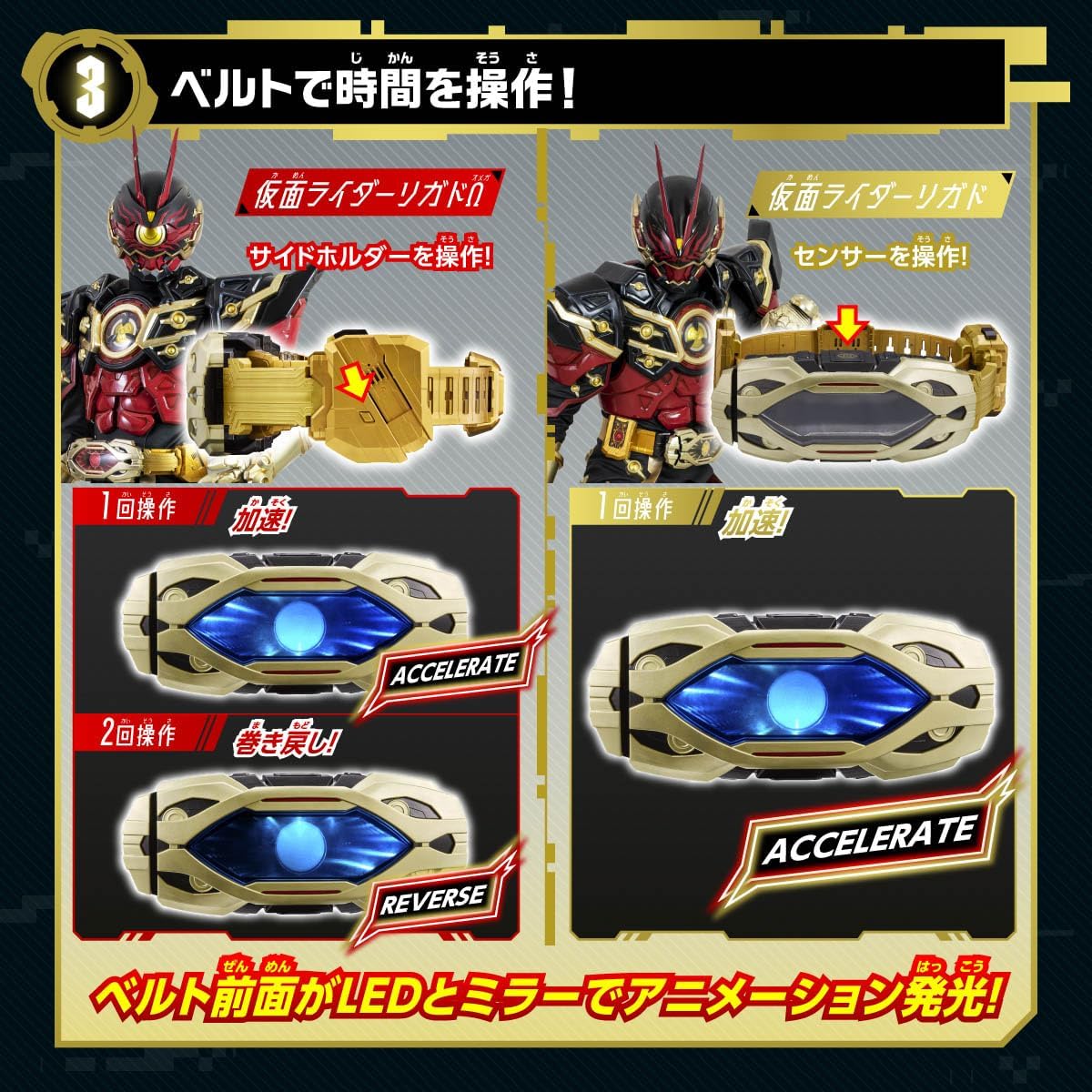
Hình 3: Visual guide for operating time manipulation. It shows how one operation triggers 'Accelerate' and two operations trigger 'Reverse' with corresponding LED animations.
4. Special Attacks via Card Slashing
After transformation, slashing the card will activate unique special attacks:
- 1 Slash: Activates a unique special animation and sound effect (e.g., "EXPUNGE").
- 2 Slashes: Activates a different special animation and sound effect (e.g., "DESTROY").
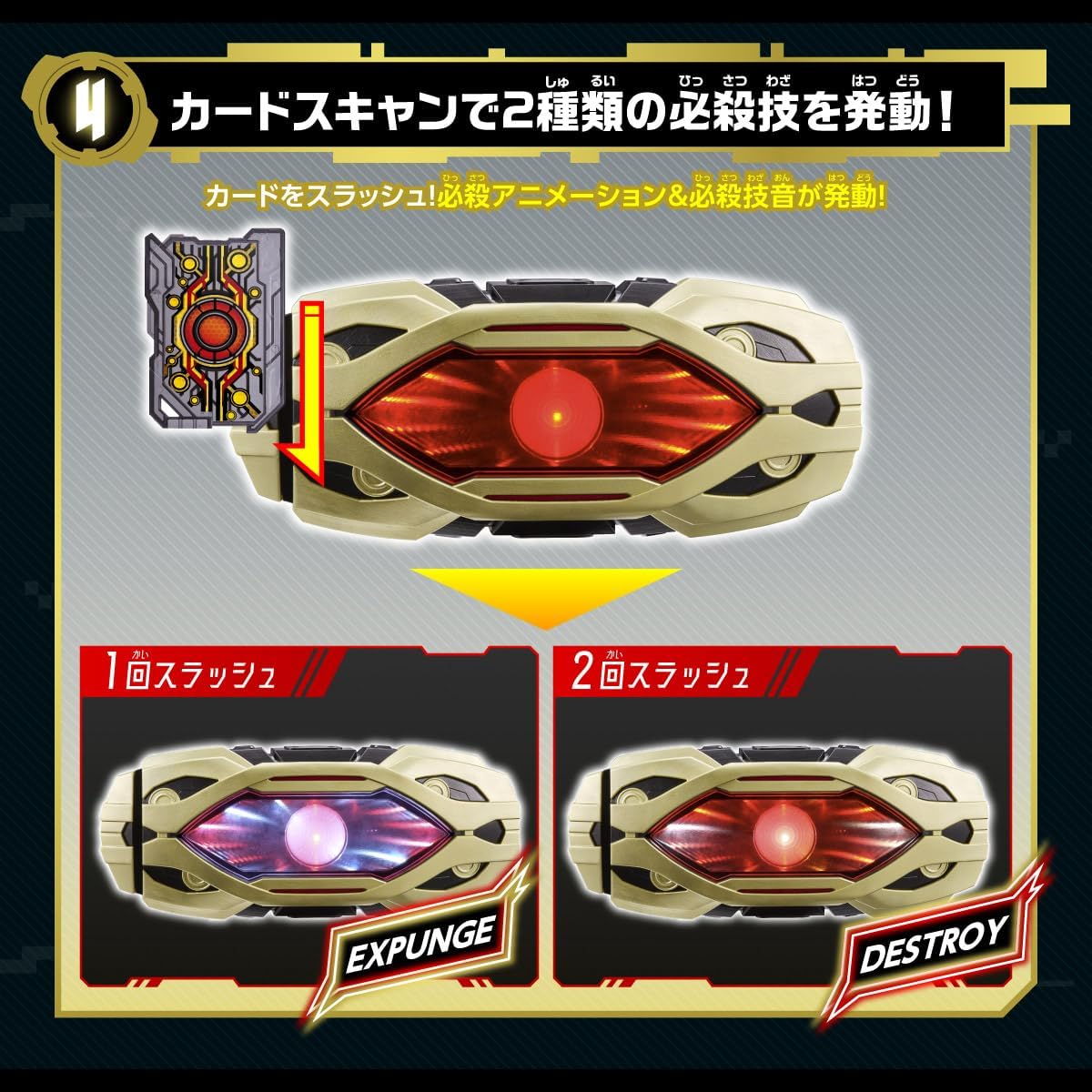
Hình 4: Demonstrates how slashing the card once or twice triggers different special attack animations and sounds, such as 'Expunge' and 'Destroy'.
5. Raise Buckle Recognition (Sold Separately)
The Zillion Driver can recognize various Raise Buckles (sold separately). Insert a Raise Buckle into the holder on the side of the belt. Each Raise Buckle will be individually recognized, activating a unique standby sound and special trick with its own LED animation.

Hình 5: Illustrates the process of inserting a Raise Buckle (e.g., Magnum) into the side holder, which triggers a unique standby sound and LED animation for a special trick.
6. Legend Raise Buckle Recognition (Sold Separately)
Similar to standard Raise Buckles, the Zillion Driver also recognizes Legend Raise Buckles (sold separately). Insert a Legend Raise Buckle into the side holder to activate its specific standby sound and LED animation.

Hình 6: Shows the recognition of a Legend Raise Buckle, such as 'Survive Infinity', when inserted into the side holder, activating its unique sounds and LED effects.
7. Character Quotes
The Zillion Driver includes recorded quotes from Git (actor: Ruduji Sato) and Suel (voice actor: Shinja Matsuoka). These quotes can be activated by operating specific buttons on the main unit. Refer to the detailed instructions on the product packaging for exact button locations and sequences.

Hình 7: Depicts the feature for activating character quotes from Git and Suel, highlighting their images and example quotes.
BẢO TRÌ
Vệ sinh
To clean the DX Zillion Driver, wipe it gently with a dry, soft cloth. Do not use abrasive cleaners, solvents, or water, as these can damage the electronic components and finish.
Kho
Store the product in a cool, dry place away from direct sunlight and extreme temperatures. If the product will not be used for an extended period, remove the batteries to prevent leakage and damage.
Xử lý sự cố
- Không có âm thanh hoặc ánh sáng: Check if the batteries are installed correctly and are not depleted. Replace with new batteries if necessary.
- Thao tác không chính xác: Ensure that cards and buckles are inserted correctly and that buttons/sensors are pressed firmly. Refer to the operating instructions for specific sequences.
- Sản phẩm bị lỗi: If the product continues to malfunction after checking the above, discontinue use and contact customer support.
Thông số kỹ thuật
| Tính năng | Chi tiết |
|---|---|
| Tên mẫu | DX Zillion Driver |
| Thương hiệu | BANAI |
| Product Materials (Driver) | ABS, PC, PA, PP |
| Product Materials (Card) | PC, PET, PP |
| Driver Dimensions (H x W x D) | Approx. 4.3 x 11.0 x 11.4 inches (280 x 290 mm) |
| Adjustable Waist Size | Approx. 20.1 - 29.9 inches (51 - 76 cm) |
| Card Dimensions (H x W x D) | Xấp xỉ. 3.4 x 2.4 x 0.2 inch (87 x 60 x 4 mm) |
| Độ tuổi khuyến nghị | 3 tuổi trở lên |
| Yêu cầu về pin | AA x 3 (sold separately) |
Thông tin bảo hành
For detailed warranty information, please refer to the product packaging or the official BANDAI webtrang web. Giữ lại biên lai mua hàng làm bằng chứng mua hàng.
Hỗ trợ khách hàng
If you have any questions, require assistance, or encounter issues not covered in this manual, please contact BANDAI customer service. Contact details can typically be found on the product packaging or the official BANDAI webđịa điểm.