
CÁ MẬP TẤN CÔNG M71
Hướng dẫn sử dụng bàn phím cơ không dây ATTACK SHARK M71
Mẫu: M71
Giới thiệu
This manual provides detailed instructions for the setup, operation, and maintenance of your ATTACK SHARK M71 75% TKL Wireless Mechanical Keyboard. Please read this guide thoroughly to ensure proper use and to maximize your keyboard's performance and lifespan.

Image: The ATTACK SHARK M71 keyboard showcasing its 68% layout and key features like aluminum alloy body, three-mode connection, and RGB backlight.
Nội dung gói
Xác minh rằng tất cả các mục đều có trong gói hàng:
- ATTACK SHARK M71 Wireless Mechanical Keyboard
- Cáp Type-C
- Bộ thu không dây 2.4G
- Keycap Puller / Switch Puller (Two-in-one tool)
- Complimentary 61 additional PBT OEM keycaps (different color layout)
- Hướng dẫn sử dụng

Image: A visual representation of the items included in the ATTACK SHARK M71 keyboard package, including the keyboard, cables, and extra keycaps.
Video: Unboxing the Blueberry version of the M71 keyboard, showing the package contents and a demonstration of its typing sound.
Sản phẩm trênview
The ATTACK SHARK M71 is a 75% TKL wireless mechanical keyboard featuring a full aluminum CNC chassis, multi-mode connectivity, hot-swappable switches, and RGB lighting. Its compact design and robust construction are engineered for both gaming and productivity.
Các tính năng chính:
- Full Aluminum CNC Body: Constructed from international standard 6063 aluminum alloy for durability and a premium feel.
- Kết nối ba chế độ: Supports Bluetooth 5.0/3.0, 2.4G wireless, and wired USB-C connections.
- Công tắc có thể hoán đổi nóng: Compatible with 3/5-pin switches, allowing for easy customization without soldering.
- Cấu trúc lắp gioăng: Incorporates anti-static IPEX switch pads, PORON sound-absorbing cotton, and PET acoustic switch pads to enhance typing feel and reduce noise.
- Đèn LED RGB: Features customizable RGB backlighting and a side LED light strip.
- Pin 4600mAh: Cung cấp khả năng sử dụng không dây mở rộng.
- PBT OEM Keycaps: Durable keycaps with GMK-like characters.
Thành phần:
Familiarize yourself with the main components of your keyboard:
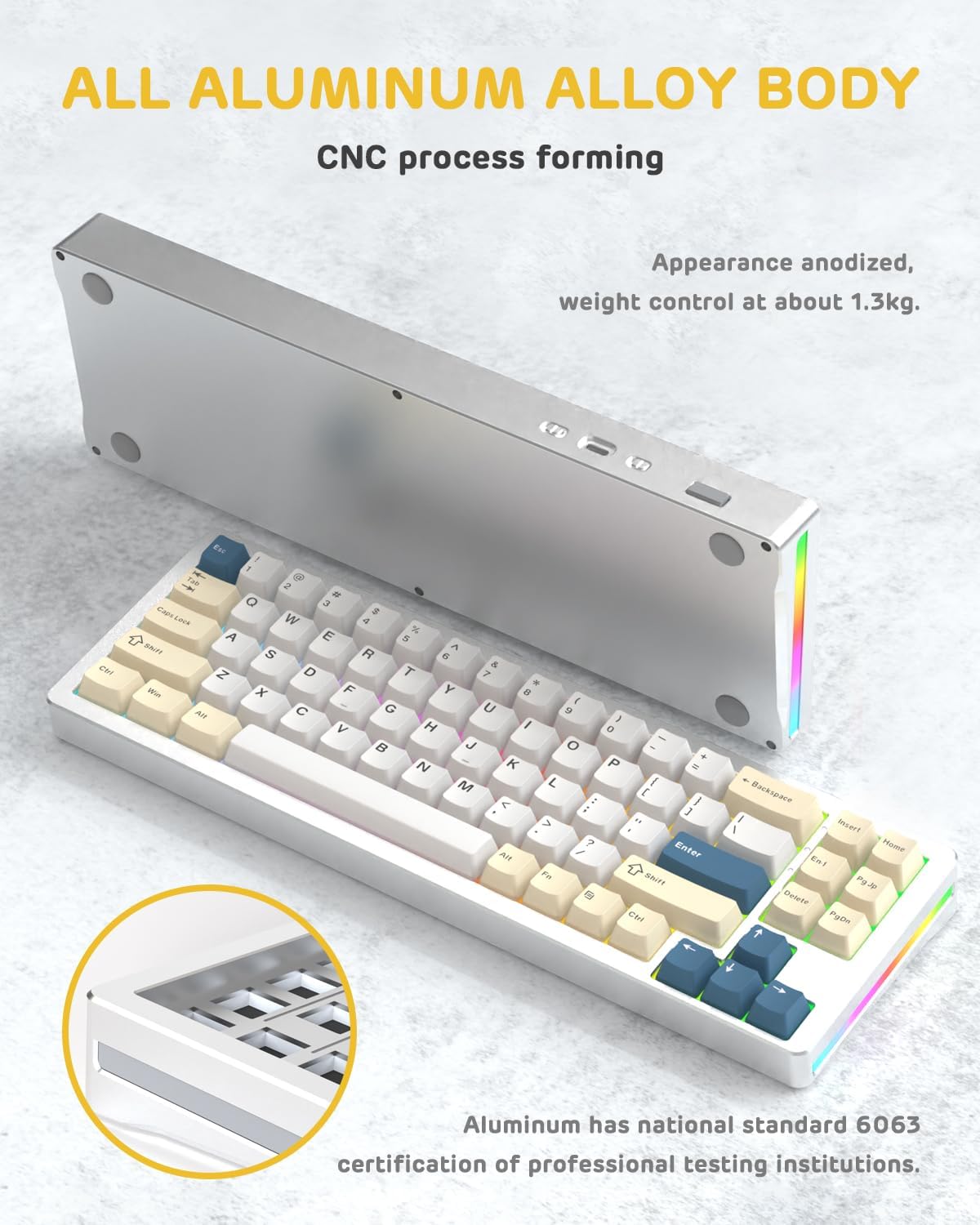
Hình ảnh: Mặt A view of the M71 keyboard highlighting its full aluminum alloy body and CNC process forming.

Hình ảnh: Một vụ nổ view illustrating the multi-layered gasket mount structure, including the PBT keycaps, aluminum alloy upper cover, customized switch body, PC positioning board, PORON filled cotton, anti-static IPEX switch underpad, PET singing pad, PCB board, PORON shaft seat cushion, PET sound backing pad, wing light strip, and aluminum alloy base.
Cài đặt
1. Connectivity Modes:
The M71 keyboard supports three connection modes: Bluetooth, 2.4G wireless, and wired USB-C.
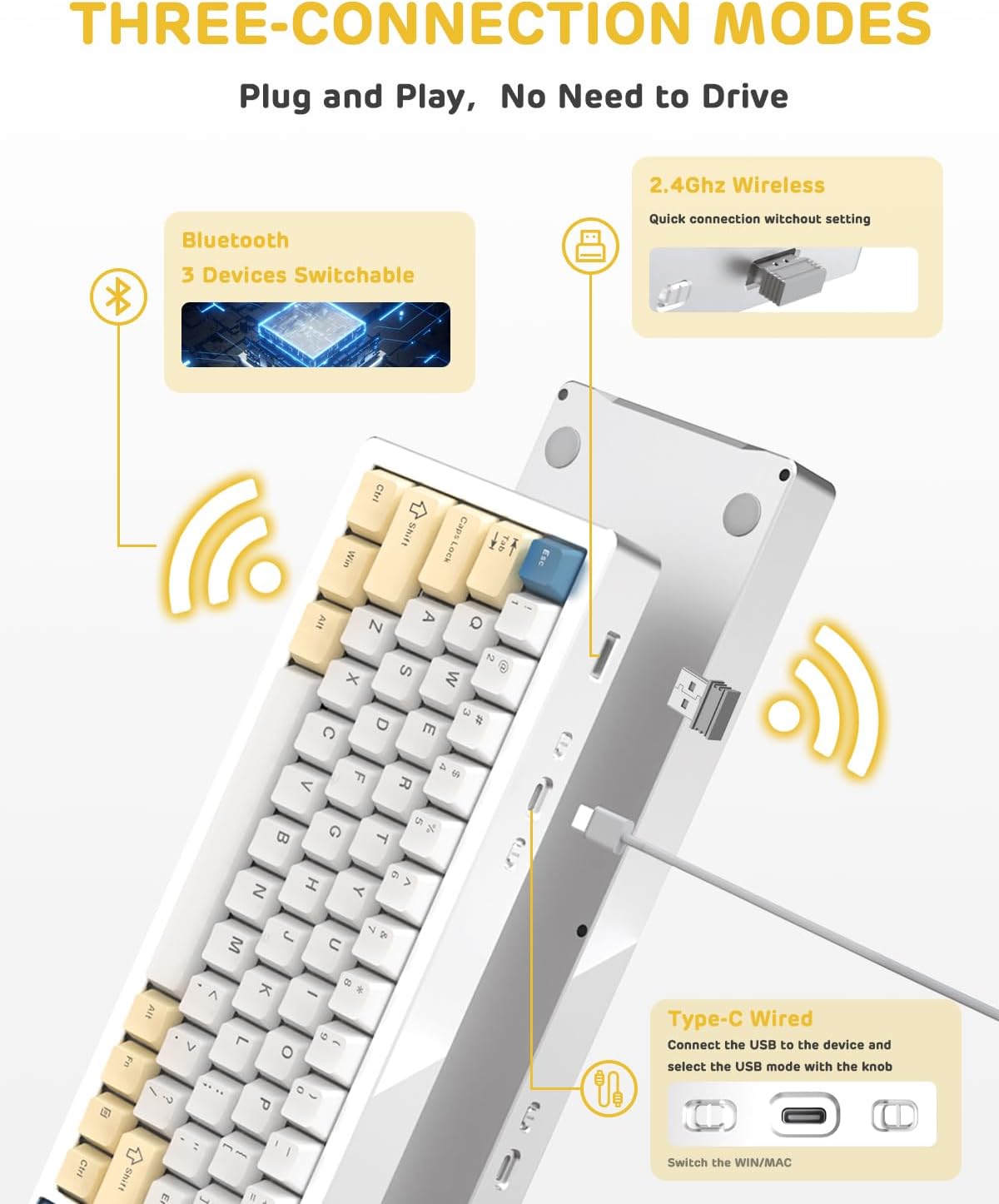
Image: A visual guide to the three connectivity options: Bluetooth for up to 3 devices, 2.4GHz wireless with a receiver, and wired Type-C connection.
Kết nối có dây:
- Kết nối cáp Type-C được cung cấp với cổng USB-C trên bàn phím và với cổng USB của máy tính.
- Hãy đảm bảo công tắc chế độ trên bàn phím được đặt ở vị trí kết nối có dây (USB-C).
- Hệ thống sẽ tự động nhận dạng bàn phím của bạn.
Kết nối không dây 2.4G:
- Tìm bộ thu sóng không dây 2.4G (dongle) trong gói hàng.
- Cắm bộ thu 2.4G vào cổng USB có sẵn trên máy tính của bạn.
- Hãy chuyển công tắc chế độ trên bàn phím sang vị trí không dây 2.4G.
- Bàn phím sẽ tự động kết nối.
Kết nối Bluetooth:
- Hãy chuyển công tắc chế độ trên bàn phím sang vị trí Bluetooth.
- Trên máy tính hoặc thiết bị của bạn, hãy mở cài đặt Bluetooth và tìm kiếm thiết bị mới.
- The keyboard should appear as "ATTACK SHARK M71" or similar. Select it to pair.
- The keyboard can connect to up to 3 Bluetooth devices. Use Fn + 1/2/3 để chuyển đổi giữa các thiết bị được ghép nối.
2. Battery Charging and Status:
The M71 keyboard is equipped with a 4600mAh battery. To charge, connect the keyboard via the USB-C cable to a power source (e.g., computer USB port, USB wall adapter).

Image: A diagram showing how to check the battery level using Fn+ALT(R) and the visual indicators on the keyboard's side LED strip.
- Để kiểm tra mức pin ở chế độ không dây, hãy nhấn Fn + ALT (Right). The side LED strip will indicate the charge level.
- Battery life is approximately 1-2 weeks with lighting enabled and up to 4 weeks with lighting disabled.
Hướng dẫn sử dụng
1. Phím đa phương tiện:
The keyboard features 12 multimedia keys accessible via the Fn tổ hợp phím:
- Fn + F1-F12: Access various multimedia functions (e.g., volume control, play/pause, calculator, email).
- Fn + 1/2: Điều chỉnh độ sáng màn hình.
2. Điều khiển ánh sáng RGB:
Customize the keyboard's RGB backlight and side LED strip:

Image: The M71 keyboard displaying its RGB backlight and side LED strip, along with a close-up of the PBT keycaps.
- Fn + Ctrl (phải): Switch between different side LED light strip modes.
- Fn + Tab: Toggle white light mode.
- Refer to the full user manual for additional lighting effect controls and customization options via the programmable software.
3. Programmable Software:
The keyboard supports a dedicated driver program for advanced customization. You can download the software from the official ATTACK SHARK website to personalize lighting effects, key assignments, and macros. The keyboard is compatible with Windows 2000/XP/Vista/7/8/10/11, Android, and iOS.
BẢO TRÌ
1. Vệ sinh:
- Hãy dùng một miếng vải mềm, khô để lau bề mặt bàn phím.
- Để vệ sinh kỹ hơn, hãy tháo các phím bằng dụng cụ tháo phím đi kèm và dùng khí nén để thổi sạch bụi bẩn giữa các công tắc.
- Tránh sử dụng hóa chất mạnh hoặc vật liệu mài mòn.
2. Hot-Swapping Switches:
The M71 keyboard features hot-swappable sockets, allowing you to change switches without soldering.

Hình ảnh: Cận cảnh view of the hot-swappable White Jade linear switches on the M71 keyboard, demonstrating how they can be easily removed and replaced.
- Tắt bàn phím hoặc ngắt kết nối khỏi thiết bị.
- Sử dụng dụng cụ tháo công tắc để kẹp chặt công tắc và kéo thẳng lên.
- Align the pins of the new switch with the holes on the PCB and press down gently until it clicks into place. Ensure pins are not bent.
- The PCB supports both 3-pin and 5-pin switches.
Video: A demonstration of the disassembly process for the M71 keyboard, showing how to remove keycaps and switches, revealing the gasket mount structure.
Xử lý sự cố
| Vấn đề | Giải pháp khả thi |
|---|---|
| Bàn phím không phản hồi ở chế độ không dây. |
|
| Phím không nhận hoặc gõ sai. |
|
| Hệ thống đèn RGB không hoạt động hoặc hoạt động không chính xác. |
|
| Sự cố ghép nối Bluetooth. |
|
Thông số kỹ thuật
| Tính năng | Chi tiết |
|---|---|
| Người mẫu | M71 |
| Cách trình bày | 75% TKL (71 phím) |
| Kết nối | Bluetooth 5.0/3.0, 2.4G Wireless, USB-C Wired |
| Công tắc | Hot-swappable (3/5-pin compatible), Pre-lubed Linear White Jade Switch |
| Mũ chìa khóa | Bộ phím PBT OEM |
| Kiểu lắp đặt | Gioăng gắn |
| Vật liệu khung gầm | Full Aluminum CNC (6063 alloy) |
| Dung lượng pin | 4600mAh |
| Chiếu sáng | RGB Backlight, RGB LED Side Light Strip |
| Khả năng tương thích | Windows 2000/XP/Vista/7/8/10/11, Android, iOS, Mac |
| Kích thước sản phẩm | Dài 13.78" x Rộng 4.53" x Cao 1.22" |
| Trọng lượng sản phẩm | 2.86 pound |
Bảo hành và Hỗ trợ
Để biết thông tin về bảo hành và hỗ trợ kỹ thuật, vui lòng tham khảo trang web chính thức của ATTACK SHARK. webhoặc liên hệ trực tiếp với bộ phận chăm sóc khách hàng của họ. Hãy giữ lại hóa đơn mua hàng để làm bằng chứng cho bất kỳ yêu cầu bảo hành nào.
Nhà sản xuất: cá mập tấn công
Người bán: Ajazz US
Ngày đầu tiên có sẵn: Ngày 4 tháng 2023 năm XNUMX