
ANKEWAY AW1010
ANKEWAY Double Din Car Stereo User Manual
Mã sản phẩm: AW1010
1. Giới thiệu
Thank you for choosing the ANKEWAY Double Din Car Stereo. This advanced car audio receiver features a 7-inch touchscreen, integrating wireless CarPlay and Android Auto for seamless smartphone connectivity. Equipped with Bluetooth, WiFi, RDS/FM radio, GPS navigation, and support for a backup camera, this unit provides a comprehensive in-car entertainment and navigation solution. This manual provides detailed instructions for installation, operation, and troubleshooting to ensure optimal performance and user experience.

Image: The ANKEWAY 7-inch Double Din Car Stereo, highlighting its compatibility with CarPlay and Android Auto.
2. Thông tin an toàn
Vui lòng đọc kỹ tất cả hướng dẫn an toàn trước khi lắp đặt và vận hành. Việc không tuân thủ các hướng dẫn này có thể dẫn đến thương tích hoặc hư hỏng thiết bị hoặc phương tiện.
- Always consult a professional for installation if you are unsure about any wiring or electrical connections.
- Không được sử dụng thiết bị theo cách gây xao nhãng khi lái xe. Luôn ưu tiên an toàn giao thông.
- Đảm bảo tất cả các kết nối đều an toàn và cách điện đúng cách để tránh hiện tượng đoản mạch.
- Tránh để thiết bị ở nơi có nhiệt độ quá cao, ánh nắng trực tiếp trong thời gian dài hoặc độ ẩm quá cao.
- Hãy để âm lượng ở mức vừa đủ để bạn có thể nghe thấy tiếng xe cộ bên ngoài.
3. Nội dung gói hàng
Hãy kiểm tra kỹ xem tất cả các vật phẩm có đầy đủ trong gói hàng trước khi bắt đầu cài đặt:
- ANKEWAY Double Din Car Stereo Unit
- Khai thác năng lượng
- Ăng-ten GPS
- USB Cables (Dual)
- Micrô ngoài
- Ở phía sau View Máy ảnh
- Cáp RCA
- Giá đỡ và ốc vít
- Hướng dẫn sử dụng (tài liệu này)

Hình ảnh: Trênview of the main unit and included accessories.
4. Tính năng sản phẩm
The ANKEWAY AW1010 Car Stereo is designed with a range of features to enhance your driving experience:
- Hệ thống Android: Runs on an Android operating system with 2GB RAM and 32GB internal storage, allowing app installation via the Play Store.
- CarPlay và Android Auto không dây: Seamlessly integrate your iPhone or Android smartphone for navigation, music, calls, and voice commands. Supports both wired and wireless connections.
- 7.0-inch HD 1080P IPS Touch Screen: High-definition, sensitive, and transparent display with 2.5D curved edge for clear visuals and responsive interaction.
- Liên kết Gương: Project your phone's display directly onto the car stereo screen.
- Kết nối: Dual USB ports, Bluetooth for hands-free calls and music streaming, WiFi for internet access, and support for external steering wheel controls (SWC).
- Định vị toàn cầu: Built-in GPS module with pre-installed navigation software (e.g., TomTom, Here WeGO).
- Đầu ra âm thanh/video: 4x60W audio output and 1080P HD video support. Features an equalizer for sound customization (Pop, Rock, Jazz, etc.).
- Đầu vào camera sau: Bao gồm camera lùi giúp tăng cường an toàn khi lùi xe.
- Radio: RDS/FM radio tuner for clear reception.

Image: Visual representation of the car stereo's core features.

Image: Detail of the HD Full Touch Screen technology.
5. Thiết lập và Cài đặt
Proper installation is crucial for the performance and longevity of your car stereo. It is recommended to have the unit installed by a qualified professional.
5.1 Sơ đồ đấu dây
Refer to the following diagram for correct wiring connections. Ensure all wires are connected to their corresponding terminals in your vehicle's wiring harness.

Image: Main Cable Wiring Diagram.
- Speaker Connections (RL/RR/FL/FR): Connect to your vehicle's 4 speakers.
- ANT-TIẾP TỤC: Connect to the antenna control wire (if applicable).
- Lamp Control (ILL): Connect to the car's front small light wire.
- Back (REVERSE): Connect to the rear camera signal input cable.
- KEY1 (KEY2): Use one of these cables to connect to the signal output cable of your car's Steering Wheel Control (SWC). If KEY1 is not compatible, select KEY2.
- GND: Connect to the battery negative/iron/ground.
- B+: Connect to the car battery positive.
- ACC: Connect to the car ignition detection cable.
5.2 Cài đặt vật lý
- Tháo dàn âm thanh xe hơi hiện có một cách cẩn thận.
- Connect the ANKEWAY stereo's wiring harness to your vehicle's harness according to the diagram.
- Connect the GPS antenna, WiFi antenna, and external microphone. Position the GPS antenna in a location with a clear view of the sky (e.g., dashboard or windshield).
- Cài đặt phía sau view camera and connect its video and power cables to the stereo.
- Secure the stereo unit into the dashboard using the provided mounting brackets and screws.
- Test all functions (power, audio, radio, GPS, camera, Bluetooth, CarPlay/Android Auto) before fully reassembling the dashboard.
6. Hướng dẫn vận hành
The ANKEWAY car stereo features an intuitive touchscreen interface. Here are basic operating guidelines:
6.1 Thao tác trên màn hình cảm ứng
Navigate through menus and control functions by tapping, swiping, and dragging on the 7-inch IPS touchscreen. The interface is designed to be responsive and user-friendly.

Image: Various screen interfaces of the car stereo.
6.2 Điều khiển vô lăng (SWC)
If your vehicle supports steering wheel controls, you can configure them to operate the stereo. Access the 'Steering Learn' or 'SWC Settings' menu in the system settings to map your vehicle's steering wheel buttons to the stereo's functions (e.g., volume up/down, track skip, mode change).

Image: Steering Wheel Control learning interface.
7. Kết nối
7.1 CarPlay không dây và Android Auto
Thiết bị này hỗ trợ cả CarPlay và Android Auto không dây và có dây. Để kết nối không dây:
- Đảm bảo Bluetooth và Wi-Fi được bật trên điện thoại thông minh của bạn.
- On the car stereo, go to the CarPlay/Android Auto application.
- Hãy làm theo hướng dẫn trên màn hình để ghép nối điện thoại của bạn qua Bluetooth. Sau khi ghép nối, hệ thống sẽ tự động thiết lập kết nối Wi-Fi để sử dụng chức năng CarPlay/Android Auto.
This allows access to navigation apps (e.g., Waze, Google Maps), music streaming (e.g., Spotify, YouTube Music), hands-free calling, and voice assistants (Siri, Google Assistant) directly from the stereo display.

Image: CarPlay interface on the stereo and smartphone integration.

Image: Android Auto interface with Spotify.

Image: Wireless CarPlay and Android Auto with voice command exampđồng nghiệp.
KHÔNG Bluetooth
Ghép nối điện thoại thông minh của bạn qua Bluetooth để gọi rảnh tay và truyền phát âm thanh.
- On the stereo, go to the Bluetooth application.
- Bật Bluetooth trên điện thoại của bạn và tìm kiếm các thiết bị khả dụng.
- Select 'ANKEWAY' (or similar device name) from the list and confirm pairing.
- Once connected, you can make/receive calls and play music through the car speakers.
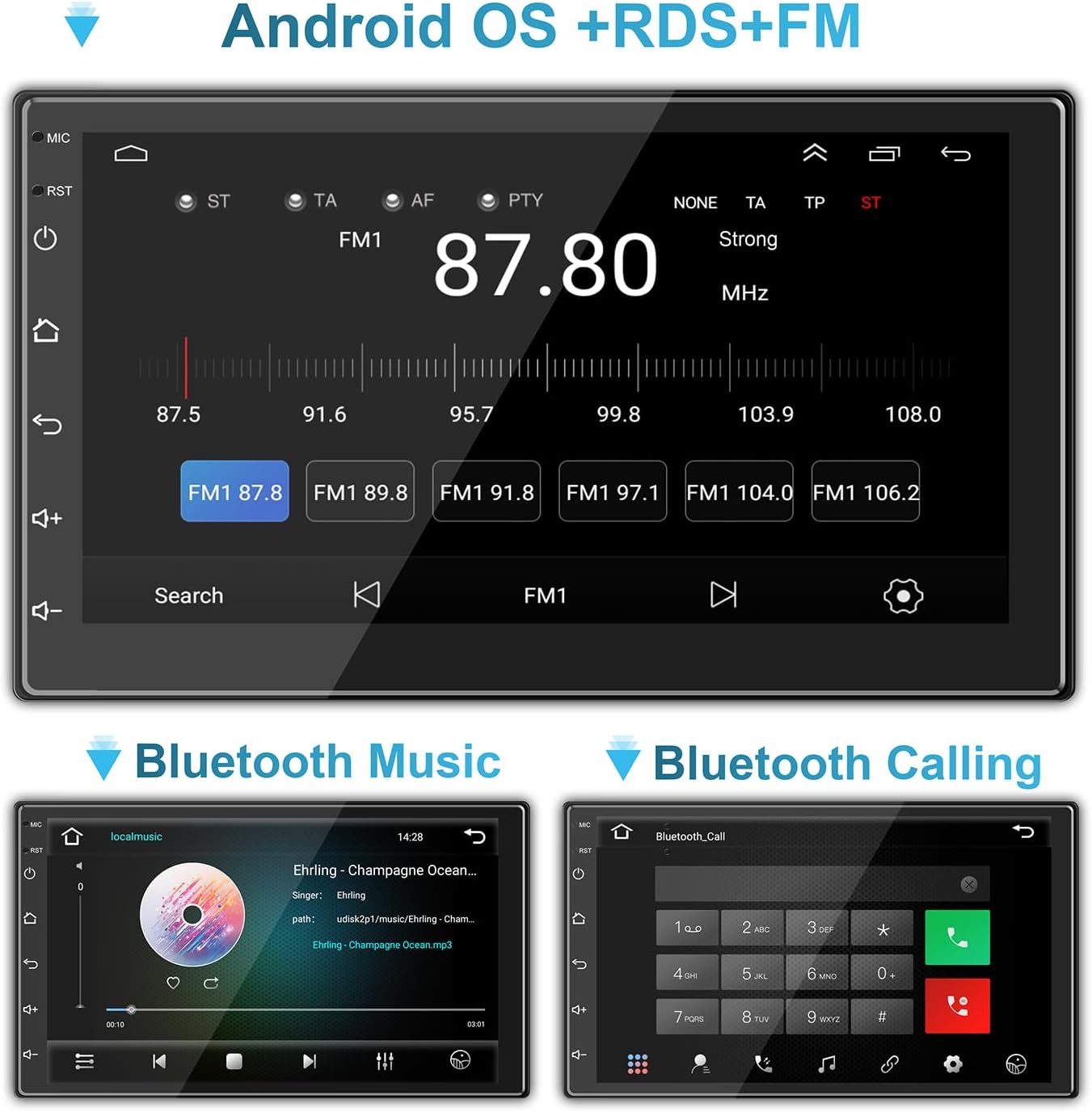
Image: Bluetooth music and calling interfaces.
7.3 WiFi & Internet
Connect the stereo to a Wi-Fi network (e.g., mobile hotspot) to access online features, download apps, and stream content.
- Go to 'Settings' on the stereo and select 'Wi-Fi'.
- Bật Wi-Fi và chọn mạng mong muốn từ danh sách.
- Nhập mật khẩu nếu được yêu cầu và kết nối.

Image: Connecting to mobile WiFi and streaming content.

Image: WiFi and Bluetooth connectivity features.
7.4 Liên kết gương
Mirror Link allows you to display your smartphone's screen directly on the car stereo. This feature is typically accessed via a dedicated app on the stereo and may require a wired USB connection for initial setup.
8. Định vị GPS
The stereo comes with a built-in GPS module and pre-installed navigation software. Ensure the GPS antenna is properly installed and has a clear view của bầu trời để định vị chính xác.
- Truy cập ứng dụng điều hướng từ menu chính.
- Enter your destination, and the system will provide turn-by-turn directions.
- Maps can be updated via Wi-Fi connection or by downloading map data to the unit's storage.
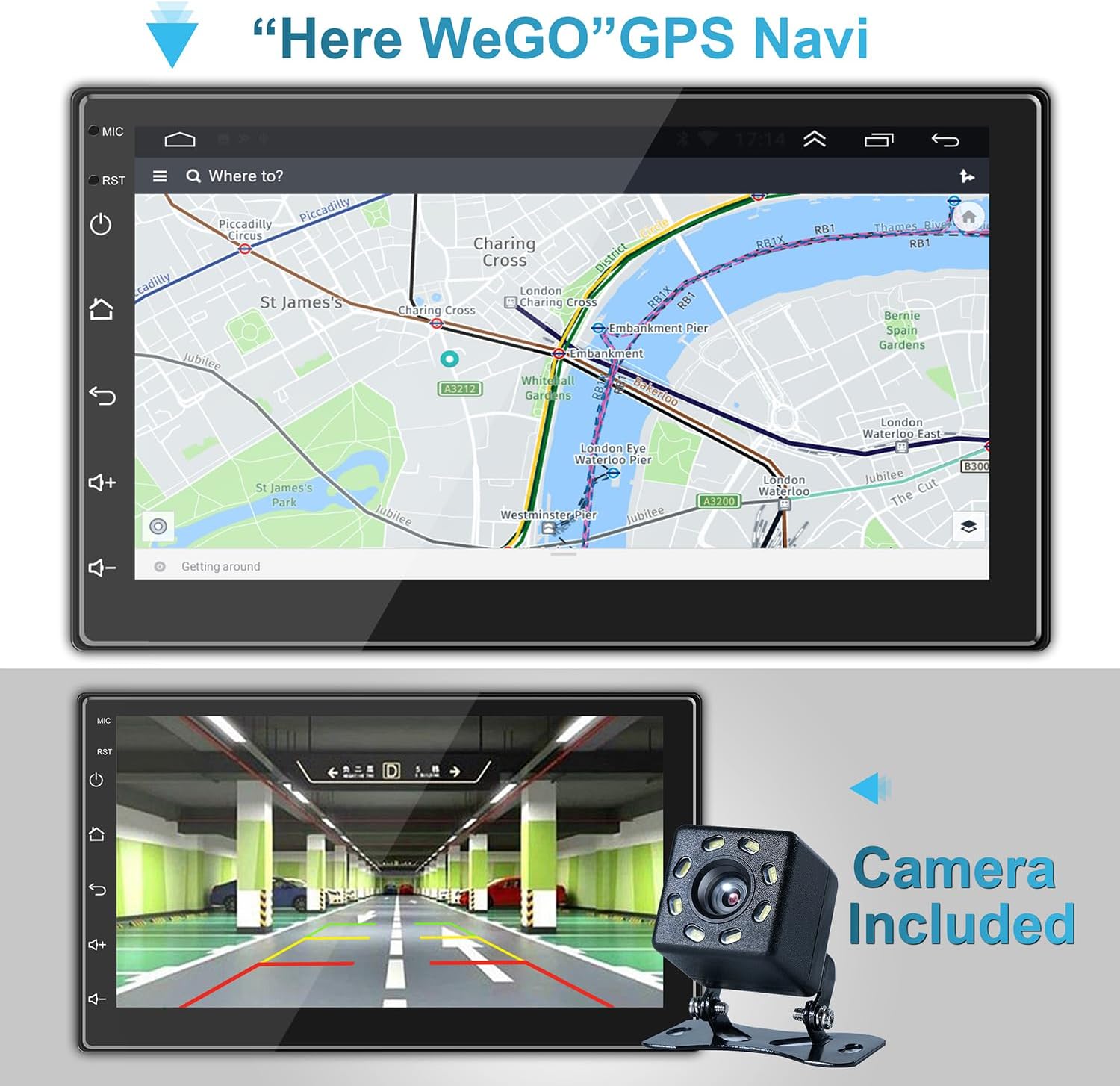
Hình ảnh: Giao diện định vị GPS.

Image: GPS Navigation within CarPlay.
9. Camera lùi
Camera lùi đi kèm sẽ tự động hiển thị hình ảnh phía sau. view on the stereo screen when the vehicle is shifted into reverse gear. This feature significantly aids in safe parking and maneuvering.
- Ensure the camera is properly installed and connected to the 'Back (REVERSE)' input on the stereo's wiring harness.
- The screen will automatically switch to the camera view khi cài số lùi.
Hình ảnh: Camera lùi view on the stereo screen.
10. Multimedia Settings
The stereo supports various multimedia functions, including audio playback and video viewđang.
10.1 Bộ cân bằng âm thanh
Customize your audio experience using the built-in equalizer. Access the equalizer settings to adjust sound effects and music styles (e.g., Pop, Rock, Jazz, Classical, Custom).
10.2 Phát lại video
The unit supports 1080P HD video playback from USB drives or streaming via connected Wi-Fi. Ensure video files are in compatible formats (e.g., H.264).
Image: High-definition video playback.
11. Bảo trì
To ensure the longevity and optimal performance of your ANKEWAY car stereo, follow these maintenance tips:
- Vệ sinh: Sử dụng khăn mềm, khô để lau màn hình cảm ứng và bên ngoài thiết bị. Đối với những vết bẩn cứng đầu, hãy dùng khăn mềm lau nhẹ.ampLau khăn bằng nước hoặc chất tẩy rửa an toàn cho màn hình. Tránh các vật liệu mài mòn hoặc hóa chất mạnh.
- Nhiệt độ: Do not expose the unit to extreme temperatures. Prolonged exposure to direct sunlight or very cold conditions can affect performance and lifespan.
- Cập nhật phần mềm: Periodically check for software updates from the manufacturer to ensure the best performance and access to new features. Updates can often be downloaded via Wi-Fi.
- Kết nối: Thường xuyên kiểm tra tất cả các mối nối dây điện để đảm bảo chúng chắc chắn và không bị ăn mòn.
KHAI THÁC. Xử lý sự cố
Nếu bạn gặp sự cố với dàn âm thanh trên xe hơi, hãy tham khảo các vấn đề và giải pháp thường gặp sau đây:
| Vấn đề | Nguyên nhân có thể | Giải pháp |
|---|---|---|
| Không có điện | Loose power connection; Blown fuse; Incorrect wiring. | Check ACC and B+ wiring; Inspect fuse in the vehicle's fuse box and on the stereo's harness; Ensure proper grounding. |
| Không có âm thanh | Dây loa bị ngắt kết nối; Âm lượng quá nhỏ; Chức năng tắt tiếng đang hoạt động; Cài đặt âm thanh không chính xác. | Verify speaker connections; Increase volume; Check if mute is on; Adjust audio output settings. |
| Sự cố kết nối Bluetooth/Wi-Fi | Phone not discoverable; Incorrect pairing; Weak signal; Software glitch. | Ensure phone's Bluetooth/Wi-Fi is on and discoverable; Re-pair device; Move closer to Wi-Fi source (for hotspot); Restart stereo and phone. |
| CarPlay/Android Auto không kết nối | Incorrect USB cable; Phone software outdated; App not installed/updated; Wireless connection issues. | Use a high-quality USB cable; Update phone OS and CarPlay/Android Auto apps; Ensure Bluetooth and Wi-Fi are active for wireless connection. |
| Mất tín hiệu GPS/Tín hiệu không chính xác | Ăng-ten GPS bị che khuất hoặc ngắt kết nối; Tín hiệu vệ tinh kém. | Ensure GPS antenna is securely connected and placed in a clear area (e.g., dashboard); Move vehicle to an open area. |
| Camera sau không hiển thị | Camera power/video cable disconnected; Reverse trigger wire (BACK) not connected. | Check camera connections; Ensure the 'BACK' wire is correctly connected to the vehicle's reverse light trigger. |
If the problem persists after trying these solutions, please contact ANKEWAY customer support for further assistance.
13. Thông số kỹ thuật
| Tính năng | Đặc điểm kỹ thuật |
|---|---|
| Số hiệu mẫu | AW1010 |
| Kích thước sản phẩm | 1.73"D x 7.01"W x 3.98"H (4.39 x 17.81 x 10.11 cm) |
| Trọng lượng sản phẩm | 2.38 pound (1.08 kg) |
| Kích thước màn hình | 7 inch (18 cm) |
| Hệ điều hành | Android |
| Bộ nhớ (RAM) | 2GB |
| Lưu trữ (ROM) | 32GB |
| Công nghệ kết nối | USB, RCA, Cable, Bluetooth, WiFi |
| Tính năng đặc biệt | Wireless Android Auto, Wireless Apple CarPlay, Mirror Link, GPS Navigation, RDS/FM Radio |
| Chế độ đầu ra âm thanh | Âm thanh nổi |
| Công suất đầu ra | 4 x 60 Watt |
| Mã hóa video | H.264 |

Image: Product dimensions and rear panel layout.
14. Bảo hành và Hỗ trợ
For warranty information, technical support, or any inquiries regarding your ANKEWAY Double Din Car Stereo, please contact ANKEWAY customer service. Refer to the contact information provided with your purchase or visit the official ANKEWAY webtrang web cho các tài nguyên hỗ trợ.
Ask a question about this manual
Ask about setup, troubleshooting, compatibility, parts, safety, or missing instructions. Manuals+ will review the question and use this page’s manual context to help answer it.