
1. Thông tin an toàn quan trọng
Please read this manual carefully before using the MBETA BT515. Keep it for future reference.
- Không để thiết bị ở nơi có nhiệt độ quá cao, ánh nắng trực tiếp hoặc độ ẩm cao.
- Tránh làm rơi hoặc để thiết bị chịu tác động mạnh.
- Không tự ý tháo rời, sửa chữa hoặc thay đổi thiết bị. Hãy liên hệ với nhân viên dịch vụ có chuyên môn để được hỗ trợ.
- Keep the device away from water and other liquids. While it has an IPx3 rating (splash-proof), it is not waterproof and should not be submerged.
- Chỉ sử dụng cáp sạc được cung cấp hoặc loại cáp tương đương đã được chứng nhận.
2. Nội dung gói hàng
Xác minh rằng tất cả các mục đều có trong gói hàng:
- MBETA BT515 Bluetooth Speaker Multifunction Clock
- Cáp sạc USB
- Hướng dẫn sử dụng (tài liệu này)

Image: The MBETA BT515 device shown alongside its retail packaging, which displays the model number 'BT515'.
3. Sản phẩm hếtview
The MBETA BT515 is a versatile device combining a Bluetooth speaker, a digital clock, and an alarm clock. It features an LED display, multiple playback options (Bluetooth, TF card, FM radio), and hands-free calling capabilities.

Hình ảnh: Mặt trước view of the MBETA BT515 Bluetooth Speaker, displaying the time and various mode indicators on its mirrored LED screen.

Hình ảnh: Từ trên xuống view of the MBETA BT515, highlighting the control buttons located on the top panel for various functions.
4. Thiết lập
4.1 Sạc thiết bị
Before first use, fully charge the device. Connect the provided USB charging cable to the device's USB port and the other end to a standard USB power adapter (not included) or a computer's USB port. The charging indicator will illuminate during charging and turn off when fully charged.
4.2 Bật / Tắt nguồn
Press and hold the Power button (usually marked with a power symbol) for approximately 3 seconds to turn the device on or off. The display will light up when powered on.
4.3 Ghép nối Bluetooth
- Ensure the device is powered on. It will automatically enter Bluetooth pairing mode, indicated by a flashing Bluetooth icon on the display.
- Trên thiết bị di động của bạn, bật Bluetooth và tìm kiếm các thiết bị có sẵn.
- Select "MBETA BT515" (or similar name) from the list of found devices.
- Sau khi kết nối, biểu tượng Bluetooth trên màn hình loa sẽ ngừng nhấp nháy và hiển thị ổn định.
4.4 Đặt đồng hồ
Refer to the specific button functions in Section 5.4. Typically, a 'SET' or 'TIME' button is used to enter time setting mode, and '+' / '-' buttons adjust hours and minutes.
4.5 Cài đặt báo thức
The device supports dual alarm modes. Use the 'ALARM' or 'SET' button to access alarm settings. Follow the on-screen prompts to set the desired alarm time and sound.
4.6 Điều chỉnh độ sáng màn hình
The display offers three levels of brightness adjustment. Locate the brightness control button (often labeled with a sun icon or integrated into another button) and press it repeatedly to cycle through the brightness levels.
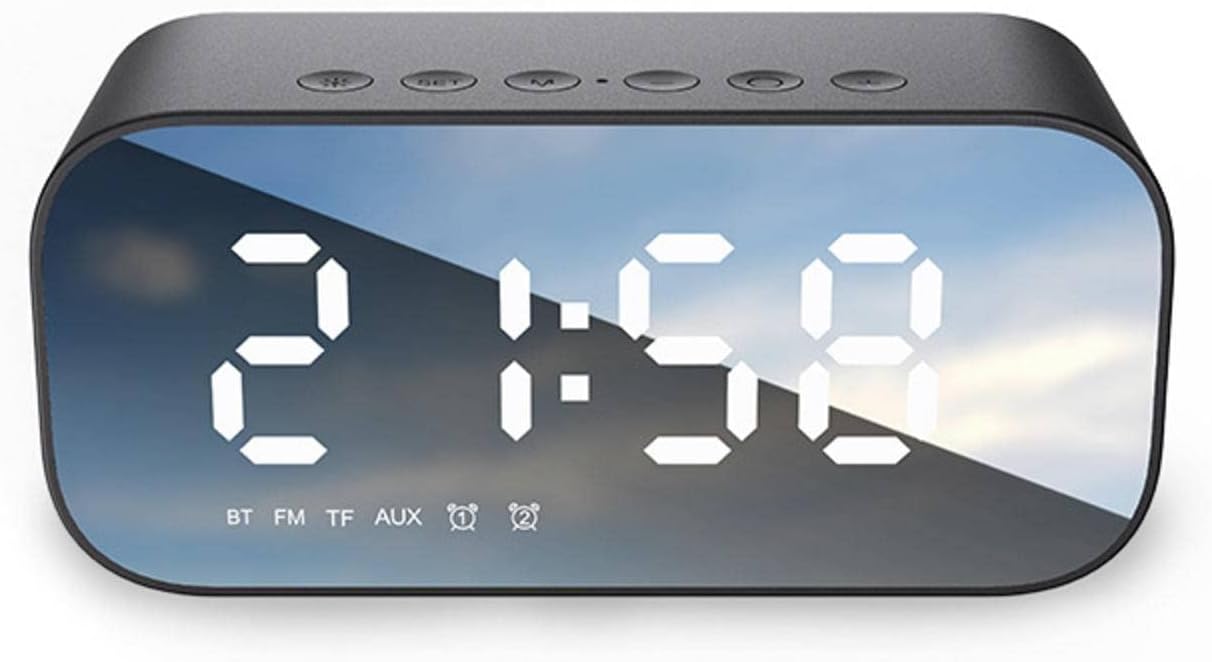
Image: The MBETA BT515 display illustrating the three-level brightness adjustment feature, providing gentle illumination at night.
5. Hoạt động
5.1 Chế độ loa Bluetooth
After successful Bluetooth pairing (Section 4.3), audio played on your connected device will stream through the MBETA BT515. Use the volume buttons on the speaker or your connected device to adjust the sound level. The Play/Pause button on the speaker can control playback.
Chế độ đài FM 5.2
Press the 'M' (Mode) button to switch to FM Radio mode. The display will show the FM frequency. Press and hold the Play/Pause button to automatically scan and save available FM stations. Use the 'Previous' and 'Next' track buttons to navigate between saved stations.
5.3 Phát lại từ thẻ TF
Insert a TF (MicroSD) card containing MP3, WMA, or WAV audio files into the designated TF card slot. The device will automatically switch to TF card mode and begin playing music. Use the Play/Pause, Previous, and Next buttons to control playback.
5.4 Gọi rảnh tay
When connected via Bluetooth to a smartphone, the MBETA BT515 can be used for hands-free calls. When an incoming call is received, press the Play/Pause button to answer. Press it again to end the call. Press and hold to reject an incoming call.
5.5 Chức năng của các nút bấmview
- Nút nguồn: Nhấn và giữ để bật / tắt nguồn.
- Nút Chế độ (M): Short press to switch between Bluetooth, FM Radio, and TF Card modes.
- Nút Phát/Tạm dừng: Short press to play/pause music; answer/end calls. Long press to auto-scan FM stations; reject calls.
- Nút giảm âm lượng / Bài hát trước (-): Nhấn nhanh để chuyển đến bài hát/đài trước đó; nhấn giữ để giảm âm lượng.
- Nút Tăng âm lượng / Chuyển bài hát tiếp theo (+): Nhấn nhanh để chuyển sang bài hát/kênh tiếp theo; nhấn giữ để tăng âm lượng.
- Nút SET: Dùng để vào chế độ cài đặt thời gian và báo thức.
6. Bảo trì
6.1 Vệ sinh
Lau thiết bị bằng vải mềm, khô hoặc hơi ẩmamp cloth. Do not use abrasive cleaners, alcohol, or chemical solvents, as these may damage the plastic casing và hiển thị.
6.2 Chăm sóc pin
Để kéo dài tuổi thọ của pin lithium tích hợp:
- Tránh xả hết pin thường xuyên.
- Hãy sạc thiết bị thường xuyên, ngay cả khi không sử dụng trong thời gian dài.
- Bảo quản thiết bị ở nơi khô ráo, thoáng mát khi không sử dụng.

Image: The MBETA BT515 display indicating battery capacity (1200mAh) and estimated playback duration (4-6 hours).
6.3 Khả năng chống nước
The MBETA BT515 has an IPx3 waterproof rating, meaning it is protected against spraying water. It is suitable for use in environments where it might encounter light splashes, but it is không designed to be submerged in water or exposed to heavy rain.
KHAI THÁC. Xử lý sự cố
If you encounter issues with your MBETA BT515, refer to the following common problems and solutions:
- Thiết bị không bật nguồn:
Hãy đảm bảo pin đã được sạc đầy. Kết nối thiết bị với nguồn điện bằng cáp USB và thử lại. - Không có âm thanh từ loa:
Check the volume level on both the speaker and the connected Bluetooth device. Ensure the device is in the correct mode (Bluetooth, FM, or TF card). Re-pair the Bluetooth device if necessary. - Kết nối Bluetooth không thành công:
Ensure the speaker is in Bluetooth pairing mode. Make sure your mobile device's Bluetooth is enabled and within range (up to 10m). Try turning both devices off and on again. Clear previous Bluetooth connections on your mobile device. - FM radio reception is poor:
Move the device to a location with better signal. Ensure no strong interference sources are nearby. - Báo động không kêu:
Verify that the alarm time is set correctly and the alarm function is activated. Check the alarm volume setting.
8. Thông số kỹ thuật
| Tính năng | Đặc điểm kỹ thuật |
|---|---|
| Thương hiệu | MBETA |
| Người mẫu | BT515 |
| Kết nối | Bluetooth 5.0, USB |
| Chức năng | Bluetooth Speaker, Alarm Clock, Digital Clock, FM Radio, TF Card Playback, Hands-Free Calling |
| Kiểu hiển thị | Đèn LED kỹ thuật số |
| Công suất đầu ra | 3W |
| Đáp ứng tần số | 100Hz-20KHz |
| Tỷ lệ tín hiệu trên nhiễu | ≥85dB |
| Nguồn điện | Built-in Lithium Battery, USB Powered |
| Dung lượng pin | 1200 mAh - 2000 mAh (typical 1200mAh) |
| Thời gian phát lại | Lên đến 6 giờ |
| Expanded Storage | Hỗ trợ tối đa 32GB (thẻ TF) |
| Định dạng phát lại | MP3, WMA, WAV |
| Khoảng cách hiệu quả | 10m (Bluetooth) |
| Phương pháp hoạt động | Nút nhấn |
| Vật liệu vỏ máy | Nhựa |
| Kích thước bên ngoài | 130mm x 70mm x 65mm (approx. 5.1"W x 2.7"H x 2.5"D) |
| Trọng lượng sản phẩm | 0.36 Kg (approx. 12.7 ounces) |
| Xếp hạng chống thấm nước | IPx3 (Splash-proof) |
9. Thông tin bảo hành
The MBETA BT515 Bluetooth Speaker Multifunction Clock Alarm Clock comes with a standard limited warranty against defects in materials and workmanship under normal use. The warranty period typically begins from the date of purchase. Please retain your proof of purchase for warranty claims. This warranty does not cover damage caused by misuse, accident, unauthorized modification, or external causes.
10. Hỗ trợ khách hàng
For further assistance, technical support, or warranty inquiries, please refer to the contact information provided by your retailer or the MBETA official website. When contacting support, please have your product model (BT515) and proof of purchase ready.