
1. Giới thiệu
The LILYGO T-Display ESP32 Module is a compact development board featuring an ESP32 microcontroller, a 1.14-inch IPS ST7789V display, and a CH9102F USB-to-serial chip. This version includes a protective shell, making it suitable for various embedded projects requiring Wi-Fi, Bluetooth, and a small display. This manual provides essential information for setting up, operating, and maintaining your T-Display module.

Hình ảnh: Mặt trước view of the LILYGO T-Display ESP32 Module with its protective shell.
2. Sản phẩm hếtview và Tính năng
The LILYGO T-Display ESP32 module integrates several key components for versatile development:
- vi điều khiển: ESP32 (Xtensa dual-core LX6 microprocessor)
- Bộ nhớ Flash: 16MB
- Trưng bày: 1.14-inch IPS ST7789V LCD, 135x240 resolution, 260 ppi, 4-wire SPI interface.
- Kết nối: Wi-Fi 802.11 b/g/n, Bluetooth V4.2+BLE
- Giao diện USB: Type-C, with CH9102F USB-to-serial chip.
- Nguồn điện: Supports USB and Li-Po battery dual power supply (JST GH 1.25mm connector).
- Onboard Functions: Two user-programmable buttons (GPIO0, GPIO35), reset button, battery power detection.
- Programming Platforms: Compatible with Arduino-IDE and MicroPython.
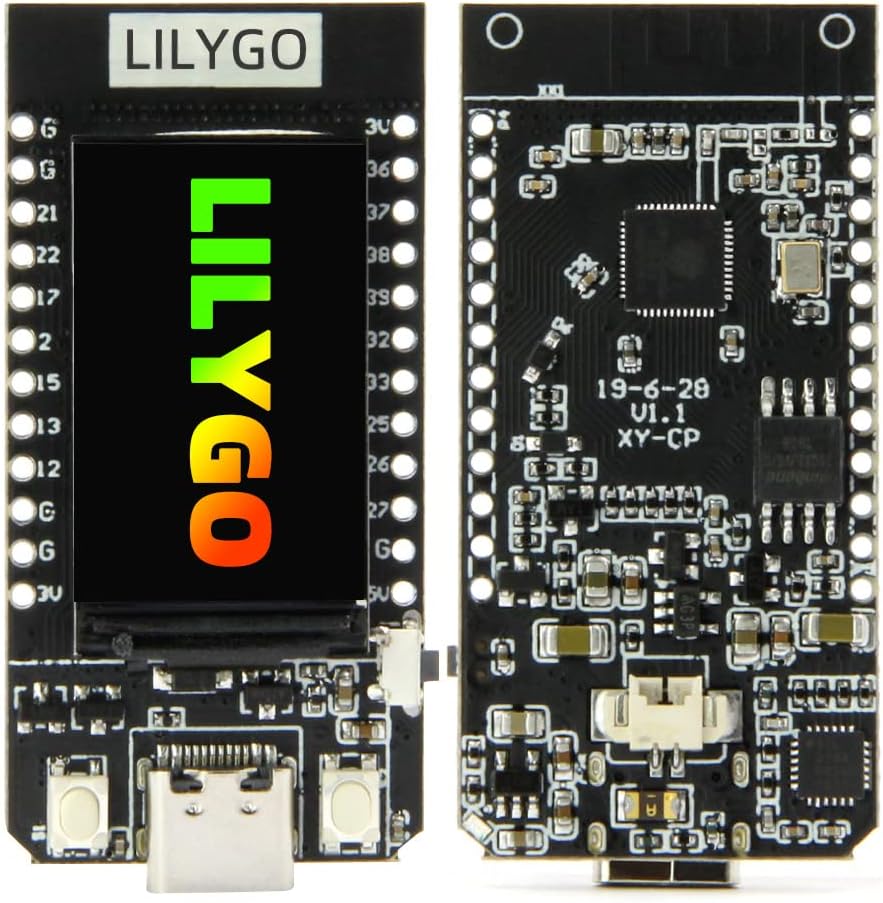
Hình ảnh: Mặt trước và mặt sau view of the LILYGO T-Display ESP32 module board.

Image: Diagram highlighting key features including MCU, display, and power options.
3. Có gì trong hộp
Your LILYGO T-Display ESP32 Module package includes the following components:
- LILYGO T-Display ESP32 Development Board
- Protective Shell/Case
- Pin Headers (for optional soldering)
- Battery Connector Cable (for Li-Po battery connection)

Image: Illustration of the components included in the package: the T-Display board, battery cable, and pin headers.
4. Thiết lập
4.1 Assembling the Shell (Optional)
If your module came without the shell pre-assembled, carefully place the T-Display board into the provided protective case. Ensure the USB-C port and buttons align with the case openings.

Image: The two halves of the protective shell for the T-Display module.

Image: The T-Display module fully assembled within its protective shell.
4.2 Cấp nguồn cho mô-đun
The T-Display module can be powered via its USB Type-C port or by connecting a compatible 3.7V Li-Po battery to the JST GH 1.25mm connector.
- Nguồn điện USB: Connect a USB Type-C cable from the module to a computer or a 5V USB power adapter.
- Công suất pin: Connect a 3.7V Li-Po battery to the JST connector. Ensure correct polarity. The module includes a battery charging circuit.

Image: The LILYGO T-Display ESP32 module with a Li-Po battery connected via its JST connector.
4.3 Sơ đồ chân cắm
Refer to the pinout diagram for connecting external components and understanding the GPIO assignments.

Image: Detailed pinout diagram for the ESP32 TTGO T-Display V1.1, showing GPIOs, power pins, and display connections.
5. Hướng dẫn vận hành
5.1 Software Development
The LILYGO T-Display ESP32 module can be programmed using popular development environments:
- Arduino IDE: Install the ESP32 board support package in the Arduino IDE. Select the appropriate board (e.g., ESP32 Dev Module) and port.
- MicroPython: Flash MicroPython firmware to the ESP32, then use a serial terminal or IDE like Thonny to upload scripts.
For detailed programming guides, examples, and libraries, refer to the official LILYGO GitHub repository:
github.com/Xinyuan-LilyGO/TTGO-T-Display
5.2 Using the Display and Buttons
The 1.14-inch IPS display is controlled via SPI. Libraries are available for graphics and text display. The two onboard buttons (GPIO0 and GPIO35) can be programmed for user input, menu navigation, or other functions within your application.
6. Bảo trì
- Vệ sinh: Use a soft, dry cloth to clean the module and display. Avoid liquid cleaners directly on the board.
- Kho: Store the module in a dry, anti-static environment when not in use.
- Xử lý: Avoid applying excessive force to the display or connectors. Handle the board by its edges to prevent damage to components.
- Cập nhật chương trình cơ sở: Regularly check the official GitHub repository for firmware updates and bug fixes to ensure optimal performance.
KHAI THÁC. Xử lý sự cố
- Mô-đun không bật nguồn:
- Hãy đảm bảo cáp USB-C được kết nối chắc chắn và đang cung cấp nguồn điện.
- If using a battery, check that it is charged and correctly connected to the JST port.
- Hiển thị không hoạt động:
- Verify that your code initializes the ST7789V display correctly.
- Check for any physical damage to the display or its connections.
- Lỗi khi tải lên:
- Ensure the correct board and COM port are selected in your IDE.
- Install the necessary USB-to-serial drivers (CH9102F).
- Sometimes pressing the boot button (if available) while uploading can help.
- Các vấn đề về Wi-Fi/Bluetooth:
- Check your code for correct Wi-Fi/Bluetooth initialization and credentials.
- Ensure sufficient power supply for wireless operations.
For further assistance, consult the LILYGO GitHub repository or community forums.
8. Thông số kỹ thuật
| Tính năng | Chi tiết |
|---|---|
| Thương hiệu | LILYGO |
| Tên mẫu | TTGO T-Display |
| vi điều khiển | ESP32 (Xtensa dual-core LX6 microprocessor) |
| Bộ nhớ Flash | 16MB |
| Trưng bày | 1.14 Inch IPS ST7789V LCD (135x240 resolution) |
| Giao diện USB | Type-C (CH9102F chip) |
| Kết nối không dây | Wi-Fi (802.11 b/g/n), Bluetooth (V4.2+BLE) |
| Nguồn điện | USB, Li-Po Battery (JST GH 1.25mm) |
| Khả năng tương thích của hệ điều hành | Linux (for development environment) |
| Dimensions (with shell) | L: 56.5mm, W: 31mm, H: 11mm (approximate) |

Image: Diagram showing the approximate dimensions of the LILYGO T-Display ESP32 module with its shell.
9. Bảo hành và Hỗ trợ
For warranty information, technical support, or further inquiries, please contact LILYGO directly or visit their official website and GitHub repository. Keep your purchase receipt for warranty claims.
LILYGO Store: Visit the LILYGO Store on Amazon
Kho lưu trữ GitHub: github.com/Xinyuan-LilyGO/TTGO-T-Display