Giới thiệu
This manual provides comprehensive instructions for the safe and efficient use of your WIKO T10 smartphone. Please read this manual carefully before using your device to ensure optimal performance and longevity. Keep this manual for future reference.
Thông tin an toàn quan trọng
- Không để thiết bị ở nơi có nhiệt độ quá cao, ánh nắng trực tiếp hoặc độ ẩm cao.
- Use only WIKO-approved chargers and accessories.
- Tránh làm rơi hoặc va đập mạnh vào thiết bị.
- Không tự ý tháo rời hoặc sửa chữa thiết bị. Hãy liên hệ với nhân viên bảo trì được ủy quyền.
- Vứt bỏ thiết bị và pin một cách có trách nhiệm theo quy định của địa phương.
Nội dung gói
Ensure all items are present in your WIKO T10 package:
- Điện thoại thông minh WIKO T10
- Bộ sạc
- Cáp USB loại C
- Công cụ đẩy SIM
- Hướng dẫn bắt đầu nhanh
- Thông tin về An toàn và Bảo hành
Sản phẩm trênview
Familiarize yourself with the physical components of your WIKO T10 smartphone.

Hình 1: Phía trước và phía sau View of the WIKO T10 Smartphone. The front features a large display with a dewdrop notch, and the rear shows the camera module and WIKO branding.
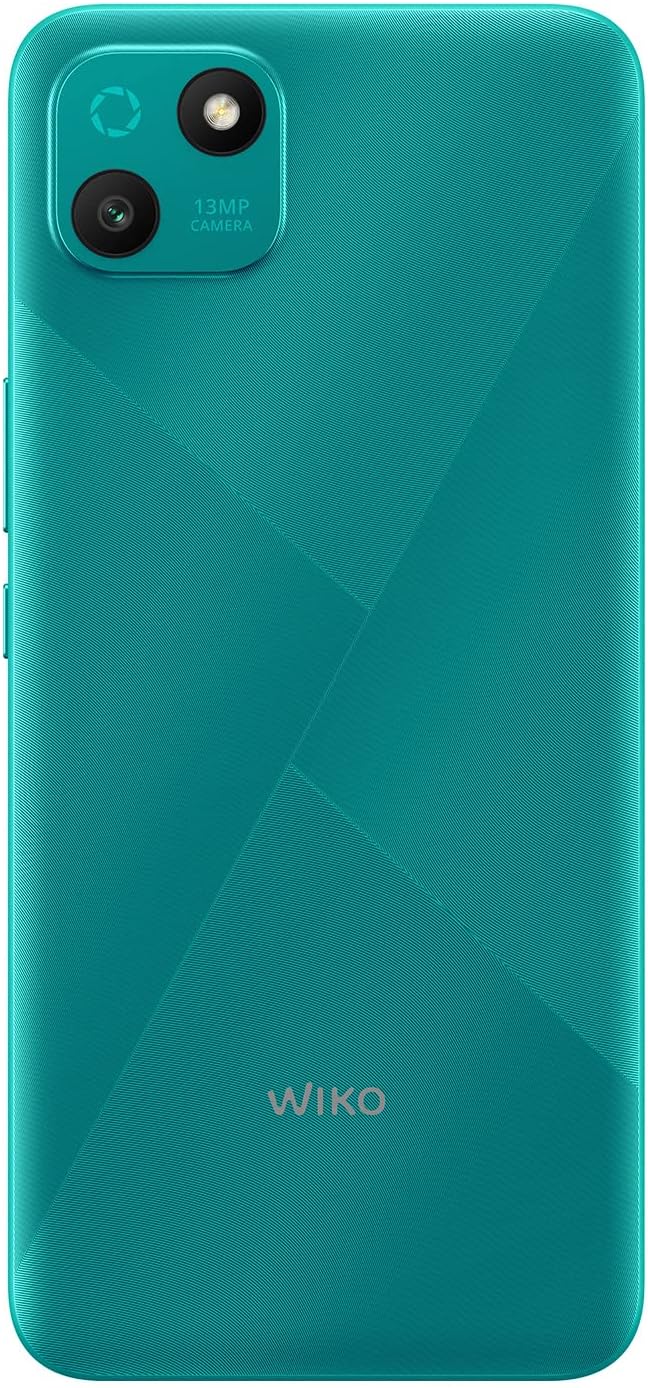
Hình 2: Chi tiết phía sau view of the WIKO T10, highlighting the 13MP camera module and textured back panel.

Hình 3: Chuyên nghiệp bênfile of the WIKO T10, illustrating its slim design and button placement.
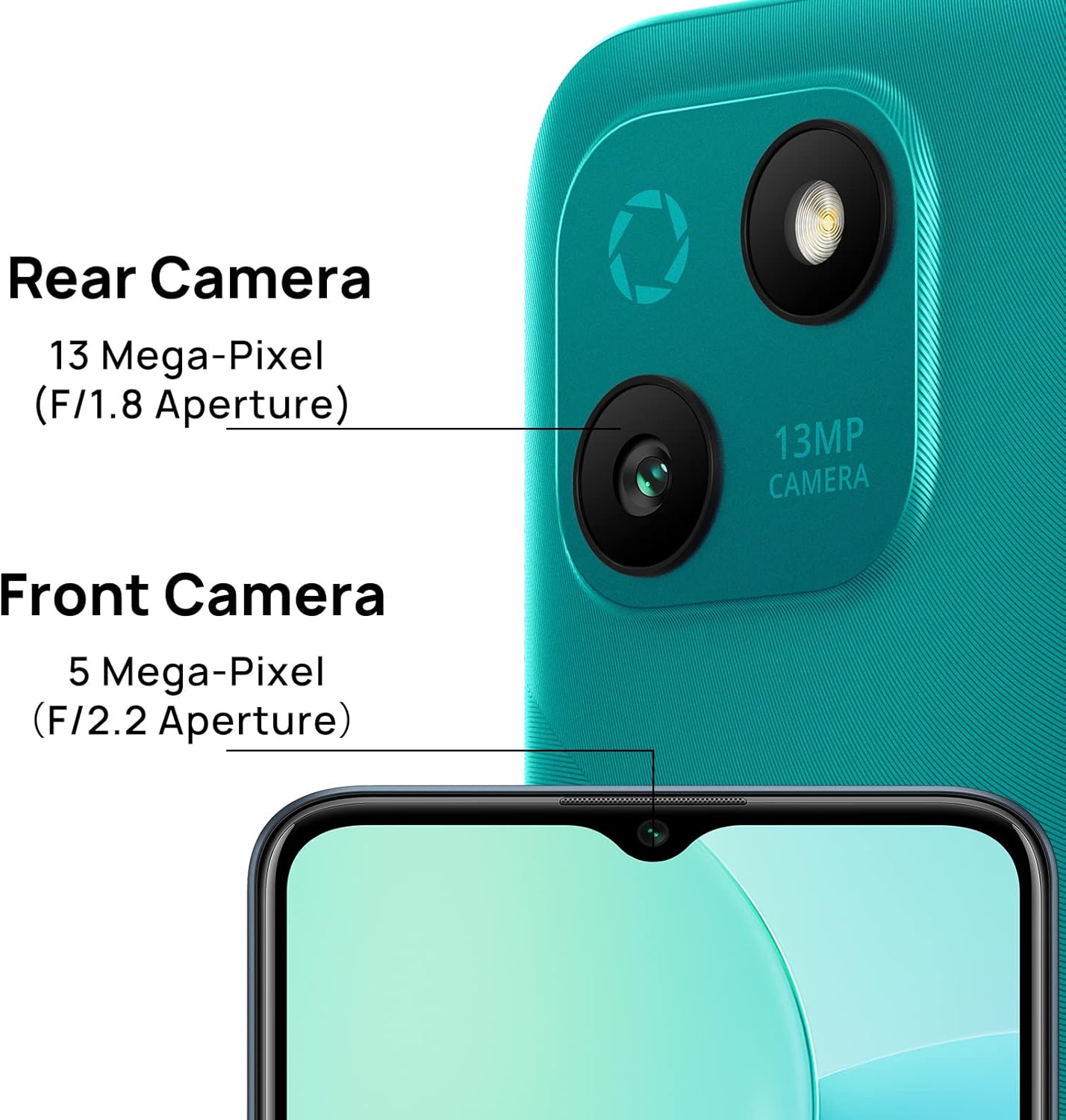
Hình 4: Camera specifications for the WIKO T10, indicating a 13 Mega-Pixel Rear Camera (F/1.8 Aperture) and a 5 Mega-Pixel Front Camera (F/2.2 Aperture).

Hình 5: The WIKO T10 features a 6.5-inch Dewdrop Display, offering an immersive visual experience with minimal bezels.
Hướng dẫn thiết lập
7.1 Lắp SIM và thẻ SD
The WIKO T10 supports Dual SIM functionality. Follow these steps to insert your SIM card(s) and an optional microSD card for expanded storage:
- Xác định vị trí khay SIM ở bên cạnh thiết bị.
- Cắm dụng cụ đẩy SIM vào lỗ nhỏ bên cạnh khay và ấn nhẹ cho đến khi khay bật ra.
- Đặt thẻ Nano-SIM và/hoặc thẻ microSD vào các khe cắm được chỉ định trên khay, đảm bảo các điểm tiếp xúc mạ vàng hướng xuống dưới.
- Cẩn thận đẩy khay trở lại khe cắm cho đến khi nó khít với thân điện thoại.
7.2 Bật nguồn và thiết lập ban đầu
To power on your WIKO T10 for the first time:
- Press and hold the Power button (usually on the right side) until the WIKO logo appears.
- Hãy làm theo hướng dẫn trên màn hình để chọn ngôn ngữ, kết nối Wi-Fi, thiết lập tài khoản Google và cấu hình các cài đặt ban đầu khác.
7.3 Sạc thiết bị
Before first use, it is recommended to fully charge your WIKO T10.
- Kết nối cáp USB Type-C vào cổng sạc ở phía dưới điện thoại.
- Nối đầu còn lại của dây cáp vào bộ chuyển đổi nguồn, sau đó cắm bộ chuyển đổi vào ổ cắm điện.
- Chỉ báo sạc sẽ hiển thị trên màn hình. Hãy ngắt kết nối bộ sạc khi pin đã được sạc đầy.
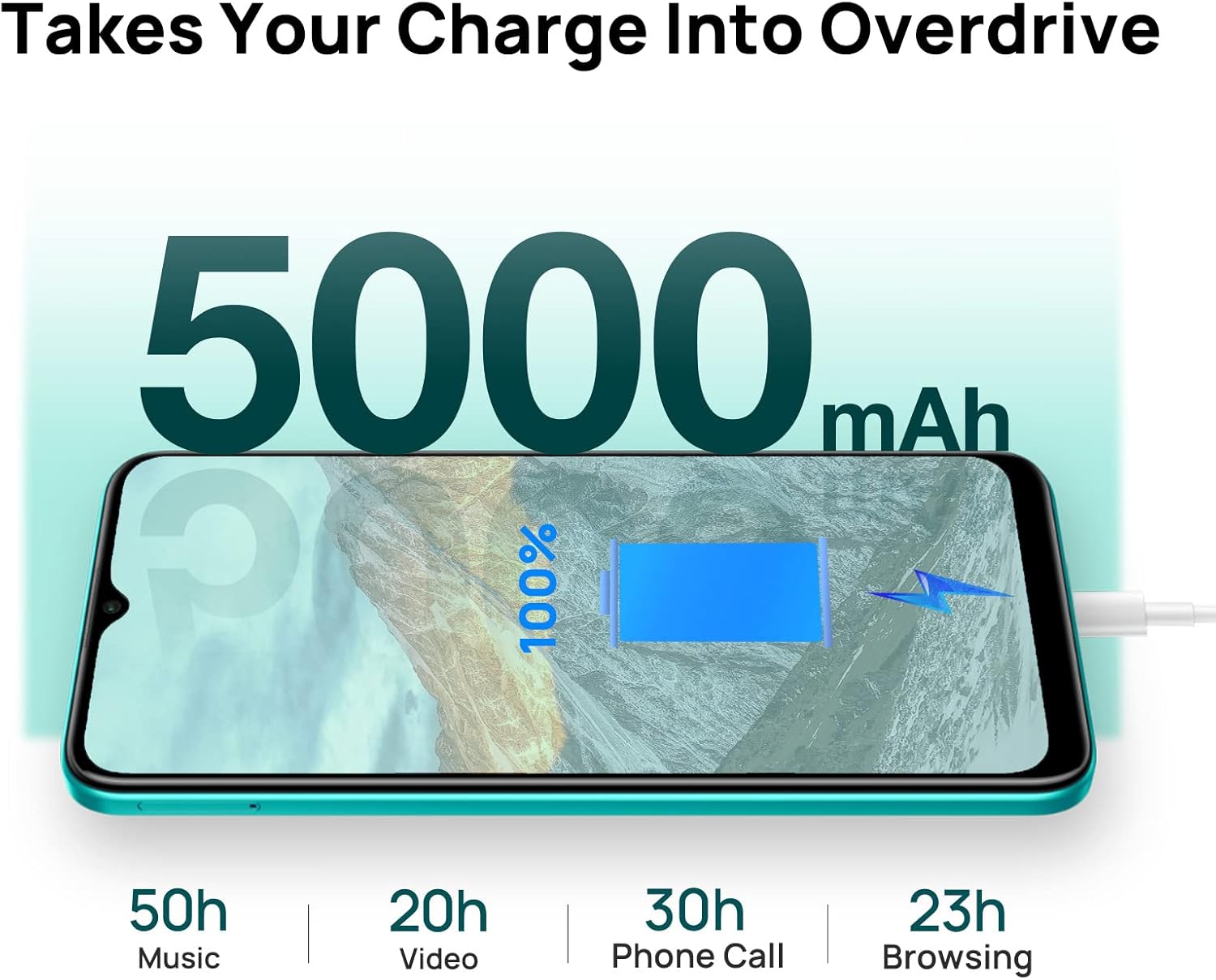
Hình 6: The WIKO T10 features a 5000mAh battery, providing extended usage times such as 50 hours of music, 20 hours of video, 30 hours of phone calls, and 23 hours of browsing on a full charge.
Operating Your WIKO T10
8.1 Điều hướng cơ bản
Your WIKO T10 uses a capacitive touchscreen for interaction:
- Vỗ nhẹ: Để mở ứng dụng, chọn mục hoặc nhấn các nút trên màn hình.
- Chạm và giữ: Để truy cập menu ngữ cảnh hoặc di chuyển các mục.
- Vuốt: To scroll through lists, switch between home screens, or navigate through photos.
- Nhón: Để phóng to hoặc thu nhỏ hình ảnh và web trang.
8.2 Thực hiện cuộc gọi và gửi tin nhắn
To make a call, open the Phone app and dial the number or select a contact. To send a message, open the Messages app, start a new conversation, and type your text.
8.3 Kết nối với mạng
Your WIKO T10 supports Wi-Fi and 4G cellular networks.
- Wi-Fi: Đi đến Cài đặt > Mạng & Internet > Wi-Fi, bật Wi-Fi và chọn mạng mong muốn.
- Dữ liệu di động (4G): Đi đến Cài đặt> Mạng & internet> Mạng di động và đảm bảo dữ liệu di động đã được bật.
8.4 Sử dụng máy ảnh
The WIKO T10 features a 13MP rear camera and a 5MP front camera. Open the Camera app to capture photos and videos.
- Nhấn nút chụp để chụp ảnh.
- Chuyển đổi giữa chế độ ảnh và video.
- Sử dụng nút chuyển đổi camera trước/sau để chụp ảnh tự sướng hoặc ảnh chính.
8.5 Quản lý pin
Pin 5000 mAh cho phép sử dụng lâu hơn. Để tối ưu hóa thời lượng pin:
- Điều chỉnh độ sáng màn hình.
- Bật chế độ Tiết kiệm pin trong Cài đặt> Pin.
- Đóng các ứng dụng không sử dụng đang chạy ngầm.
8.6 Quản lý lưu trữ
Your WIKO T10 comes with 64GB of internal storage. You can expand this using a microSD card.
- Để kiểm tra dung lượng lưu trữ đã sử dụng, hãy truy cập vào... Cài đặt > Lưu trữ.
- Thường xuyên xóa bộ nhớ cache và các tệp không cần thiết. files để giải phóng không gian.

Hình 7: Key features of the WIKO T10, including its 5000mAh Mega Battery, 6.5" Edgeless Dewdrop Display, 13MP Rear Camera, 64GB Large Storage, and Android 11 operating system.
BẢO TRÌ
9.1 Vệ sinh thiết bị của bạn
To keep your WIKO T10 clean and in good condition:
- Sử dụng vải mềm, không xơ để lau màn hình và thân máy.
- Tránh sử dụng hóa chất mạnh, chất tẩy rửa có tính mài mòn hoặc bình xịt.
- Do not allow moisture into openings.
9.2 Cập nhật phần mềm
Thường xuyên kiểm tra các bản cập nhật phần mềm để đảm bảo thiết bị của bạn có các tính năng và bản vá bảo mật mới nhất. Truy cập Cài đặt > Hệ thống > Cập nhật hệ thống.
9.3 Chăm sóc pin
Để kéo dài tuổi thọ pin:
- Tránh xả hết pin thường xuyên.
- Do not leave the phone charging for extended periods after it's full.
- Hãy đảm bảo thiết bị hoạt động trong phạm vi nhiệt độ được khuyến nghị.
Xử lý sự cố
| Vấn đề | Giải pháp khả thi |
|---|---|
| Thiết bị không bật | Đảm bảo pin đã được sạc. Nhấn và giữ nút Nguồn trong ít nhất 10 giây để buộc khởi động lại. |
| Không thể kết nối với Wi-Fi | Kiểm tra xem Wi-Fi đã được bật chưa. Khởi động lại bộ định tuyến. Xóa mạng hiện tại và kết nối lại. |
| Ứng dụng chạy chậm hoặc bị lỗi. | Đóng các ứng dụng chạy ngầm. Xóa bộ nhớ đệm của ứng dụng. Khởi động lại thiết bị. Đảm bảo có đủ dung lượng lưu trữ. |
| Tuổi thọ pin kém | Reduce screen brightness. Disable unused features (Bluetooth, GPS). Enable Battery Saver mode. |
| Không thể thực hiện hoặc nhận cuộc gọi | Check SIM card insertion. Ensure mobile data is enabled. Contact your network provider. |
Thông số kỹ thuật
| Tính năng | Chi tiết |
|---|---|
| Thương hiệu | Wiko |
| Tên mẫu | T10 |
| Hệ điều hành | Android 11.0 (Phiên bản đi) |
| Kích thước màn hình | 6.5 inch |
| Nghị quyết | 2340 x 1080 (HD+) |
| Kích thước RAM | 2GB |
| Dung lượng lưu trữ | 64GB |
| Độ phân giải camera sau | 13MP |
| Độ phân giải camera trước | 5MP |
| Dung lượng pin | 5000 mAh (Pin lithium-polymer) |
| Công nghệ di động | 4G |
| Kết nối | Cellular, USB Type C |
| Tính năng đặc biệt | Integrated GPS, Dual SIM |
| Màu sắc | Xanh ngọc lục bảo |
Bảo hành và Hỗ trợ
For warranty information and customer support, please refer to the warranty card included in your product package or visit the official WIKO webtrang web. Giữ lại bằng chứng mua hàng để yêu cầu bảo hành.
For further assistance, you may contact WIKO customer service through their official channels.