
1. Giới thiệu
The ACT AC7049 Dual Monitor Docking Station transforms your laptop into a complete workstation. This versatile 11-in-1 docking station allows you to connect up to two Full HD displays (max. 2048 x 1152 resolution) to your laptop via HDMI, using a single USB-C/A cable. It expands your laptop's connectivity with a Gigabit LAN port, microphone and headphone jacks, and six additional USB ports. Featuring DisplayLink® technology, it ensures advanced screen display on both MacOS and Windows computers.
2. Các tính năng chính
- Hỗ trợ màn hình kép: Connect up to two external displays with HDMI ports, supporting resolutions up to 2048x1152@60Hz.
- Tương thích phổ quát: Works with laptops featuring a USB-C or USB-A 3.2 Gen1 (USB 3.0) port, compatible with MacOS and Windows thanks to DisplayLink technology.
- Khả năng kết nối rộng rãi: Includes 2x HDMI, 1x Gigabit Ethernet, 3x USB-A 3.2 Gen 1 (one with fast charging), 4x USB-A 2.0, and 3.5mm audio jacks for microphone and headphones.
- Vị trí linh hoạt: Designed for both vertical and horizontal placement to optimize desk space and port accessibility.
- Cổng sạc USB: Dedicated USB port for charging smartphones and tablets.
3. Nội dung gói hàng
Vui lòng kiểm tra gói hàng để biết các mục sau:
- ACT AC7049 Docking Station
- USB-C/A 3.2 Gen1 Connection Cable (USB-A to USB-C)
- Bộ đổi nguồn
- Đứng dọc
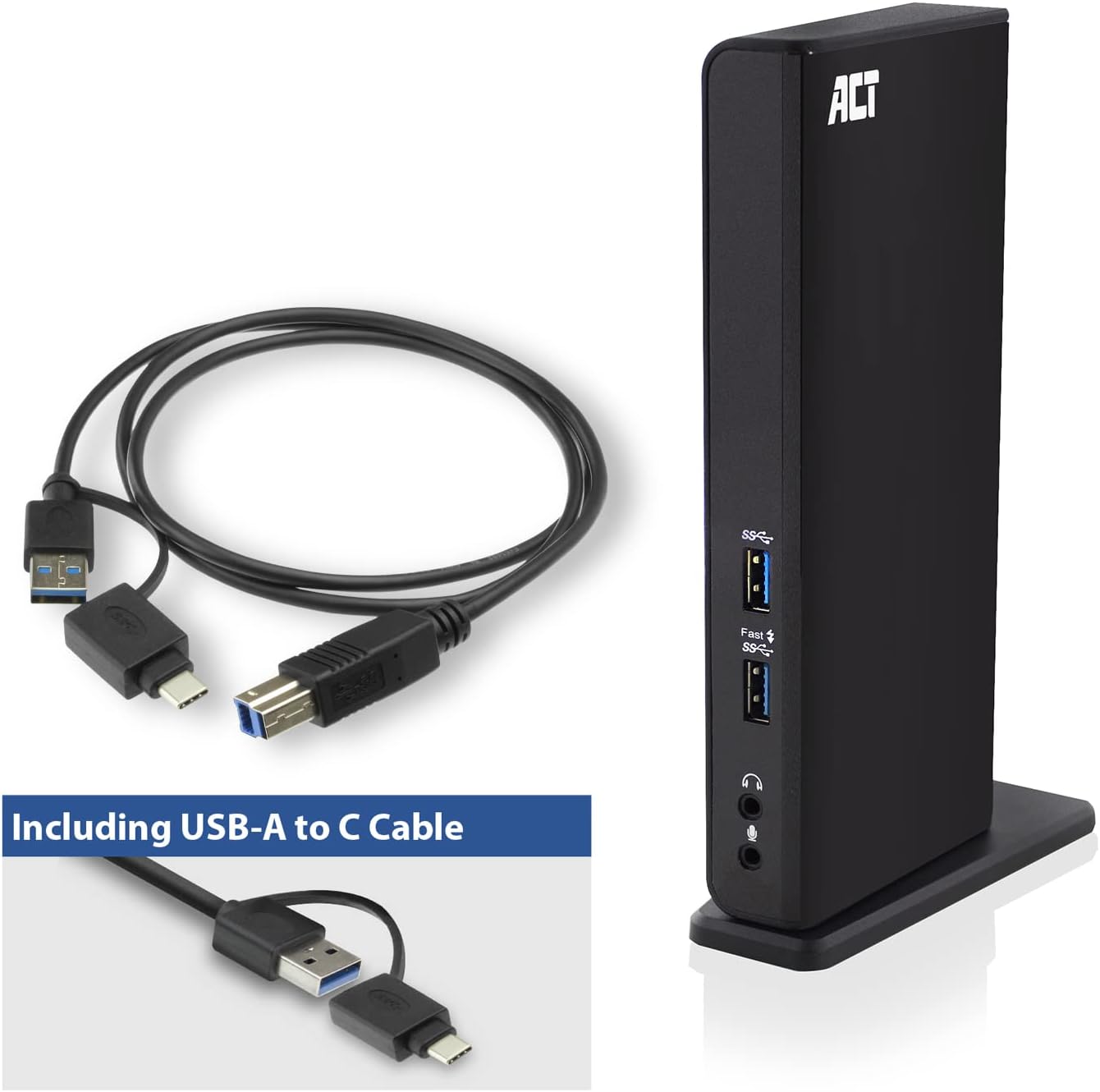
Image: The ACT AC7049 Docking Station shown with its included USB-A to USB-C connection cable and power adapter, highlighting the components provided in the package.
4. Hướng dẫn cài đặt
4.1. Kết nối bộ chuyển đổi nguồn
- Connect the power adapter to the DC 5V input port on the back of the AC7049 docking station.
- Plug the power adapter into a wall outlet. The docking station will power on.
4.2. Kết nối với máy tính xách tay của bạn
- Use the provided USB-C/A 3.2 Gen1 connection cable. Connect the USB-B end to the corresponding port on the docking station.
- Connect the other end (USB-A or USB-C, depending on your laptop's port) to an available USB 3.2 Gen1 (USB 3.0) or USB-C port on your laptop.
4.3. Driver Installation (DisplayLink)
The AC7049 utilizes DisplayLink technology for extended monitor functionality. Drivers are typically installed automatically on most operating systems. If not, please follow these steps:
- Hãy truy cập trang web chính thức của DisplayLink. webĐịa điểm (www.displaylink.com/downloads) to download the latest drivers for your operating system (Windows or MacOS).
- Install the downloaded driver package and follow the on-screen instructions.
- Khởi động lại máy tính nếu được yêu cầu.

Image: The official DisplayLink 'Plug and Display' logo, indicating the technology used for multi-monitor support.
5. Hướng dẫn vận hành
5.1. Kết nối màn hình ngoài
- Connect your HDMI monitors to the two HDMI ports on the back of the docking station.
- Once connected, your operating system should detect the new displays. You can configure display settings (extend, mirror, primary display) through your computer's display settings.

Image: A visual representation of the docking station enabling both 'Mirror your content' and 'Extend your content' display modes across a laptop and two external monitors.
5.2. Kết nối thiết bị ngoại vi USB
- Cổng USB phía trước: Two USB-A 3.2 Gen1 ports (one with fast charging capability) are located on the front for easy access to frequently used devices like USB drives, smartphones, or tablets.
- Rear USB Ports: Four USB-A 2.0 ports are located on the back for connecting peripherals such as keyboards, mice, printers, or other less frequently connected devices.
5.3. Kết nối mạng
Connect an Ethernet cable from your router or network switch to the Gigabit Ethernet port on the docking station. Your laptop will automatically gain wired network access.
5.4. Kết nối âm thanh
Connect your headphones and/or microphone to the dedicated 3.5mm audio jacks on the front of the docking station.

Image: An isometric diagram showcasing the comprehensive connectivity of the ACT AC7049, demonstrating how a laptop, two monitors, a keyboard, mouse, network cable, headphones, and a smartphone can all be connected simultaneously.
6. Tùy chọn vị trí
The ACT AC7049 docking station offers flexible placement options to suit your workspace:
- Vị trí dọc: Use the included stand to position the docking station vertically. This saves desk space and provides easy access to all ports.
- Vị trí theo chiều ngang: The docking station can also be placed horizontally if preferred.

Image: The ACT AC7049 Docking Station positioned vertically on its stand, highlighting its compact design and accessible ports.
7. Bảo trì
To ensure optimal performance and longevity of your ACT AC7049 Docking Station, follow these maintenance guidelines:
- Vệ sinh: Hãy dùng khăn mềm, khô để lau sạch bên ngoài đế sạc. Tránh sử dụng chất tẩy rửa dạng lỏng hoặc dạng xịt vì chúng có thể làm hỏng thiết bị.
- Thông gió: Hãy đảm bảo đặt trạm sạc ở khu vực thông gió tốt để tránh quá nhiệt. Không được chặn bất kỳ lỗ thông gió nào.
- Kho: Khi không sử dụng trong thời gian dài, hãy bảo quản đế sạc ở nơi khô ráo, thoáng mát, tránh ánh nắng trực tiếp và nhiệt độ quá cao hoặc quá thấp.
- Quản lý cáp: Giữ cho dây cáp được gọn gàng, không bị xoắn hoặc uốn cong quá mức để tránh làm hỏng dây cáp và cổng.
KHAI THÁC. Xử lý sự cố
If you encounter issues with your ACT AC7049 Docking Station, please refer to the following common troubleshooting steps:
- Không có đầu ra hiển thị:
- Ensure the docking station is powered on and correctly connected to your laptop.
- Verify that the HDMI cables are securely connected to both the docking station and the monitors.
- Kiểm tra cài đặt hiển thị của máy tính xách tay để đảm bảo màn hình ngoài được nhận diện và cấu hình chính xác (ví dụ: chế độ mở rộng hoặc phản chiếu).
- Reinstall or update the DisplayLink drivers from www.displaylink.com/downloads.
- Hãy thử kết nối từng màn hình một để xác định nguyên nhân gây ra sự cố.
- Các thiết bị USB không hoạt động:
- Ensure the docking station is properly connected to your laptop and powered.
- Try connecting the USB device directly to your laptop to confirm it is functional.
- Connect the USB device to a different USB port on the docking station.
- Khởi động lại máy tính xách tay của bạn.
- Không có kết nối mạng:
- Hãy kiểm tra xem cáp Ethernet đã được kết nối chắc chắn với cả trạm kết nối và bộ định tuyến/bộ chuyển mạch của bạn chưa.
- Check your laptop's network settings to ensure the wired connection is enabled.
- Nếu có thể, hãy kiểm tra cáp Ethernet bằng một thiết bị khác.
- Âm thanh không hoạt động:
- Ensure headphones/microphone are fully plugged into the correct 3.5mm jacks.
- Check your laptop's sound settings to ensure the docking station's audio output/input is selected as the default device.
9. Thông số kỹ thuật
| Tính năng | Đặc điểm kỹ thuật |
|---|---|
| Số hiệu mẫu | AC7049 |
| Thương hiệu | HÀNH ĐỘNG |
| Màu sắc | Đen |
| Công nghệ kết nối | USB-A, USB-C |
| Đầu ra video | 2 x HDMI (Max. 2048 x 1152 @ 60Hz) |
| Cổng USB | 3 x USB-A 3.2 Gen 1 (5Gbps, 1x Fast Charging), 4 x USB-A 2.0 (480Mbps) |
| Cổng mạng | 1 x Gigabit Ethernet (RJ45) |
| Cổng âm thanh | 1 x 3.5mm Headphone Jack, 1 x 3.5mm Microphone Jack |
| Thiết bị tương thích | Laptop, Computer (with USB 3.2 Gen1 / USB 3.0 or USB-C port) |
| Hỗ trợ hệ điều hành | Windows, MacOS (via DisplayLink) |
| Kích thước (D x R x C) | 10.9 x 6 x 18.1 cm (xấp xỉ) |
| Trọng lượng sản phẩm | 317 gam |
10. Bảo hành và Hỗ trợ
ACT products are designed for reliability and adhere to international standards and EU legislation. The ACT AC7049 Docking Station comes with a manufacturer's warranty, typically ranging from 2 to 5 years. For specific warranty details and support, please refer to the official ACT webtrang web hoặc liên hệ với nhà bán lẻ của bạn.
For technical support or further inquiries, please visit the official ACT connectivity webđịa điểm: www.act-connectivity.com