
1. Giới thiệu
Thank you for choosing the Awei TC-7 Wired Earphones. These in-ear earphones are designed for clear audio and convenient communication, featuring a Type-C connector for modern devices and an inline microphone with control buttons. Please read this manual carefully to ensure proper use and maintenance of your earphones.
2. Nội dung gói hàng
- Awei TC-7 Wired Earphones
- Multiple sizes of Ear Cushions (Small, Medium, Large)

Hình 2.1: The Awei TC-7 earphones include ear caps in various sizes to ensure a comfortable and secure fit for different users.
3. Sản phẩm hếtview
The Awei TC-7 earphones feature a durable design with a Type-C plug for direct connection to compatible devices. The inline remote control allows for easy management of audio playback and calls.

Hình 3.1: A close view of the Awei TC-7 earphones, showcasing their in-ear design for optimal sound delivery.

Hình 3.2: The inline remote control features multi-function buttons for managing audio and calls.

Hình 3.3: The integrated HD microphone is designed to pick up clear audio, even in noisy environments.
4. Thiết lập
- Chọn đệm tai: Choose the ear cushion size (Small, Medium, or Large) that provides the most comfortable and secure fit for your ears. A proper fit enhances sound quality and noise isolation.
- Kết nối với thiết bị: Insert the USB-C plug of the earphones into the Type-C port of your smartphone, tablet, laptop, or other compatible device.
- Đầu ra âm thanh: Ensure your device's audio output is set to the connected earphones. This is usually automatic upon connection.
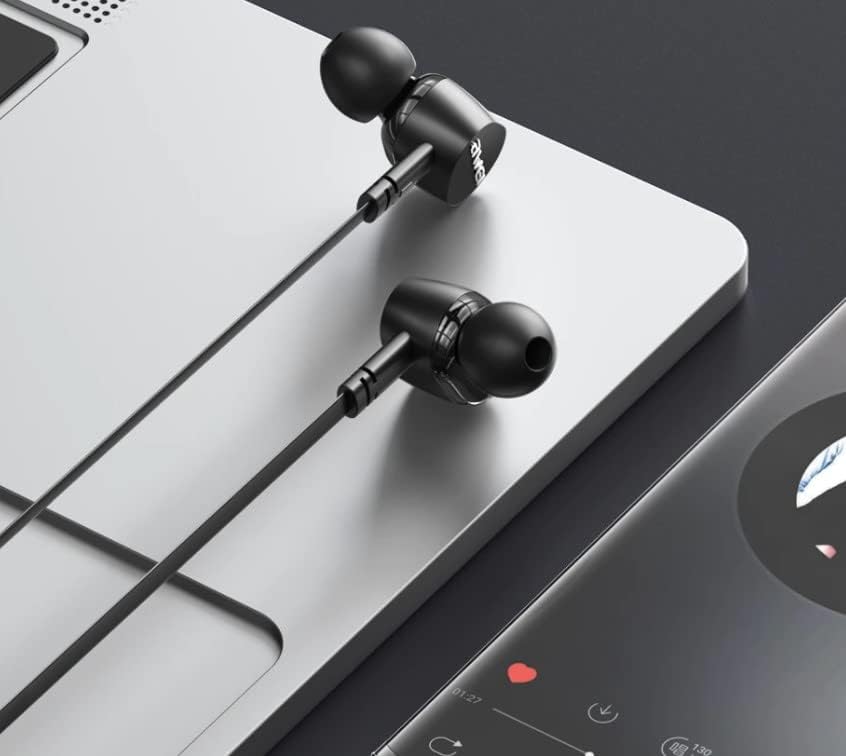
Hình 4.1: The earphones are compatible with various devices featuring a USB-C port, such as laptops and smartphones.
5. Hướng dẫn vận hành
The Awei TC-7 earphones feature an inline remote with buttons for convenient control of your audio and calls.
5.1. Điều khiển phát nhạc
- Phát/Tạm dừng: Nhấn nút trung tâm một lần.
- Bài hát tiếp theo: Nhấn nhanh nút trung tâm hai lần.
- Bản nhạc trước: Nhấn nhanh nút trung tâm ba lần.
- Tăng âm lượng: Nhấn nút '+'.
- Giảm âm lượng: Nhấn nút '-'.
5.2. Quản lý cuộc gọi
- Trả lời/Kết thúc cuộc gọi: Nhấn nút ở giữa một lần khi có cuộc gọi đến hoặc đang có cuộc gọi đang diễn ra.
- Từ chối cuộc gọi: Press and hold the center button for approximately 2 seconds during an incoming call.
6. Bảo trì
Proper care will extend the lifespan of your Awei TC-7 earphones.
- Vệ sinh đệm tai: Regularly remove the ear cushions and clean them with a soft, damp vải. Đảm bảo chúng khô hoàn toàn trước khi gắn lại.
- Chăm sóc cáp: The cable is designed to be tangle-free. Avoid excessive pulling or sharp bending to prevent internal damage.
- Kho: When not in use, store the earphones in a clean, dry place, away from extreme temperatures.
- Khả năng chống nước: The earphones are rated as waterproof. However, avoid prolonged submersion and ensure the USB-C port is dry before connecting to a device after exposure to water.
KHAI THÁC. Xử lý sự cố
If you encounter issues with your Awei TC-7 earphones, please refer to the following common solutions:
| Vấn đề | Nguyên nhân có thể | Giải pháp |
|---|---|---|
| Không có âm thanh từ tai nghe | Earphones not properly connected; device volume too low; incorrect audio output setting on device. | Ensure the USB-C plug is fully inserted. Increase device volume. Check device audio settings to confirm output is set to earphones. |
| Micrô không hoạt động | Microphone port blocked; incorrect input setting on device; application permissions. | Ensure the microphone area is clear. Check device sound settings for microphone input. Verify application permissions for microphone access. |
| Các nút không phản hồi | Loose connection; device incompatibility; software glitch. | Reconnect the earphones. Test with another compatible device if possible. Restart your device. |
8. Thông số kỹ thuật
| Tính năng | Chi tiết |
|---|---|
| Tên mẫu | TC-7 |
| Công nghệ kết nối | Có dây |
| Jack cắm tai nghe | USB-C |
| Vị trí tai | Trong tai |
| Dải tần số | 20Hz - 20kHz |
| Các tính năng bổ sung | Microphone Included, Inline Control |
| Vật liệu | Nhựa |
| Mức độ chống nước | Không thấm nước |
| Tính năng của cáp | Tangle miễn phí |
| Thiết bị tương thích | Smartphones, Laptops, Tablets, Desktops with USB-C |
9. Bảo hành và Hỗ trợ
Để biết thông tin về bảo hành và hỗ trợ khách hàng, vui lòng tham khảo tài liệu được cung cấp tại thời điểm mua hàng hoặc liên hệ với nhà bán lẻ của bạn. Hãy giữ lại hóa đơn mua hàng để phục vụ cho các yêu cầu bảo hành.