
1. Giới thiệu
Thank you for choosing the MESTEK IR02C-Y Infrared Thermometer. This device is designed for safe, non-contact temperature measurement of various surfaces, and also includes a K-type probe for contact temperature measurement. Additionally, it can measure ambient temperature, humidity, and dew point. Please read this manual thoroughly before use to ensure proper operation and safety.
Important Safety Note: This infrared thermometer is not intended for measuring human or animal body temperature.
2. Sản phẩm hếtview
The MESTEK IR02C-Y features a clear color LCD, adjustable emissivity, and various alarm modes to assist in diverse measurement tasks.
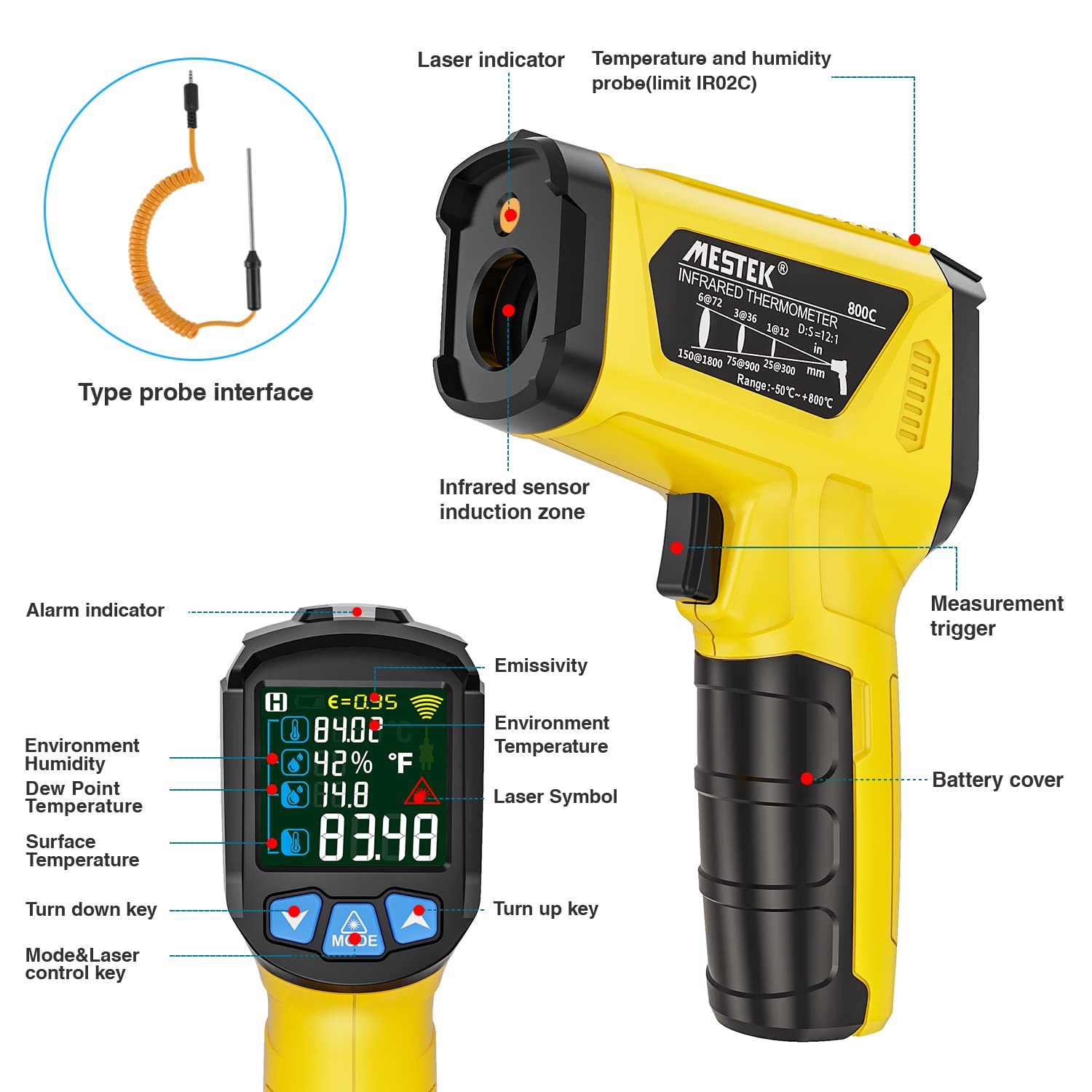
Figure 1: MESTEK IR02C-Y Infrared Thermometer with labeled components including laser indicator, infrared sensor, display, and buttons.
Các thành phần chính:
- Infrared Sensor Zone: Dùng để đo nhiệt độ không tiếp xúc.
- Chỉ thị laser: Helps pinpoint the measurement target.
- Trưng bày: Color LCD screen showing temperature, humidity, dew point, emissivity, and alarm indicators.
- Kích hoạt đo lường: Kích hoạt quá trình đo lường.
- Mode & Laser Control Key: Cycles through measurement modes and controls the laser.
- Phím Lên/Xuống: Adjust settings like emissivity or alarm thresholds.
- Type Probe Interface: Port for connecting the K-type thermocouple probe.
- Nắp pin: Chứa các viên pin AAA.
3. Thiết lập
3.1. Lắp đặt pin
The MESTEK IR02C-Y requires two (2) AAA batteries (included). To install:
- Tìm nắp pin trên tay cầm của nhiệt kế.
- Mở nắp pin.
- Lắp hai pin AAA 1.5V, đảm bảo đúng cực (+/-).
- Đóng chặt nắp pin.
Video 1: Demonstrates battery installation and basic operation modes.
3.2. Connecting the K-Type Probe (Optional)
If you need to measure internal temperatures of liquids or semi-solids, connect the K-type thermocouple probe:
- Insert the K-type thermocouple probe connector into the designated port on the thermometer.
- The thermometer will automatically detect the probe and display K-type temperature readings alongside infrared measurements.
4. Hướng dẫn vận hành
4.1. Bật/Tắt nguồn
- To power on, press the Measurement Trigger.
- The device will automatically power off after 30 seconds of inactivity to conserve battery life.
4.2. Taking a Measurement (Infrared)
- Hướng ống kính hồng ngoại về phía vật thể cần quan sát.
- Press and hold the Measurement Trigger. The laser indicator will activate (if enabled) to show the measurement area.
- The temperature reading will appear on the display. Release the trigger to hold the reading.
4.3. Taking a Measurement (K-Type Probe)
With the K-type probe connected:
- Insert the metal tip of the probe into the liquid or semi-solid material you wish to measure.
- Press the Measurement Trigger. The display will show both the infrared surface temperature and the K-type probe temperature.
4.4. Lựa chọn chế độ
Nhấn nút CÁCH THỨC Nút để chuyển đổi giữa các chế độ hiển thị khác nhau:
- Environment Surface Temperature: Displays the infrared temperature of the target surface.
- Chức năng của đầu dò nhiệt độ: Displays K-type probe temperature (if connected) and infrared temperature.
- Adjustable Emissivity Function: Allows adjustment of emissivity.
- Unit Switch (°C/°F): Chuyển đổi giữa độ Celsius và độ Fahrenheit.
Video 2: Explains screen parameters, mildew alarm mode, temperature difference alarm mode, and K-type thermocouple temperature measurement.
4.5. Adjustable Emissivity
Emissivity (ε) is a measure of an object's ability to emit infrared energy. Different materials have different emissivities. For accurate readings, adjust the emissivity setting (0.10-1.00) to match the material being measured. Consult a standard emissivity table for common materials.

Figure 2: The thermometer's adjustable emissivity feature allows for accurate temperature readings across different surfaces, from ice to grilled foods and wood.
4.6. Chế độ báo động
The thermometer features two alarm modes:
- Mildew Alarm Mode: The device judges the likelihood of mildew based on the surface temperature and the dew point temperature of the environment. A green indicator means no mildew, yellow indicates a tendency for mildew, and red indicates mildew.
- Temperature Difference Alarm Mode: The meter compares the surface temperature of the object with the ambient temperature. A green indicator lights up if the difference is less than 5°C/41°F. A red indicator lights up if the difference is greater than 5°C/41°F. Other cases result in a yellow indicator.
4.7. Laser ON/OFF
To toggle the laser on or off, press and hold the Up nhấn nút trong 2 giây.
5. Ứng dụng
The MESTEK IR02C-Y is suitable for a wide range of applications, including:
- Cooking, baking, grilling, and monitoring frozen foods.
- Automotive maintenance and electrical repairs.
- Household tasks such as checking appliance temperatures or HVAC systems.
- Industrial use for monitoring machinery and processes.
- Horticulture and viticulture.

Hình 3: Ví dụamples of the thermometer's diverse applications, from culinary to automotive and home heating.
6. Bảo trì
6.1. Vệ sinh
- Lau máy bằng khăn mềm, damp vải. Không sử dụng chất tẩy rửa có tính mài mòn hoặc dung môi.
- Keep the infrared lens clean for accurate readings. Use a soft cloth or cotton swab with a small amount of isopropyl alcohol if necessary.
6.2. Lưu trữ
- Bảo quản nhiệt kế ở nơi khô ráo, thoáng mát khi không sử dụng.
- Tháo pin ra nếu không sử dụng thiết bị trong thời gian dài để tránh rò rỉ.
KHAI THÁC. Xử lý sự cố
| Vấn đề | Nguyên nhân có thể | Giải pháp |
|---|---|---|
| Thiết bị không bật nguồn. | Pin yếu hoặc hết; lắp pin không đúng cách. | Thay pin cũ bằng pin AAA 1.5V mới, đảm bảo đúng cực. |
| Các bài đọc không chính xác. | Dirty infrared lens; incorrect emissivity setting; distance to spot ratio exceeded. | Clean the lens; adjust emissivity to match the material; ensure measurement is within the 12:1 D:S ratio. |
| Laser not visible. | Laser is turned off. | Press and hold the Up button for 2 seconds to toggle the laser on. |
| K-type probe not working. | Probe not properly connected; damaged probe. | Ensure the probe is fully inserted into the port. If still not working, the probe may need replacement. |
8. Thông số kỹ thuật
- Infrared Temperature Range: -50°C đến 800°C (-58°F đến 1472°F)
- K-Type Probe Temperature Range: -10°C đến 500°C (14°F đến 932°F)
- Sự chính xác: ±1.5% or ±2°C/4°F (whichever is greater)
- Thời gian phản hồi: ≤ 0.5 giây
- Tỷ lệ khoảng cách đến điểm (D:S): 12:1
- Sự sai sót: Có thể điều chỉnh từ 0.10 đến 1.00
- Đo nhiệt độ môi trường xung quanh: Đúng
- Đo độ ẩm: Đúng
- Dew Point Measurement: Đúng
- Trưng bày: Màn hình LCD màu có đèn nền
- Tính năng đặc biệt: MAX/HOLD data, Low Battery Indication, Auto Power-Off (30 seconds), Mildew Alarm Mode, Temperature Difference Alarm Mode.
- Quyền lực: 2 x 1.5V pin AAA (bao gồm)
- Kích thước: 13.99 x 9.39 x 3.2cm
- Cân nặng: 310 gram
- Vật liệu: Nhựa
- Chứng nhận: CE, EMC, FCC, RoHS, WEEE
- Các thành phần bao gồm: 1 x Infrared Thermometer, 1 x K-Type Probe, 2 x AAA Batteries, 1 x User Manual.
9. Bảo hành và Hỗ trợ
MESTEK offers a lifetime warranty for this product. If you encounter any issues or require assistance, please contact MESTEK customer support. Our professional engineers are available to provide prompt support.
Thông tin liên lạc: Please refer to the contact details provided on the product packaging or the official MESTEK webtrang web để biết thông tin hỗ trợ mới nhất.