
1. Giới thiệu
This manual provides comprehensive instructions for the COMTEC ZDR035 dual camera Full HD drive recorder. It covers product features, installation, operation, maintenance, and troubleshooting. Please read this manual thoroughly before using the device to ensure proper and safe operation.

Image 1.1: COMTEC ZDR035 Front and Rear Dash Cam units.
2. Các tính năng chính
The COMTEC ZDR035 is equipped with advanced features designed to enhance driving safety and provide reliable recording:
- Ghi hình bằng hai camera: Ghi lại cả phía trước và phía sau views simultaneously in Full HD.
- STARVIS Technology: Enhances image clarity in low-light conditions, such as at night or in tunnels.
- Ultra-Wide-Angle Lenses: Chụp một trường rộng lớn view (168° diagonal) for comprehensive coverage.
- Safety Driving Support Functions: Includes alerts for rear vehicle approach, forward vehicle start, front traffic signal, rapid acceleration/deceleration/steering, and vehicle speed.
- Chế độ giám sát đỗ xe: Monitors your vehicle for impacts or continuous recording while parked (requires optional accessory).
- HDR/WDR: Provides clear images by compensating for brightness differences, reducing whiteout and black crush.
- SD Card Data Protection: Features a proprietary file system and super capacitor to minimize data corruption and ensure high recovery rates.
- Noise Countermeasures: Designed to prevent interference with terrestrial digital TV and car navigation GPS signals.

Hình 2.1: Hếtview of ZDR035 key features including dual cameras, STARVIS, and GPS.
3. Thiết lập và Cài đặt
Proper installation is crucial for optimal performance. It is recommended to have the device professionally installed. If self-installing, ensure the following:
- Vị trí lắp đặt: Mount the front camera on the windshield where it does not obstruct the driver's view. The rear camera should be mounted on the rear window.
- Kết nối nguồn điện: Connect the power cable to the vehicle's power source according to the instructions provided in the separate installation guide.
- Kết nối máy ảnh: Connect the front and rear cameras using the supplied camera cable.
- Lắp thẻ SD: Insert the microSDHC card into the main unit.
The device uses an adhesive mounting type for secure attachment.

Image 3.1: Illustration of the 168-degree wide-angle coverage for both front and rear cameras.
4. Hướng dẫn vận hành
4.1. Chức năng ghi âm
- Ghi liên tục: Automatically records from engine ON to OFF. Recording time varies based on settings. Older fileDữ liệu sẽ bị ghi đè khi thẻ nhớ đầy.
- Impact Recording: When the built-in G-sensor detects an impact, the relevant footage is saved as protected data.
- Ghi thủ công: Press the designated switch to manually record and protect footage bất cứ lúc nào.
4.2. Safety Driving Support Functions
These functions provide alerts to assist safe driving. They are not accident prevention systems.
- Rear Vehicle Approach Alert: Detects vehicles approaching from the rear and provides an audible or alarm alert. Can automatically save footage của sự kiện.
- Cảnh báo khởi động xe phía trước: Notifies you when the vehicle ahead begins to move.
- Front Signal Alert: Alerts you when a traffic light ahead turns green.
- Drive Support Function: Detects and alerts for sudden acceleration, deceleration, or steering.
- Vehicle Speed Alarm: Alerts you if your vehicle exceeds a preset speed.

Image 4.1: Illustration of the Rear Vehicle Approach Alert function.
4.3. Các tính năng hình ảnh nâng cao
- STARVIS Night Vision: Both front and rear cameras utilize Sony's STARVIS CMOS sensor for clear recording in dark environments.
- HDR/WDR: High Dynamic Range (HDR) and Wide Dynamic Range (WDR) functions ensure clear images in varying light conditions, such as strong backlight or sudden changes in brightness. (Rear camera supports HDR only).
- LED Traffic Light Compatibility: Records reliably across different power frequencies in Japan (East/West).

Image 4.2: Comparison of night recording with and without STARVIS technology.
4.4. Parking Surveillance Functions
Requires the optional HDROP-14 direct wiring cord.
- Impact Quick Recording: Records when an impact is detected while parked, minimizing power consumption.
- One-Time Parking Surveillance Mode: Temporarily activates parking surveillance even if the main function is off.
- Parking Surveillance Mode Pass: Temporarily disables parking surveillance in environments prone to false triggers (e.g., mechanical parking lots, windy conditions).
- Ghi thời gian trôi đi: Records still images at 1-second intervals, compressing them into a short video for extended parking surveillance.
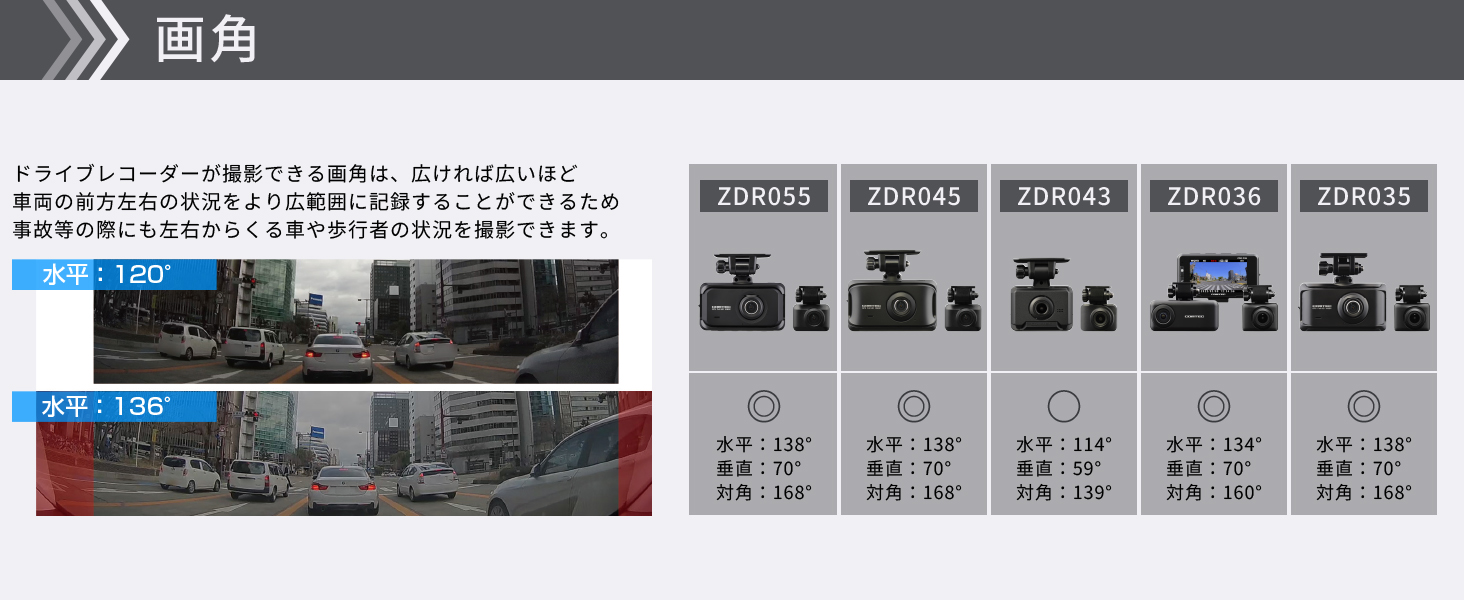
Image 4.3: Diagram illustrating parking surveillance features, including impact detection and recording.
4.5. Data Protection Features
- Chức năng sao lưu: A proprietary file system and super capacitor protect recorded data from corruption in case of sudden power loss.
- SD Card Check Function: The device checks the microSDHC card at startup and alerts you via an LED indicator if damage is detected, preventing missed recordings.
- Emergency Recording Stop Function: Automatically stops recording after a significant impact to prevent important accident footage khỏi bị ghi đè.
4.6. Tính năng tiện lợi
- High-Speed Start Recording: Recording begins immediately after the engine is turned ON.
- Recorded Image Rotation: The built-in G-sensor automatically adjusts image orientation, allowing flexible mounting.
- Ghi âm: Ghi lại âm thanh cùng với video.
- Date and Time Information: Records date and time data with footage.
5. Bảo trì
The COMTEC ZDR035 utilizes a proprietary file system that significantly reduces SD card fragmentation, thereby minimizing the need for frequent manual formatting. However, it is good practice to periodically check the SD card's health using the device's built-in SD Card Check Function.
KHAI THÁC. Xử lý sự cố
- Không có ghi chú: Check if the SD card is inserted correctly and is not damaged. The SD Card Check Function will alert you if there's an issue.
- Function Malfunction: Some functions, particularly safety support features, may not operate correctly if GPS reception is poor or unavailable, or due to environmental factors (weather, vehicle ahead's shape/color, mounting position).
- Nhiễu tiếng ồn: The device includes noise countermeasures to prevent interference with other vehicle electronics. If interference occurs, ensure proper installation and grounding.
- Impact Detection Sensitivity: The impact detection sensitivity for features like Impact Recording and Emergency Recording Stop can be adjusted in 11 levels (including OFF) via the device settings.
7. Thông số kỹ thuật
| Tính năng | Chi tiết |
|---|---|
| Thương hiệu | COMTEC |
| Tên mẫu | ZDR035 |
| Kích thước sản phẩm (D x R x C) | 9.2 x 3.2 x 5.2cm |
| Trọng lượng sản phẩm | 600 gam |
| Ắc quy | 1 pin Lithium Metal (đi kèm) |
| Tính năng đặc biệt | Built-in GPS, Night Vision |
| Màu sắc | Đen |
| Loại xe tương thích | Xe hơi |
| Độ phân giải quay video | 1080p (Full HD) |
| Kiểu lắp đặt | Chất kết dính |
| Lĩnh vực View | 168 độ (đường chéo) |
| Phương pháp kiểm soát | Chạm |

Image 7.1: Diagram showing the dimensions of the COMTEC ZDR035 main unit.
8. Bảo hành và Hỗ trợ
8.1. Thông tin bảo hành
The COMTEC ZDR035 comes with a Bảo hành 3 năm from the date of purchase. Please retain your proof of purchase (e.g., delivery note) as it is required for warranty claims. The warranty is not applicable for use outside Japan or without valid proof of purchase.

Image 8.1: Illustration indicating the 3-year product warranty.
8.2. Viewer Phần mềm
Một người tận tụy viewer software is available for download from the official COMTEC website. This software allows you to review ghi lại thức ăntage, audio, and G-sensor data on your computer. You can also convert recorded data into video or still images for saving.
For further support or inquiries, please visit the official COMTEC webtrang web hoặc liên hệ với dịch vụ khách hàng.