
1. Giới thiệu
Thank you for choosing the Inscabin P2 Portable DAB/DAB+FM Digital Radio and Bluetooth Speaker. This device combines multiple audio functionalities, including DAB/DAB+ digital radio, FM radio, Bluetooth connectivity, and playback from USB drives and TF cards. It also features a dual alarm clock, sleep timer, and snooze function. This manual provides detailed instructions to help you set up, operate, and maintain your device.
Vui lòng đọc kỹ hướng dẫn này trước khi sử dụng sản phẩm và giữ lại để tham khảo sau này.
2. Thông tin an toàn
- Nguồn điện: Use only the specified power adapter or USB charging cable. Ensure the voltage tương thích với khu vực của bạn.
- Nước và độ ẩm: Do not expose the device to rain, moisture, or immerse it in water. Avoid placing liquid-filled objects on the device.
- Nhiệt: Hãy đặt thiết bị tránh xa các nguồn nhiệt như lò sưởi, lỗ thông hơi, bếp hoặc các thiết bị tỏa nhiệt khác.
- Thông gió: Đảm bảo thông gió thích hợp. Không chặn bất kỳ lỗ thông gió nào.
- Vệ sinh: Ngắt nguồn điện trước khi vệ sinh. Sử dụng khăn mềm, khô. Không sử dụng chất tẩy rửa dạng lỏng hoặc dạng xịt.
- Bảo dưỡng: Đừng cố gắng tự bảo dưỡng sản phẩm này. Giới thiệu tất cả các dịch vụ cho nhân viên dịch vụ có trình độ.
- Ắc quy: The device contains a built-in rechargeable battery. Do not expose it to excessive heat or direct sunlight. Dispose of batteries responsibly according to local regulations.
3. Sản phẩm hếtview
Familiarize yourself with the various parts and controls of your Inscabin P2 radio.
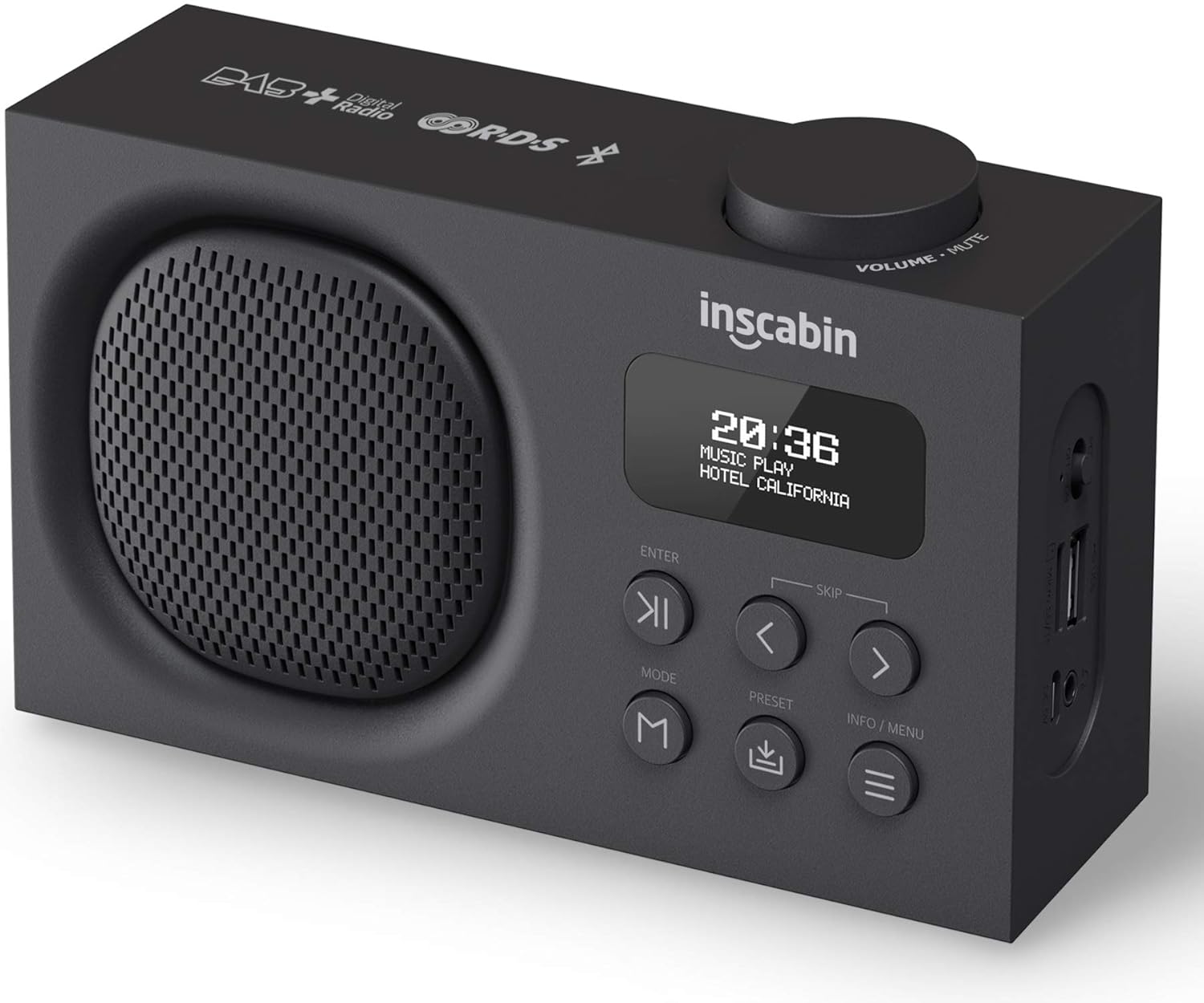
This image displays the front of the Inscabin P2 radio, highlighting its speaker grille, LCD display, control buttons, and the volume knob on top. It provides a clear view of the device's compact design.

This detailed side view of the Inscabin P2 radio clearly labels its various ports: Power Switch, Micro SD/TF card slot, USB input port, Headphone insert slot, and Micro USB charging slot. This helps users identify connection points.
Điều khiển và cổng:
- Núm điều chỉnh âm lượng/tắt tiếng: Xoay để điều chỉnh âm lượng, nhấn để tắt tiếng/bật tiếng.
- Màn hình LCD: Shows time, station information, mode, and menu options.
- Nút NHẬP: Xác nhận lựa chọn.
- SKIP Buttons (< / >): Navigate menus, skip tracks, or tune stations.
- Nút MODE: Switches between DAB, FM, Bluetooth, USB, and TF card modes.
- Nút PRESET: Accesses or saves preset stations.
- Nút INFO/MENU: Displays information or accesses the system menu.
- Công tắc điện: Bật hoặc tắt thiết bị.
- Khe cắm thẻ Micro SD/TF: Để phát âm thanh files từ thẻ TF.
- Cổng đầu vào USB: Để phát âm thanh files từ ổ USB.
- Headphone Insert Slot: Để nghe riêng tư.
- Khe sạc Micro USB: Để sạc pin bên trong.
4. Thiết lập
4.1 Sạc pin
- Connect the provided Micro USB cable to the Micro USB charging slot on the side of the radio.
- Connect the other end of the USB cable to a USB power adapter (not included) or a powered USB port.
- Đèn báo trạng thái sạc trên màn hình sẽ hiển thị tình trạng sạc. Thông thường, quá trình sạc đầy mất vài giờ.
- Once fully charged, disconnect the charging cable. The built-in 1800mAh battery provides over 10 hours of playback.
4.2 Bật nguồn ban đầu
- Ensure the radio is charged or connected to power.
- Slide the Power Switch to the 'ON' position.
- The display will light up, and the device will typically start in DAB mode or the last used mode.
4.3 Định vị ăng-ten
For optimal reception in DAB and FM modes, extend the telescopic antenna fully and adjust its position. Experiment with different angles to find the best signal strength.
5. Hướng dẫn vận hành
5.1 Bật/Tắt nguồn
- To turn on, slide the Power Switch to 'ON'.
- To turn off, slide the Power Switch to 'OFF'.
5.2 Lựa chọn chế độ
Nhấn nút CÁCH THỨC button repeatedly to cycle through the available modes: DAB, FM, Bluetooth, USB, and TF Card.
5.3 Chế độ Radio DAB/DAB+
- Switch to DAB mode using the CÁCH THỨC cái nút.
- Upon first use or if no stations are found, the radio will automatically perform a full scan for available DAB/DAB+ stations. This may take a few minutes.
- Once the scan is complete, the first available station will begin playing.
- Sử dụng SKIP (< / >) buttons to navigate through the list of available stations. Press ĐI VÀO để chọn một đài.
- Lưu cài đặt trước: Để lưu đài, hãy dò đến đài mong muốn, sau đó nhấn và giữ nút. CÀI ĐẶT TRƯỚC nút. Sử dụng SKIP (< / >) các nút để chọn số cài đặt trước (1-10), sau đó nhấn ĐI VÀO để xác nhận.
- Nhắc lại cài đặt trước: Nhấn nhanh nút CÀI ĐẶT TRƯỚC , sau đó sử dụng SKIP (< / >) buttons to select your desired preset, and press ĐI VÀO.
- DAB Information: Nhấn nút THÔNG TIN / MENU button to cycle through various information displays such as program type, signal strength, bit rate, and date/time.
Chế độ đài FM 5.4
- Chuyển sang chế độ FM bằng cách sử dụng CÁCH THỨC cái nút.
- Tự động quét: To automatically scan and save FM stations, press and hold the THÔNG TIN / MENU button. The radio will scan and store stations with strong signals.
- Điều chỉnh thủ công: Nhấn nhanh nút SKIP (< / >) buttons to fine-tune the frequency in small increments. Press and hold the SKIP (< / >) các nút để tự động quét tìm trạm tiếp theo có sẵn.
- Lưu cài đặt trước: Similar to DAB mode, tune to the desired FM station, then press and hold the CÀI ĐẶT TRƯỚC nút. Sử dụng SKIP (< / >) nhấn các nút để chọn số đã được thiết lập sẵn, sau đó nhấn ĐI VÀO.
- Nhắc lại cài đặt trước: Nhấn nhanh nút CÀI ĐẶT TRƯỚC , sau đó sử dụng SKIP (< / >) buttons to select your desired preset, and press ĐI VÀO.
5.5 Chế độ Bluetooth
- Chuyển sang chế độ Bluetooth bằng cách sử dụng CÁCH THỨC button. The display will show "Bluetooth Pairing" or similar, indicating it's ready to connect.
- Trên thiết bị hỗ trợ Bluetooth của bạn (điện thoại thông minh, máy tính bảng), hãy bật Bluetooth và tìm kiếm các thiết bị khả dụng.
- Select "Inscabin P2" from the list of devices.
- Once paired, the radio will confirm the connection, and you can now stream audio from your device to the Inscabin P2.
- Use your connected device or the radio's SKIP (< / >) buttons to control playback (play/pause, next/previous track).
5.6 USB/TF Card Playback Mode
- Insert a USB drive into the USB input port or a TF card into the Micro SD/TF card slot.
- Switch to USB or TF Card mode using the CÁCH THỨC button. The radio will automatically detect and begin playing compatible audio files.
- Sử dụng SKIP (< / >) buttons to navigate between tracks. Press ĐI VÀO để phát / tạm dừng.
5.7 Alarm Clock, Sleep Timer, and Snooze
The Inscabin P2 features two independent alarms, a sleep timer, and a snooze function.
- Cài đặt báo thức: Truy cập cài đặt báo thức thông qua... THÔNG TIN / MENU button. You can set two separate alarms with options for alarm source (DAB, FM, or Buzzer) and volume.
- Hẹn giờ ngủ: Set a duration after which the radio will automatically turn off. This is typically found in the system settings menu.
- Chức năng báo lại: Khi có báo động, hãy nhấn nút ĐI VÀO button (or another designated button) to activate snooze, which will temporarily silence the alarm for a short period before it sounds again.
5.8 Cài đặt hệ thống
Nhấn và giữ THÔNG TIN / MENU button to access the system settings. Here you can adjust:
- Thời gian / Ngày: Manually set or synchronize with DAB/FM broadcast.
- Ngôn ngữ: Select from nine supported languages.
- Đèn nền: Adjust brightness and timeout.
- Khôi phục cài đặt gốc: Đặt lại tất cả các cài đặt về mặc định.
6. Bảo trì
6.1 Vệ sinh
- Luôn ngắt kết nối dây nguồn trước khi vệ sinh.
- Use a soft, dry, lint-free cloth to wipe the exterior surfaces of the radio.
- Không sử dụng chất tẩy rửa có tính mài mòn, sáp hoặc dung môi vì chúng có thể làm hỏng lớp hoàn thiện.
6.2 Chăm sóc pin
- Để kéo dài tuổi thọ pin, tránh xả pin hoàn toàn thường xuyên.
- Nếu cất giữ thiết bị trong thời gian dài, hãy sạc pin đến khoảng 50% và sạc đầy lại sau mỗi vài tháng.
- Không để pin tiếp xúc với nhiệt độ quá cao.
6.3 Lưu trữ
When not in use, store the radio in a cool, dry place, away from direct sunlight and excessive dust.
KHAI THÁC. Xử lý sự cố
If you encounter issues with your Inscabin P2 radio, please refer to the following common problems and solutions:
| Vấn đề | Nguyên nhân có thể | Giải pháp |
|---|---|---|
| Không có nguồn/Thiết bị không bật được | Battery is depleted; Power switch is off; Faulty charging cable/adapter. | Charge the battery; Ensure power switch is 'ON'; Try a different charging cable/adapter. |
| Thu sóng DAB/FM kém | Ăng-ten chưa được kéo dài; Vùng tín hiệu yếu; Nhiễu sóng. | Fully extend and adjust the telescopic antenna; Move the radio to a location with better signal; Avoid placing near other electronic devices. |
| Bluetooth won't connect | Radio not in Bluetooth mode; Device not discoverable; Already connected to another device. | Ensure radio is in Bluetooth mode; Make sure your device's Bluetooth is on and searching; Disconnect from other devices; Try restarting both devices. |
| Không có âm thanh từ thẻ USB/TF. | Chế độ không chính xác; Không tương thích file Định dạng; Phương tiện bị hỏng. | Ensure radio is in USB/TF mode; Check if audio files are in a supported format (e.g., MP3); Try a different USB drive/TF card. |
| Báo thức không kêu | Alarm not set correctly; Alarm volume too low; Device powered off. | Verify alarm settings (time, source, volume); Ensure the device is on or in standby mode. |
8. Thông số kỹ thuật
Detailed technical specifications for the Inscabin P2 Portable DAB/DAB+FM Digital Radio and Bluetooth Speaker.
| Tính năng | Đặc điểm kỹ thuật |
|---|---|
| Thương hiệu | Inscabin |
| Số hiệu mẫu | 054114293711 |
| Kích thước sản phẩm | 16 x 9 x 5cm |
| Trọng lượng sản phẩm | 540 gam |
| Công nghệ Tuner | DAB Plus, FM |
| DAB/DAB+ Tần số | Băng tần III 174.928-239.20MHz |
| Tần số FM | Band II 87.5-108MHz |
| Phiên bản Bluetooth | Bluetooth 5.0 |
| Công nghệ kết nối | Phụ trợ, Bluetooth, USB |
| Kiểu hiển thị | Màn hình tinh thể lỏng |
| Công suất đầu ra của loa | 7 Watts RMS |
| Nguồn điện | Pin chạy bằng |
| Loại pin | 1 Lithium Polymer (bao gồm) |
| Dung lượng pin | 1800mAh (approx. 10+ hours playback) |
| Tính năng đặc biệt | Lightweight, Portable, Rechargeable, Dual Alarm Clock, Sleep/Snooze Function, USB/TF Card Playback |
| Ngôn ngữ được hỗ trợ | Nine languages for system operation |
9. Bảo hành và Hỗ trợ
The Inscabin P2 Portable DAB/DAB+FM Digital Radio and Bluetooth Speaker comes with a standard manufacturer's warranty. Please refer to the warranty card included in your product packaging for specific terms and conditions, including warranty duration and coverage details.
For technical support, troubleshooting assistance, or warranty claims, please contact Inscabin customer service through the contact information provided on your purchase receipt or the official Inscabin website. When contacting support, please have your model number (P2) and purchase date ready.