
KONNWEI KW360
KONNWEI KW360 Diagnostic Scanner User Manual
Mẫu: KW360 | Thương hiệu: KONNWEI
Giới thiệu
The KONNWEI KW360 is a professional full system diagnostic scan tool engineered for Mercedes Benz and Smart vehicles. It provides comprehensive diagnostic capabilities for various vehicle systems beyond standard OBD2 functions, including engine, ABS, SRS, transmission, and more. This manual provides detailed instructions for setting up, operating, maintaining, and troubleshooting your KW360 device.

Image: The KONNWEI KW360 diagnostic scanner, featuring a compact design with a display screen and control buttons.
Hướng dẫn thiết lập
Follow these steps to prepare your KONNWEI KW360 for first use:
- Tháo hộp: Carefully remove all components from the packaging. The package typically includes the KW360 OBDII scanner, an OBD2 cable, a USB cable, and a user manual.
- Bật nguồn: Connect the KW360 scanner to your vehicle's 16-pin OBD2 port. The device will power on automatically. Ensure the vehicle's ignition is in the 'ON' position (engine off or running, depending on the test).
- Cập nhật phần mềm (Khuyến nghị): For optimal performance and access to the latest vehicle data and functions, it is highly recommended to update the device software. Connect the KW360 to a computer using the provided USB cable and visit the official KONNWEI webTrang web cung cấp hướng dẫn cập nhật và phần mềm.

Image: Contents of the KONNWEI KW360 package, including the scanner, cables, and user manual.

Image: The KW360 scanner connected to a vehicle's OBD2 port, demonstrating its wide compatibility.

Image: The KW360 scanner connected via USB to a laptop, illustrating the process for free lifetime software updates.
Hướng dẫn sử dụng
The KW360 features a user-friendly interface with a 2.4-inch TFT LCD display and silicone keyboard for navigation.
Điều hướng chung
- Sử dụng LÊN/XUỐNG Các nút mũi tên dùng để cuộn qua các tùy chọn menu.
- Nhấn nút ĐI VÀO Nút này dùng để chọn một tùy chọn hoặc xác nhận một hành động.
- Nhấn nút THOÁT Nút này dùng để quay lại màn hình trước hoặc thoát khỏi một chức năng.
OBD2 Services (All Vehicles)
The KW360 supports 10 modes of OBD2/EOBD diagnostic functions for the engine system, compatible with most OBD2 protocol vehicles (KWP2000, ISO9141, J1850 VPW, J1850 PWM, and CAN) with a 16 PIN interface.
- Đọc mã: Hiển thị các mã lỗi chẩn đoán (DTC) được lưu trữ trong máy tính của xe.
- Xóa mã: Erases DTCs from the vehicle's computer and turns off the Check Engine Light.
- Luồng dữ liệu trực tiếp: Shows real-time data from various sensors in graphical or text format.
- I / M Sẵn sàng: Kiểm tra trạng thái của các thiết bị giám sát liên quan đến khí thải.
- Cố định dữ liệu khung hình: Displays a snapshot of vehicle operating conditions when an emission-related fault occurred.
- Kiểm tra cảm biến O2: Truy xuất kết quả kiểm tra giám sát cảm biến O2.
- Kiểm tra giám sát trên xe (Chế độ 6): Truy xuất kết quả kiểm tra đối với các bộ phận và hệ thống truyền động liên quan đến khí thải không được giám sát liên tục.
- Kiểm tra hệ thống EVAP (Chế độ 8): Bắt đầu thử nghiệm Hệ thống kiểm soát khí thải bay hơi.
- Thông tin xe: Truy xuất số nhận dạng xe (VIN), ID hiệu chuẩn (CALID) và số xác minh hiệu chuẩn (CVN).
- Tra cứu DTC: Cung cấp định nghĩa cho các mã lỗi chẩn đoán chung và mã lỗi chẩn đoán dành riêng cho nhà sản xuất.
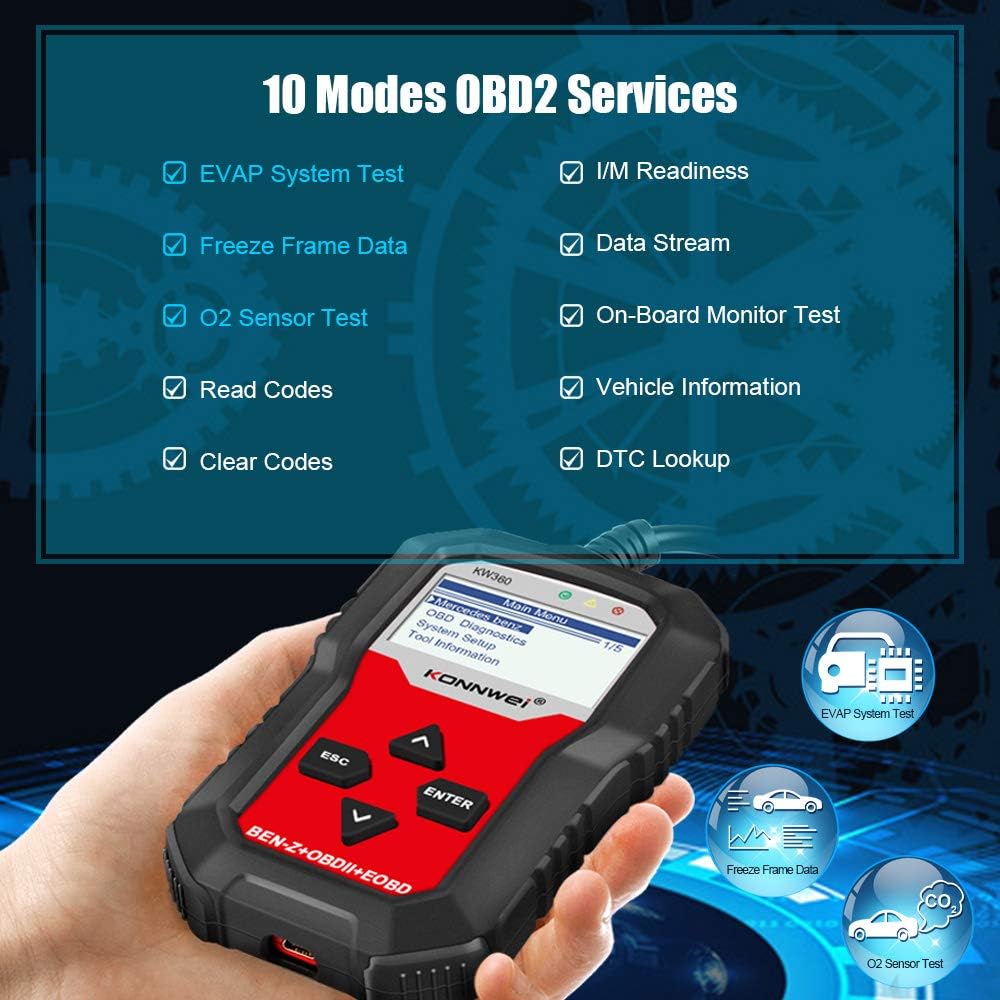
Image: The KW360 screen showing a list of the 10 supported OBD2 diagnostic services.
Mercedes-Benz Specific Diagnostics
The KW360 offers full system diagnosis for Mercedes Benz and Smart vehicles, covering systems beyond standard OBD2.
- Full System Scan: Diagnose systems such as Airbag (SRS), SAS (Steering Angle Sensor), Transmission, ETS (Electronic Throttle System), TPMS (Tire Pressure Monitoring System), ABS (Anti-lock Braking System), Injector System, Engine System, Battery System, TPS (Throttle Position Sensor), Headlight System, Radio System, and more.
- Đặt lại dầu: Perform oil service light reset functions.
- Đặt lại phanh tay điện tử (EPB): Đặt lại vị trí má phanh sau khi thay thế.
- Điều chỉnh vị trí bướm ga: Perform throttle body relearn procedures.

Image: Icons representing various Mercedes Benz systems diagnosable by the KW360, including Airbag, SAS, Transmission, and ABS.

Image: A hand pouring oil into an engine, symbolizing the oil reset special function available on the KW360.
BẢO TRÌ
Proper maintenance ensures the longevity and reliability of your KONNWEI KW360 scanner.
- Vệ sinh: Hãy dùng khăn mềm, khô để lau sạch thiết bị. Tránh sử dụng chất tẩy rửa có tính mài mòn hoặc dung môi có thể làm hỏng màn hình hoặc linh kiện.asing.
- Kho: Store the device in a cool, dry place away from direct sunlight and extreme temperatures. Keep it in its protective case or original packaging when not in use to prevent physical damage.
- Chăm sóc cáp: Do not bend or crimp the OBD2 or USB cables excessively. Always grasp the connector when plugging or unplugging to avoid damaging the wires.
Xử lý sự cố
If you encounter issues with your KW360, refer to the common problems and solutions below:
- Thiết bị không bật nguồn:
- Hãy đảm bảo cáp OBD2 được kết nối chắc chắn với cả máy quét và cổng OBD2 của xe.
- Hãy kiểm tra xem công tắc đánh lửa của xe có đang ở vị trí "ON" hay không.
- Kiểm tra cầu chì của xe cho cổng OBD2 (thường được dán nhãn 'CIGAR' hoặc 'AUX').
- "Communication Error With Vehicle ECU":
- Confirm the vehicle's ignition is 'ON'.
- Hãy đảm bảo rằng đầu nối OBD2 được cắm chặt vào cổng trên xe.
- Verify that the vehicle is OBD2 compliant (most vehicles 1996 and newer in the US).
- For Mercedes-Benz specific functions, ensure the correct chassis/model is selected if manual selection is required. Some older or specific Mercedes-Benz models may have limited support for certain advanced functions.
- Try updating the scanner's software to the latest version.
- Screen Freezes or Device is Unresponsive:
- Disconnect the device from the vehicle and reconnect it.
- If the issue persists, perform a software update.
- Incorrect Readings or Inaccurate Diagnostics:
- Hãy đảm bảo phần mềm được cập nhật phiên bản mới nhất.
- Verify that the vehicle's battery voltage là ổn định.
- Tham khảo sách hướng dẫn bảo dưỡng xe để biết quy trình chẩn đoán cụ thể.
If these steps do not resolve the issue, please contact KONNWEI customer support for further assistance.
Thông số kỹ thuật
| Tính năng | Đặc điểm kỹ thuật |
|---|---|
| Người mẫu | KW360 |
| Trưng bày | LCD TFT 2.4 inch |
| Kết nối | OBD2 16 chân, USB |
| Giao thức được hỗ trợ | KWP2000, ISO9141, J1850 VPW, J1850 PWM, CAN |
| Hoạt động Voltage | 9-18V (từ cổng OBD2 của xe) |
| Kích thước | Khoảng 7.17 x 6.02 x 2.05 inch |
| Cân nặng | Khoảng 1.01 pound |
| Nhiệt độ hoạt động | 0°C đến 60°C (32°F đến 140°F) |
| Nhiệt độ lưu trữ | -20°C đến 70°C (-4°F đến 158°F) |
Bảo hành và Hỗ trợ
KONNWEI provides comprehensive support for the KW360 diagnostic scanner.
- Bảo hành: The product comes with a 3-year after-sale service warranty. Please retain your proof of purchase for warranty claims.
- Cập nhật phần mềm: Enjoy lifetime free software updates to ensure your device always has the latest features and vehicle compatibility. Visit the official KONNWEI website for update tools and instructions.
- Hỗ trợ kỹ thuật: For any technical problems or inquiries regarding your KW360 OBDII Code Scanner, please contact KONNWEI customer service. Professional engineers are available to assist you.
For the most up-to-date support information and contact details, please refer to the official KONNWEI webtrang web hoặc thông tin liên lạc được cung cấp trên bao bì sản phẩm của bạn.