
1. Sản phẩm hếtview
The XIAOMI Smartmi Standing Floor Fan 3 is a portable, rechargeable DC pedestal fan designed to provide natural wind simulation and efficient air circulation. It features intelligent controls, a quiet operation, and a built-in battery for wireless use.
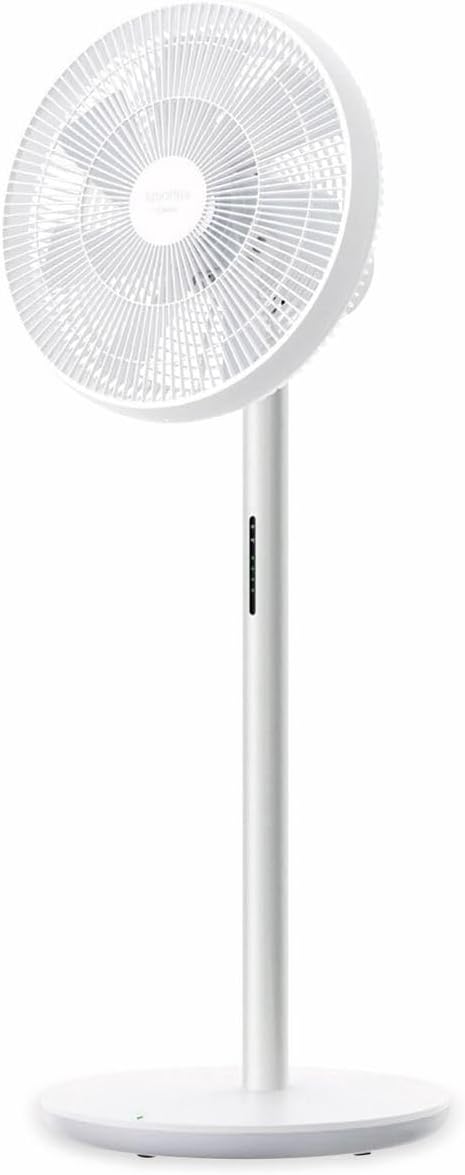
Hình 1.1: Đằng trước view of the Smartmi Standing Floor Fan 3, showcasing its minimalist white design and fan head.

Hình 1.2: Chuyên nghiệp bênfile of the Smartmi Standing Floor Fan 3, highlighting its slim pedestal and stable base.
2. Thiết lập và lắp ráp
The Smartmi Standing Floor Fan 3 is designed for easy assembly. Follow these steps to set up your fan:
- Giải nén các thành phần: Carefully remove all components from the packaging. Ensure all parts are present: fan head, pedestal, base, power adapter, and remote control.
- Gắn chân đế vào đế chính: Align the bottom of the pedestal with the opening in the base. Secure it firmly, typically with a screw provided, using the included tool or a standard screwdriver.
- Attach Fan Head to Pedestal: Connect the fan head to the top of the pedestal. Ensure it clicks into place or is secured according to the visual guides.
- Sạc ban đầu: Before first use, connect the power adapter to the fan and a suitable power outlet. Allow the fan to charge for approximately 4 hours until fully charged. The power indicator on the pedestal will provide charging status.
- Kết nối ứng dụng (Tùy chọn): Download the Xiaomi Home app from your device's app store. Follow the in-app instructions to connect your fan via Wi-Fi (IEEE 802.11b/g/n 2.4GHz). This enables advanced control features.
3. Hướng dẫn vận hành
The fan can be operated using the physical buttons on the pedestal, the included Bluetooth remote control, or the Xiaomi Home app.
3.1 Bật/Tắt nguồn
- Nút vật lý: Press the power button on the pedestal once to turn on, and again to turn off.
- Điều khiển từ xa: Nhấn nút nguồn trên điều khiển từ xa.
- Ứng dụng Xiaomi Home: Use the power toggle within the app interface.
3.2 Điều chỉnh tốc độ quạt
- Điều khiển từ xa: Use the speed adjustment buttons on the remote to cycle through available speeds.
- Ứng dụng Xiaomi Home: The app allows for precise adjustment across 100 different speed settings.
3.3 Wind Type Selection
The fan offers a 'Natural Wind' mode, which simulates irregular wind patterns for a more comfortable experience.
- Điều khiển từ xa: Press the mode button to switch between standard and natural wind modes.
- Ứng dụng Xiaomi Home: Select the desired wind mode from the app interface.
3.4 Oscillation (Head Shaking)
The fan head can oscillate to distribute air across a wider area. The oscillation angle is adjustable via the app.

Hình 3.1: Illustration of the fan's adjustable oscillation angles (30°, 60°, 90°, 120°).
- Điều khiển từ xa: Press the oscillation button to start or stop head shaking.
- Ứng dụng Xiaomi Home: Adjust the oscillation angle (30°, 60°, 90°, 120°) and control the oscillation function.
3.5 Chức năng hẹn giờ
Set a timer for the fan to automatically turn off after a specified duration (up to 7.5 hours or more).
- Điều khiển từ xa: Use the timer button to cycle through preset timer options.
- Ứng dụng Xiaomi Home: Set a precise timer duration.
3.6 Additional App Features
When connected to the Xiaomi Home app, you can access:
- Negative ion function activation.
- Screen brightness adjustment on the pedestal.
- Child safety lock activation.
4. Bảo trì
Vệ sinh thường xuyên đảm bảo hiệu suất tối ưu và tuổi thọ của quạt.
- Tắt nguồn: Luôn rút phích cắm quạt khỏi nguồn điện trước khi vệ sinh.
- Vệ sinh bên ngoài: Wipe the exterior surfaces of the fan, pedestal, and base with a soft, damp vải. Tránh sử dụng chất tẩy rửa hoặc dung môi có tính mài mòn.
- Vệ sinh cánh quạt: For thorough cleaning, the front grille can typically be removed to access the fan blades. Use a soft brush or cloth to gently clean the blades. Ensure all parts are dry before reassembling.
- Kho: Nếu cất quạt trong thời gian dài, hãy đảm bảo quạt sạch sẽ và khô ráo. Bảo quản quạt ở nơi khô ráo, thoáng mát, tốt nhất là trong bao bì gốc.
KHAI THÁC. Xử lý sự cố
- Quạt không bật:
- Ensure the fan is properly plugged into a working power outlet or that the internal battery is charged.
- Check if the power adapter is securely connected to the fan.
- Điều khiển từ xa không phản hồi:
- Thay pin cho điều khiển từ xa.
- Ensure there are no obstructions between the remote control and the fan.
- Sự cố kết nối ứng dụng:
- Verify your Wi-Fi network is active and operating on the 2.4GHz band.
- If the fan is running on battery and has been off for a period, it may enter a deep sleep mode. In this state, it might not respond to app commands until the physical power button on the fan is pressed to wake it up.
- Ensure the Xiaomi Home app is updated to the latest version.
- Battery Charge Status Indication:
- The fan's battery indicator typically shows status changes for a limited duration (e.g., 20 seconds) rather than a continuous display. Observe the indicator during charging or immediately after powering on.
6. Thông số kỹ thuật
| Tính năng | Đặc điểm kỹ thuật |
|---|---|
| Thương hiệu | XIAOMI (Smartmi) |
| Số hiệu mẫu | ZLBPLDS05ZM (6970403201486) |
| Công suất định mức | 25W |
| Xếp hạng Voltage | 220V |
| Tần số định mức | 50Hz |
| Dung lượng pin | 33.6Wh / 288mAh |
| Thời gian sử dụng không dây | Lên đến 4 giờ |
| Kích thước sản phẩm | 340 x 330 x 960 mm (34 x 33 x 96 cm) |
| Trọng lượng tịnh | 3.5kg |
| Mức độ tiếng ồn | 29 Decibel (tối thiểu) |
| Số lượng cánh quạt quay | 7 |
| Kết nối không dây | Wi-Fi IEEE 802.11b / g / n 2.4GHz |
| Chế độ điều khiển | Remote Controlled, App Controlled |
7. Bảo hành và Hỗ trợ
For warranty information, please refer to the warranty card included with your product or contact your retailer. For technical support, please visit the official XIAOMI or Smartmi webtrang web hoặc liên hệ với bộ phận dịch vụ khách hàng của họ.
Giữ lại bằng chứng mua hàng để yêu cầu bảo hành.