
Giới thiệu
This manual provides detailed instructions for the installation, operation, maintenance, and troubleshooting of the HP ProDesk 400 G3 MS-7957 motherboard. Please read this manual thoroughly before proceeding with any installation or operation to ensure proper functionality and safety.
Thông tin an toàn
Luôn tuân thủ các biện pháp phòng ngừa an toàn sau đây để tránh làm hỏng bo mạch chủ hoặc gây thương tích cho bản thân:
- Hãy ngắt nguồn điện khỏi ổ cắm trên tường trước khi lắp đặt hoặc tháo bất kỳ linh kiện nào.
- Wear an anti-static wrist strap or frequently touch a grounded metal object to discharge static electricity before handling the motherboard.
- Cầm bo mạch chủ bằng các cạnh để tránh chạm vào các linh kiện nhạy cảm.
- Đảm bảo hệ thống thông gió tốt bên trong thùng máy tính để tránh quá nhiệt.
- Hãy tránh để bo mạch chủ tiếp xúc với hơi ẩm và nhiệt độ quá cao hoặc quá thấp.
Sản phẩm trênview
The HP ProDesk 400 G3 MS-7957 is a MicroATX motherboard designed for Intel processors with an LGA 1151 socket. It supports DDR4 RAM and features a B250 chipset, offering a reliable foundation for desktop computing.
Các tính năng chính
- Compatible CPU Brand: Trí tuệ
- Loại ổ cắm: LGA 1151/Socket H4
- Yếu tố hình thức: MicroATX
- Đầu nối I / O: Ethernet (RJ-45), USB 2.0, USB 3.0, VGA, DisplayPort, HD Audio Jack
Nhận dạng thành phần
Familiarize yourself with the layout of the motherboard to facilitate proper installation and connection of components.

Hình 1: Góc cạnh view of the HP ProDesk 400 G3 MS-7957 motherboard. This image highlights the CPU socket (LGA 1151), four DDR4 RAM slots, PCIe slots, and various headers for front panel connections and storage devices.
Thiết lập và cài đặt
Trước khi bạn bắt đầu
- Ensure your computer case is compatible with the MicroATX form factor.
- Gather all necessary components: CPU, RAM, CPU cooler, power supply, storage devices, and graphics card (if not using integrated graphics).
- Prepare your workspace by ensuring it is clean, well-lit, and static-free.
Cài đặt bo mạch chủ
- Install the CPU into the LGA 1151 socket. Carefully align the CPU with the socket's notch and gently lower it into place. Close the retention arm.
- Bôi keo tản nhiệt lên CPU và lắp đặt bộ tản nhiệt CPU theo hướng dẫn của nhà sản xuất.
- Install the DDR4 RAM modules into the designated slots. Ensure they are fully seated until the clips lock into place.
- Mount the motherboard into the computer case using the appropriate standoffs and screws.
- Kết nối đầu nối nguồn ATX 24 chân chính và đầu nối nguồn CPU 4 chân hoặc 8 chân từ bộ nguồn của bạn với bo mạch chủ.
- Install any expansion cards (e.g., graphics card) into the PCIe slots.

Hình 2: Góc nhìn từ trên xuống view of the HP ProDesk 400 G3 MS-7957 motherboard. This perspective provides a clear view of the processor socket, memory slots, and the layout of the various internal connectors and components.
Kết nối thiết bị ngoại vi
- Connect SATA storage devices (HDDs/SSDs) to the SATA ports on the motherboard.
- Connect front panel headers (power button, reset button, USB ports, audio jacks) to their respective pins on the motherboard. Refer to your case manual for specific pin assignments.
- Connect external peripherals such as monitor, keyboard, mouse, and Ethernet cable to the rear I/O panel.
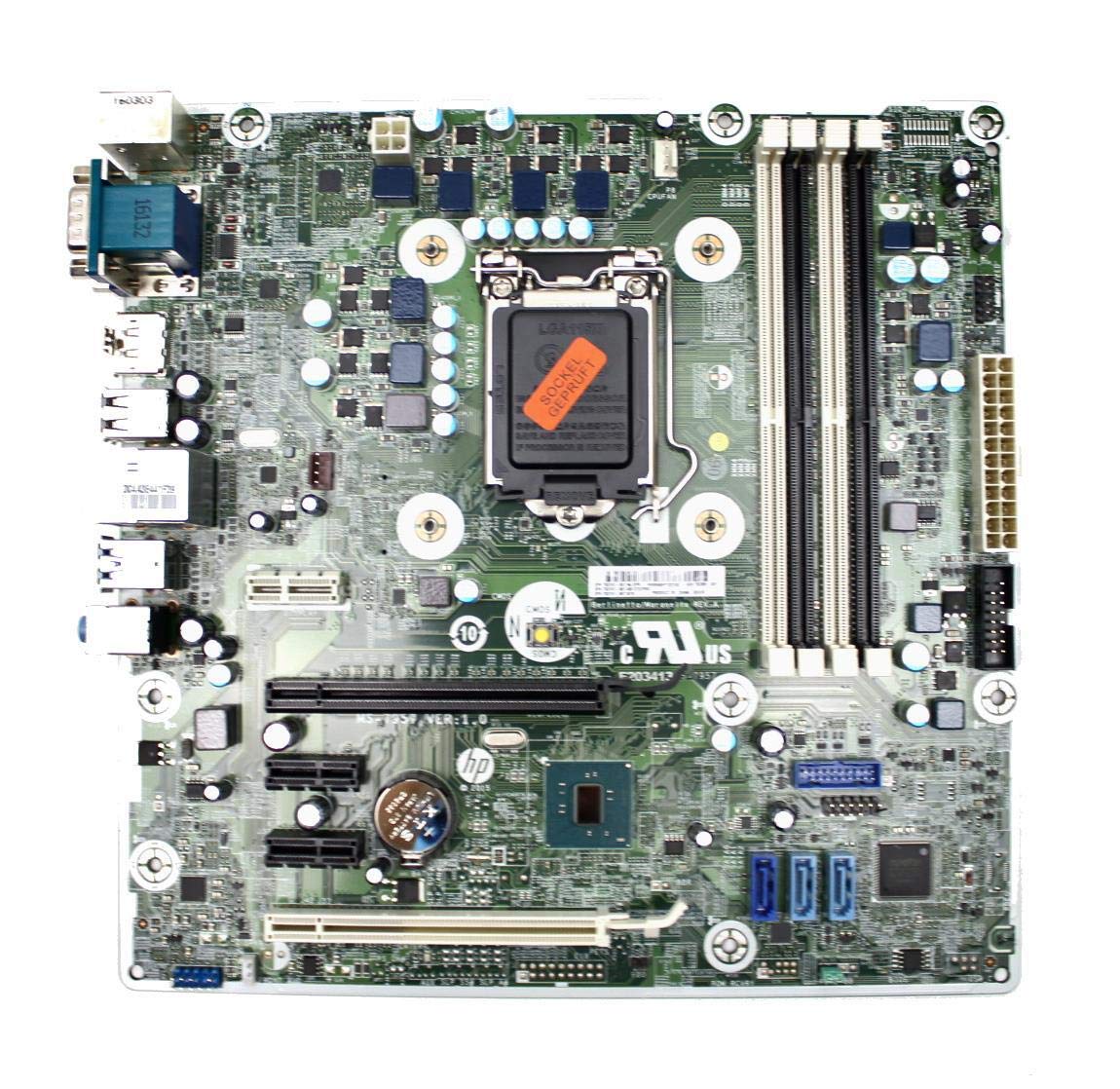
Figure 3: Rear I/O panel of the HP ProDesk 400 G3 MS-7957 motherboard. This image displays the available external connectivity options, including PS/2 ports, serial port, VGA, DisplayPort, USB 2.0, USB 3.0, Ethernet (RJ-45), and HD audio jacks.
Hướng dẫn sử dụng
Bật nguồn ban đầu
After all components are installed and connected, connect the power cable to the power supply and press the power button on your computer case. The system should initiate the boot process.
Cấu hình BIOS/UEFI
To access the BIOS/UEFI setup utility, press the designated key (commonly Xóa, F2, F10, hoặc F12Trong quá trình khởi động ban đầu, bạn có thể cấu hình thứ tự khởi động, thời gian hệ thống và các cài đặt phần cứng khác.
Cài đặt trình điều khiển
After installing your operating system, it is crucial to install the latest drivers for your motherboard's chipset, integrated graphics, audio, and network adapter. These drivers can typically be found on the HP support website or the chipset manufacturer's webđịa điểm.
BẢO TRÌ
- Vệ sinh: Thường xuyên vệ sinh bụi bẩn trên bo mạch chủ và các linh kiện bằng khí nén. Đảm bảo hệ thống đã tắt nguồn và rút phích cắm trước khi vệ sinh.
- Cập nhật BIOS/UEFI: Periodically check for BIOS/UEFI updates from HP's official support website. Updates can improve stability, compatibility, and performance. Follow update instructions carefully to avoid system damage.
- Cập nhật trình điều khiển: Keep all system drivers updated to ensure optimal performance and compatibility with new software and hardware.
Xử lý sự cố
Phần này cung cấp giải pháp cho những vấn đề phổ biến mà bạn có thể gặp phải:
- Không có điện: Check all power connections, including the 24-pin ATX and CPU power cables. Ensure the power supply is switched on and the wall outlet is functional.
- Không hiển thị: Verify that your monitor is connected to the correct video output (VGA or DisplayPort) and is powered on. Reseat the graphics card (if applicable) and RAM modules.
- Hệ thống không ổn định/sập: This could be due to overheating, faulty RAM, or outdated drivers. Check CPU and GPU temperatures, run memory diagnostic tools, and update drivers.
- Thiết bị ngoại vi không được phát hiện: Ensure the peripheral is properly connected. Try a different port or update the relevant drivers.
- Các vấn đề về BIOS/UEFI: If you encounter issues after changing BIOS settings, try resetting the CMOS by removing the CMOS battery for a few minutes or using the clear CMOS jumper (refer to motherboard diagram for location).
Thông số kỹ thuật
| Tính năng | Đặc điểm kỹ thuật |
|---|---|
| Thương hiệu | HP |
| Ổ cắm CPU | LGA 1151 |
| Thiết bị tương thích | Máy tính để bàn |
| Công nghệ RAM | DDR4 |
| Bộ xử lý tương thích | Intel Core i3-6xxx, Intel Core i5-6xxx, Intel Core i7-6xxx, Intel Core i3-7xxx, Intel Core i5-7xxx, Intel Core i7-7xxx, Intel Core i3-8xxx, Intel Core i5-8xxx, Intel Core i7-8xxx |
| Loại chipset | Bộ vi xử lý Intel B250 |
| Nền tảng | Cửa sổ |
| Tên mẫu | MS-7957 |
| Mô hình CPU | Core i3 (Note: Supports i3, i5, i7 as listed above) |
| Loại đầu nối nguồn chính | 24 chân |
| Giao diện card đồ họa | PCI Express |
| Available Memory Slots | 4 |
| Total SATA Ports | 6 |
| Tổng số cổng USB | 2 (Note: Refers to internal headers, rear I/O has more) |
| Tổng số cổng Ethernet | 1 |
| Total PCIe Ports | 3 |
| Nhà sản xuất | Computer Store Berlin (Reseller/Supplier) |
| Mã số sản phẩm | 4061435962741 |
| ASIN | B08CS13PTQ |
Bảo hành và Hỗ trợ
Sản phẩm này đi kèm với một Bảo hành 1 năm kể từ ngày mua. Bảo hành này bao gồm các lỗi về vật liệu và tay nghề trong quá trình sử dụng bình thường.
For technical support, warranty claims, or further assistance, please contact your point of purchase or refer to the official HP support resources for the ProDesk 400 G3 series.