
Giới thiệu
This manual provides detailed instructions for the setup, operation, and maintenance of your MINISO Casual Style Electronic Clock, Model 4509628218010. Please read this manual thoroughly before using the product to ensure proper function and longevity.
Nội dung gói
Xác minh rằng tất cả các mục đều có trong gói hàng:
- 1 x MINISO Casual Style Electronic Clock
- 1 x Hướng dẫn sử dụng (tài liệu này)

Figure 1: MINISO Casual Style Electronic Clock in its retail packaging. The image shows the clock inside a white box with "MINISO LCD CLOCK Casual & Simple" printed on it.
Sản phẩm trênview
The MINISO Casual Style Electronic Clock features a large digital display and simple controls for time and alarm settings.
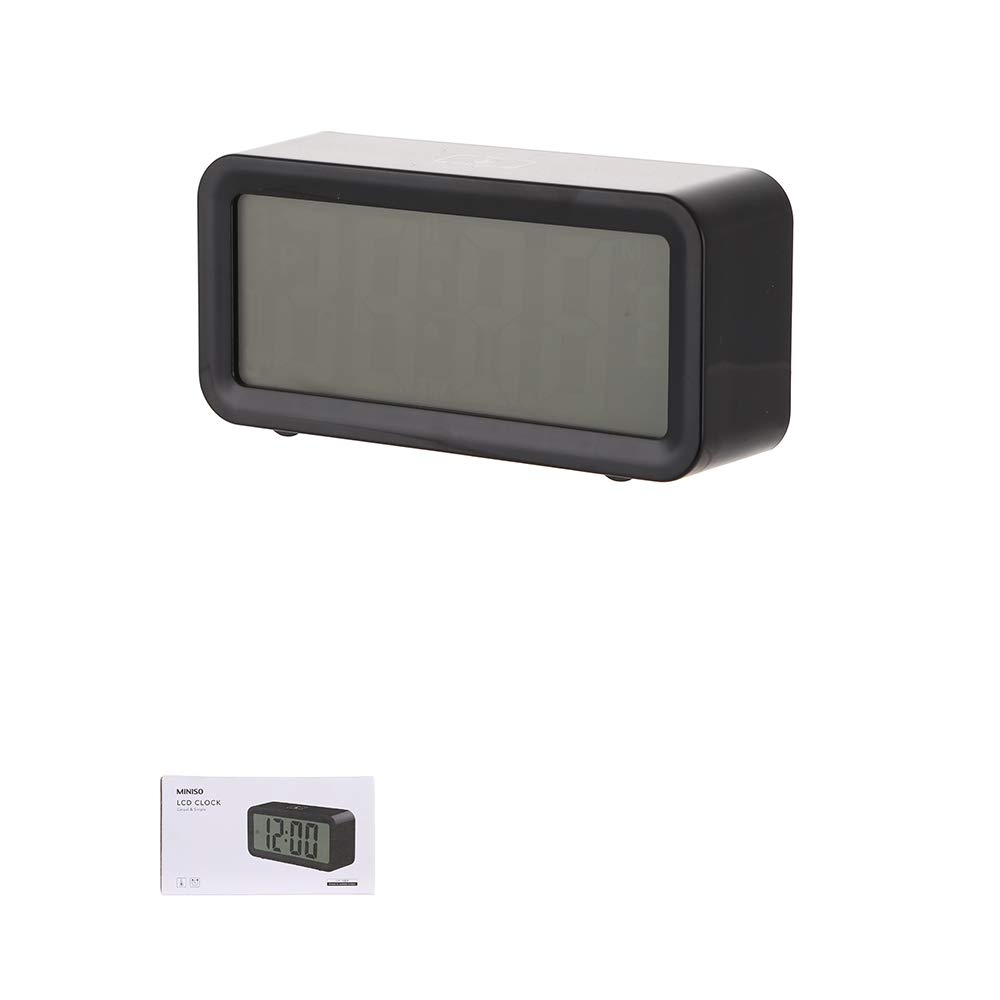
Hình 2: Mặt trước view of the MINISO Casual Style Electronic Clock. The image displays the rectangular black clock with a large, clear digital display.
Các tính năng chính:
- Big Screen with very clear Display
- Casual design suitable for various placements
- Chức năng báo động
- Dễ dàng vận hành
Nhận dạng thành phần:
- Màn hình hiển thị: Shows time, alarm status, etc.
- Nút SET: Used to enter time/alarm setting mode.
- Nút lên: Adjusts values upwards during setting.
- Nút XUỐNG: Adjusts values downwards during setting.
- ALARM ON/OFF Button: Kích hoạt hoặc hủy kích hoạt báo động.
- Ngăn chứa pin: Located on the back, for battery installation.
Cài đặt
1. Lắp đặt pin
- Hãy tìm nắp đậy ngăn chứa pin ở mặt sau của đồng hồ.
- Tháo nắp bằng cách trượt hoặc nhẹ nhàng cạy mở.
- Insert the required batteries (not included) according to the polarity indicators (+ and -) inside the compartment.
- Lắp lại nắp ngăn chứa pin một cách an toàn.
Ghi chú: The clock requires batteries for operation. Ensure fresh batteries are used for optimal performance.
Hướng dẫn sử dụng
1. Đặt thời gian
- Nhấn và giữ BỘ nhấn nút cho đến khi chữ số giờ bắt đầu nhấp nháy.
- Sử dụng UP or XUỐNG các nút điều chỉnh giờ.
- Nhấn nút BỘ Nhấn nút một lần nữa để chuyển sang hiển thị số phút.
- Sử dụng UP or XUỐNG các nút để điều chỉnh phút.
- Nhấn nút BỘ Nhấn nút thêm một lần nữa để xác nhận thời gian và thoát khỏi chế độ cài đặt.
2. Đặt báo thức
- Nhấn nút BÁO ĐỘNG BẬT / TẮT Nhấn nút một lần để hiển thị thời gian báo thức hiện tại.
- Trong khi thời gian báo thức được hiển thị, hãy nhấn và giữ BỘ Nhấn nút cho đến khi các chữ số hiển thị giờ báo thức bắt đầu nhấp nháy.
- Sử dụng UP or XUỐNG các nút điều chỉnh giờ báo thức.
- Nhấn nút BỘ Nhấn nút một lần nữa để chuyển đến các chữ số phút của báo thức.
- Sử dụng UP or XUỐNG các nút để điều chỉnh số phút báo thức.
- Nhấn nút BỘ button one more time to confirm the alarm time and exit setting mode.
3. Kích hoạt/Vô hiệu hóa báo động
- Để kích hoạt báo thức, hãy nhấn nút BÁO ĐỘNG BẬT / TẮT button. An alarm icon (e.g., a bell) should appear on the display.
- Để tắt báo thức, hãy nhấn nút BÁO ĐỘNG BẬT / TẮT button again. The alarm icon should disappear from the display.
4. Chức năng báo lại
When the alarm sounds, press any button other than the BÁO ĐỘNG BẬT / TẮT button to activate the snooze function. The alarm will temporarily stop and sound again after a few minutes (typically 5-10 minutes, specific duration not provided).
To turn off the alarm completely when it sounds, press the BÁO ĐỘNG BẬT / TẮT cái nút.
BẢO TRÌ
Vệ sinh
- Lau đồng hồ bằng một miếng vải mềm, khô.
- Không sử dụng chất tẩy rửa mài mòn, dung môi hoặc bình xịt hóa chất vì chúng có thể làm hỏng lớp hoàn thiện hoặc các bộ phận bên trong.
Thay thế pin
- Replace batteries when the display becomes dim or the clock functions erratically.
- Refer to the "Battery Installation" section under Setup for instructions.
- Vứt bỏ pin đã qua sử dụng một cách có trách nhiệm theo quy định của địa phương.
Xử lý sự cố
| Vấn đề | Nguyên nhân có thể | Giải pháp |
|---|---|---|
| Màn hình trống hoặc mờ. | Pin yếu hoặc hết. | Thay pin mới. |
| Clock not keeping accurate time. | Pin yếu; nhiễu sóng môi trường. | Replace batteries. Ensure clock is not near strong electromagnetic fields. |
| Chuông báo động không kêu. | Alarm not activated; incorrect alarm time set. | Ensure alarm icon is visible on display. Verify alarm time is set correctly. |
| Các nút không phản hồi. | Low batteries; temporary software glitch. | Replace batteries. Remove batteries for 1 minute and reinsert to reset. |
Thông số kỹ thuật
| Tính năng | Chi tiết |
|---|---|
| Thương hiệu | MINISO |
| Số hiệu mẫu | 4509628218010 |
| Màu sắc | Đen |
| Kiểu hiển thị | Điện tử |
| Phong cách | Bình thường |
| Tính năng đặc biệt | Báo thức |
| Nguồn điện | Pin chạy bằng |
| Loại phòng | Phòng ngủ, Phòng khách, Văn phòng |
| Hình dạng | Hình chữ nhật |
| Sử dụng trong nhà/ngoài trời | Trong nhà |
| Vật liệu | Acrylonitrile Butadiene Styrene (ABS) |
| Trọng lượng sản phẩm | 160 gam |
| Kích thước vật phẩm (LxWxH) | 13.2 x 3.8 x 6.5 Centimet |
| Bao gồm pin | KHÔNG |
Bảo hành và Hỗ trợ
Specific warranty information for the MINISO Casual Style Electronic Clock is not provided within this manual. For details regarding warranty coverage, technical support, or service inquiries, please refer to the original purchase documentation or contact MINISO customer service directly.
You may find contact information on the MINISO official webtrang web hoặc thông qua nhà bán lẻ của bạn.