
1. Sản phẩm hếtview
This manual provides instructions for the Cloudray LIHUIYU M2 Nano CO2 Laser Controller Kit. This kit is designed as a replacement or upgrade part for DIY 3020, 3040, and K40 laser engraver and cutter machines.
Package Contents (Set A)
- 1 x M2 Nano Controller Mainboard
- 1 x M2 Controller Panel
- 1 x Cáp kết nối
- 1 x USB Dongle B
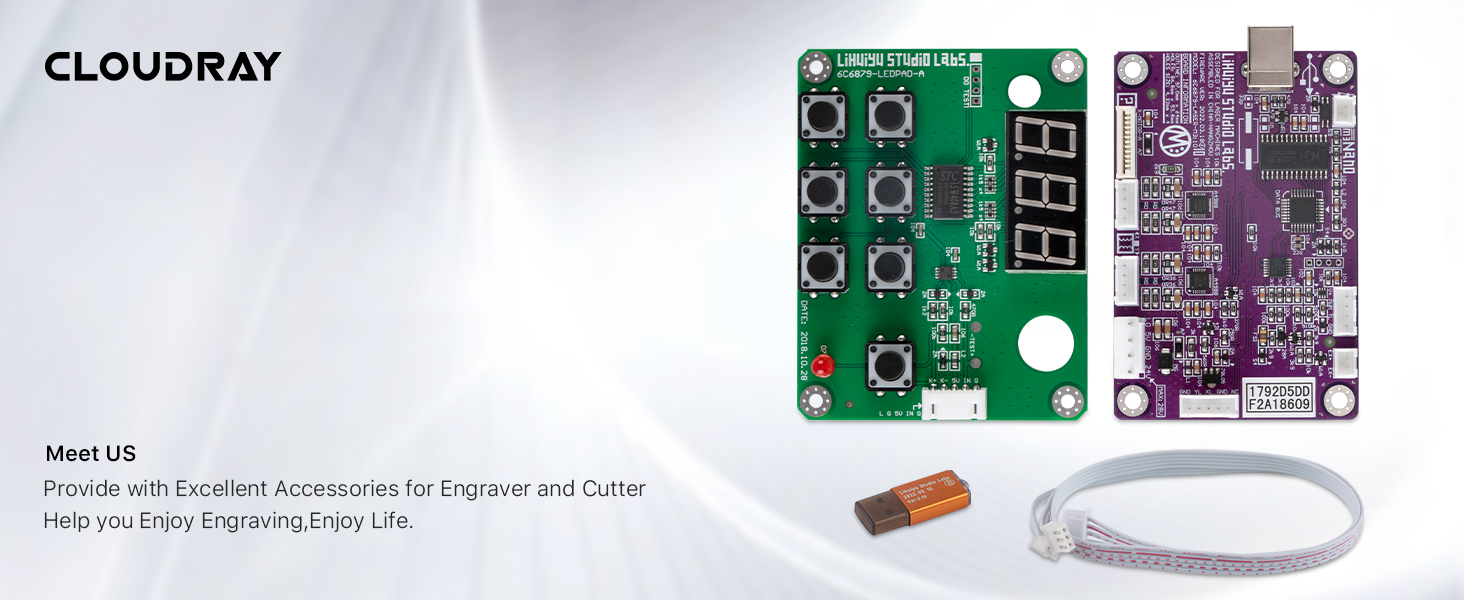
2. Thiết lập và Cài đặt
Careful installation is crucial for proper function. Ensure all power is disconnected from your laser machine before proceeding with any connections.
2.1 M2 Nano Mainboard Layout
Familiarize yourself with the mainboard's various ports and components before installation.

2.2 Bố cục bảng điều khiển
Understand the functions of the control panel buttons and display.

2.3 Kết nối dây
Connect the mainboard, control panel, and power supply according to the following diagrams. Ensure all connections are secure to prevent damage.


2.4 Kết nối USB Dongle
The USB Dongle B is required for software authorization and operation. Connect it to an available USB port on your computer.

3. Hướng dẫn vận hành
After successful installation and power-up, the laser controller is ready for operation. This system typically uses specific laser control software (e.g., LaserDRW, CorelDRAW with a plugin) for design and machine control.
3.1 Cài đặt và thiết lập phần mềm
- Install the laser control software provided with your laser machine or recommended by the manufacturer.
- Ensure the USB Dongle B is connected to your computer before launching the software.
- Follow the software's instructions for driver installation and machine configuration.
3.2 Chức năng cơ bản của bảng điều khiển
- Màn hình kỹ thuật số: Shows operational status, current settings, or error codes.
- Các nút định hướng: Used for manual movement of the laser head (X and Y axes).
- Nút Bắt đầu / Tạm dừng: Initiates or temporarily stops a laser job.
- Stop/Emergency Stop Button: Immediately halts all laser operations.
- Power Adjustment Buttons: Allows for fine-tuning of laser power during operation (if supported by software/firmware).
- Laser Status Indicator: Provides visual feedback on the laser's operational state (e.g., ready, firing, error).
Refer to your laser machine's specific software manual for detailed instructions on creating and executing laser jobs.
4. Bảo trì
To ensure the longevity and reliable performance of your LIHUIYU M2 Nano controller kit, follow these general maintenance guidelines:
- Giữ sạch sẽ: Regularly clean the mainboard and control panel surfaces with a soft, dry cloth. Avoid using liquids or abrasive cleaners.
- Phòng chống bụi: Operate the laser machine in a clean, dust-free environment as much as possible. Dust accumulation on electronic components can lead to overheating or short circuits.
- Kiểm tra kết nối: Periodically check all wiring connections for looseness or signs of wear. Secure any loose connections.
- Điều kiện môi trường: Ensure the controller is operated within its specified temperature and humidity ranges. Avoid extreme temperatures or high humidity.
- Cập nhật phần mềm: Keep your laser control software updated to the latest version to benefit from performance improvements and bug fixes.
KHAI THÁC. Xử lý sự cố
This section addresses common issues you might encounter with your laser controller kit.
| Vấn đề | Nguyên nhân có thể | Giải pháp |
|---|---|---|
| Bộ điều khiển không bật nguồn | Loose power connection; Faulty power supply; Incorrect wiring. | Check all power connections. Verify power supply output. Review wiring diagrams (Figure 2.3, 2.4). |
| Laser machine not responding to software commands | USB Dongle not recognized; Incorrect software settings; USB cable issue. | Ensure USB Dongle B is properly inserted. Reinstall software drivers. Try a different USB port or cable. |
| Motor movement issues (X/Y axis) | Loose motor wiring; Motor driver fault; Mechanical obstruction. | Check X and Y axis motor connections on the mainboard (Figure 2.1). Inspect for any physical obstructions in the laser head's path. |
| Tia laser không bắn | Water protection triggered; Laser power supply issue; Laser tube fault; Incorrect software settings. | Verify water flow and protection sensor status (if applicable, Figure 2.4). Check laser power supply connections and status indicators. Consult laser tube manual. |
| Incompatibility with existing laser machine | Controller model mismatch (e.g., M2 vs M3). | Verify that your laser machine is compatible with the M2 Nano controller. Some machines may require an M3 or other specific controller version. |
6. Thông số kỹ thuật
| Tính năng | Chi tiết |
|---|---|
| Thương hiệu | Mây mù |
| Người mẫu | LIHUIYU M2 Nano |
| Vật liệu | Nhôm, Kim loại |
| Màu sắc | Purple (Mainboard) |
| Trọng lượng sản phẩm | 0.15 Kilôgam |
| Chế độ hoạt động | Tự động |
| Mã số UPC | 661021766933 |
| ASIN | B07BFSVS2V |
7. Thông tin bảo hành
For specific warranty details regarding your Cloudray LIHUIYU M2 Nano CO2 Laser Controller Kit, please refer to the warranty documentation provided at the time of purchase or contact Cloudray customer support directly. Warranty terms typically cover manufacturing defects under normal use conditions.
8. Hỗ trợ khách hàng
If you encounter any issues not covered in this manual or require further assistance, please contact Cloudray customer support. Provide your product model number (M2 Nano) and ASIN (B07BFSVS2V) for faster service.
- Mây mù Webđịa điểm: Visit the official Cloudray webtrang web cung cấp tài nguyên hỗ trợ, câu hỏi thường gặp và thông tin liên hệ.
- Người bán liên hệ: If purchased through a marketplace, you may also contact the seller directly for product-specific inquiries.