
1. Sản phẩm hếtview
The COMTEC ZERO 800V is a high-performance radar detector designed for automotive use, offering advanced detection capabilities and a user-friendly interface. It features a 4.0-inch wide MVA LCD display, motion sensor operation, and comprehensive GPS data for various alerts.
Các tính năng chính:
- Drive Recorder Connectivity: Equipped with external input and power output terminals. Connects seamlessly with compatible drive recorders using the optional ZR-10 cable.
- Mobile Small Orb Detection: Provides alerts for mobile speed cameras, including those in residential areas where traditional installations were not possible. Warnings are displayed with maps and actual images.
- Roundabout Support: Alerts drivers to roundabouts (circular intersections without traffic lights or stop signs) to promote safe driving.
- Zone 30 Support: Compatible with the new traffic regulation 'Zone 30', which restricts speeds to 30 km/h in residential areas. Provides visual and audio alerts upon entering and displays an icon while driving within the zone.
- Cảm biến chuyển động: Allows for hands-free operation, such as switching standby screens, adjusting volume, or muting alerts, by simply waving your hand.
- GracefulLED: LEDs located at the bottom of the unit can be set to one of five colors to match your car's interior illumination. They can also be linked to vehicle speed or alerts for flashing indications.
- External Input Function: Displays video from external devices like backup cameras or DVD players. Also supports audio input. Input switching can be done via motion sensor (video playback mode) or input signal (back monitor mode).
- GLONASS & Michibiki Reception & Fastest GPS Positioning: Supports GPS, Michibiki (QZSS), GLONASS, Himawari, and GAGAN satellites. With 59 receivable satellites, reception accuracy and speed are significantly improved.
- OBD2 Connection Support: Offers 6 display patterns and up to 138 display items (with optional OBD2 adapter). Provides accurate vehicle speed information, preventing loss of vehicle position even in tunnels where GPS signals are lost. (Applicable to compatible vehicle models only; check manufacturer's website for compatibility.)
- 4-Interface Operation: Enhanced operability with remote control, touch panel, touch switch, and motion sensor. The unit can be operated without the remote control.
- Hiệu suất cơ bản: 4.0-inch wide MVA LCD, G-sensor, Gyro sensor, Illumination sensor. Compatible with idling stop vehicles and hybrid cars. Supports Toyota hybrid display. Monthly free GPS data updates. Industry-leading 18 reception bands. Over 39,000 control point data entries.
- MVA LCD: Offers significantly clearer display and wider viewing angles compared to TFT LCDs.
- Cảm biến ánh sáng: Automatically adjusts LCD brightness based on ambient light, reducing glare in tunnels or underground parking.
- Auto Mode Function: Automatically distinguishes between general roads and highways to cut down on false alarms and unnecessary GPS alerts.
- Super High Sensitivity Triple Engine: Equipped with super high sensitivity GPS, radar, and wireless for accurate reception.
- Radar Cancel Point Detection: Automatically identifies locations that generate false radar signals (e.g., automatic doors) and allows you to register them as false alarm points. When passing these registered points again, the alert will be muted.
- Opposite Lane Radar Cancel Function: Automatically mutes radar alerts from opposite lanes or H-systems when receiving radar waves.
2. Thiết lập và Cài đặt
2.1 Phụ kiện đi kèm
- Điều khiển từ xa
- Lắp khung
- 12V Cigarette Lighter Plug Cord (4m length)
- Băng keo hai mặt
- Tấm dính
- Kẹp tấm che nắng
- Fastener for Remote Control Fixing
- thẻ nhớ microSD
- Instruction Manual (with Warranty Card)

2.2 Unit Components and Connections
Familiarize yourself with the various ports and switches on the main unit for proper installation and connection.


2.3 kết nối nguồn
Connect the provided 12V cigarette lighter plug cord to the DC-IN port on the main unit and then to your vehicle's cigarette lighter socket. Ensure the power switch on the unit is in the 'ON' position.
2.4 Gắn thiết bị
Use the included mounting bracket and double-sided tape to securely attach the radar detector to your dashboard or windshield, ensuring it does not obstruct your view or interfere with airbag deployment. The sun visor clip can be used for alternative mounting.
2.5 Kết nối tùy chọn
- Drive Recorder: For connecting a compatible drive recorder, use the optional ZR-10 drive recorder connection cable. Connect the cable to the DC-OUT and AV-IN ports on the ZERO 800V and the corresponding ports on the drive recorder.
- OBD2 Adapter: For enhanced vehicle information display, connect an optional OBD2 adapter to your vehicle's OBD2 port and the ZERO 800V. Refer to the manufacturer's website for a list of compatible vehicles and adapters.
3. Hoạt động
3.1 Bật/Tắt nguồn
To power on the unit, ensure it is connected to a 12V power source and the power switch on the side is set to 'ON'. The unit will automatically power on when the vehicle's ignition is turned on. To power off, turn off the vehicle's ignition or set the power switch to 'OFF'.
3.2 Interface Controls
The ZERO 800V offers multiple ways to interact with the device:
- Điều khiển từ xa: Use the included remote control for full functionality.
- Bảng cảm ứng: Directly interact with the 4.0-inch LCD screen.
- Chạm vào Công tắc: Specific areas on the unit may function as touch-sensitive buttons.
- Cảm biến chuyển động: Wave your hand in front of the unit for quick actions like changing display modes, adjusting volume, or muting alerts.

3.3 Chế độ hiển thị
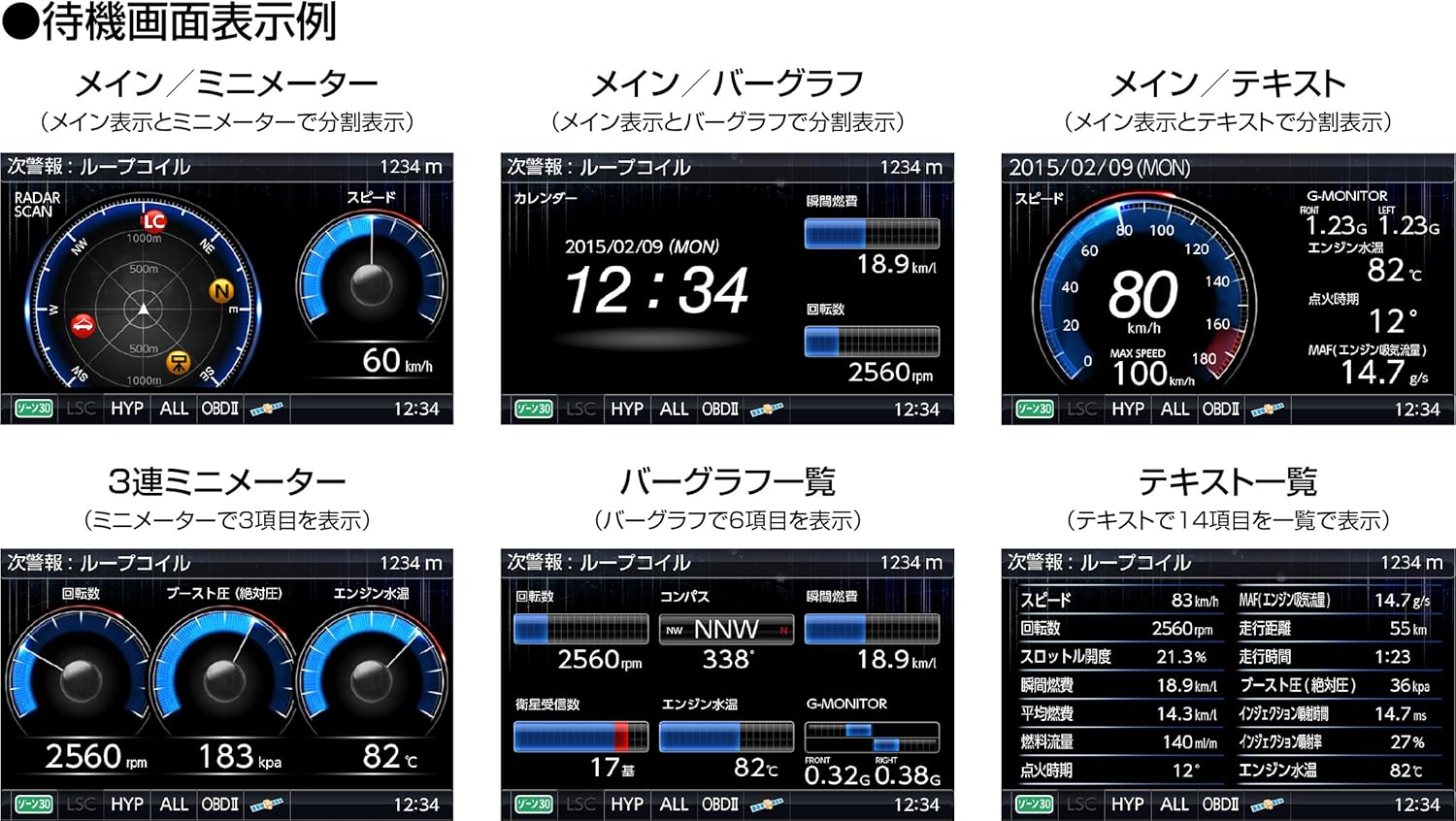
The unit offers various standby screen display patterns to suit your preferences:
- Main / Mini Meter
- Main / Bar Graph
- Main / Text
- 3 Mini Meters
- Bar Graph List
- Text List
3.4 Warning Displays
The ZERO 800V provides clear and timely warnings for various road conditions and potential hazards.

3.5 GracefulLED Illumination
The GracefulLED feature allows you to customize the unit's ambient lighting. You can select from five colors (blue, red, orange, white, green) to match your vehicle's interior. The LEDs can also be configured to flash in response to alerts or vehicle speed.

4. Bảo trì
4.1 GPS Data Updates
To ensure the most accurate and up-to-date warning information, it is recommended to perform monthly free GPS data updates. These updates are available for download from the COMTEC website. Use the included microSD card to transfer the updated data to your ZERO 800V unit.
4.2 Vệ sinh thiết bị
To clean the unit, gently wipe the screen and casing with a soft, dry cloth. Do not use abrasive cleaners, solvents, or alcohol, as these may damage the display or finish. Ensure no liquids enter the ports.
KHAI THÁC. Xử lý sự cố
5.1 Poor GPS Reception or Slow Positioning
- Đảm bảo thiết bị có bề mặt rõ ràng. view of the sky. Obstructions like tall buildings, tunnels, or dense foliage can interfere with GPS signals.
- Verify that the GPS data is up-to-date. Perform a monthly update if necessary.
- If your vehicle has a radio wave-blocking windshield (common in some luxury cars), consider using an external GPS antenna (sold separately) or a separate-type radar detector.
5.2 Các cảnh báo sai thường xuyên
- Sử dụng Radar Cancel Point Detection feature. When you encounter a location with persistent false alarms (e.g., automatic doors at convenience stores), register it as a false alarm point. The unit will mute alerts at this location in the future.
- Đảm bảo Chế độ tự động is enabled. This function helps differentiate between general roads and highways, reducing unnecessary alerts.
- Các Opposite Lane Radar Cancel Function can help reduce alerts from radar sources in opposing traffic lanes.
5.3 Thiết bị không bật nguồn
- Check the power connection. Ensure the cigarette lighter plug is firmly inserted and the vehicle's 12V socket is functioning.
- Verify that the power switch on the side of the ZERO 800V unit is in the 'ON' position.
- If using an optional OBD2 adapter, ensure it is correctly connected and compatible with your vehicle.
5.4 Internal Battery Issues (Time/GPS Info Not Retained)
Some users have reported issues with the internal battery not retaining time or GPS information after a few years. If your unit is experiencing this outside of the warranty period, contact COMTEC customer support for repair options.
6. Thông số kỹ thuật
| Tính năng | Đặc điểm kỹ thuật |
|---|---|
| Nhà sản xuất | COMTEC |
| Thương hiệu | COMTEC |
| Tên mẫu | ZERO 800V |
| Số mô hình sản phẩm | ZERO 800V |
| Kích thước sản phẩm (D x R x C) | 19 x 115 x 64mm |
| Trọng lượng sản phẩm | 124 gam |
| Tậptage | 12 vôn |
| Nguồn điện | Điện có dây |
| Kiểu hiển thị | LCD (4.0-inch wide MVA) |
| Thiết bị tương thích | Camera (e.g., Drive Recorder, Backup Camera) |
| ASIN | B00TYFIRHU |
| Ngày đầu tiên có sẵn | 2015/02/23 |
7. Bảo hành & Hỗ trợ
7.1 Thông tin bảo hành
This product comes with a warranty. Please refer to the warranty card included with your instruction manual for detailed terms, conditions, and duration of the warranty period. Keep your proof of purchase for warranty claims.
7.2 Hỗ trợ khách hàng
For further assistance, technical support, or inquiries not covered in this manual, please contact COMTEC customer service. You can find contact information on the official COMTEC webtrang web hoặc trong tài liệu đi kèm.
For OBD2 adapter compatibility, please visit the manufacturer's official website to check the latest compatibility chart for your vehicle model.