
Giới thiệu
This manual provides instructions for the Rocketek RT-CR3A USB 3.0 Memory Card Reader/Writer. This device facilitates high-speed data transfer between various memory card types and your computer via a USB 3.0 interface.
Tính năng sản phẩm
- Two media slots: one for standard SD/MMC cards and one for Micro SD cards.
- Supports SDXC up to 2TB, SDHC, SD, MMC, RS-MMC, Micro SDXC, Micro SD, Micro SDHC card, and UHS-I cards.
- Built-in card cover design for secure storage of inserted cards.
- Plug and play functionality; supports hot swapping.
- USB powered (no external power or battery required).
- Super speed USB 3.0, backward compatible with USB 2.0/1.1.
- Automatic memory card detection.
- LED status indicator: solid when connected, flashing during data transfer.

Image: The Rocketek RT-CR3A card reader showing its compact design and a blue LED indicator when connected.
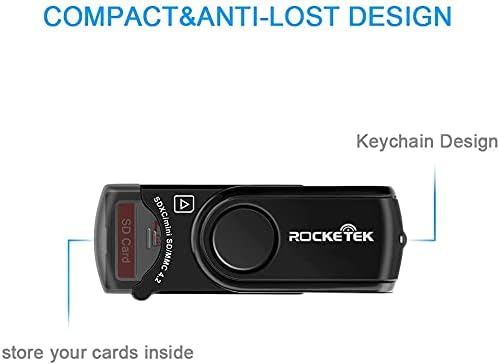
Image: The Rocketek RT-CR3A card reader illustrating its 360-degree rotatable protective cover for the USB connector.
Cài đặt
- Kết nối với máy tính: Insert the USB 3.0 connector of the RT-CR3A into an available USB port on your computer. For optimal performance, use a USB 3.0 port. The device is backward compatible with USB 2.0 and 1.1 ports.
- Cài đặt trình điều khiển: The device is plug-and-play and typically does not require additional driver installation on most operating systems (Windows, Mac OS). Your computer should automatically detect and configure the device.
- Đèn báo LED: A blue LED light will illuminate when the device is successfully connected and powered.

Image: The Rocketek RT-CR3A card reader connected to a laptop, demonstrating its use for high-speed data transfer.
Hướng dẫn sử dụng
Chèn thẻ nhớ
The RT-CR3A features two card slots: one for standard SD/MMC cards and one for Micro SD cards.
- For SD/MMC Cards: Open the built-in card cover. Gently insert your SD, SDHC, SDXC, MMC, or RS-MMC card into the larger slot with the contacts facing down until it clicks into place. Close the cover for secure storage.
- For Micro SD Cards: Gently insert your Micro SD, Micro SDHC, or Micro SDXC card into the smaller slot with the contacts facing down until it clicks into place.
The LED indicator will flash when data is being accessed or transferred.
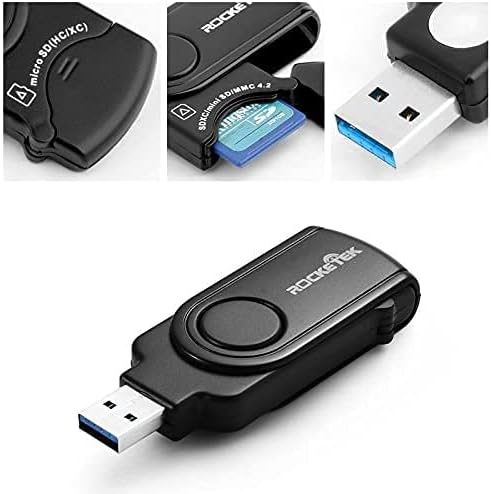
Hình ảnh: Cận cảnh view of the Rocketek RT-CR3A, illustrating an SD card partially inserted into its slot with the protective cover open.
Chuyển dữ liệu
Once a memory card is inserted and detected, it will appear as a removable drive in your computer's file explorer. You can then drag and drop files, copy, paste, or cut data between your computer and the memory card.
Note: While the device has two slots, it may only read one card at a time. If both are inserted, remove one and reinsert the device if only one card is detected.
Các loại thẻ được hỗ trợ
The Rocketek RT-CR3A supports a wide range of memory card formats:
- SD Card (Secure Digital)
- SDHC (Secure Digital High Capacity)
- SDXC (Secure Digital eXtended Capacity) up to 2TB
- UHS-I SD cards
- MMC (MultiMediaCard)
- RS-MMC (Reduced Size MultiMediaCard)
- Thẻ Micro SD
- Thẻ nhớ MicroSDHC
- Thẻ nhớ MicroSDXC
- Mini SD (requires an adapter, not included)
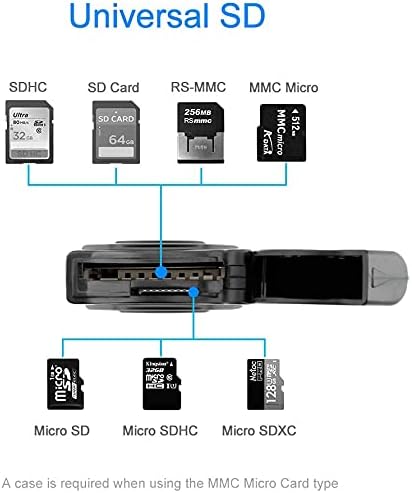
Image: A visual representation of the different types of SD and Micro SD cards compatible with the Rocketek RT-CR3A card reader.
BẢO TRÌ
- Vệ sinh: Hãy dùng khăn mềm, khô để lau sạch bên ngoài thiết bị. Tránh sử dụng chất tẩy rửa dạng lỏng hoặc dung môi.
- Kho: When not in use, keep the card reader in a clean, dry place. Utilize the built-in card cover to protect inserted cards and the USB connector.
- Xử lý: Tránh làm rơi thiết bị hoặc để thiết bị tiếp xúc với nhiệt độ quá cao hoặc độ ẩm cao.

Image: The Rocketek RT-CR3A highlighting its compact and anti-lost design, including a keychain loop for portability.
Xử lý sự cố
Thiết bị không được phát hiện
- Ensure the card reader is fully inserted into a functional USB port.
- Hãy thử một cổng USB khác trên máy tính của bạn.
- If using a USB hub, try connecting the reader directly to the computer.
- Khởi động lại máy tính của bạn.
Memory Card Not Detected
- Ensure the memory card is correctly inserted into the appropriate slot with contacts facing down.
- Try removing and reinserting the memory card.
- Hãy thử cắm thẻ nhớ vào thiết bị khác để xác nhận xem nó có hoạt động bình thường hay không.
- If multiple cards are inserted, remove one and reinsert the card reader into the USB port.
Truyền dữ liệu chậm
- Ensure the card reader is connected to a USB 3.0 port on your computer for optimal speed. USB 2.0/1.1 ports will result in slower transfer rates.
- The speed of data transfer also depends on the speed class of your memory card.
Thông số kỹ thuật
| Tính năng | Đặc điểm kỹ thuật |
|---|---|
| Người mẫu | RT-CR3A |
| Giao diện | USB 3.0 (tương thích ngược với USB 2.0/1.1) |
| Các loại thẻ được hỗ trợ | SD, SDHC, SDXC, UHS-I, MMC, RS-MMC, Micro SD, Micro SDHC, Micro SDXC |
| Công suất tối đa | SDXC up to 2TB |
| Hệ điều hành | Hệ điều hành Mac, Windows |
| Kích thước (DxRxC) | 4.72 x 2.56 x 0.71 inch (khoảng 120 x 65 x 18 mm) |
| Trọng lượng sản phẩm | 1.44 ounce (khoảng 40.8 gram) |
| Tính năng đặc biệt | Plug & Play, Built-in Card Cover, LED Status Indicator |

Image: A diagram illustrating the physical dimensions of the Rocketek RT-CR3A card reader.
Bảo hành và Hỗ trợ
Rocketek provides a 24-month manufacturer's warranty for this product.
For technical support or warranty claims, please contact Rocketek customer service. Refer to the product packaging or the official Rocketek webtrang web để biết thông tin liên hệ.
Free lifetime technical support is also available.
Thông tin an toàn
- Không cố tháo rời hoặc sửa đổi thiết bị.
- Để xa tầm tay trẻ em.
- Tránh tiếp xúc với nước hoặc các chất lỏng khác.
- Hãy xử lý thiết bị một cách có trách nhiệm theo quy định về rác thải điện tử của địa phương.