
1. Giới thiệu và kết thúcview
The ORICO 8628SUS3-C is a versatile, tool-free docking station designed for 2.5-inch and 3.5-inch SATA hard drives and SSDs. It provides high-speed connectivity to your computer via SuperSpeed USB 3.0 and eSATA interfaces, facilitating data backup, transfer, and drive management. Its top slot-loading design ensures easy installation and removal of drives. This docking station also supports standalone cloning, allowing you to duplicate drives without a host computer connection.
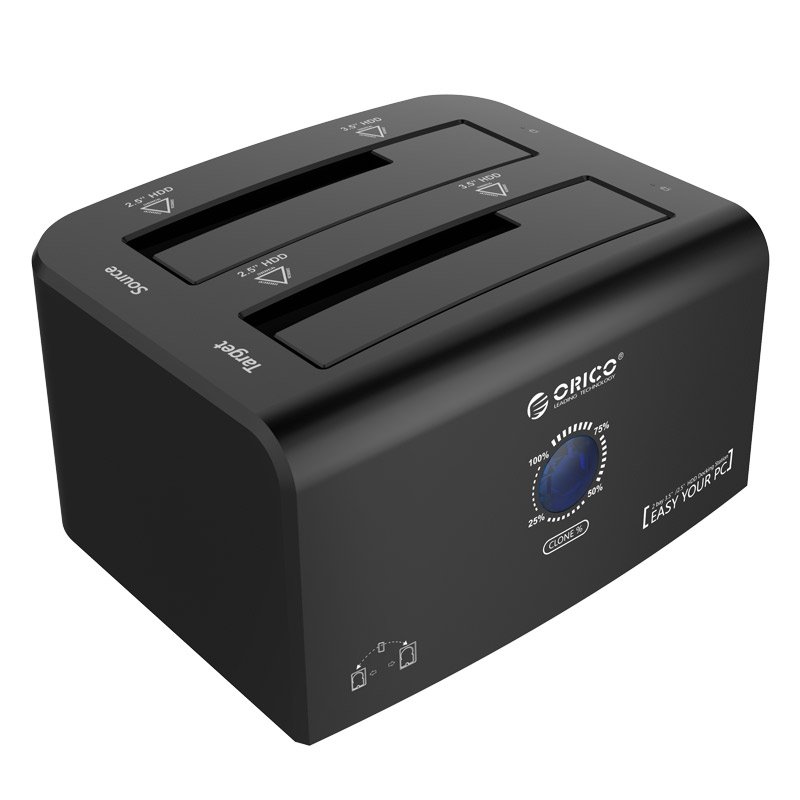
The ORICO 8628SUS3-C docking station, showcasing its dual slots accommodating both 2.5-inch and 3.5-inch SATA hard drives or SSDs.
2. Có gì trong hộp
Vui lòng kiểm tra xem tất cả các mục có trong gói hàng không:
- 1 x ORICO 2.5 & 3.5 inch Hard Drive Docking Station (Model: 8628SUS3-C)
- 1 x Bộ đổi nguồn 12V4A
- 1 x 3.3Ft. USB 3.0 Cable
- 1 x eSATA Cable
- 1 x Hướng dẫn sử dụng (tài liệu này)
- Thẻ dịch vụ 1 x
3. Hướng dẫn thiết lập
Follow these steps to set up your ORICO docking station:
- Kết nối bộ đổi nguồn: Plug the 12V4A power adapter into the DC port on the back of the docking station and then into a power outlet.
- Kết nối với máy tính: Chọn phương thức kết nối bạn ưa thích:
- USB 3.0: Connect one end of the provided USB 3.0 cable to the USB 3.0 port on the docking station and the other end to an available USB 3.0 port on your computer.
- eSATA: Connect one end of the provided eSATA cable to the eSATA port on the docking station and the other end to an available eSATA port on your computer.
- Lắp đặt ổ cứng: Gently slide your 2.5-inch or 3.5-inch SATA HDD/SSD into the designated slots on top of the docking station. Ensure the drive is fully seated. The docking station supports two drives simultaneously.
- Bật nguồn: Press the power switch on the back of the docking station to turn it on. The LED indicators will illuminate.

An illustrative diagram detailing the connection process: 1) DC adapter, 2) USB cable to PC, 3) SSD/HDD insertion, and 4) power on/off button.
4. Hướng dẫn vận hành
4.1. Data Transfer Mode
Once connected to your computer and powered on, the inserted drives will be recognized by your operating system. You can then access them like any other external storage device.
- USB 3.0 siêu tốc: Offers data transfer rates up to 5Gbps. It is backward compatible with USB 2.0 and 1.1.
- eSATA: Provides data transfer rates up to 3Gbps.
- Cắm và chạy: The device supports hot-swapping, allowing you to insert or remove drives while the docking station is powered on, without needing to restart your computer. No drivers are typically required for Windows, Linux, or Mac operating systems.

This image illustrates the ORICO docking station connected to a laptop via USB, with both 2.5-inch and 3.5-inch drives inserted, highlighting its broad compatibility.
4.2. Standalone Clone Function (Offline Duplication)
The ORICO 8628SUS3-C supports standalone cloning, allowing you to duplicate a source drive to a target drive without connecting to a computer.
- Chuẩn bị ổ đĩa: Ensure both the Source drive (the drive you want to copy FROM) and the Target drive (the drive you want to copy TO) are unformatted or contain data you are willing to overwrite. The Target drive must be equal to or larger in capacity than the Source drive.
- Chèn ổ đĩa: Insert the Source drive into the 'Source' slot and the Target drive into the 'Target' slot on the docking station.
- Ngắt kết nối khỏi máy tính: Ensure the docking station is disconnected from your computer (USB or eSATA cable).
- Bật nguồn: Bật trạm kết nối bằng công tắc nguồn.
- Khởi tạo bản sao: Press and hold the 'Clone' button (often labeled 'PC-Clone Button' or similar) on the back of the docking station for approximately 3-5 seconds until the cloning process begins. The progress indicator LEDs will light up, showing the cloning status (e.g., 25%, 50%, 75%, 100%).
- Hoàn thành: The cloning process is complete when all progress indicator LEDs are solid. Power off the docking station and safely remove the drives.
Lưu ý quan trọng: All data on the Target drive will be erased during the cloning process. Back up any important data on the Target drive before proceeding.

This image provides a close-up of the docking station's rear panel, showing the PC-Clone button, Power Switch, DC Port, USB 3.0, and eSATA interfaces. The top view highlights the Source and Target drive slots and LED lights.

The docking station is shown performing an offline clone operation, capable of cloning up to 8TB. Product dimensions are provided: W 217x D 142 x H 80 (mm) or W 8.54x D 5.59 x H 3.14 (in).
5. Bảo trì
Để đảm bảo tuổi thọ và hiệu suất tối ưu của đế cắm ORICO của bạn:
- Giữ thiết bị sạch sẽ và không bám bụi. Dùng vải mềm, khô để lau chùi.
- Avoid exposing the docking station to extreme temperatures, humidity, or direct sunlight.
- Do not block the ventilation openings, if any, to prevent overheating.
- Handle hard drives carefully when inserting or removing them to prevent damage to the drive connectors or the docking station slots.
- Always power off the docking station before disconnecting the power adapter.
KHAI THÁC. Xử lý sự cố
If you encounter issues with your ORICO docking station, refer to the following common problems and solutions:
| Vấn đề | Nguyên nhân có thể / Giải pháp |
|---|---|
| Ổ đĩa không được máy tính nhận diện. |
|
| Tốc độ truyền dữ liệu chậm |
|
| Cloning process fails or does not start |
|
| Docking station not powering on |
|
7. Thông số kỹ thuật
| Tính năng | Sự miêu tả |
|---|---|
| Số hiệu mẫu | ORICO 8628SUS3-C |
| Giao diện phần cứng | USB 3.0, eSATA |
| Ổ đĩa tương thích | 2.5 inch / 3.5 inch SATA HDD & SSD |
| Supported Devices Quantity | 2 |
| Data Transfer Rate (USB 3.0) | Tốc độ lên đến 5 Gigabits mỗi giây (Gbps) |
| Data Transfer Rate (eSATA) | Tốc độ lên đến 3 Gigabits mỗi giây (Gbps) |
| Offline Clone Capacity | Lên đến 8TB |
| Khả năng tương thích của hệ điều hành | Windows XP/7/8/8.1, Linux, Mac 9.1 or later |
| Bộ đổi nguồn | 12V4A |
| Kích thước (D x R x C) | 217 x 142 x 80 mm (8.54 x 5.59 x 3.14 inch) |
| Trọng lượng sản phẩm | 1.7 Bảng Anh |
8. Bảo hành và Hỗ trợ
Your ORICO 8628SUS3-C Hard Drive Docking Station comes with a service card. For warranty information, technical support, or any inquiries regarding your product, please refer to the contact details provided on the service card or visit the official ORICO webtrang web. Vui lòng giữ lại bằng chứng mua hàng để yêu cầu bảo hành.