

1. Kirish
This manual provides comprehensive instructions for setting up, operating, and maintaining your EPOMAKER X Aula F65 PRO Wireless Mechanical Gaming Keyboard. Designed for peak performance and personalized perfection, the F65 PRO features hot-swappable pre-lubed switches, a sound-dampened Gasket structure, programmable keys, RGB lighting, and versatile tri-mode connectivity.
2. Qutida nima bor
Upon unboxing your EPOMAKER X Aula F65 PRO keyboard, please ensure all the following items are present:
- EPOMAKER X Aula F65 PRO Wireless Mechanical Gaming Keyboard
- 2-in-1 Keycap-and-Switch Puller
- USB kabeli (A turidan C turiga)
- 2.4 gigagertsli simsiz qabul qilgich
- 3 Extra Switches
- Foydalanuvchi uchun qo'llanma (ushbu hujjat)
Video: EPOMAKER X Aula F65 PRO Unboxing & Showing & Typing Video. This video demonstrates the unboxing process and shows the contents of the package, including the keyboard and accessories.
Video: F65 PRO Wireless Mechanical Gaming Keyboard Unboxing Video. This video provides a quick overview of the unboxing experience for the F65 PRO keyboard.
3. Sozlash
3.1 Ulanish rejimlari
The F65 PRO keyboard supports three connectivity modes: Bluetooth (BT), 2.4GHz Wireless, and USB-C Wired.
- Bluetooth (BT) rejimi: Ideal for connecting to multiple devices (up to 3) such as smartphones, tablets, and laptops. Switch the mode selector on the keyboard to 'BT'. Follow your device's Bluetooth pairing instructions.
- 2.4 gigagertsli simsiz rejim: Provides a stable and low-latency connection for gaming. Insert the 2.4GHz USB receiver into your computer's USB port. Switch the mode selector on the keyboard to '2.4G'.
- USB-C simli rejimi: For a direct, zero-latency connection and charging. Connect the provided USB-C cable to the keyboard and your computer. Switch the mode selector on the keyboard to 'Wired'.

Image: Tri-Mode Connectivity. This image illustrates the various connectivity options available for the F65 PRO keyboard, highlighting its compatibility with multiple device types.
3.2 Jismoniy sozlash
Place the keyboard on a stable, flat surface. The keyboard features silicone stage-feet for stability and an ergonomic typing angle.

Image: Ergonomic Typing Angle. This image highlights the comfortable typing angle and stable feet of the F65 PRO keyboard.
4. Foydalanish bo'yicha ko'rsatmalar
4.1 RGB orqa yorug'likni boshqarish
The F65 PRO features dynamic RGB backlighting with various effects and customization options.
- Orqa yorug'likni yoqish/o'chirish: bosing FN + Backspace.
- Orqa yorug'lik effektini yoqish/o'chirish: bosing FN + \ |.
- Orqa yorug'lik rangini almashtirish/o'chirish: bosing FN + Enter.
- Orqa yorug'likning yorqinligini sozlash: bosing FN + (kamaytirish) yoki FN + (kattalashtirish; ko'paytirish).
- Adjust Backlight Effect Speed: bosing FN + (kamaytirish) yoki FN + → (kattalashtirish; ko'paytirish).
- Toggle Light Strip Effect: bosing FN + R_SHIFT.
- Adjust Light Strip Brightness: bosing FN + . > (kamaytirish) yoki FN + /? (kattalashtirish; ko'paytirish).
- Toggle Light Strip Color: bosing FN + /? (while holding FN).
Video: EPOMAKER X Aula F65 PRO RGB Setting. This video demonstrates how to adjust the RGB lighting settings on the keyboard.
Video: EPOMAKER X Aula F65 PRO Lighting Effect Check. This video showcases various lighting effects and how to cycle through them.
4.2 Multi-functional Knob
The rotary knob on the F65 PRO provides intuitive control over volume and backlight settings.
- Matbuot: Mute/Unmute audio.
- Aylantirish: Adjust system volume (clockwise to increase, counter-clockwise to decrease).
- Toggle Knob Function: bosing FN + Tugma to switch the knob's default function to the Home key. Press again to revert to volume control.
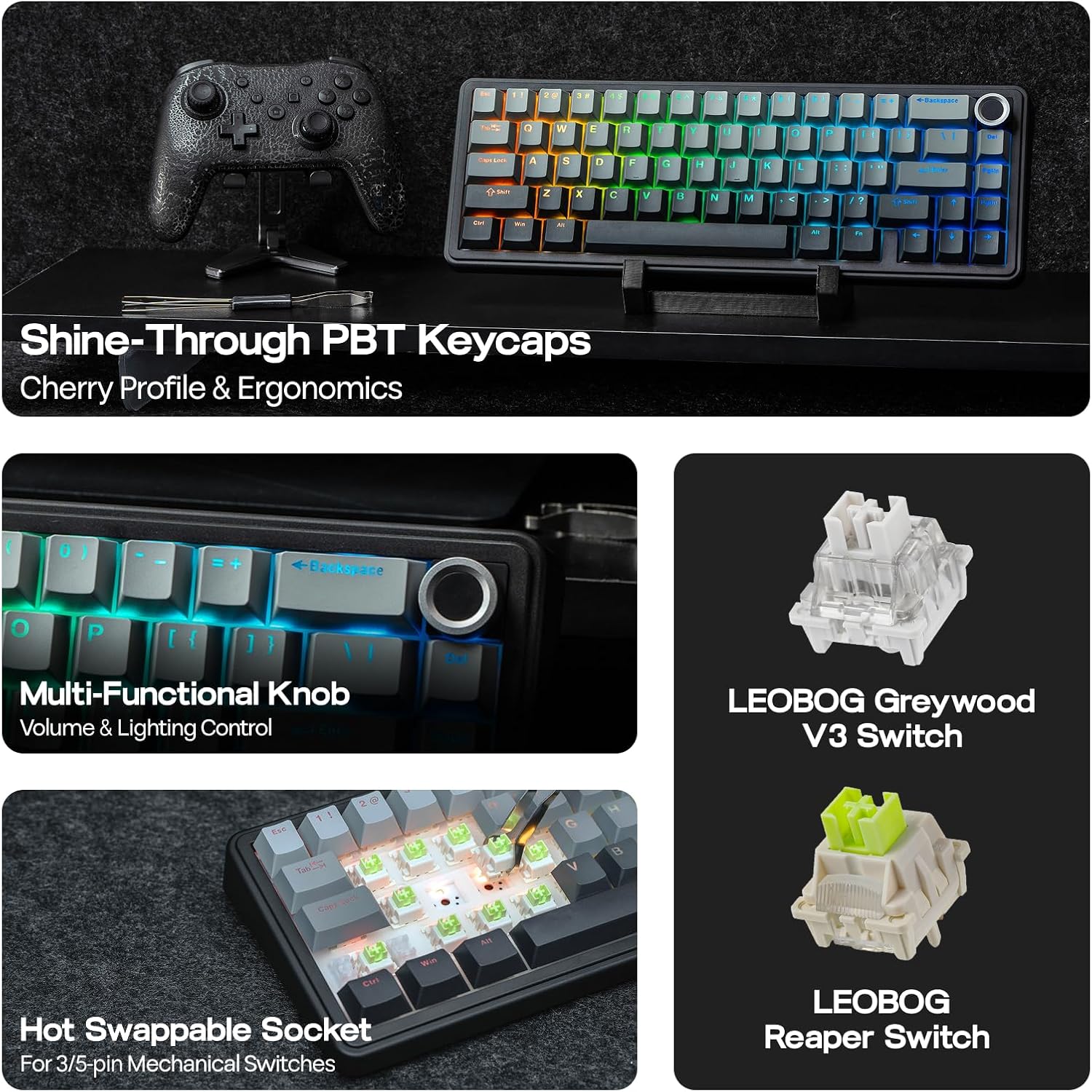
Image: Multi-Functional Knob. This image highlights the rotary knob and its functions for volume and lighting.
4.3 Game Mode and Office Mode
The keyboard can switch between Game Mode and Office Mode for optimized performance.
- O'yin rejimiga kiring: Press the knob for 3 seconds. The L_Win and Caps keys will flash blue.
- Enter Office Mode: Press the knob for 3 seconds again while in Game Mode. The L_Win and Caps keys will flash green.
4.4 Dasturiy ta'minotni sozlash
Customize your keyboard's settings, key assignments, macros, and lighting effects using the dedicated software.
- Tizim sozlamalari: Adjust general keyboard parameters.
- Key Remap: Reassign functions to individual keys.
- Macro Record: Murakkab makro ketma-ketliklarni yarating va tayinlang.
- Yorug'lik sozlamalari: Fine-tune RGB lighting effects and colors.
- Musiqa ritmi: Synchronize lighting with audio output.
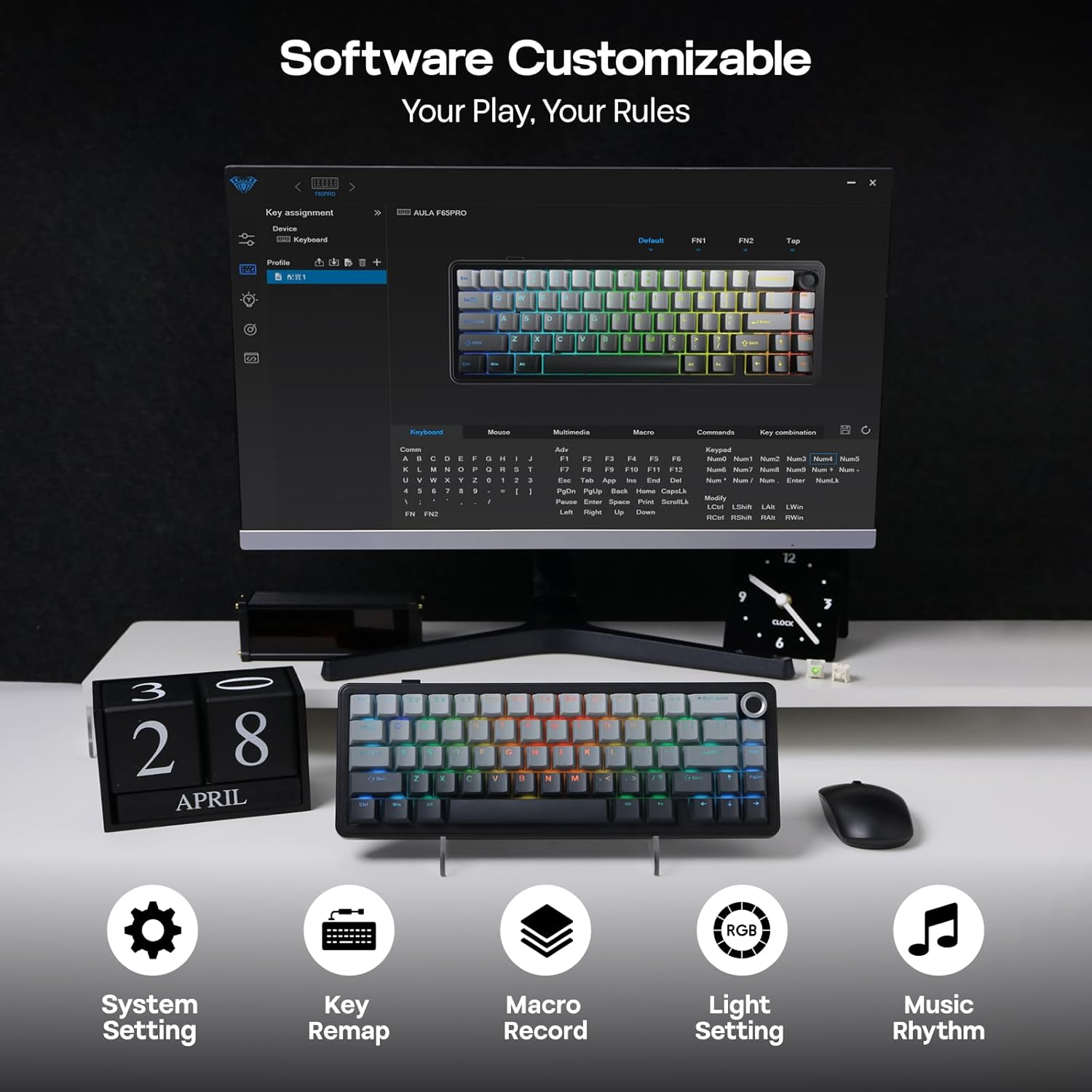
Image: Software Customizable. This image shows the keyboard's software interface for advanced customization.
5. Xususiyatlar tugadiview
The EPOMAKER X Aula F65 PRO is engineered with several advanced features for an enhanced user experience:
- Issiq almashtiriladigan kalitlar: Easily change 3-pin or 5-pin mechanical switches without soldering, allowing for personalized typing feel.
- Creamy Gasket-Mount Structure: Features a 5-layer sound-dampening system for a satisfyingly muted thud and responsive feel with each keystroke.
- Shine-Through PBT Keycaps: Premium PBT keycaps with topographic lines and shine-through legends for durability and vibrant RGB illumination.
- 4000 mAh batareya: Offers extended wireless usage, with approximately 20 hours with RGB backlight on and 200 hours with RGB backlight off.
- Kam kechikish muddati: Achieves 1-3ms response time in USB-C wired and 2.4GHz wireless modes, and 8ms in BT 125Hz mode.
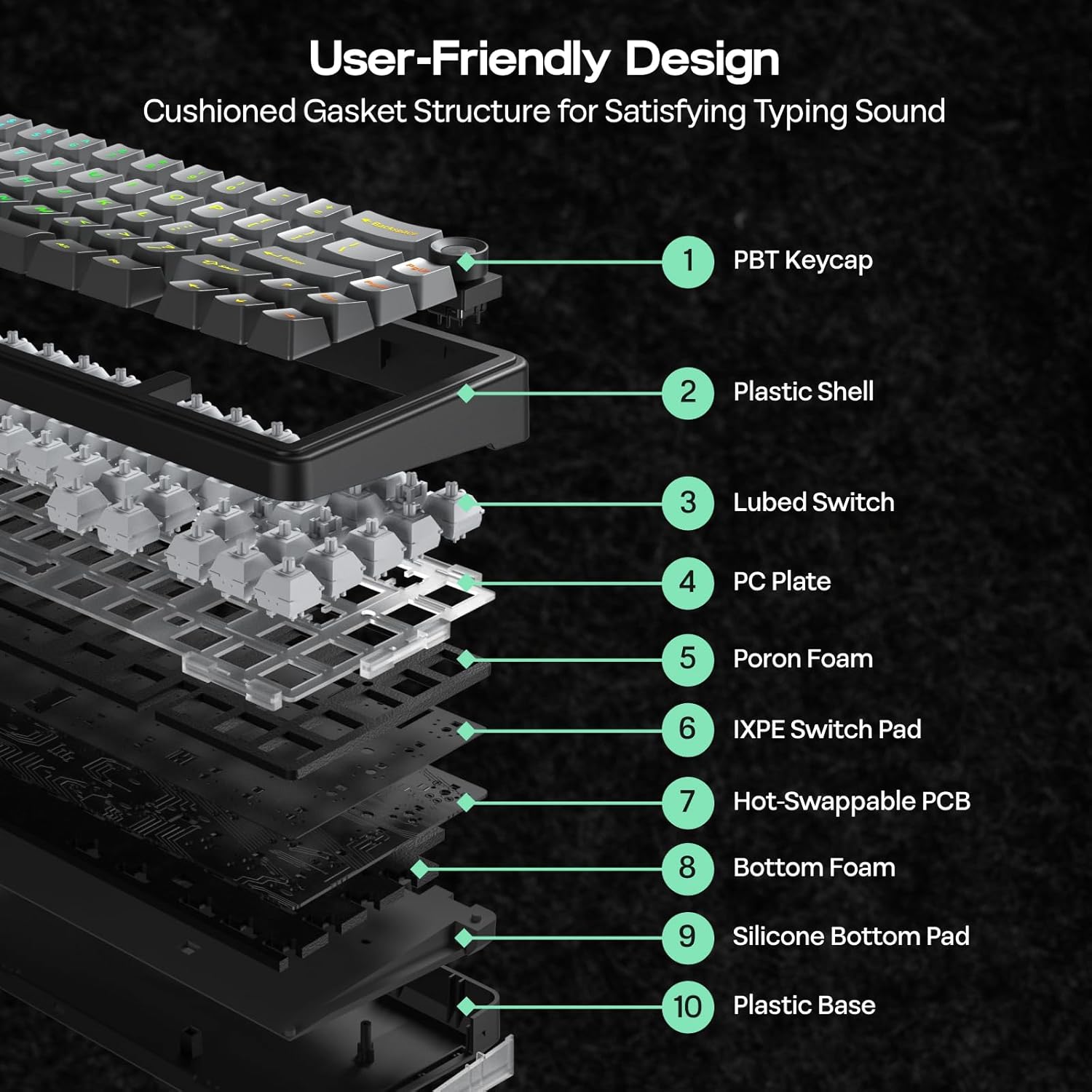
Image: User-Friendly Design (Cushioned Gasket Structure). This diagram illustrates the 5-layer sound-dampening gasket structure of the keyboard.
Image: Hot Swappable Socket. This image demonstrates the hot-swappable nature of the keyboard's switches.
Video: F65 PRO Wireless Mechanical Gaming Keyboard - Typing Sound. This video demonstrates the typing sound profile of the F65 PRO keyboard.
Video: EPOMAKER X Aula F65 PRO Typing ASMR. This video provides an ASMR-style demonstration of the keyboard's typing sound.
Video: EPOMAKER X Aula F65 PRO Typing Video. This video demonstrates the typing experience on the F65 PRO keyboard.
6. Texnik shartlar
| Xususiyat | Tafsilot |
|---|---|
| Brend | EPOMAKER |
| Model raqami | F65 PRO |
| Ulanish texnologiyasi | 2.4Ghz Wireless, BT, USB A to C Cable |
| Klaviatura tavsifi | Mexanik |
| Maxsus xususiyatlar | 5-Layer Padding, Backlit, Gasket Structure, Hot-Swappable, Knob |
| Rang | Gradient kulrang |
| Klaviatura orqa yorug'ligi | RGB |
| Mahsulot o'lchamlari (U x G x Y) | 4.4"L x 12.8"W x 1.2"Y |
| Material | Plastik |
| Quvvat manbai | Batareyadan quvvatlanadi |
| Kommutator turi | Linear (Graywood V3 Switch) |
| Klaviatura tartibi | QWERTY |
| Tugmalar soni | 66 |
| Mos qurilmalar | O'yin konsoli, noutbuk, kompyuter, smartfon, planshet |
| Minimum Required OS | Android 14.0, Windows 11 |
7. Xizmat ko'rsatish
To ensure the longevity and optimal performance of your EPOMAKER X Aula F65 PRO keyboard, follow these maintenance guidelines:
- Doimiy tozalash: Use a soft, dry cloth to wipe down the keycaps and chassis. For deeper cleaning, use a can of compressed air to remove dust and debris from between the keys.
- Klaviatura qopqog'i va tugmachani olib tashlash: Use the provided 2-in-1 keycap-and-switch puller for safe removal of keycaps and switches. Avoid using excessive force to prevent damage.
- Suyuqlik ta'siridan saqlaning: Ichki shikastlanishning oldini olish uchun suyuqliklarni klaviaturadan uzoqroq tuting. To'kilgan taqdirda, klaviaturani darhol ajratib oling va qayta ulashdan oldin to'liq quriting.
- Batareya parvarishi: Batareya quvvatini optimal darajada ishlatish uchun klaviaturani tez-tez to'liq zaryadsizlantirishdan saqlaning. Uni taqdim etilgan USB-C kabelidan foydalanib muntazam ravishda zaryadlang.
8. Muammolarni bartaraf qilish; nosozliklarni TUZATISH
If you encounter any issues with your EPOMAKER X Aula F65 PRO keyboard, please refer to the following common troubleshooting steps:
- Klaviatura javob bermayapti:
- Klaviatura zaryadlanganligiga ishonch hosil qiling.
- Check the connectivity mode switch (BT, 2.4G, Wired) matches your connection method.
- For 2.4GHz, ensure the USB receiver is properly inserted and recognized by your device.
- For Bluetooth, ensure the keyboard is paired correctly and within range. Try re-pairing if necessary.
- For wired mode, ensure the USB-C cable is securely connected to both the keyboard and your device.
- RGB Backlight Not Working:
- bosing FN + Backspace orqa yorug'likni yoqish/o'chirish uchun.
- Yorqinlikni foydalanib sozlang FN + ↑/↓.
- Ensure the keyboard is not in a low-power state.
- Ro'yxatdan o'tmagan kalitlar:
- Klaviatura qopqog'i ostidagi har qanday jismoniy to'siqlarni tekshiring.
- If a specific switch is faulty, use the provided switch puller to replace it with one of the extra switches.
- Connectivity Issues (Lag/Disconnections):
- Ensure the keyboard is close to the receiver/device for wireless connections.
- Boshqa simsiz qurilmalarning shovqinidan saqlaning.
- Update keyboard firmware if available through the customization software.
9. Kafolat va qo'llab-quvvatlash
The EPOMAKER X Aula F65 PRO Wireless Mechanical Gaming Keyboard comes with a 1 Yil Kafolat sotib olingan kundan boshlab.
For technical support, warranty claims, or further assistance, please visit the official EPOMAKER store or contact their customer service directly. You can find more information and support resources at the Amazondagi EPOMAKER do'koni.