
Kirish
This manual provides essential instructions for the safe operation, setup, and maintenance of your Protocol Director HD Foldable Drone. Please read this manual thoroughly before operating the drone to ensure proper function and to prevent damage or injury.
The Protocol Director HD is a foldable drone equipped with a live streaming HD camera, designed for capturing aerial video and photos. It features an intuitive 2.4 GHz remote control, an altitude sensor for stable flight, and a free downloadable app for enhanced camera control and flight path drawing.
Xavfsizlik choralari
- Dronni har doim ochiq, to'siqsiz joylarda, odamlar, hayvonlar va to'siqlardan uzoqda boshqaring.
- Do not operate near airports, restricted airspace, or sensitive facilities.
- Maintain a safe distance from power lines, trees, and water bodies.
- Ensure all propellers are securely attached and undamaged before each flight.
- Kuchli shamollarda yoki noqulay ob-havo sharoitida uchmang.
- Barmoqlar va sochlarni aylanuvchi pervanellardan uzoqroq tuting.
- Adult supervision is recommended for users under 18 years of age. Recommended age for operation is 14 years and up.
- Only use original Protocol replacement parts and accessories.
- Do not attempt to modify the drone or its components.
- Ishlatilmayotganda dron va masofadan boshqarish pultini o'chiring.
Paket tarkibi
Paketda barcha elementlar mavjudligiga ishonch hosil qiling:
- Protocol Director HD Foldable Drone with Camera
- Remote Control with Phone Mount
- USB zaryadlovchi kabeli
- 2 ta dron batareyasi
- Sayohat sumkasi
- Qo'llanma (bu hujjat)
- Spare Parts: Blades, Screwdriver

Image: The Protocol Director HD Foldable Drone, showcasing its compact design with propellers extended and camera visible at the front.
Sozlash; o'rnatish
1. Drone batareyasini zaryadlash
- Insert one of the drone batteries into the USB charging cable.
- Connect the USB charging cable to a USB power source (e.g., computer USB port, USB wall adapter).
- The charging indicator light on the USB cable will illuminate during charging and turn off when fully charged.
- Zaryadlash odatda taxminan 60-90 daqiqa davom etadi. Haddan tashqari zaryadlamang.
2. Masofadan boshqarish pultining batareyalarini o'rnatish
- Masofadan boshqarish pulti orqasidagi batareya bo'linmasini oching.
- To'g'ri kutupluluğa (+/-) ishonch hosil qilib, 4 ta AA batareyasini joylashtiring (qo'shilmagan).
- Batareya bo'linmasini mahkam yoping.

Image: The drone's remote control with a smartphone securely mounted, displaying a live feed from the drone's camera.
3. Dronni ochish
- Gently unfold each of the four rotor arms until they click into place.
- Ensure all arms are fully extended and locked before flight.
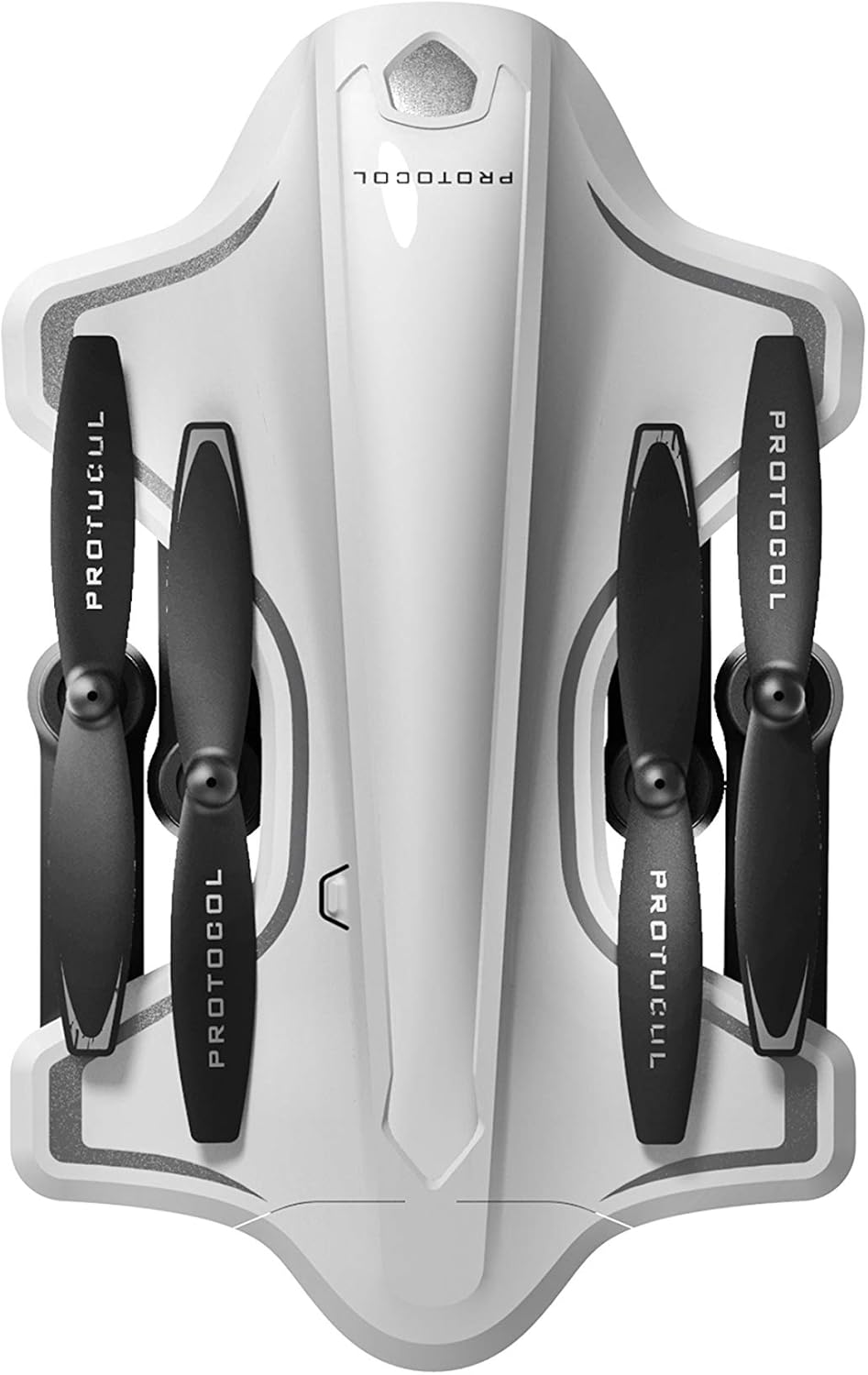
Image: The Protocol Director HD Foldable Drone in its compact, folded configuration, ready for transport.
4. Dron batareyasini o'rnatish
- Drondagi batareya bo'linmasini toping.
- Insert the fully charged drone battery, ensuring it is securely seated.
- Batareya bo'limi qopqog'ini yoping.
5. Downloading the App (Optional for Camera Features)
- Ni qidirish the "Protocol Director HD" app in your smartphone's app store (iOS or Android).
- Download and install the free application.
- Mount your smartphone onto the remote control's phone mount.
Foydalanish bo'yicha ko'rsatmalar
1. Quvvatni yoqish va ulash
- Dronni tekis, tekis yuzaga qo'ying.
- Turn on the drone by pressing the power button. The drone's lights will flash.
- Masofadan boshqarish pultini yoqing.
- Chap joystikni (drosselni) oxirigacha yuqoriga, keyin esa oxirigacha pastga bosing. Dronning chiroqlari bir tekis yonadi, bu muvaffaqiyatli ulanishni ko'rsatadi.
2. Calibrating the Gyroscope
After pairing, it is recommended to calibrate the gyroscope for stable flight:
- With the drone on a flat surface, push both joysticks down and to the right simultaneously for a few seconds.
- The drone's lights will flash rapidly and then become solid, indicating calibration is complete.
3. Asosiy parvozlarni boshqarish
The Protocol Director HD features auto launch, hover, and land functions due to its altitude sensor.
- Auto Launch: Press the dedicated auto launch button on the remote. The drone will ascend to a stable hovering altitude.
- Gaz kelebeği (chap joystik):
- Push up: Increase altitude
- Push down: Decrease altitude
- Push left/right: Rotate drone left/right (yaw)
- Yo'nalishni boshqarish (o'ng joystik):
- Yuqoriga ko'tarilish: Oldinga uchish
- Push down: Fly backward
- Chapga suring: Chapga uching (strafe)
- O'ngga suring: O'ngga uching (strafe)
- Auto Land: Press the dedicated auto land button. The drone will slowly descend and land.
- Tezlikni tanlash: Use the speed button on the remote to cycle through three selectable speeds (low, medium, high).
4. Camera and App Features
Connect your smartphone to the drone's Wi-Fi network (usually named "Protocol_Drone_XXXXXX") to access live streaming and advanced camera functions via the app.
- Jonli translatsiya: View the drone's camera feed in real-time on your smartphone.
- Videoyozuv: Initiate and stop video recording (480p resolution) through the app.
- Suratga olish: Take still images through the app.
- Multiple Camera Angles: The app supports three different camera angles (Aerial, POV, Selfie) for varied content creation.
- Audioyozuv: The app allows for audio recording alongside video.
- Draw Your Own Flight Path: Utilize the app's feature to draw a flight path on your screen, and the drone will follow it.
- VR Capability: The app is VR capable; VR goggles are sold separately.
Xizmat
- Pervanel tekshiruvi: Regularly check propellers for cracks, bends, or damage. Replace any damaged propellers using the provided spare parts and screwdriver.
- Tozalash: Dron va masofadan boshqarish pultini tozalash uchun yumshoq, quruq matodan foydalaning. Suyuqliklar yoki kuchli kimyoviy moddalardan foydalanishdan saqlaning.
- Batareya parvarishi:
- Batareyalarni ortiqcha zaryad qilmang.
- Batareyalarni salqin, quruq joyda saqlang.
- Remove batteries from the drone and remote control during long periods of non-use.
- Saqlash: Fold the drone arms for compact storage in the provided travel bag when not in use. Store in a cool, dry environment.
Muammolarni bartaraf qilish; nosozliklarni TUZATISH
| Muammo | Mumkin sabab | Yechim |
|---|---|---|
| Drone yoqilmaydi. | Batareya zaryadlanmagan yoki noto'g'ri o'rnatilgan. | Batareya to'liq zaryadlangan va to'g'ri kiritilganligiga ishonch hosil qiling. |
| Masofadan boshqarish pulti yoqilmaydi. | AA batteries are dead or incorrectly installed. | Replace AA batteries, checking polarity. |
| Drone and remote do not pair. | Pairing sequence not followed correctly. | Ensure drone is on, then remote. Push left joystick up then down completely. |
| Uchuvchisiz uchish paytida uchib ketadi. | Gyroscope needs calibration; uneven surface at launch. | Land the drone, place on a flat surface, and recalibrate the gyroscope (both joysticks down and right). |
| One propeller does not spin. | Propeller damaged or motor issue. | Check for obstructions. Replace damaged propeller. If issue persists, contact support. |
| No live video feed on smartphone. | Dronning Wi-Fi tarmog'iga ulanmagan; ilova ochilmagan. | Ensure smartphone is connected to the drone's Wi-Fi network and the app is running. |
Texnik xususiyatlari
| Brend | Protokol |
| Model nomi | Director HD |
| Model raqami | 6182-7RCHA |
| Olchamlari (katlanmış) | Taxminan 4.75 dyuym (uzunlik) |
| Olchamlari (kengaytirilgan) | Approximately 9 inches (length, including blades) |
| Og'irligi | 0.94 Kilogramm (940 g) |
| Kamera ruxsati | 480p (Video Capture) |
| Ulanish | Wi-Fi (for app control and live streaming), 2.4 GHz (for remote control) |
| Stabilizatsiya | 6-axis motion-sensitive auto stabilizers, Altitude sensor |
| Tezlik rejimlari | Three selectable speeds |
| Dron batareyasi | Qayta zaryadlanuvchi (2 tasi kiritilgan) |
| Masofadan boshqarish pulti batareyasi | 4 x AA batareyalar (qo'shilmagan) |
| Material | Plastic (Crash-resistant) |
| Tavsiya etilgan yosh | 14 yil va undan yuqori |
Kafolat va qo'llab-quvvatlash
For warranty information, technical support, or to purchase replacement parts, please visit the official Protocol websaytga yoki mijozlarga xizmat ko'rsatish bo'limiga murojaat qiling. Xarid kvitansiyasini xaridni tasdiqlovchi hujjat sifatida saqlang.
Websayt: www.protocolny.com (Masalanample havola, haqiqiy havola farq qilishi mumkin)
Aloqa: Refer to the Protocol website for contact details, including phone numbers or email support.