
1. تعارف
This manual provides essential information for setting up, operating, maintaining, and troubleshooting your Lenovo IdeaCentre AIO 27 All-in-One Desktop PC. Please read this manual thoroughly before using your device to ensure proper functionality and to maximize its lifespan.

Figure 1: Lenovo IdeaCentre AIO 27 All-in-One Desktop PC
2. پیکیج کے مشمولات
تصدیق کریں کہ تمام اشیاء آپ کی مصنوعات کی پیکیجنگ میں موجود ہیں:
- Lenovo IdeaCentre AIO 27 Desktop PC
- پاور اڈاپٹر (90W)
- کی بورڈ (کنفیگریشن کے لحاظ سے وائرڈ یا وائرلیس ہو سکتا ہے)
- ماؤس (کنفیگریشن کے لحاظ سے وائرڈ یا وائرلیس ہو سکتا ہے)
- دستاویزات (کوئیک سٹارٹ گائیڈ، وارنٹی معلومات)
3. پروڈکٹ ختمview
3.1 کلیدی اجزاء
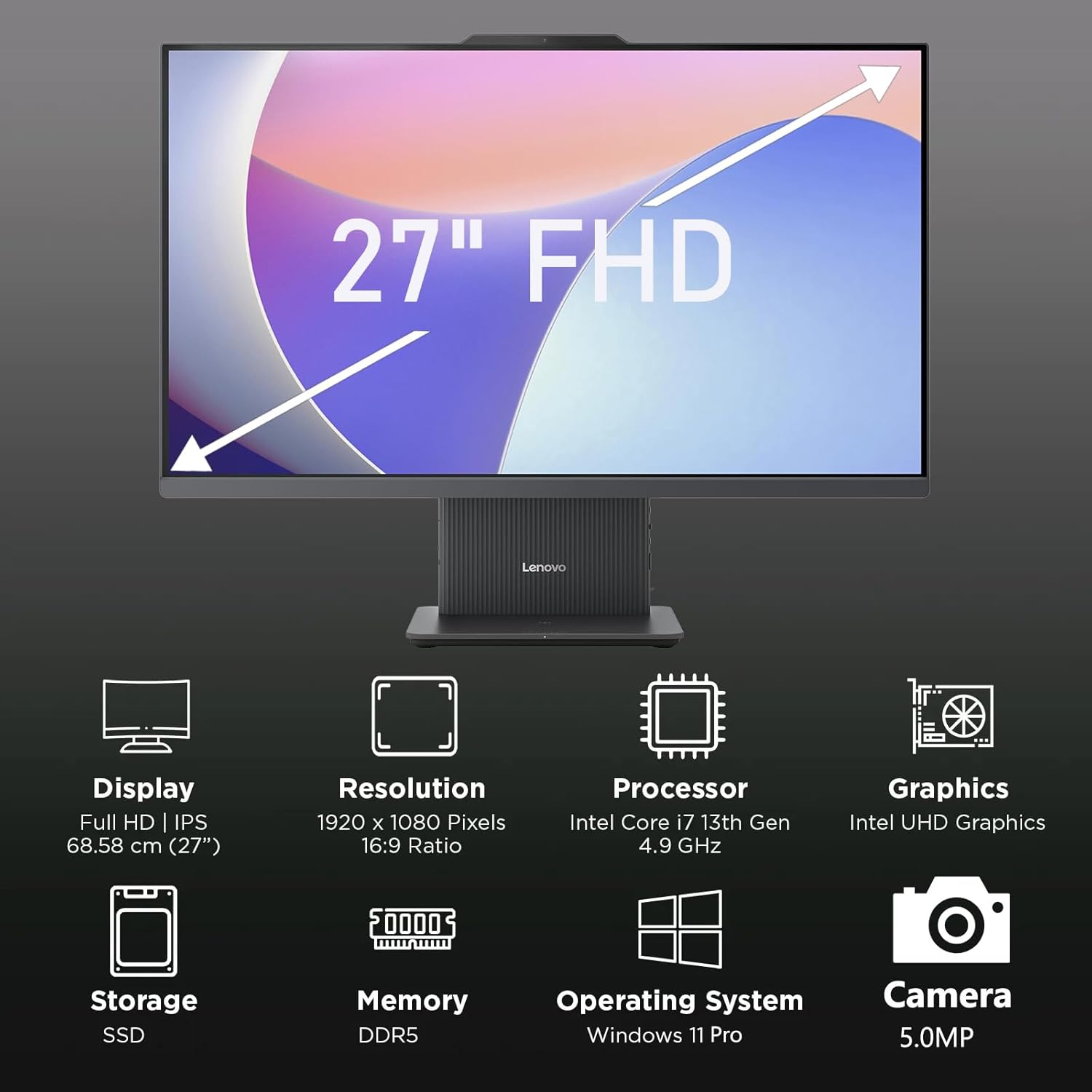
شکل 2: ختمview of key features including Display, Resolution, Processor, Graphics, Storage, Memory, Operating System, and Camera.
- ڈسپلے: 27-inch Full HD (1920x1080) IPS, 300 nits, anti-glare.
- Webکیمرے: Integrated 5.0MP webcam with dual microphones.
- مقررین: Integrated 3W x2 HARMAN speakers.
- پروسیسر: Intel Core i7-13620H.
- یادداشت: DDR5 RAM.
- ذخیرہ: PCIe NVMe SSD.
3.2 پورٹس اور کنیکٹر

Figure 3: Detailed diagram of ports and connectors on the Lenovo IdeaCentre AIO 27.
- E-shutter (for webcam privacy)
- پاور بٹن
- HDMI-in 1.4
- پاور ڈی سی ان
- USB-A 480Mbps (USB 2.0)
- ایتھرنیٹ (RJ-45)
- USB-A 480Mbps (USB 2.0)
- USB-A 10Gbps (USB 3.2 Gen 2)
- HDMI-out 2.1 TMDS
- USB-C 10Gbps (data transfer only)
- ہیڈ فون/مائیکروفون کومبو جیک
4. سیٹ اپ
4.1 ان باکسنگ اور پلیسمنٹ
- Carefully remove the AIO PC and all accessories from the packaging.
- Place the AIO PC on a stable, flat surface with adequate ventilation around the device.
4.2 کنیکٹنگ پاور
- Connect the power adapter cable to the DC-in port (4) on the rear of the AIO PC.
- پاور اڈاپٹر کو گراؤنڈڈ الیکٹریکل آؤٹ لیٹ میں لگائیں۔
4.3 کنیکٹنگ پیری فیرلز
- Connect your keyboard and mouse to the available USB-A ports (5, 7, 8) on the rear of the AIO PC.
- If using wired Ethernet, connect the cable to the RJ-45 port (6).
- For external displays, use the HDMI-out port (9). To use the AIO as a display for another device, use the HDMI-in port (3).
4.4 ابتدائی بوٹ اور ونڈوز سیٹ اپ
- Press the power button (2) to turn on the PC.
- Windows 11 پرو ابتدائی سیٹ اپ مکمل کرنے کے لیے اسکرین پر دی گئی ہدایات پر عمل کریں، بشمول زبان، علاقہ، نیٹ ورک کنکشن، اور صارف اکاؤنٹ بنانا۔
4.5 اسٹینڈ کو ایڈجسٹ کرنا

Figure 4: The AIO stand allows for ergonomic tilt adjustment.
The integrated stand allows for tilt adjustment from -5° to 15° to optimize your viewing angle and posture. Gently adjust the display to your preferred position.
5. آپ کے کمپیوٹر کو آپریٹ کرنا
5.1 بنیادی آپریشن
- پاور آن/آف: Press the power button (2) to turn on. To shut down, click Start > Power > Shut down in Windows.
- نیند موڈ: Press the power button briefly or select Sleep from the Start menu.
5.2 کا استعمال کرتے ہوئے۔ Webکیمرے اور آڈیو

Figure 5: The 5MP webcam and Harman audio enhance video conferencing.
- Webکیمرے: مربوط 5.0MP webcam is ideal for video conferencing and online communication. Use the E-shutter (1) to physically block the camera for privacy.
- مائیکروفونز: Dual microphones provide clear audio input.
- مقررین: HARMAN speakers deliver high-quality audio output.
5.3 کنیکٹیویٹی
- Wi-Fi 6: تیز رفتار انٹرنیٹ تک رسائی کے لیے وائرلیس نیٹ ورکس سے جڑیں۔
- بلوٹوتھ 5.2: Pair with Bluetooth-enabled devices such as headphones, speakers, or mobile phones.
- USB پورٹس: Utilize the various USB-A and USB-C ports for connecting external drives, printers, and other peripherals.
5.4 ونڈوز 11 پرو کی خصوصیات
Your AIO PC comes pre-installed with Windows 11 Pro, offering advanced features for productivity and security:
- BitLocker: For advanced data encryption.
- ریموٹ ڈیسک ٹاپ: Access your PC from another device.
- Domain Join: Integrate into corporate networks.
- ونڈوز ہیلو: Secure and fast login using facial recognition (if IR camera is present) or PIN.
6 دیکھ بھال
6.1 Cleaning Your PC
- ڈسپلے: تھوڑا سا نرم، لنٹ سے پاک کپڑا استعمال کریں۔ampپانی یا غیر کھرچنے والی اسکرین کلینر کے ساتھ ختم کیا گیا ہے۔ مائع کو براہ راست اسکرین پر نہ چھڑکیں۔
- Chassis: Wipe with a soft, dry cloth. Avoid harsh chemicals or abrasive materials.
- وینٹیلیشن: اس بات کو یقینی بنائیں کہ زیادہ گرم ہونے سے بچنے کے لیے وینٹیلیشن کے سوراخ دھول اور رکاوٹوں سے پاک ہوں۔
6.2 سافٹ ویئر اپ ڈیٹس
Regularly check for and install Windows updates and driver updates to ensure optimal performance and security. Go to Settings > Windows Update to check for updates.
6.3 ڈیٹا بیک اپ
ڈیٹا ضائع ہونے سے بچنے کے لیے وقتاً فوقتاً اپنے اہم ڈیٹا کو ایکسٹرنل ڈرائیو یا کلاؤڈ اسٹوریج میں بیک اپ کریں۔
7 خرابیوں کا سراغ لگانا
This section addresses common issues you might encounter with your IdeaCentre AIO 27.
| مسئلہ | ممکنہ حل |
|---|---|
| پی سی آن نہیں ہوتا ہے۔ | Ensure the power adapter is securely connected to both the PC and a working electrical outlet. Test the outlet with another device. |
| اسکرین پر کوئی ڈسپلے نہیں۔ | Check power connection. Ensure the PC is powered on. If using HDMI-in, verify the external device is on and correctly connected. |
| انٹرنیٹ کنکشن نہیں ہے (وائی فائی) | Check if Wi-Fi is enabled in Windows settings. Verify your router is working. Reconnect to the Wi-Fi network. |
| کوئی آڈیو نہیں۔ | Check volume levels in Windows. Ensure speakers are not muted. Verify audio drivers are up to date. |
| Webکیم کام نہیں کر رہا | Ensure the E-shutter (1) is open. Check privacy settings in Windows. Verify webcam drivers are installed and up to date. |
8. وضاحتیں

Figure 6: Details of the Intel Core i7-13620H processor.

Figure 7: The 27-inch FHD display offers comfortable viewing
| فیچر | تفصیلات |
|---|---|
| برانڈ | لینووو |
| ماڈل کا نام | آئیڈیا سینٹر اے آئی او 27۔ |
| آپریٹنگ سسٹم | ونڈوز 11 پرو |
| پروسیسر | Intel Core i7-13620H (10 کور، 16 تھریڈز، 4.9GHz تک) |
| گرافکس | انٹیگریٹڈ انٹیل UHD گرافکس |
| ڈسپلے | 27-inch FHD (1920x1080) IPS, 300 nits, Anti-glare, 99% sRGB |
| یادداشت | 32GB DDR5 RAM (5200 MT/s) |
| ذخیرہ | 1TB M.2 PCIe 4.0x4 NVMe SSD |
| آڈیو | High Definition (HD) Audio, Realtek ALC233-CG codec, 3W x2 HARMAN speakers |
| Webکیمرے | 5.0MP with Dual Microphones |
| وائرلیس کنیکٹیویٹی | Wi-Fi 6 (802.11ax 2x2)، بلوٹوتھ 5.2 |
| بندرگاہیں (پیچھے) | 1x USB-A 10Gbps, 2x USB-A 480Mbps, 1x HDMI-in 1.4, 1x HDMI-out 2.1 TMDS, 1x RJ-45, 1x Power Connector |
| Ports (Left) | 1x USB-C 10Gbps (data transfer only), 1x 3.5mm combo audio jack |
| سیکیورٹی چپ | فرم ویئر TPM 2.0 |
| پاور اڈاپٹر | 90W 89% adapter |
| طول و عرض (W x D x H) | 611.72 x 192 x 473.16 ملی میٹر (24.08 x 7.55 x 18.62 انچ) |
| وزن | تقریباً 7.1 کلوگرام (15.65 پونڈ) |
9. وارنٹی کی معلومات
Your Lenovo IdeaCentre AIO 27 PC comes with a standard manufacturer's warranty. The specific terms and duration of your warranty may vary by region and purchase agreement. Please refer to the warranty documentation included in your product packaging or visit the official Lenovo support webتفصیلی معلومات کے لیے سائٹ۔
Typically, the warranty covers defects in materials and workmanship under normal use. It does not cover damage caused by misuse, accidents, unauthorized modifications, or external factors.
10. معاونت اور رابطہ کی معلومات
For technical support, service, or additional information, please contact Lenovo customer support through the following channels:
- لینووو سپورٹ Webسائٹ: وزٹ کریں۔ حمایت.lenovo.com ڈرائیوروں، دستورالعمل، اور ٹربل شوٹنگ گائیڈز کے لیے۔
- فون سپورٹ: Refer to your warranty card or the Lenovo support webعلاقائی رابطہ نمبروں کے لیے سائٹ۔
- آن لائن چیٹ: Available on the Lenovo support website for real-time assistance.
Please have your product's serial number ready when contacting support. The serial number is typically located on a label on the back or bottom of your AIO PC.