
1. پروڈکٹ ختمview
The G-Shock Casio GD010 digital watch is engineered for durability and functionality, designed to withstand demanding conditions while providing essential timekeeping features. This timepiece incorporates bio-based resin components and a CORDURA re/cor band, reflecting a commitment to environmental considerations.
This manual provides detailed instructions for setting up, operating, maintaining, and troubleshooting your GD010 watch.
کلیدی خصوصیات
- Shock Resistant Construction: Designed to endure impacts and vibrations.
- کاربن کور گارڈ کی ساخت: Enhances durability and protection for the internal module.
- 200 میٹر پانی کی مزاحمت: Suitable for swimming, snorkeling, and diving (non-SCUBA).
- لمبی بیٹری کی زندگی: CR2025 بیٹری پر تقریباً 10 سال۔
- Bio-based Resin Components: Case and bezel made with environmentally conscious materials.
- CORDURA re/cor Band: Durable strap made from recycled PET plastic fiber.
- ڈیجیٹل ڈسپلے: Clear and easy-to-read time and function information.
- متعدد افعال: Includes alarm, chronograph (stopwatch), and timer.

Image 1.1: The G-Shock GD010 watch, showcasing its core features including shock resistance, Carbon Core Guard structure, and a 10-year battery life.
2. شروع کرنا: سیٹ اپ
بٹن کے افعال
Your GD010 watch features several buttons for navigation and function control. Familiarize yourself with their locations and primary roles.

تصویر 2.1: سائیڈ view of the G-Shock GD010, illustrating the location of the control buttons.
- ایڈجسٹ کریں (اوپر بائیں): سیٹنگ موڈز میں داخل ہونے اور باہر نکلنے، اور سیٹنگز کی تصدیق کرنے کے لیے استعمال کیا جاتا ہے۔
- موڈ (نیچے بائیں): Cycles through the watch's various modes (Timekeeping, Stopwatch, Timer, Alarm).
- ریورس (اوپر دائیں): Used to decrease values or move backward through options during setting.
- FORWARD / START (Bottom Right): Used to increase values or move forward through options during setting. Also used to start/stop stopwatch or timer.
- LIGHT (Center Bottom): روشنی کے لیے بیک لائٹ کو چالو کرتا ہے۔
ابتدائی وقت اور تاریخ کی ترتیب
- ٹائم کیپنگ موڈ میں، دبائیں اور دبائے رکھیں ایڈجسٹ کریں۔ button until the city code starts to flash, indicating the setting mode.
- استعمال کریں۔ معکوس اور آگے buttons to select your desired Home City Code. This will automatically set the correct time zone.
- دبائیں موڈ button to cycle through the settings: DST (Daylight Saving Time) → 12/24-hour format → Seconds → Hour → Minute → Year → Month → Day.
- For each setting, use the معکوس اور آگے قدر کو تبدیل کرنے کے لیے بٹن۔
- تمام سیٹنگز کنفیگر ہونے کے بعد، دبائیں۔ ایڈجسٹ کریں۔ سیٹنگ موڈ سے باہر نکلنے کے لیے بٹن۔
3. اپنی گھڑی کو چلانا
The GD010 offers various modes for different functions. Press the موڈ ان کے ذریعے سائیکل کرنے کے لئے بٹن.
ٹائم کیپنگ وضع
This is the default mode, displaying the current time, day of the week, and date.
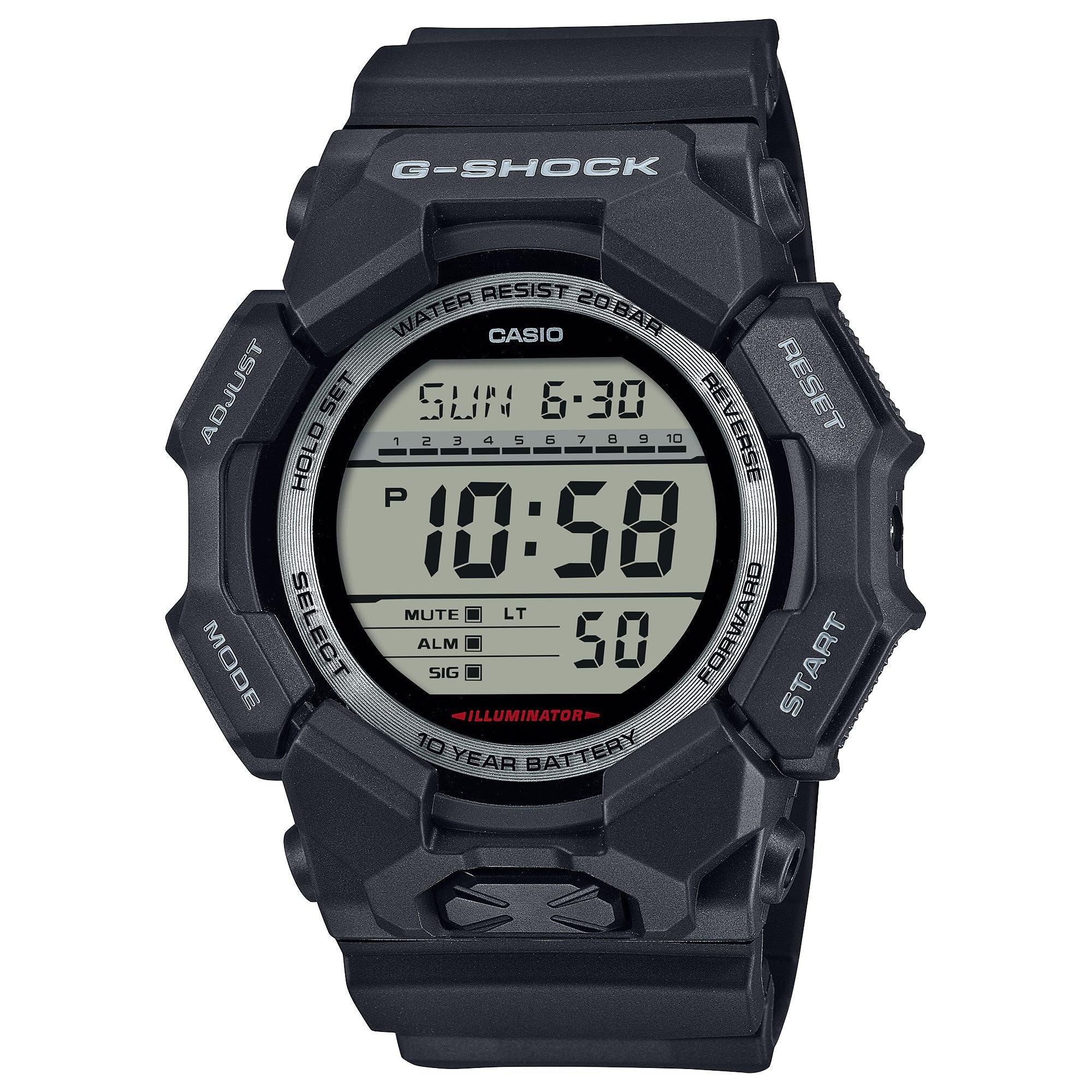
Image 3.1: The G-Shock GD010 watch face in Timekeeping Mode.
اسٹاپ واچ (کرونوگراف) کا استعمال
- ٹائم کیپنگ موڈ سے، دبائیں۔ موڈ button until "STW" or "STOPWATCH" appears on the display.
- دبائیں FORWARD / START اسٹاپ واچ شروع کرنے کے لیے بٹن۔
- دبائیں FORWARD / START اسٹاپ واچ کو روکنے کے لیے دوبارہ بٹن۔
- اسٹاپ واچ کو صفر پر ری سیٹ کرنے کے لیے، دبائیں۔ معکوس سٹاپ واچ کے بند ہونے پر بٹن۔
کاؤنٹ ڈاؤن ٹائمر ترتیب دینا
- ٹائم کیپنگ موڈ سے، دبائیں۔ موڈ button until "TMR" or "TIMER" appears.
- دبائیں اور تھامیں۔ ایڈجسٹ کریں۔ button until the current timer setting starts to flash.
- استعمال کریں۔ موڈ گھنٹے یا منٹ کی ترتیب کو منتخب کرنے کے لیے بٹن۔
- استعمال کریں۔ معکوس اور آگے مطلوبہ الٹی گنتی کا وقت مقرر کرنے کے لیے بٹن۔
- دبائیں ایڈجسٹ کریں۔ سیٹنگ موڈ سے باہر نکلنے کے لیے بٹن۔
- دبائیں FORWARD / START button to start the countdown. An alarm will sound when the timer reaches zero.
الارم کے افعال
- ٹائم کیپنگ موڈ سے، دبائیں۔ موڈ بٹن جب تک "ALM" یا "ALARM" ظاہر نہ ہو۔
- دبائیں اور تھامیں۔ ایڈجسٹ کریں۔ بٹن جب تک الارم کا وقت چمکنا شروع نہ ہو جائے۔
- استعمال کریں۔ موڈ گھنٹے یا منٹ کی ترتیب کو منتخب کرنے کے لیے بٹن۔
- استعمال کریں۔ معکوس اور آگے مطلوبہ الارم کا وقت مقرر کرنے کے لیے بٹن۔
- دبائیں ایڈجسٹ کریں۔ سیٹنگ موڈ سے باہر نکلنے کے لیے بٹن۔
- الارم کو آن/آف کرنے کے لیے، دبائیں۔ FORWARD / START button while in Alarm Mode (without holding ADJUST).
پانی کی مزاحمت کی ہدایات
Your GD010 watch is rated for 200-meter water resistance. This means it is suitable for recreational diving (excluding saturation diving), swimming, snorkeling, and water sports.
- Do not operate buttons while the watch is submerged in water or wet.
- Avoid exposing the watch to hot water, steam, or extreme temperature changes, as this can compromise water resistance.
- نمکین پانی کی نمائش کے بعد، گھڑی کو تازہ پانی سے اچھی طرح سے کللا کریں اور اسے خشک کریں۔
4. دیکھ بھال اور دیکھ بھال
جنرل کیئر
- گندگی اور نمی کو دور کرنے کے لیے نرم، خشک کپڑے سے گھڑی کو باقاعدگی سے صاف کریں۔
- Avoid exposing the watch to strong chemicals, solvents, or detergents, as these can damage the resin materials.
- گھڑی کو ٹھنڈی، خشک جگہ پر براہ راست سورج کی روشنی اور انتہائی درجہ حرارت سے دور رکھیں جب استعمال میں نہ ہوں۔
- The watch's resin components and band are designed for durability, but prolonged exposure to UV light may cause discoloration over time.
بیٹری کی تبدیلی
The GD010 watch is equipped with a CR2025 battery, providing an approximate battery life of 10 years. When the display becomes dim or functions become erratic, it may be time for a battery replacement.
Battery replacement should ideally be performed by a qualified watch technician to ensure proper sealing and maintain water resistance. Attempting to replace the battery yourself may void the warranty and compromise the watch's water resistance.
صفائی
To clean your watch, use a soft cloth dampened with mild soap and water. Gently wipe the case and band. For stubborn dirt, a soft brush can be used. Rinse thoroughly with fresh water and dry completely with a soft cloth.
5. ٹربل شوٹنگ گائیڈ
If you encounter issues with your GD010 watch, refer to the following common problems and their solutions.
| مسئلہ | ممکنہ وجہ | حل |
|---|---|---|
| ڈسپلے خالی یا مدھم ہے۔ | کم بیٹری۔ | Replace the battery (CR2025). Consult a professional watch technician. |
| وقت غلط ہے۔ | Incorrect time zone or manual setting error. | Re-adjust the time and date settings as described in Section 2. |
| بٹن غیر جوابی ہیں۔ | Watch is wet, or internal module error. | Ensure the watch is dry. If the problem persists, a reset may be required (consult support), or professional service. |
| الارم نہیں بجتا ہے۔ | Alarm is turned off or volume is too low (if adjustable). | Verify the alarm is set to ON in Alarm Mode. Check watch settings for alarm volume if applicable. |
If the problem persists after attempting these solutions, please contact G-Shock customer support for further assistance.
6. مصنوعات کی تفصیلات
| ماڈل کا نام | GD010 |
| ماڈل نمبر | GD010-1 |
| کیس کا سائز (L × W × H) | 54.9 × 51.9 × 16.1 ملی میٹر |
| وزن | 73 جی (تقریباً 2.57 آانس) |
| Case and Bezel Material | Bio-based Carbon / Bio-based Resin |
| بینڈ مواد کی قسم | Resin (CORDURA re/cor) |
| تعمیر | Shock Resistant, Carbon Core Guard structure |
| پانی کی مزاحمت | 200 میٹر پانی کی مزاحمت |
| بجلی کی فراہمی | CR2025 (1 Lithium Metal battery, included) |
| تقریبا بیٹری کی زندگی | 10 سال |
| کرسٹل | معدنی شیشہ |
| ڈسپلے کی قسم | ڈیجیٹل |
| حرکت کی قسم | جاپانی کوارٹج |
| اضافی خصوصیات | Alarm, Chronograph, Timer |
| کلپ کی قسم | بکسوا |
| بینڈ کا رنگ | سیاہ |
| رنگ ڈائل کریں۔ | سیاہ |
7. وارنٹی اور کسٹمر سپورٹ
وارنٹی کی معلومات
Your G-Shock GD010 watch comes with a محدود وارنٹی. The terms and conditions of this warranty cover manufacturing defects under normal use. Please refer to the warranty card included with your purchase for specific details regarding coverage duration, exclusions, and how to make a claim. Keep your proof of purchase for warranty validation.
کسٹمر سپورٹ سے رابطہ کرنا
For technical assistance, warranty service, or any other inquiries regarding your G-Shock GD010 watch, please contact G-Shock customer support.
- Visit the official G-Shock website for support contact information, FAQs, and service center locations.
- Have your watch model number (GD010-1) and proof of purchase ready when contacting support.