1. تعارف
This manual provides instructions for the Generic replacement remote control, designed for use with specific Denon AV Receiver models. This remote is a functional replacement and may not offer all features or functions present on your original Denon remote control. Please read this manual thoroughly before use to ensure proper operation.
نوٹ: This is a replacement remote control and is not a genuine Denon product. Some minor cosmetic scratches may be present due to bulk item storage.
2. پیکیج کے مشمولات
براہ کرم درج ذیل اشیاء کے لیے پیکج چیک کریں:
- 1 x Generic Replacement Remote Control
بیٹریاں شامل نہیں ہیں اور انہیں الگ سے خریدنا ضروری ہے۔
3. سیٹ اپ
3.1 بیٹری کی تنصیب
To power your remote control, you will need to install two AAA batteries (not included).
- ریموٹ کنٹرول کے پیچھے بیٹری کے ٹوکرے کو تلاش کریں۔
- Slide the battery compartment cover downwards or press the latch and lift to open.
- دو AAA بیٹریاں ڈالیں، اس بات کو یقینی بناتے ہوئے کہ مثبت (+) اور منفی (-) ٹرمینلز کمپارٹمنٹ کے اندر موجود خاکوں سے مماثل ہوں۔
- بیٹری کے کمپارٹمنٹ کور کو تبدیل کریں، اس بات کو یقینی بناتے ہوئے کہ یہ محفوظ طریقے سے اپنی جگہ پر کلک کرتا ہے۔
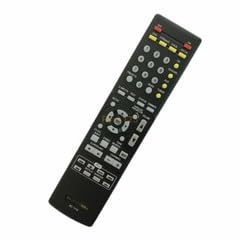
تصویر 1: پیچھے view ریموٹ کنٹرول کا، بیٹری کے ٹوکری کے مقام کی وضاحت کرتا ہے۔
3.2 ابتدائی استعمال
This replacement remote control is pre-programmed for the specified Denon AV Receiver models. No additional programming is typically required. Once batteries are installed, point the remote control towards your Denon AV Receiver and begin operation.
4. آپریٹنگ ہدایات
The remote control features standard buttons for common AV receiver functions. While the layout may differ from your original remote, the primary functions (e.g., Power, Volume, Input Selection, Mute) are typically present and operate similarly.
- پاور بٹن: Turns the AV receiver on or off.
- والیوم اوپر/نیچے: آڈیو آؤٹ پٹ لیول کو ایڈجسٹ کرتا ہے۔
- بٹن خاموش کریں: آڈیو آؤٹ پٹ کو خاموش کرتا ہے۔
- ان پٹ سلیکشن بٹن: Switches between different audio/video input sources (e.g., DVD, CD, TV).
- نیویگیشن بٹن: Used for menu navigation (if supported by the receiver and remote).
اہم: As a replacement remote, it may not work with all advanced functions or specific menu navigation features of your original Denon AV Receiver. Functionality may vary depending on the specific receiver model.
5 دیکھ بھال
5.1 صفائی
ریموٹ کنٹرول کو صاف کرنے کے لیے، نرم، خشک کپڑا استعمال کریں۔ ضدی گندگی کے لیے، ہلکے سے ڈیampur کپڑا جس میں پانی یا ہلکا، غیر کھرچنے والا کلینر۔ سخت کیمیکل استعمال نہ کریں یا ریموٹ کو پانی میں نہ ڈبویں۔
5.2 بیٹری کی تبدیلی
If the remote control becomes unresponsive or its range decreases, the batteries may need to be replaced. Follow the battery installation steps in Section 3.1 to replace old batteries with new AAA batteries. Always dispose of used batteries responsibly according to local regulations.
6 خرابیوں کا سراغ لگانا
- ریموٹ کام نہیں کر رہا:
- یقینی بنائیں کہ بیٹریاں درست قطبیت کے ساتھ صحیح طریقے سے نصب ہیں۔
- پرانی بیٹریاں نئی سے بدلیں۔
- Check for any obstructions between the remote control and the AV receiver's infrared sensor.
- Ensure you are within the effective range of the remote control.
- کچھ افعال کام نہیں کرتے:
- This replacement remote may not support all functions of your original Denon remote. Refer to the "Operating Instructions" section.
- Verify that your AV receiver model is listed as compatible (AVR-1516, AVR-4806, AVR-3801).
7. وضاحتیں
| ماڈل نمبر | vietRM#070942506 |
| برانڈ | عام |
| ہم آہنگ آلات | Denon AV Receiver (AVR-1516, AVR-4806, AVR-3801) |
| طاقت کا منبع | 2 x AAA بیٹریاں (شامل نہیں) |
| خصوصی خصوصیت | ایرگونومک ڈیزائن |
| رنگ | سیاہ/سفید |
| تعاون یافتہ آلات کی زیادہ سے زیادہ تعداد | 1 |
8. وارنٹی اور سپورٹ
As a generic replacement product, specific warranty details may vary. Please refer to the seller or your purchase documentation for information regarding warranty coverage and return policies.
For technical support or inquiries, please contact the seller directly through the platform where the product was purchased.