
1. تعارف
This manual provides detailed instructions for the safe and efficient operation of your Fanttik X9 Pro Portable Tire Inflator and Fanttik B10 Pro Max Electric Air Duster. Please read this manual thoroughly before use and retain it for future reference.

Image 1.1: The Fanttik X9 Pro Portable Tire Inflator (right) and B10 Pro Max Electric Air Duster (left) shown together.
پیکیج کا مواد:
- Fanttik X9 Pro Portable Tire Inflator
- Fanttik B10 Pro Max Electric Air Duster
- Inflation hose with various nozzles (for X9 Pro)
- Multiple nozzles (for B10 Pro Max)
- USB Type-C چارجنگ کیبل
- صارف دستی
2. Fanttik X9 Pro Portable Tire Inflator
2.1. پروڈکٹ ختمview اور اجزاء
The Fanttik X9 Pro is a compact and powerful portable tire inflator designed for various inflation needs.

Image 2.1: The Fanttik X9 Pro features an integrated storage design for its accessories, located at the bottom of the device.
کلیدی اجزاء:
- ڈیجیٹل ڈسپلے سکرین
- Control Buttons (Power, Mode, +, -)
- Inflation Hose Port
- لوازمات اسٹوریج سلاٹ
- USB-C چارجنگ پورٹ
2.2. سیٹ اپ اور چارجنگ
- ابتدائی چارج: Before first use, fully charge the X9 Pro using the provided USB Type-C cable and a compatible power adapter. The battery indicator on the display will show charging status.
- نلی منسلک کریں: Connect the inflation hose to the designated port on the X9 Pro. Ensure it is securely fastened.
- لوازمات کا ذخیرہ: The hose and various nozzles can be stored within the integrated accessory slot at the bottom of the device.
2.3. آپریٹنگ ہدایات
پاور آن/آف:

Image 2.2: The X9 Pro features a smart on/off design. Pulling out the inflation hose turns the device on, and pushing it back in turns it off.
- To turn on the device, pull out the inflation hose from its storage slot.
- To turn off the device, push the inflation hose back into its storage slot.
مطلوبہ دباؤ کی ترتیب:

Image 2.3: The X9 Pro offers one-click preset modes for Car, Motorcycle, Bike, Ball, and a Manual mode. Users can also select units: PSI, BAR, or KPA.
- موڈ منتخب کریں: Press the 'Mode' button to cycle through preset modes: Car, Motorcycle, Bike, Ball, or Manual. Each mode has a default pressure setting.
- دباؤ کو ایڈجسٹ کریں: Use the '+' and '-' buttons to increase or decrease the target pressure.
- یونٹ منتخب کریں: Press the unit button (often represented by a light icon or a dedicated button) to switch between PSI, BAR, and KPA.
افراط زر کا عمل:

Image 2.4: The Fanttik X9 Pro can inflate a compact car tire from 30 PSI to 35 PSI in approximately 1 minute, demonstrating its 'JET-INFLATE' capability.
- Connect the inflation hose to the tire valve or inflatable item.
- Ensure the connection is secure to prevent air leakage.
- The display will show the current pressure.
- Once the desired pressure is set, press the power button (often the center button) to start inflation.
- پہلے سے طے شدہ دباؤ تک پہنچنے پر انفلیٹر خود بخود رک جائے گا۔
- Disconnect the hose and return it to the storage slot to turn off the device.
2.4. X9 Pro Maintenance
- آلے کو صاف اور دھول اور ملبے سے پاک رکھیں۔
- استعمال میں نہ ہونے پر آلہ کو ٹھنڈی، خشک جگہ پر اسٹور کریں۔
- Regularly charge the battery to maintain its lifespan, even if not used frequently.
- Ensure the inflation hose and nozzles are clean and undamaged before and after each use.
3. Fanttik B10 Pro Max Electric Air Duster
3.1. پروڈکٹ ختمview اور اجزاء
The Fanttik B10 Pro Max is a powerful electric air duster designed for efficient cleaning of electronics and other delicate items.
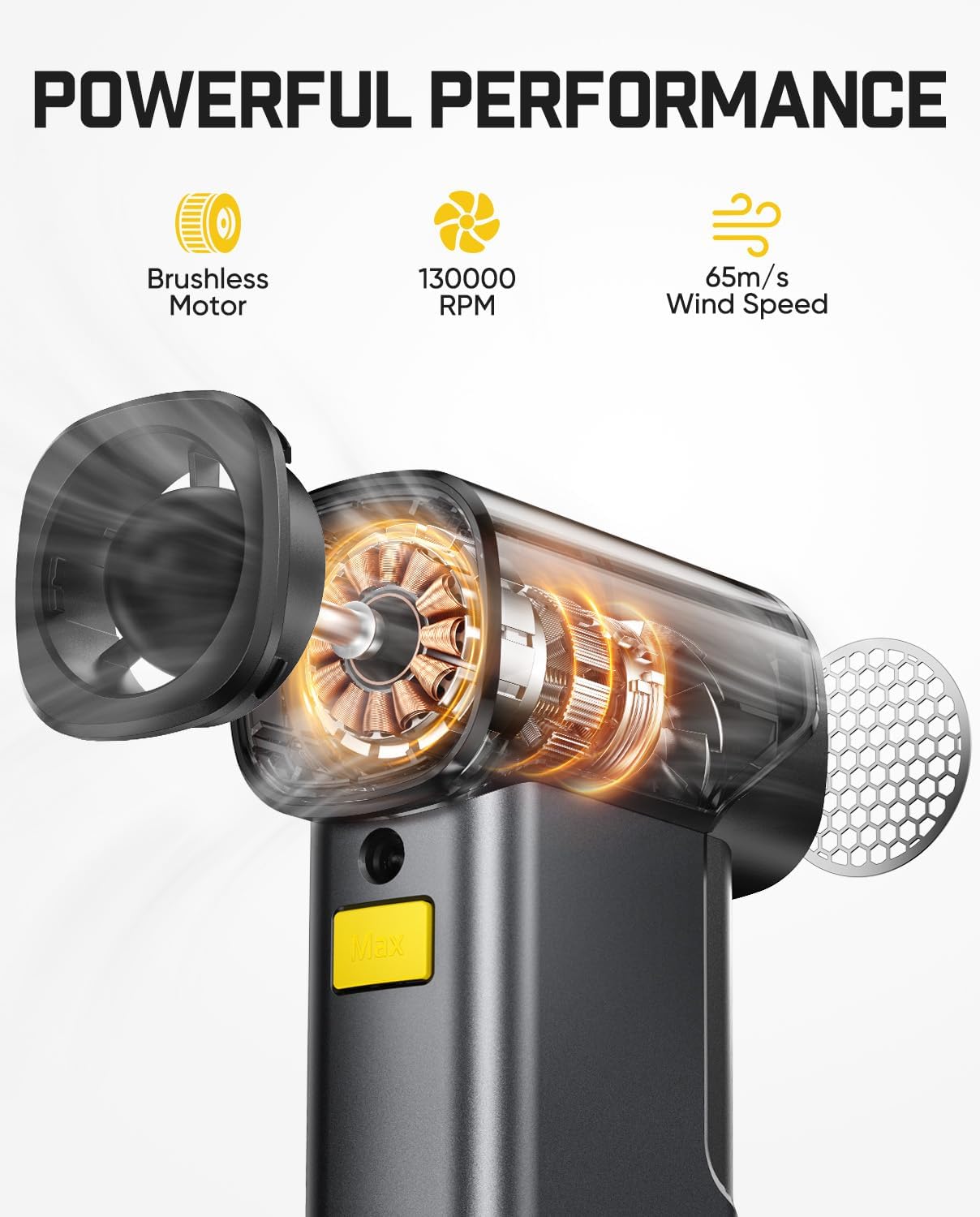
Image 3.1: The B10 Pro Max features a brushless motor capable of 130,000 RPM, generating a wind speed of 65 m/s for powerful cleaning.
کلیدی اجزاء:
- ایئر آؤٹ لیٹ۔
- Power/Speed Control Button
- Nozzle Attachment Point
- USB ٹائپ سی چارجنگ پورٹ
- بیٹری انڈیکیٹر
3.2. سیٹ اپ اور چارجنگ
- ابتدائی چارج: Fully charge the B10 Pro Max before first use. Connect the provided USB Type-C cable to the charging port. The battery indicator will show charging status.
- نوزل منسلک کریں: Select the appropriate nozzle for your cleaning task and securely attach it to the air outlet.
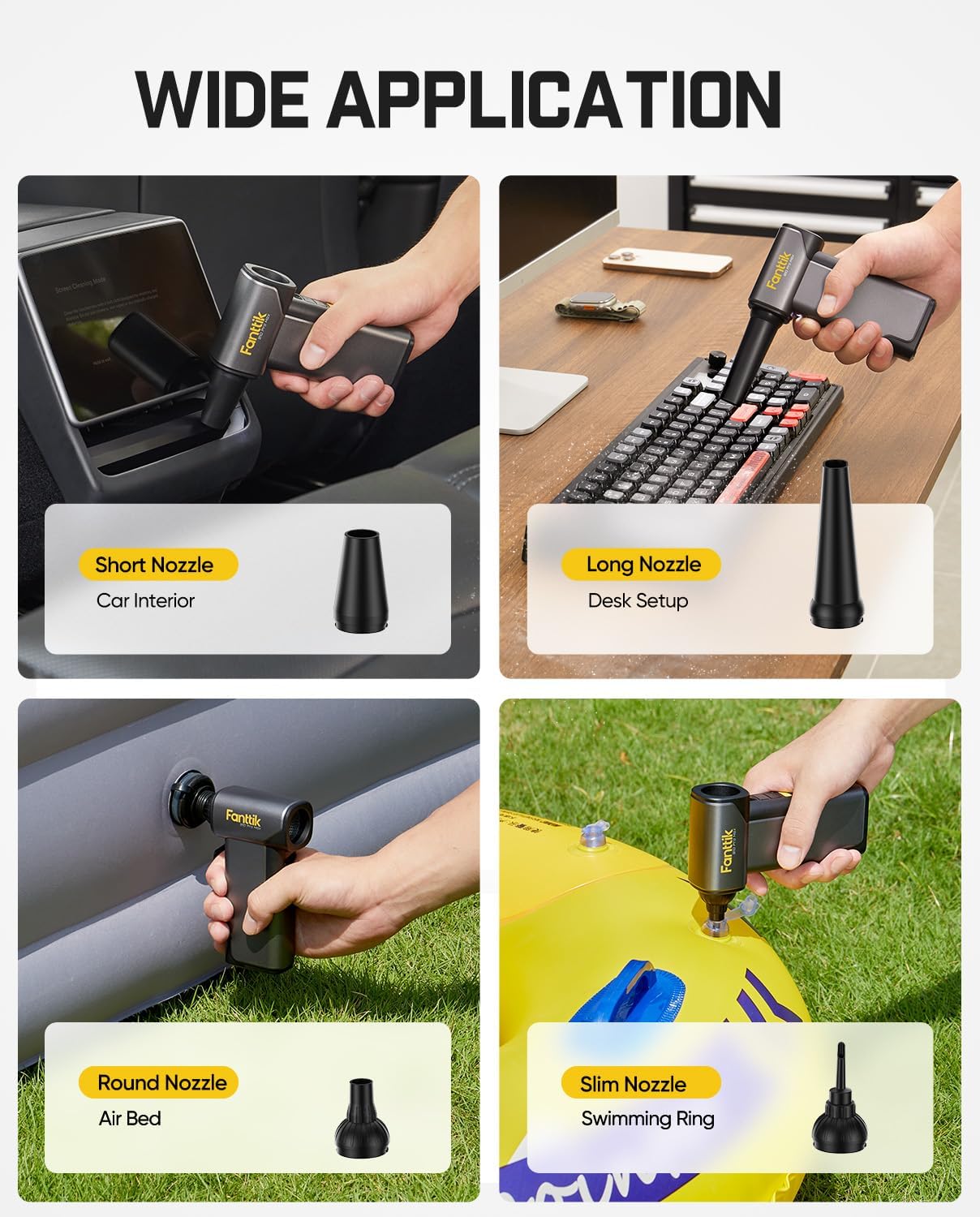
Image 3.2: The B10 Pro Max comes with various nozzles, including a short nozzle for car interiors, a long nozzle for desk setups, a round nozzle for air beds, and a slim nozzle for swimming rings, demonstrating its wide application.
3.3. آپریٹنگ ہدایات
پاور آن اور رفتار کو ایڈجسٹ کرنا:
- پاور آن: ڈیوائس کو آن کرنے کے لیے پاور بٹن کو چند سیکنڈ کے لیے دبائے رکھیں۔
- رفتار کو ایڈجسٹ کریں: Short press the power button to cycle through the 6 available wind speed levels.
- بجلی بند: ڈیوائس کو آف کرنے کے لیے پاور بٹن کو دوبارہ دبائیں اور تھامیں۔
استعمال:
- نوزل کو صاف کرنے والے علاقے کی طرف لے جائیں۔
- Use lower speeds for delicate items and higher speeds for stubborn dust or larger areas.
- Common applications include cleaning electronic devices, computer keyboards, car interiors, and inflating small items.
3.4. Backup Power Bank Function
The B10 Pro Max can also function as a backup power bank for charging small electronic devices.

Image 3.3: The B10 Pro Max can serve as a backup power bank (28.8Wh) to charge electronic devices via its Type-C port when outdoors. Note: The blower function cannot be used while charging.
- Connect your device to the B10 Pro Max's USB Type-C port using a compatible charging cable.
- The blower function is disabled while the device is acting as a power bank.
3.5. B10 Pro Max Maintenance
- ایئر انلیٹ اور آؤٹ لیٹ کو رکاوٹوں سے پاک رکھیں۔
- باہر کو نرم، خشک کپڑے سے صاف کریں۔
- آلے کو ٹھنڈی، خشک جگہ پر اسٹور کریں۔
- Regularly charge the battery to prolong its life.
4. General Maintenance and Battery Care
Both devices are equipped with high-capacity lithium batteries. Proper care ensures longevity:

Image 4.1: The B10 Pro Max features two 4000 mAh lithium batteries, providing up to 210 minutes of run time and supporting 5V/2A Type-C charging.
- بیٹری کو بار بار مکمل طور پر خارج کرنے سے گریز کریں۔
- Charge the devices regularly, even if not in use, to maintain battery health.
- Do not expose the devices to extreme temperatures or direct sunlight.
- Use only the provided or certified USB Type-C charging cables.
5 خرابیوں کا سراغ لگانا
Fanttik X9 Pro Tire Inflator:
- ڈیوائس آن نہیں ہو رہی ہے: Ensure the inflation hose is fully pulled out. Check battery level and charge if necessary.
- مہنگائی شروع نہیں ہو رہی: Ensure the hose is securely connected to both the inflator and the tire valve. Check if the desired pressure is set above the current pressure.
- غلط دباؤ پڑھنا: Ensure the hose connection is tight. Calibrate the device if possible (refer to specific device instructions if available).
Fanttik B10 Pro Max Electric Air Duster:
- ڈیوائس آن نہیں ہو رہی ہے: Press and hold the power button for a few seconds. Check battery level and charge if necessary.
- کمزور ہوا کا بہاؤ: Ensure the nozzle is correctly attached and not obstructed. Check battery level.
- ڈیوائس چارج نہیں ہو رہی ہے: Ensure the USB-C cable is properly connected to both the device and a power source. Try a different cable or power adapter.
6. وضاحتیں
Fanttik X9 Pro Portable Tire Inflator:
- مہنگائی کا زیادہ سے زیادہ دباؤ: 150 پی ایس آئی
- بیٹری کی صلاحیت: 7.4 V (2.5 Ah)
- Continuous Work Time: 23 منٹ تک
- افراط زر کی رفتار: Approximately 1 minute to refill a compact car tire (30 to 35 PSI)
- Supported Units: پی ایس آئی، بار، کے پی اے
Fanttik B10 Pro Max Electric Air Duster:
- موٹر کی قسم: برش لیس موٹر
- موٹر کی رفتار: 130,000 RPM
- ہوا کی رفتار: 65 میٹر فی سیکنڈ تک
- رفتار کی سطح: 6
- بیٹری کی صلاحیت: 2x 4000 mAh Lithium Batteries (Total 8000 mAh)
- چلانے کا وقت: Up to 210 minutes (depending on speed setting)
- چارج کرنا: 5V/2A ٹائپ-سی
- پاور بینک آؤٹ پٹ: 28.8Wh
7. حفاظتی معلومات
- بچوں کی پہنچ سے دور رکھیں۔
- Do not operate the devices in wet conditions or near flammable liquids/gases.
- آلات کو جدا یا ترمیم نہ کریں۔
- Avoid directing the air duster's powerful airflow directly at eyes or sensitive body parts.
- For the tire inflator, do not over-inflate tires. Always refer to the vehicle manufacturer's recommended tire pressure.
- If any malfunction occurs, discontinue use immediately and contact customer support.
8. وارنٹی کی معلومات
Fanttik products are covered by a limited warranty. Please refer to the warranty card included in your package or visit the official Fanttik webتفصیلی وارنٹی شرائط و ضوابط کے لیے سائٹ۔ خریداری کے ثبوت کے طور پر اپنی خریداری کی رسید اپنے پاس رکھیں۔
9. کسٹمر سپورٹ
For technical assistance, troubleshooting, or warranty claims, please contact Fanttik customer support through their official webآپ کی مصنوعات کی پیکیجنگ میں فراہم کردہ سائٹ یا رابطے کی معلومات۔
Webسائٹ: www.fanttik.com